
unity 实现调用Windows窗口/对话框交互
Unity调用Window窗口
|
本文提供全流程,中文翻译。 Chinar 坚持将简单的生活方式,带给世人! (拥有更好的阅读体验 —— 高分辨率用户请根据需求调整网页缩放比例) |
|
Chinar —— 心分享、心创新! 助力快速完成 Unity调用 Window api 执行保存/打开操作 为新手节省宝贵的时间,避免采坑! |
Chinar 教程效果:
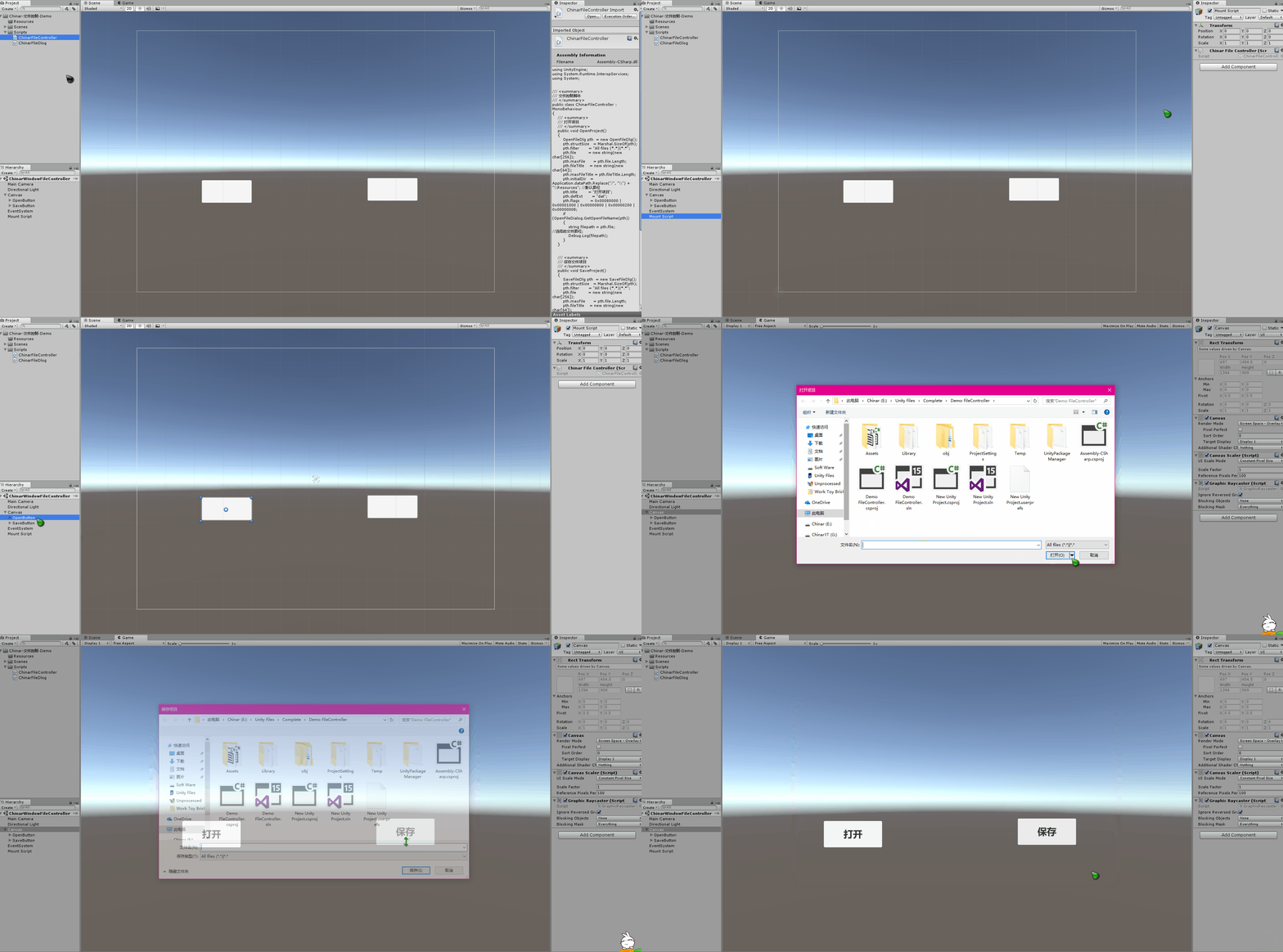
全文高清图片,点击即可放大观看 (很多人竟然不知道)
1
File Controller —— 文件控制脚本
晚会儿修改
用来控制打开/保存项目文件
将两个脚本放到项目中,分别绑定2个按钮 打开/保存
ChinarFileController 脚本需要挂载到空物体上
即可正常调用
具体需求,需要自己来定,保存到某个路径下

using UnityEngine;

using System.Runtime.InteropServices;

using System;

/// <summary>

/// 文件控制脚本

/// </summary>

public class ChinarFileController : MonoBehaviour

{

    /// <summary>

    /// 打开项目

    /// </summary>

    public void OpenProject()

    {

        OpenFileDlg pth  = new OpenFileDlg();

        pth.structSize   = Marshal.SizeOf(pth);

        pth.filter       = "All files (*.*)|*.*";

        pth.file         = new string(new char[256]);

        pth.maxFile      = pth.file.Length;

        pth.fileTitle    = new string(new char[64]);

        pth.maxFileTitle = pth.fileTitle.Length;

        pth.initialDir   = Application.dataPath.Replace("/", "\\") + "\\Resources"; //默认路径

        pth.title        = "打开项目";

        pth.defExt       = "dat";

        pth.flags        = 0x00080000 | 0x00001000 | 0x00000800 | 0x00000200 | 0x00000008;

        if (OpenFileDialog.GetOpenFileName(pth))

        {

            string filepath = pth.file; //选择的文件路径;

            Debug.Log(filepath);

        }

    }

    /// <summary>

    /// 保存文件项目

    /// </summary>

    public void SaveProject()

    {

        SaveFileDlg pth  = new SaveFileDlg();

        pth.structSize   = Marshal.SizeOf(pth);

        pth.filter       = "All files (*.*)|*.*";

        pth.file         = new string(new char[256]);

        pth.maxFile      = pth.file.Length;

        pth.fileTitle    = new string(new char[64]);

        pth.maxFileTitle = pth.fileTitle.Length;

        pth.initialDir   = Application.dataPath; //默认路径

        pth.title        = "保存项目";

        pth.defExt       = "dat";

        pth.flags        = 0x00080000 | 0x00001000 | 0x00000800 | 0x00000200 | 0x00000008;

        if (SaveFileDialog.GetSaveFileName(pth))

        {

            string filepath = pth.file; //选择的文件路径;

            Debug.Log(filepath);

        }

    }

}
2
FileDlog —— 文件日志
无需挂载到空物体上
using System.Runtime.InteropServices;

using System;

/// <summary>

/// 文件日志类

/// </summary>

// [特性(布局种类.有序,字符集=字符集.自动)]

[StructLayout(LayoutKind.Sequential, CharSet = CharSet.Auto)]

public class ChinarFileDlog

{

    public int    structSize    = 0;

    public IntPtr dlgOwner      = IntPtr.Zero;

    public IntPtr instance      = IntPtr.Zero;

    public String filter        = null;

    public String customFilter  = null;

    public int    maxCustFilter = 0;

    public int    filterIndex   = 0;

    public String file          = null;

    public int    maxFile       = 0;

    public String fileTitle     = null;

    public int    maxFileTitle  = 0;

    public String initialDir    = null;

    public String title         = null;

    public int    flags         = 0;

    public short  fileOffset    = 0;

    public short  fileExtension = 0;

    public String defExt        = null;

    public IntPtr custData      = IntPtr.Zero;

    public IntPtr hook          = IntPtr.Zero;

    public String templateName  = null;

    public IntPtr reservedPtr   = IntPtr.Zero;

    public int    reservedInt   = 0;

    public int    flagsEx       = 0;

}

[StructLayout(LayoutKind.Sequential, CharSet = CharSet.Auto)]

public class OpenFileDlg : ChinarFileDlog

{

}

public class OpenFileDialog

{

    [DllImport("Comdlg32.dll", SetLastError = true, ThrowOnUnmappableChar = true, CharSet = CharSet.Auto)]

    public static extern bool GetOpenFileName([In, Out] OpenFileDlg ofd);

}

public class SaveFileDialog

{

    [DllImport("Comdlg32.dll", SetLastError = true, ThrowOnUnmappableChar = true, CharSet = CharSet.Auto)]

    public static extern bool GetSaveFileName([In, Out] SaveFileDlg ofd);

}

[StructLayout(LayoutKind.Sequential, CharSet = CharSet.Auto)]

public class SaveFileDlg : ChinarFileDlog

{

}
运行效果:
支持
May Be —— 搞开发,总有一天要做的事!
|
拥有自己的服务器,无需再找攻略! Chinar 提供一站式教程,闭眼式创建! 为新手节省宝贵时间,避免采坑! |
先点击领取 —— 阿里全产品优惠券 (享受最低优惠)
1 —— 云服务器超全购买流程 (新手必备!)
2 —— 阿里ECS云服务器自定义配置 - 购买教程(新手必备!)
3—— Windows 服务器配置、运行、建站一条龙 !
4 —— Linux 服务器配置、运行、建站一条龙 !

" role="presentation">
技术交流群:806091680 ! Chinar 欢迎你的加入
END
本博客为非营利性个人原创,除部分有明确署名的作品外,所刊登的所有作品的著作权均为本人所拥有,本人保留所有法定权利。违者必究
对于需要复制、转载、链接和传播博客文章或内容的,请及时和本博主进行联系,留言,Email: ichinar@icloud.com
对于经本博主明确授权和许可使用文章及内容的,使用时请注明文章或内容出处并注明网址>
unity 实现调用Windows窗口/对话框交互的更多相关文章
- Unity中调用Windows窗口选择文件
1.OpenFileName数据接收类,如下: using UnityEngine; using System.Collections; using System; using System.Runt ...
- Unity中调用Windows窗口句柄以及根据需求设置并且解决扩展屏窗体显示错乱/位置错误的Bug
问题背景: 现在在搞PC端应用开发,我们开发中需要调用系统的窗口以及需要最大化最小化,缩放窗口拖拽窗口,以及设置窗口位置,去边框等功能 解决根据: 使用user32.dll解决 具体功能: Unity ...
- Unity 3D调用Windows打开、保存窗口、文件浏览器
Unity调用Window窗口 本文提供全流程,中文翻译. Chinar 坚持将简单的生活方式,带给世人!(拥有更好的阅读体验 -- 高分辨率用户请根据需求调整网页缩放比例) Chinar -- 心分 ...
- java使用RunTime调用windows命令行
当Java需要调用windows系统进行交互时,可以使用Runtime进行操作. 例子: 1.调用window中获取关于java相关的进行信息 Runtime rt = Runtime.getRunt ...
- Unity调用Windows弹框、提示框(确认与否,中文)
Unity调用Windows弹提示框 本文提供全流程,中文翻译. Chinar 坚持将简单的生活方式,带给世人!(拥有更好的阅读体验 -- 高分辨率用户请根据需求调整网页缩放比例) Chinar -- ...
- 【转】用C#调用Windows API向指定窗口发送
一.调用Windows API. C#下调用Windows API方法如下: 1.引入命名空间:using System.Runtime.InteropServices; 2.引用需要使用的方法,格式 ...
- C#在父窗口中调用子窗口的过程(无法访问已释放的对象)异常,不存在从对象类型System.Windows.Forms.DateTimePicker到已知的托管提供程序本机类型的映射。
一:C#在父窗口中调用子窗口的过程(无法访问已释放的对象)异常 其实,这个问题与C#的垃圾回收有关.垃圾回收器管 理所有的托管对象,所有需要托管数据的.NET语言(包括 C#)都受运行库的 垃圾回收器 ...
- windows下C语言调用系统文件选择对话框
代码片段,在windows下用C语言调用文件选择对话框,以备忘 #define DEFAULT_DIR "" char extraction_path[MAX_PATH] = DE ...
- 用C#调用Windows API向指定窗口发送按键消息 z
用C#调用Windows API向指定窗口发送 一.调用Windows API. C#下调用Windows API方法如下: 1.引入命名空间:using System.Runtime.Interop ...
随机推荐
- windows工具打开命令
程序 命令 位置 记事本 notepad C:\Windows\system32 ping ping C:\Windows\System32 服务管理器 services.msc C:\Windows ...
- 包--json 与 pickle 模块
一. 包 一个含有__init__.py 文件的文件夹(将py 文件中的内容划分成不同的部分放在不同的py 文件中,在将这些py 文件放在一个文件夹中) 是模块,不做执行文件,仅做调用 m1.py 和 ...
- mysql sql_mode=only_full_group_by问题?
视图查询的时候本地数据库报错: 解决办法: 1.查看sql_mode select @@global.sql_mode STRICT_TRANS_TABLES,NO_ZERO_IN_DATE,NO_Z ...
- python-递归,二分查找
# print(list("胡辣汤")) # lst = ["河南话", "四川话", "东北", "山东&q ...
- day26 第二阶段共享
第二阶段共享--网络编程 一.C/S架构 : 客户端(client)/服务端(sever)框架 B/S架构: 浏览器(brower)/服务端(sever)架构 软件CS架构: 服务端连接到浏览器,QQ ...
- C++ Templates STL标准模板库的基本概念
STL标准库包括几个重要的组件:容器.迭代器和算法.迭代器iterator,用来在一个对象群集的元素上进行遍历操作.这个对象群集或许是一个容器,或许是容器的一部分.迭代器的主要好处是,为所有的容器提供 ...
- sublime text3 常用配置
. 打开Preferences菜单,并选择 Browse Packages… . 系统会打开Sublime Text 的Packages文件夹,回到上一级菜单,然后打开Installed Packag ...
- python笔记2-变量
变量 存东西所用 #定义变量 name='feifei'#定义变量,字符串 age=18.9#整型或者小数定义变量不需要加引号 print(name) print(age) name2="w ...
- android 获取Asset中Properties文件配置的键值对
1 获取 AssetManager AssetManager assetManager = context.getApplicationContext().getAssets(); 2 获取流 Str ...
- mybatis 异常 There is no getter for property named 'bizId' in 'class java.lang.Long'
mybatis 异常 There is no getter for property named 'bizId' in 'class java.lang.Long' 当使用mybatis进行传参的时候 ...