
C# 委托、lambda表达式和事件
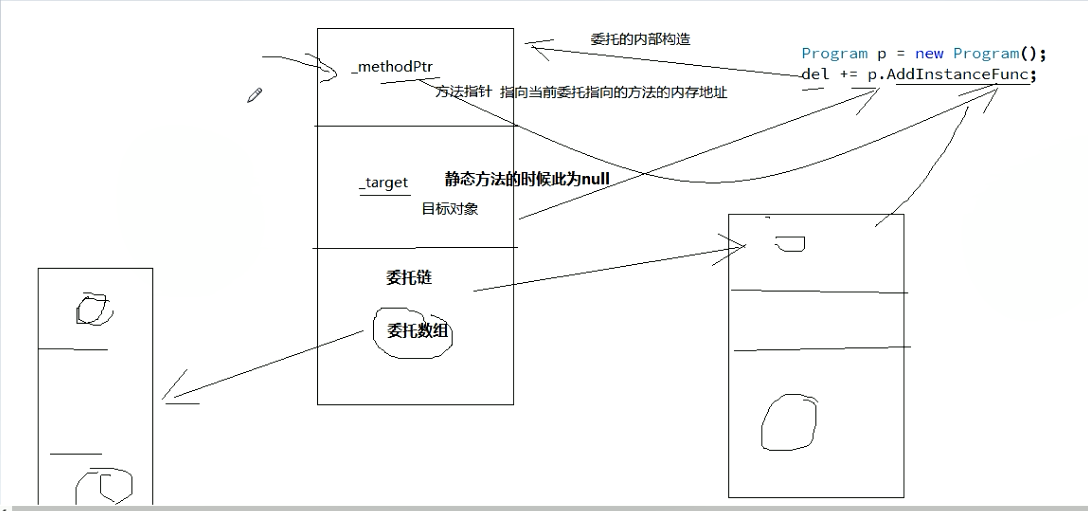
什么是委托?委托就是持有一个或多个方法的对象,并且该对象可以执行,可以传递。
using System;

using System.Collections.Generic;

using System.Linq;

using System.Text;

using System.Threading.Tasks;

namespace ConsoleApplication1

{

    class Program

    {

        // 定义委托事件

        delegate void ActCute();

        static void Main(string[] args)

        {

            ActCute del = null;

            Dog dog1 = new Dog("dog");

            Cat cat1 = new Cat("cat");

            // 委托事件的添加

            del = dog1.WagTail;

            del += cat1.InnocentLook;

            // 定义lambda 表达式

            del += () =>

            {

                Console.WriteLine("这是lambda表达式定义的方法!!!");

            };

            // 按照添加的顺序依次调用

            del();

        }

        public class Dog

        {

            private string Name;

            public Dog(string name)

            {

                Name = name;

            }

            public void WagTail()

            {

                Console.WriteLine(Name + "正在摇尾巴...");

            }

        }

        public class Cat

        {

            private string Name;

            public Cat(string name)

            {

                Name = name;

            }

            public void InnocentLook()

            {

                Console.WriteLine(Name + "正在摆弄无辜表情...");

            }

        }

    }

}
using System;

using System.Collections.Generic;

using System.Linq;

using System.Text;

using System.Threading.Tasks;

namespace ConsoleApplication2

{

    class Program

    {

        delegate void Func1();

        // 使用方法

        public static void Aminal()

        {

            Console.WriteLine("我是一只动物...");

        }

        public static void Plant()

        {

            Console.WriteLine("我是一棵植物...");

        }

        static void Main(string[] args)

        {

            Func1 myfunc1;

            myfunc1 = new Func1(Aminal);

            myfunc1 += new Func1(Plant);

            myfunc1();

        }

    }

}
委托是一个类型,事件是委托的一个特殊实例。
定义一个委托实例是不完全的,可以被外部的类调用内部的委托;事件可以在外部定义,但是触发事件是在内部。所以相对于普通的委托,事件是安全的。
事件:一种封装受限制的委托。
using System;

using System.Collections.Generic;

using System.Linq;

using System.Text;

using System.Threading.Tasks;

namespace ConsoleApplication1

{

    class Program

    {

        static void Main(string[] args)

        {

            Client1 c1 = new Client1();

            Client1 c2 = new Client1();

            // 绑定委托

            Dog.NewDog += c1.WangADog;

            Dog.NewDog += c2.WangADog;

            Dog dog1 = new Dog("jack");

        }

        public class Dog

        {

            private string Name;

            public delegate void Handler();  // 定义委托类型

            public static event Handler NewDog;  // 在委托事情上定义事件

            public Dog(string name)

            {

                Name = name;

                if (NewDog != null)

                {

                    NewDog();

                }

            }

            public void WagTail()

            {

                Console.WriteLine(Name + "正在摇尾巴...");

            }

        }

        class Client1

        {

            public void WangADog()

            {

                Console.WriteLine("我想要一条狗!!!");

            }

        }

    }

}
2019-7-29
委托和事件在窗体之间的应用:
委托:
using System;

using System.Collections.Generic;

using System.ComponentModel;

using System.Data;

using System.Drawing;

using System.Linq;

using System.Text;

using System.Threading.Tasks;

using System.Windows.Forms;

namespace 窗体之间的传参

{

    public partial class ParentForm : Form

    {

        public Action<string> ChildFrm { get; set; }  // 定义一个委托

        public ParentForm()

        {

            InitializeComponent();

        }

        private void ParentForm_Load(object sender, EventArgs e)

        {

            ChildForm frm = new ChildForm();  // 初始化子窗体

            ChildFrm += frm.SetText;  // 绑定事件

            frm.Show();

        }

        private void Btn_Send_Click(object sender, EventArgs e)

        {

            ChildFrm(this.TB_Msg.Text);

        }

    }

}

======================================================

using System;

using System.Collections.Generic;

using System.ComponentModel;

using System.Data;

using System.Drawing;

using System.Linq;

using System.Text;

using System.Threading.Tasks;

using System.Windows.Forms;

namespace 窗体之间的传参

{

    public partial class ChildForm : Form

    {

        public ChildForm()

        {

            InitializeComponent();

        }

        private void ChildForm_Load(object sender, EventArgs e)

        {

        }

        public void SetText(string text)

        {

            this.TB_Msg.Text = text;

        }

    }

}
事件:
using System;

using System.Collections.Generic;

using System.ComponentModel;

using System.Data;

using System.Drawing;

using System.Linq;

using System.Text;

using System.Threading.Tasks;

using System.Windows.Forms;

namespace 窗体之间的传参

{

    public partial class ParentForm : Form

    {

        public event EventHandler ChildFrmEvent;  // 定义一个事件

        public ParentForm()

        {

            InitializeComponent();

        }

        private void ParentForm_Load(object sender, EventArgs e)

        {

            ChildForm frm = new ChildForm();  // 初始化子窗体

            ChildFrmEvent += frm.FrmEvent;  // 绑定子窗体里面的事件

            frm.Show();  // 显示

        }

        private void Btn_Send_Click(object sender, EventArgs e)

        {

            ChildFrmEvent(this, new NewEventArgsClass() { Text = this.TB_Msg.Text });

        }

    }

}

===================================================================

using System;

using System.Collections.Generic;

using System.ComponentModel;

using System.Data;

using System.Drawing;

using System.Linq;

using System.Text;

using System.Threading.Tasks;

using System.Windows.Forms;

namespace 窗体之间的传参

{

    public partial class ChildForm : Form

    {

        public ChildForm()

        {

            InitializeComponent();

        }

        private void ChildForm_Load(object sender, EventArgs e)

        {

        }

        public void FrmEvent(object sender, EventArgs e)

        {

            NewEventArgsClass args = e as NewEventArgsClass;

            TB_Msg.Text = args.Text;

        }

    }

}
===================================================================================================
using System;
using System.Collections.Generic;
using System.Linq;
using System.Text;
using System.Threading.Tasks
namespace 窗体之间的传参
{
class NewEventArgsClass:EventArgs
{
public string Text { get; set; }
}
}
管家解耦父子窗体(发布订阅模式的非委托实现):
using System;

using System.Collections.Generic;

using System.ComponentModel;

using System.Data;

using System.Drawing;

using System.Linq;

using System.Text;

using System.Threading.Tasks;

using System.Windows.Forms;

namespace 管家解耦父子窗体

{

    public partial class MasterForm : Form

    {

        public MasterForm()

        {

            InitializeComponent();

        }

        private void MasterForm_Load(object sender, EventArgs e)

        {

            // 启动父子窗体

            ParentForm PFrm = new ParentForm();

            ChildForm CFrm = new ChildForm();

            PFrm.ChildList = new List<TotalInterface>();

            PFrm.ChildList.Add(CFrm);

            PFrm.Show();

            CFrm.Show();

        }

    }

}

=======================================================================

using System;

using System.Collections.Generic;

using System.ComponentModel;

using System.Data;

using System.Drawing;

using System.Linq;

using System.Text;

using System.Threading.Tasks;

using System.Windows.Forms;

namespace 管家解耦父子窗体

{

    public partial class ParentForm : Form

    {

        public List<TotalInterface> ChildList { get; set; }

        public ParentForm()

        {

            InitializeComponent();

        }

        private void ParentForm_Load(object sender, EventArgs e)

        {

        }

        private void Btn_Send_Click(object sender, EventArgs e)

        {

            if (ChildList == null) return;

            foreach(TotalInterface item in ChildList)

            {

                item.SetText(this.TB_Msg.Text);

            }

        }

    }

}

=============================================================

using System;

using System.Collections.Generic;

using System.ComponentModel;

using System.Data;

using System.Drawing;

using System.Linq;

using System.Text;

using System.Threading.Tasks;

using System.Windows.Forms;

namespace 管家解耦父子窗体

{

    public partial class ChildForm : Form,TotalInterface

    {

        public ChildForm()

        {

            InitializeComponent();

        }

        public void SetText(string text)

        {

            this.TB_Msg.Text = text;

        }

        private void ChildForm_Load(object sender, EventArgs e)

        {

        }

    }

}

=============================================================

using System;

using System.Collections.Generic;

using System.Linq;

using System.Text;

using System.Threading.Tasks;

namespace 管家解耦父子窗体

{

    // 定义接口

    public interface TotalInterface

    {

        void SetText(string text);

    }

}
C# 委托、lambda表达式和事件的更多相关文章
- C#编程 委托 Lambda表达式和事件
委托 如果我们要把方法当做参数来传递的话,就要用到委托.简单来说委托是一个类型,这个类型可以赋值一个方法的引用. 声明委托 在C#中使用一个类分两个阶段,首选定义这个类,告诉编译器这个类由什么字段和方 ...
- C#学习笔记三(委托·lambda表达式和事件,字符串和正则表达式,集合,特殊的集合)
委托和事件的区别 序号 区别 委托 事件 1 是否可以使用=来赋值 是 否 2 是否可以在类外部进行调用 是 否 3 是否是一个类型 是 否,事件修饰的是一个对象 public delegate vo ...
- 委托、Lambda表达式、事件系列07,使用EventHandler委托
谈到事件注册,EventHandler是最常用的. EventHandler是一个委托,接收2个形参.sender是指事件的发起者,e代表事件参数. □ 使用EventHandler实现猜拳游戏 使用 ...
- 委托、Lambda表达式、事件系列06,使用Action实现观察者模式,体验委托和事件的区别
在"实现观察者模式(Observer Pattern)的2种方式"中,曾经通过接口的方式.委托与事件的方式实现过观察者模式.本篇体验使用Action实现此模式,并从中体验委托与事件 ...
- 委托、Lambda表达式、事件系列05,Action委托与闭包
来看使用Action委托的一个实例: static void Main(string[] args) { int i = 0; Action a = () => i++; a(); a(); C ...
- 委托、Lambda表达式、事件系列04,委托链是怎样形成的, 多播委托, 调用委托链方法,委托链异常处理
委托是多播委托,我们可以通过"+="把多个方法赋给委托变量,这样就形成了一个委托链.本篇的话题包括:委托链是怎样形成的,如何调用委托链方法,以及委托链异常处理. □ 调用返回类型为 ...
- 委托、Lambda表达式、事件系列03,从委托到Lamda表达式
在"委托.Lambda表达式.事件系列02,什么时候该用委托"一文中,使用委托让代码简洁了不少. namespace ConsoleApplication2 { internal ...
- 委托、Lambda表达式、事件系列02,什么时候该用委托
假设要找出整型集合中小于5的数. static void Main(string[] args) { IEnumerable<int> source = new List<int&g ...
- 委托、Lambda表达式、事件系列01,委托是什么,委托的基本用法,委托的Method和Target属性
委托是一个类. namespace ConsoleApplication1 { internal delegate void MyDelegate(int val); class Program { ...
- C#高级编程(第9版) 第08章 委托、lambda表达式和事件 笔记
本章代码分为以下几个主要的示例文件: 1. 简单委托 2. 冒泡排序 3. lambda表达式 4. 事件示例 5. 弱事件 引用方法 委托是寻址方法的.NET版本.在C++中函数 ...
随机推荐
- mysql ON DUPLICATE KEY UPDATE ; 以及 同replace to 的区别.
需求: 1)如果admin表中没有数据, 插入一条 2)如果admin表中有数据, 不插入. 一般做法: if($result = mysql_query("select * from ad ...
- 将python环境打包成.txt文件
1 导出Python环境安装包[root@bogon ~]# pip freeze > packages.txt这将会创建一个 packages.txt文件,其中包含了当前环境中所有包及各自的版 ...
- 2019-03-14-day010-函数进阶
昨日回顾 1.函数: 函数的定义 函数的参数 位置参数 关键字参数 混合参数 形参的位置上(默认参数) 实参的位置上(关键字参数) 位置参数 > 默认参数 三元运算符: c = a if a&g ...
- Oralce 11g新特性 转载
Oracle 11g于2007年7月11日美国东部时间11时(北京时间11日22时)正式发布,11g是甲骨文公司30年来发布的最重要的数据库版本,根据用户的需求实现了信息生命周期管理(Informat ...
- MAVEN 阿里云中央仓库
<mirror> <id>nexus-aliyun</id> <mirrorOf>*</mirrorOf> <name>Nexu ...
- mysql 数据库复制方法
同一台MySQL服务器上复制数据库的方法 CREATE DATABASE `新库` DEFAULT CHARACTER SET UTF8 COLLATE UTF8_GENERAL_CI; mysqld ...
- h5 手机端适配问题汇总
1.uc手机浏览器竟然没有 sessionstorage 醉了 2.opera 浏览器 能识别 a标签中href的 javascript:; 为网址 , 55555 3.safari 的弹框如 ...
- Python学习笔记第二十周
目录: 一.ORM 1.查询补充 备注:forloop.counter介绍 二.Ajax 三.ORM多对多操作 内容: 一.ORM 1.查询补充: 1.models.USR.objects.all() ...
- SPI有关CPOL和CPHA的时序图
SPI模块为了和外设进行数据交换,根据外设工作要求,其输出串行同步时钟极性和相位可以进行配置. 时钟极性(CPOL)对传输协议没有重大的影响. 如果CPOL=0,串行同步时钟的空闲状态为低电平: 如果 ...
- lesson6-图像分割-小象c
显著性检测:1)显著性物体检测-最能引起视觉注意的物体区域2)注视点预测:人类视觉注意机制 视觉注意机制的两种机制:1)自底而上基于数据驱动的注意机制,如颜色.边缘 2)自上而下基于任务驱动的目标的注 ...