
html 简单的table样式
效果预览:
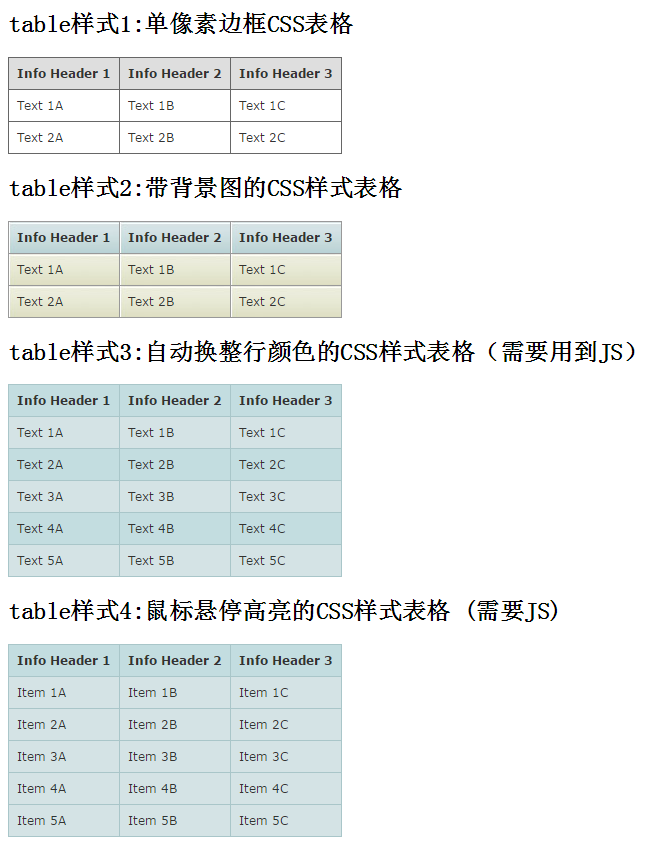
代码:
 <!DOCTYPE html>

 <html>

 <head>

     <meta charset="utf-8">

     <title>html 简单的table样式</title>

     <style type="text/css">

     /* gridtable */

     table.gridtable {

         font-family: verdana,arial,sans-serif;

         font-size:11px;

         color:#333333;

         border-width: 1px;

         border-color: #666666;

         border-collapse: collapse;

     }

     table.gridtable th {

         border-width: 1px;

         padding: 8px;

         border-style: solid;

         border-color: #666666;

         background-color: #dedede;

     }

     table.gridtable td {

         border-width: 1px;

         padding: 8px;

         border-style: solid;

         border-color: #666666;

         background-color: #ffffff;

     }

     /* /gridtable */

     /* imagetable */

     table.imagetable {

         font-family: verdana,arial,sans-serif;

         font-size:11px;

         color:#333333;

         border-width: 1px;

         border-color: #999999;

         border-collapse: collapse;

     }

     table.imagetable th {

         background:#b5cfd2 url('cell-blue.jpg');

         border-width: 1px;

         padding: 8px;

         border-style: solid;

         border-color: #999999;

     }

     table.imagetable td {

         background:#dcddc0 url('cell-grey.jpg');

         border-width: 1px;

         padding: 8px;

         border-style: solid;

         border-color: #999999;

     }

     /* /imagetable */

     /* altrowstable */

     table.altrowstable {

         font-family: verdana,arial,sans-serif;

         font-size:11px;

         color:#333333;

         border-width: 1px;

         border-color: #a9c6c9;

         border-collapse: collapse;

     }

     table.altrowstable th {

         border-width: 1px;

         padding: 8px;

         border-style: solid;

         border-color: #a9c6c9;

     }

     table.altrowstable td {

         border-width: 1px;

         padding: 8px;

         border-style: solid;

         border-color: #a9c6c9;

     }

     .oddrowcolor{

         background-color:#d4e3e5;

     }

     .evenrowcolor{

         background-color:#c3dde0;

     }

     /* /altrowstable */

     /* hovertable */

     table.hovertable {

         font-family: verdana,arial,sans-serif;

         font-size:11px;

         color:#333333;

         border-width: 1px;

         border-color: #999999;

         border-collapse: collapse;

     }

     table.hovertable th {

         background-color:#c3dde0;

         border-width: 1px;

         padding: 8px;

         border-style: solid;

         border-color: #a9c6c9;

     }

     table.hovertable tr {

         background-color:#d4e3e5;

     }

     table.hovertable td {

         border-width: 1px;

         padding: 8px;

         border-style: solid;

         border-color: #a9c6c9;

     }

     /* /hovertable */

     </style>

 </head>

 <body>

 <h2>table样式1:单像素边框CSS表格</h2>

 <table class="gridtable">

     <tr>

         <th>Info Header 1</th>

         <th>Info Header 2</th>

         <th>Info Header 3</th>

     </tr>

     <tr>

         <td>Text 1A</td><td>Text 1B</td><td>Text 1C</td>

     </tr>

     <tr>

         <td>Text 2A</td><td>Text 2B</td><td>Text 2C</td>

     </tr>

 </table>

 <h2>table样式2:带背景图的CSS样式表格</h2>

 <table class="imagetable">

     <tr>

         <th>Info Header 1</th>

         <th>Info Header 2</th>

         <th>Info Header 3</th>

     </tr>

     <tr>

         <td>Text 1A</td><td>Text 1B</td><td>Text 1C</td>

     </tr>

     <tr>

         <td>Text 2A</td><td>Text 2B</td><td>Text 2C</td>

     </tr>

 </table>

 <h2>table样式3:自动换整行颜色的CSS样式表格(需要用到JS)</h2>

 <table class="altrowstable" id="alternatecolor">

     <tr>

         <th>Info Header 1</th><th>Info Header 2</th><th>Info Header 3</th>

     </tr>

     <tr>

         <td>Text 1A</td><td>Text 1B</td><td>Text 1C</td>

     </tr>

     <tr>

         <td>Text 2A</td><td>Text 2B</td><td>Text 2C</td>

     </tr>

     </tr>

     <tr>

         <td>Text 3A</td><td>Text 3B</td><td>Text 3C</td>

     </tr>

     <tr>

         <td>Text 4A</td><td>Text 4B</td><td>Text 4C</td>

     </tr>

     <tr>

         <td>Text 5A</td><td>Text 5B</td><td>Text 5C</td>

     </tr>

 </table>

 <h2>table样式4:鼠标悬停高亮的CSS样式表格 (需要JS)</h2>

 <table class="hovertable">

     <tr>

         <th>Info Header 1</th><th>Info Header 2</th><th>Info Header 3</th>

     </tr>

     <tr onmouseover="this.style.backgroundColor='#ffff66';" onmouseout="this.style.backgroundColor='#d4e3e5';">

         <td>Item 1A</td><td>Item 1B</td><td>Item 1C</td>

     </tr>

     <tr onmouseover="this.style.backgroundColor='#ffff66';" onmouseout="this.style.backgroundColor='#d4e3e5';">

         <td>Item 2A</td><td>Item 2B</td><td>Item 2C</td>

     </tr>

     <tr onmouseover="this.style.backgroundColor='#ffff66';" onmouseout="this.style.backgroundColor='#d4e3e5';">

         <td>Item 3A</td><td>Item 3B</td><td>Item 3C</td>

     </tr>

     <tr onmouseover="this.style.backgroundColor='#ffff66';" onmouseout="this.style.backgroundColor='#d4e3e5';">

         <td>Item 4A</td><td>Item 4B</td><td>Item 4C</td>

     </tr>

     <tr onmouseover="this.style.backgroundColor='#ffff66';" onmouseout="this.style.backgroundColor='#d4e3e5';">

         <td>Item 5A</td><td>Item 5B</td><td>Item 5C</td>

     </tr>

 </table>

 <script type="text/javascript">

     function altRows(id){

         if(document.getElementsByTagName){

             var table = document.getElementById(id);

             var rows = table.getElementsByTagName("tr");

             for(i = 0; i < rows.length; i++){

                 if(i % 2 == 0){

                     rows[i].className = "evenrowcolor";

                 }else{

                     rows[i].className = "oddrowcolor";

                 }

             }

         }

     }

     window.onload=function(){

         altRows('alternatecolor');

     }

 </script>

 </body>

 </html>
素材图片:
 cell-blue.jpg
 cell-greyjpg
html 简单的table样式的更多相关文章
- 一个简单的TabItem样式。
分享一个以前项目中用到的简单的TabItem样式. 效果图如下: <SolidColorBrush x:Key="TabItemDisabledBackground" Col ...
- 小物件之输出简单的table
如果需要将一个数组输出一个简单的table可以采用以下代码(该数组非空) <?php $thead=array("name"=>"名称"," ...
- table完美css样式,table的基本样式,table样式
table完美css样式,table的基本样式,table样式 >>>>>>>>>>>>>>>>> ...
- 经常使用的两个清爽的table样式
两个我经常使用的table样式: <html> <head> <title></title> <style type="text/css ...
- js简单固定table表头及css问题分析。
<head> <meta name="viewport" content="width=device-width" /> <tit ...
- 通用table样式
<html> <head> <title>通用table样式</title> <style type="text/css"&g ...
- Table样式设置
<table class="listTable"> <tr><th width="40px">序号</th>&l ...
- css table样式
1.table样式首先设置表格边框,属性设置表格的边框是否被合并为一个单一的边框. table{ border-collapse: collapse; border-spacing: 0;} 2.固定 ...
- 好看的table样式
收藏个好看的table样式 <style type="text/css">table.gridtable { font-family: verdana,arial,sa ...
随机推荐
- libusb 终于搞好了
- python selenium爬取QQ空间方法
from selenium import webdriver import time # 打开浏览器 dr = webdriver.Chrome() # 打开某个网址 dr.get('https:// ...
- 路由器DHCP服务及DHCP中继
实验要求:掌握路由配置DHCP服务配置 拓扑如下: R1enable 进入特权模式config terminal 进入全局模式interface s0/0/0 进入端口ip address 192 ...
- 后台返回json字符串 页面js报错 Uncaught SyntaxError: Unexpected identifier
后台json字符串是 [{"name": "报销申请", "id": "start"}, {"name&quo ...
- c++函数参数类型-引用、指针、值
c++函数参数类型-引用.指针.值 https://www.cnblogs.com/lidabo/archive/2012/05/30/2525837.html
- Java中的break和continue以及标签
一.Java中的break,continue,goto 首先break,continue是Java中的关键字,而goto是保留字. 基于goto在c和c++中的鬼畜表现,我觉得goto可能还会长期在J ...
- Python之路,第四篇:Python入门与基础4
Python3 字符串 字符串是一个有序的字符序列 如何表示一个字符串: 在非注释中凡是用引号括起来的部分都是字符串: ‘ 单引号 ” 双引号 ‘’‘ 三单引号 “”“ ...
- Angular 插值字符串
<!DOCTYPE html> <html> <head> <meta charset="utf-8"> <title> ...
- inner join 与一般笛卡尔积的区别
inner join 与一般笛卡尔积的区别:inner join是笛卡尔积的特殊形式.如果有表a和表b,表a有m条记录,表b有n条记录,则一般笛卡尔积后得到的记录条数是m*n条,记录之间的组合是随意的 ...
- 如何运行简单的scrapy
1.建scrapy工程 scrapy startproject python123demo 2.在工程中写一个爬虫文件 cd python123demo scrapy genspider demo p ...