
html 简单的table样式
效果预览:
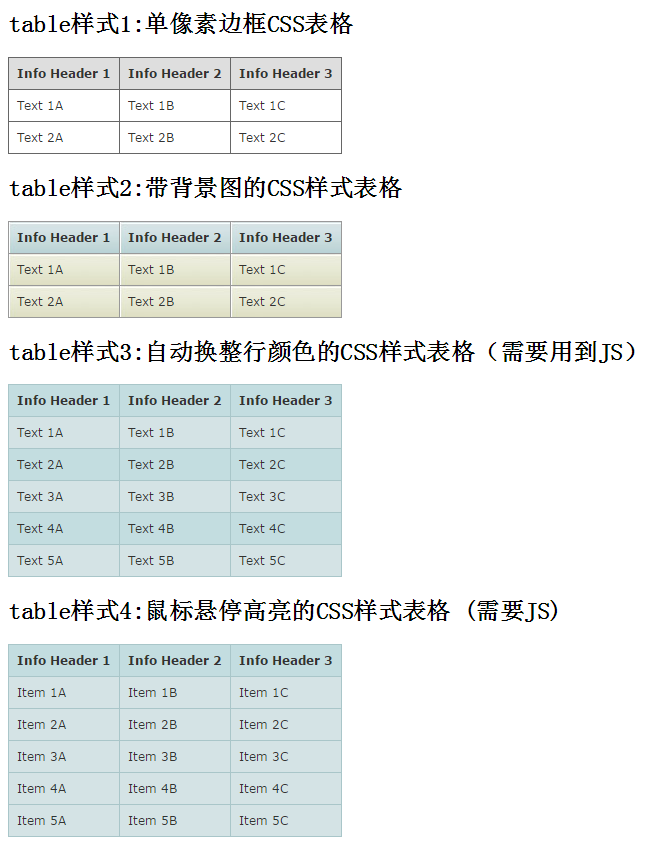
代码:
 <!DOCTYPE html>

 <html>

 <head>

     <meta charset="utf-8">

     <title>html 简单的table样式</title>

     <style type="text/css">

     /* gridtable */

     table.gridtable {

         font-family: verdana,arial,sans-serif;

         font-size:11px;

         color:#333333;

         border-width: 1px;

         border-color: #666666;

         border-collapse: collapse;

     }

     table.gridtable th {

         border-width: 1px;

         padding: 8px;

         border-style: solid;

         border-color: #666666;

         background-color: #dedede;

     }

     table.gridtable td {

         border-width: 1px;

         padding: 8px;

         border-style: solid;

         border-color: #666666;

         background-color: #ffffff;

     }

     /* /gridtable */

     /* imagetable */

     table.imagetable {

         font-family: verdana,arial,sans-serif;

         font-size:11px;

         color:#333333;

         border-width: 1px;

         border-color: #999999;

         border-collapse: collapse;

     }

     table.imagetable th {

         background:#b5cfd2 url('cell-blue.jpg');

         border-width: 1px;

         padding: 8px;

         border-style: solid;

         border-color: #999999;

     }

     table.imagetable td {

         background:#dcddc0 url('cell-grey.jpg');

         border-width: 1px;

         padding: 8px;

         border-style: solid;

         border-color: #999999;

     }

     /* /imagetable */

     /* altrowstable */

     table.altrowstable {

         font-family: verdana,arial,sans-serif;

         font-size:11px;

         color:#333333;

         border-width: 1px;

         border-color: #a9c6c9;

         border-collapse: collapse;

     }

     table.altrowstable th {

         border-width: 1px;

         padding: 8px;

         border-style: solid;

         border-color: #a9c6c9;

     }

     table.altrowstable td {

         border-width: 1px;

         padding: 8px;

         border-style: solid;

         border-color: #a9c6c9;

     }

     .oddrowcolor{

         background-color:#d4e3e5;

     }

     .evenrowcolor{

         background-color:#c3dde0;

     }

     /* /altrowstable */

     /* hovertable */

     table.hovertable {

         font-family: verdana,arial,sans-serif;

         font-size:11px;

         color:#333333;

         border-width: 1px;

         border-color: #999999;

         border-collapse: collapse;

     }

     table.hovertable th {

         background-color:#c3dde0;

         border-width: 1px;

         padding: 8px;

         border-style: solid;

         border-color: #a9c6c9;

     }

     table.hovertable tr {

         background-color:#d4e3e5;

     }

     table.hovertable td {

         border-width: 1px;

         padding: 8px;

         border-style: solid;

         border-color: #a9c6c9;

     }

     /* /hovertable */

     </style>

 </head>

 <body>

 <h2>table样式1:单像素边框CSS表格</h2>

 <table class="gridtable">

     <tr>

         <th>Info Header 1</th>

         <th>Info Header 2</th>

         <th>Info Header 3</th>

     </tr>

     <tr>

         <td>Text 1A</td><td>Text 1B</td><td>Text 1C</td>

     </tr>

     <tr>

         <td>Text 2A</td><td>Text 2B</td><td>Text 2C</td>

     </tr>

 </table>

 <h2>table样式2:带背景图的CSS样式表格</h2>

 <table class="imagetable">

     <tr>

         <th>Info Header 1</th>

         <th>Info Header 2</th>

         <th>Info Header 3</th>

     </tr>

     <tr>

         <td>Text 1A</td><td>Text 1B</td><td>Text 1C</td>

     </tr>

     <tr>

         <td>Text 2A</td><td>Text 2B</td><td>Text 2C</td>

     </tr>

 </table>

 <h2>table样式3:自动换整行颜色的CSS样式表格(需要用到JS)</h2>

 <table class="altrowstable" id="alternatecolor">

     <tr>

         <th>Info Header 1</th><th>Info Header 2</th><th>Info Header 3</th>

     </tr>

     <tr>

         <td>Text 1A</td><td>Text 1B</td><td>Text 1C</td>

     </tr>

     <tr>

         <td>Text 2A</td><td>Text 2B</td><td>Text 2C</td>

     </tr>

     </tr>

     <tr>

         <td>Text 3A</td><td>Text 3B</td><td>Text 3C</td>

     </tr>

     <tr>

         <td>Text 4A</td><td>Text 4B</td><td>Text 4C</td>

     </tr>

     <tr>

         <td>Text 5A</td><td>Text 5B</td><td>Text 5C</td>

     </tr>

 </table>

 <h2>table样式4:鼠标悬停高亮的CSS样式表格 (需要JS)</h2>

 <table class="hovertable">

     <tr>

         <th>Info Header 1</th><th>Info Header 2</th><th>Info Header 3</th>

     </tr>

     <tr onmouseover="this.style.backgroundColor='#ffff66';" onmouseout="this.style.backgroundColor='#d4e3e5';">

         <td>Item 1A</td><td>Item 1B</td><td>Item 1C</td>

     </tr>

     <tr onmouseover="this.style.backgroundColor='#ffff66';" onmouseout="this.style.backgroundColor='#d4e3e5';">

         <td>Item 2A</td><td>Item 2B</td><td>Item 2C</td>

     </tr>

     <tr onmouseover="this.style.backgroundColor='#ffff66';" onmouseout="this.style.backgroundColor='#d4e3e5';">

         <td>Item 3A</td><td>Item 3B</td><td>Item 3C</td>

     </tr>

     <tr onmouseover="this.style.backgroundColor='#ffff66';" onmouseout="this.style.backgroundColor='#d4e3e5';">

         <td>Item 4A</td><td>Item 4B</td><td>Item 4C</td>

     </tr>

     <tr onmouseover="this.style.backgroundColor='#ffff66';" onmouseout="this.style.backgroundColor='#d4e3e5';">

         <td>Item 5A</td><td>Item 5B</td><td>Item 5C</td>

     </tr>

 </table>

 <script type="text/javascript">

     function altRows(id){

         if(document.getElementsByTagName){

             var table = document.getElementById(id);

             var rows = table.getElementsByTagName("tr");

             for(i = 0; i < rows.length; i++){

                 if(i % 2 == 0){

                     rows[i].className = "evenrowcolor";

                 }else{

                     rows[i].className = "oddrowcolor";

                 }

             }

         }

     }

     window.onload=function(){

         altRows('alternatecolor');

     }

 </script>

 </body>

 </html>
素材图片:
 cell-blue.jpg
 cell-greyjpg
html 简单的table样式的更多相关文章
- 一个简单的TabItem样式。
分享一个以前项目中用到的简单的TabItem样式. 效果图如下: <SolidColorBrush x:Key="TabItemDisabledBackground" Col ...
- 小物件之输出简单的table
如果需要将一个数组输出一个简单的table可以采用以下代码(该数组非空) <?php $thead=array("name"=>"名称"," ...
- table完美css样式,table的基本样式,table样式
table完美css样式,table的基本样式,table样式 >>>>>>>>>>>>>>>>> ...
- 经常使用的两个清爽的table样式
两个我经常使用的table样式: <html> <head> <title></title> <style type="text/css ...
- js简单固定table表头及css问题分析。
<head> <meta name="viewport" content="width=device-width" /> <tit ...
- 通用table样式
<html> <head> <title>通用table样式</title> <style type="text/css"&g ...
- Table样式设置
<table class="listTable"> <tr><th width="40px">序号</th>&l ...
- css table样式
1.table样式首先设置表格边框,属性设置表格的边框是否被合并为一个单一的边框. table{ border-collapse: collapse; border-spacing: 0;} 2.固定 ...
- 好看的table样式
收藏个好看的table样式 <style type="text/css">table.gridtable { font-family: verdana,arial,sa ...
随机推荐
- Python的string模块
如果要使用string模块,需要先导入该模块 import string string.ascii_lowercase #打印所有的小写字母 string.ascii_uppercase #打印所 ...
- day 46 前端基础 基本框架
注意一点 使用绝对路径的时候 在pxm里 打开显示不了图片 可以直接找到那个实际的网页去打开 还可能是图片的格式尽量用jpg一 详细解释 <!DOCTYPE html>声明为HTML5文档 ...
- Nginx相关链接
nginx+lua实现waf http://blog.oldboyedu.com/nginx-waf/ nginx慕课网 http://coding.imooc.com/class/121.html ...
- 1--常用linux命令
参考链接:http://www.cnblogs.com/yjd_hycf_space/p/7730690.html 文件和目录 cd /home 进入 '/ home' 目录' cd .. 返回上一级 ...
- Spring架构-01-微服务架构
一.单体架构 所有功能,所有模块都耦合在一个系统里面,如传统的一MVC. 需要重新编译测试,重新部署. 伸缩性差 可靠性差 系统迭代困难 跨开发语言程序低 团队协作麻烦 二.微服务架构 常见架构风格: ...
- iccv文献引用
1.@inproceedings:会议 2.@article:期刊 3.@incollection:书 4.@misc:啥不是 author的名字书写: pdf显示为:G. Wang bibtex中: ...
- pycharm远程服务器进行调试
背景是这样的:我有一台远程的服务器,以及一台本地的电脑:现在我想用远程的服务器上的python编译器来运行代码,怎么办?通用的做法是ssh服务器,vim代码,之后python运行文件,但是如果遇到调试 ...
- while循环中出现ssh导致读取文件错误
while read line do ...... ssh ... done < $file 使用上面包含ssh命令的while循环,ssh命令将$file内容全部吞噬,导致只处理完一行即退出: ...
- upstream timed out (110: Connection timed out) while reading response header from upstream
Nginx报错日志有如下内容: upstream timed out (110: Connection timed out) while reading response header from up ...
- try catch之ajax调错