
Winform中使用WPF控件并动态读取Xaml
1、添加新项

2、在构造函数中加入
    public partial class UserControl1 : UserControl

    {

        public UserControl1()

        {

            InitializeComponent();

            Grid grid = null;

            String xamlFile = @"C:\Users\zgj\source\repos\WindowsFormsApp1\test.xaml";

            using (FileStream fs = new FileStream(xamlFile, FileMode.Open))

            {

                grid = (Grid)XamlReader.Load(fs);

            }

            grid1.Children.Add(grid);

        }

    }
3、test.xaml内容
<Grid xmlns="http://schemas.microsoft.com/winfx/2006/xaml/presentation"

    xmlns:x="http://schemas.microsoft.com/winfx/2006/xaml">

        <StackPanel x:Name="test_panel">

            <Button x:Name="but1" Height="25" Width="60">but1</Button>

            <Button x:Name="but2" Height="25" Width="60">but2</Button>

        </StackPanel>

    </Grid>
4、将usercontrol拖到winform窗体上即可显示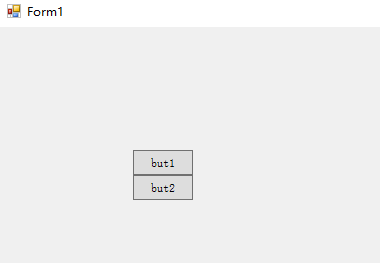
5、如果test.xaml的根节点为window,需要分离,注意加黑部分。
 /// <summary>

    /// UserControl1.xaml 的交互逻辑

    /// </summary>

    public partial class UserControl1 : UserControl

    {

        public UserControl1()

        {

            InitializeComponent();

            Window window = null;

            String xamlFile = @"C:\Users\zgj\source\repos\WindowsFormsApp1\test.xaml";

            using (FileStream fs = new FileStream(xamlFile, FileMode.Open))

            {

                window = (Window)XamlReader.Load(fs);

            }

            Grid grid = (Grid)window.Content;

            DependencyObject parent = grid.Parent;

            if (parent != null)

            {

                parent.SetValue(ContentPresenter.ContentProperty, null);

            }

            grid1.Children.Add(grid);

        }

    }
<Window

    xmlns="http://schemas.microsoft.com/winfx/2006/xaml/presentation"

    xmlns:x="http://schemas.microsoft.com/winfx/2006/xaml"

    Title="test" Height="300" Width="300">

    <Grid>

        <StackPanel x:Name="test_panel">

            <Button x:Name="but1" Height="25" Width="60">but1</Button>

            <Button x:Name="but2" Height="25" Width="60">but2</Button>

        </StackPanel>

    </Grid>

</Window>
源程序在QQ群:616945527,winform加载WPF例子。
Winform中使用WPF控件并动态读取Xaml的更多相关文章
- 关于WinForm引用WPF窗体---在Winform窗体中使用WPF控件
项目中有个界面展示用WPF实现起来比较简单,并且能提供更酷炫的效果,但是在WinForm中使用WPF窗体出现了问题,在网上找了一下有些人说Winform不能引用WPF的窗体,我就很纳闷,Win32都能 ...
- 在Winform窗体中使用WPF控件(附源码)
原文:在Winform窗体中使用WPF控件(附源码) 今天是礼拜6,下雨,没有外出,闲暇就写一篇博文讲下如何在Winform中使用WPF控件.原有是我在百度上搜索相关信息无果,遂干脆动手自己实现. W ...
- WPF中嵌入WinForm中的webbrowser控件
原文:WPF中嵌入WinForm中的webbrowser控件 使用VS2008创建WPF应用程序,需使用webbrowser.从工具箱中添加WPF组件中的webbrowser发现其中有很多属性事件不能 ...
- 在WinForm应用程序中嵌入WPF控件
我们知道,在WPF界面上添加WinForm的控件需要使用WindowsFormHost类.而在WinForm界面上添加WPF控件该如何做呢?有没有类似的类呢?明显是有的,ElementHost就是为了 ...
- Winform中修改WebBrowser控件User-Agent的方法(已经测试成功)
using System; using System.Collections.Generic; using System.Linq; using System.Text; using System.W ...
- winfrom窗体中嵌套WPF控件
前言 本文主要介绍如何在winfrom窗体中嵌套WPF控件, 一来是自己记录一下,而来希望能对有需要的朋友提供实现思路. 如有错误请指出...下面进入正题... -1.前期准备 准备一个建立好的win ...
- winform中的dateTimePicker控件设置默认值为空
winform中的dateTimePicker控件设置默认值为空 第一步:设置Format的属性值为“Custom” 第二步:设置CustomFormat的属性值为空,需要按一个空格键
- C#在WinForm中重写ProgressBar控件(带%的显示)
废话少说,直接上码: namespace csPublish { [ToolboxItem(true)] class textProgressBar : System.Windows.Forms.Pr ...
- Sparrow.Chart.Wpf控件的动态调用
最近需要在Wpf程序中显示曲线,感觉Sparrow.Chart.Wpf控件不错(http://sparrowtoolkit.codeplex.com/),完全开源的一个控件支持,可以通过nuget下载 ...
随机推荐
- Docker 执行nginx以及简单进入container
1. docker run -d --name mynginx nginx 运行起来nginx镜像之后 2. docker exec -ti mynginx /bin/bash 能够进入操作界面 发现 ...
- python之字典操作
字典操作代码如下: #数据字典操作汇总 person = {'name': 'Mike', 'age': 25} print("初始的数据字典:", person) #访问字典值 ...
- Spark_RDD之RDD基础
1.什么是RDD RDD(resilient distributed dataset)弹性分布式数据集,每一个RDD都被分为多个分区,分布在集群的不同节点上. 2.RDD的操作 Spark对于数据的操 ...
- Django model 字段详解
字段类型选择: AutoField(Field) - int自增列,必须填入参数 primary_key=True BigAutoField(AutoField) - bigint自增列,必须填入参数 ...
- Catenyms POJ - 2337(单词+字典序输出路径)
题意: 就是给出几个单词 看能否组成欧拉回路或路径 当然还是让输出组成的最小字典序的路 解析: 还是把首尾字母看成点 把单词看成边 记录边就好了 这题让我对fleury输出最小字典序又加深了一些 ...
- FieldGroup绑定ItemDataSource
FieldGroup可以直接绑定一个数据源DataSource.但如果想绑定某个值,并没有直接作为数据库中的一个字段存在.而是最后转为json串保存在数据库中.这样的话相当于key-value模式的D ...
- mysql 免安装版 启动服务马上关闭
在my.ini 加入这一句 1.直接在后面加上一下的参数 [mysqld] port=3306 basedir=D:\mysql-5.7.17-win32 datadir=D:\mysql-5.7.1 ...
- 任意目录下启动tomcat
DOS中启动tomcat 1.将tomcat的bin目录添加到Path变量中 2.添加catalina_home变量 3.命令行输入catalina run ojbk
- MT【46】不动点,稳定点几何直观
评:不动点概念在数列的一类题中也是非常有用的.
- 51Nod 1048 1383 整数分解为2的幂
任何正整数都能分解成2的幂,给定整数N,求N的此类划分方法的数量! 比如N = 7时,共有6种划分方法. 7=1+1+1+1+1+1+1 =1+1+1+1+1+2 =1+1+1+2+2 ...