
Winform中使用WPF控件并动态读取Xaml
1、添加新项

2、在构造函数中加入
    public partial class UserControl1 : UserControl

    {

        public UserControl1()

        {

            InitializeComponent();

            Grid grid = null;

            String xamlFile = @"C:\Users\zgj\source\repos\WindowsFormsApp1\test.xaml";

            using (FileStream fs = new FileStream(xamlFile, FileMode.Open))

            {

                grid = (Grid)XamlReader.Load(fs);

            }

            grid1.Children.Add(grid);

        }

    }
3、test.xaml内容
<Grid xmlns="http://schemas.microsoft.com/winfx/2006/xaml/presentation"

    xmlns:x="http://schemas.microsoft.com/winfx/2006/xaml">

        <StackPanel x:Name="test_panel">

            <Button x:Name="but1" Height="25" Width="60">but1</Button>

            <Button x:Name="but2" Height="25" Width="60">but2</Button>

        </StackPanel>

    </Grid>
4、将usercontrol拖到winform窗体上即可显示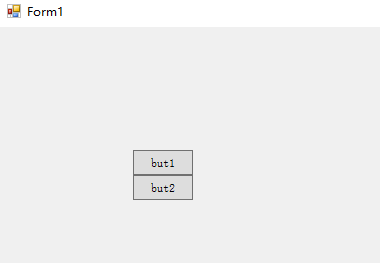
5、如果test.xaml的根节点为window,需要分离,注意加黑部分。
 /// <summary>

    /// UserControl1.xaml 的交互逻辑

    /// </summary>

    public partial class UserControl1 : UserControl

    {

        public UserControl1()

        {

            InitializeComponent();

            Window window = null;

            String xamlFile = @"C:\Users\zgj\source\repos\WindowsFormsApp1\test.xaml";

            using (FileStream fs = new FileStream(xamlFile, FileMode.Open))

            {

                window = (Window)XamlReader.Load(fs);

            }

            Grid grid = (Grid)window.Content;

            DependencyObject parent = grid.Parent;

            if (parent != null)

            {

                parent.SetValue(ContentPresenter.ContentProperty, null);

            }

            grid1.Children.Add(grid);

        }

    }
<Window

    xmlns="http://schemas.microsoft.com/winfx/2006/xaml/presentation"

    xmlns:x="http://schemas.microsoft.com/winfx/2006/xaml"

    Title="test" Height="300" Width="300">

    <Grid>

        <StackPanel x:Name="test_panel">

            <Button x:Name="but1" Height="25" Width="60">but1</Button>

            <Button x:Name="but2" Height="25" Width="60">but2</Button>

        </StackPanel>

    </Grid>

</Window>
源程序在QQ群:616945527,winform加载WPF例子。
Winform中使用WPF控件并动态读取Xaml的更多相关文章
- 关于WinForm引用WPF窗体---在Winform窗体中使用WPF控件
项目中有个界面展示用WPF实现起来比较简单,并且能提供更酷炫的效果,但是在WinForm中使用WPF窗体出现了问题,在网上找了一下有些人说Winform不能引用WPF的窗体,我就很纳闷,Win32都能 ...
- 在Winform窗体中使用WPF控件(附源码)
原文:在Winform窗体中使用WPF控件(附源码) 今天是礼拜6,下雨,没有外出,闲暇就写一篇博文讲下如何在Winform中使用WPF控件.原有是我在百度上搜索相关信息无果,遂干脆动手自己实现. W ...
- WPF中嵌入WinForm中的webbrowser控件
原文:WPF中嵌入WinForm中的webbrowser控件 使用VS2008创建WPF应用程序,需使用webbrowser.从工具箱中添加WPF组件中的webbrowser发现其中有很多属性事件不能 ...
- 在WinForm应用程序中嵌入WPF控件
我们知道,在WPF界面上添加WinForm的控件需要使用WindowsFormHost类.而在WinForm界面上添加WPF控件该如何做呢?有没有类似的类呢?明显是有的,ElementHost就是为了 ...
- Winform中修改WebBrowser控件User-Agent的方法(已经测试成功)
using System; using System.Collections.Generic; using System.Linq; using System.Text; using System.W ...
- winfrom窗体中嵌套WPF控件
前言 本文主要介绍如何在winfrom窗体中嵌套WPF控件, 一来是自己记录一下,而来希望能对有需要的朋友提供实现思路. 如有错误请指出...下面进入正题... -1.前期准备 准备一个建立好的win ...
- winform中的dateTimePicker控件设置默认值为空
winform中的dateTimePicker控件设置默认值为空 第一步:设置Format的属性值为“Custom” 第二步:设置CustomFormat的属性值为空,需要按一个空格键
- C#在WinForm中重写ProgressBar控件(带%的显示)
废话少说,直接上码: namespace csPublish { [ToolboxItem(true)] class textProgressBar : System.Windows.Forms.Pr ...
- Sparrow.Chart.Wpf控件的动态调用
最近需要在Wpf程序中显示曲线,感觉Sparrow.Chart.Wpf控件不错(http://sparrowtoolkit.codeplex.com/),完全开源的一个控件支持,可以通过nuget下载 ...
随机推荐
- Qt__文件打开保存对话框(QFileDialog)
转自豆子空间 使用QFileDialog有两种方法,一种是比较简单的使用"静态函数法",另一种是可以自定义各个细节的"构造函数法". 静态函数法 修改MainW ...
- Jquery Jquery对象和DOM对象的微妙联系
声明变量 var $variable= Jquery 对象: var varibake= DOM对象: var $cr= $("#id&q ...
- GlusterFS卷的优化
GlusterFS可以通过配置选项来优化卷 配置选项 用途 默认值 合法值 network.ping-timeout 客户端等待检查服务器是否响应的持续时间,节点挂了数据不能写入 42 0-42 ...
- nginx的安装应用
Nginx的安装 # yum install gcc pcre-devel zlib-devel –y #./configure –prefix=/usr/local/nginx #make & ...
- postgres(pgAdmin) 客户端保存密码
pgAdmin 大象客户端保存密码后连接服务器,删除掉当前连接,建立一个新的连接不用输入密码也能连接上,其实是客户端保存了密码,让人误以为是空密码可登录.可以通过右键连接,选择重载服务配置,再次连接就 ...
- Leetcode 242.有效的字母异位词 By Python
给定两个字符串 s 和 t ,编写一个函数来判断 t 是否是 s 的一个字母异位词. 示例 1: 输入: s = "anagram", t = "nagaram" ...
- 【BZOJ1822】[JSOI2010]冷冻波(二分,网络流)
[BZOJ1822][JSOI2010]冷冻波(二分,网络流) 题面 BZOJ 洛谷 题解 先预处理每个巫妖可以打到哪些小精灵,然后二分答案,网络流判定即可. #include<iostream ...
- 添加AD RMS role时,提示密码不能被验证The password could not be validated
"The password could not be validated" when attempting to provision an AD RMS server. Sympt ...
- VirtualBox中slitaz系统不能联网
首先,关于VirtualBox虚拟机中安装slitaz操作系统中,先不讲,现在假设电脑中已经装好了VirtualBox,并且已经装好了slitaz操作系统,一个轻量版的linux发行版本. 右上角我画 ...
- Android 友盟SDK 终极解决报错:SocialSDK_QQZone_2.jar contains native libraries that
转自:http://bbs.umeng.com/thread-6552-1-2.html 报错信息:The library `SocialSDK_QQZone_2.jar` contains nati ...