
ROS actionlib学习(二)
在ROS actionlib学习(一)中的例子展示了actionlib最基本的用法,下面我们看一个稍微实际一点的例子,用actionlib计算斐波那契数列,并发布反馈(feedback)和结果(result)。斐波那契数列指的是这样一个数列:
1, 1, 2, 3, 5, 8, 13, 21, 34, 55, 89, 144, 233,377,610,987,1597,2584,4181,6765,10946,17711,28657,46368........
这个数列从第3项开始,每一项都等于前两项之和。
首先在action文件中定义goal、result、feedback,其中goal是斐波那契数列的阶数,result为最终生成的数列,feedback为当前一步的中间结果(也是一个数列)。
#goal definition

int32 order

---

#result definition

int32[] sequence

---

#feedback

int32[] sequence
然后按照教程SimpleActionServer(ExecuteCallbackMethod)中所述的步骤,修改CMakeLists.txt以及package.xml文件,编译成功后会生成相应的消息文件以及头文件。
$ cd ../.. # Go back to the top level of your catkin workspace

$ catkin_make

$ ls devel/share/actionlib_tutorials/msg/

FibonacciActionFeedback.msg  FibonacciAction.msg        FibonacciFeedback.msg

FibonacciResult.msg          FibonacciActionGoal.msg    FibonacciActionResult.msg  FibonacciGoal.msg

$ ls devel/include/actionlib_tutorials/

FibonacciActionFeedback.h  FibonacciAction.h        FibonacciFeedback.h  FibonacciResult.h

FibonacciActionGoal.h      FibonacciActionResult.h  FibonacciGoal.h
下面编写服务端程序,用于处理客户端发送的请求。
#include <ros/ros.h>

#include <actionlib/server/simple_action_server.h>

#include <actionlib_tutorials/FibonacciAction.h>

class FibonacciAction

{

protected:

  ros::NodeHandle nh_;

  actionlib::SimpleActionServer<actionlib_tutorials::FibonacciAction> as_; // NodeHandle instance must be created before this line. Otherwise strange error occurs.

  std::string action_name_;

  // create messages that are used to published feedback/result

  actionlib_tutorials::FibonacciFeedback feedback_;

  actionlib_tutorials::FibonacciResult result_;

public:

  FibonacciAction(std::string name) :

    as_(nh_, name, boost::bind(&FibonacciAction::executeCB, this, _1), false),

    action_name_(name)

  {

    as_.start();  // Explicitly start the action server

  }

  ~FibonacciAction(void)

  {

  }

  void executeCB(const actionlib_tutorials::FibonacciGoalConstPtr &goal)

  {

    // helper variables

    ros::Rate r();

    bool success = true;

    // push_back the seeds for the fibonacci sequence

    feedback_.sequence.clear();

    feedback_.sequence.push_back();

    feedback_.sequence.push_back();

    // publish info to the console for the user

    ROS_INFO("%s: Executing, creating fibonacci sequence of order %i with seeds %i, %i", action_name_.c_str(), goal->order, feedback_.sequence[], feedback_.sequence[]);

    // start executing the action

    for(int i=; i<=goal->order; i++)

    {

      // check that preempt has not been requested by the client

      if (as_.isPreemptRequested() || !ros::ok())

      {

        ROS_INFO("%s: Preempted", action_name_.c_str());

        // set the action state to preempted

        as_.setPreempted(); // signals that the action has been preempted by user request

        success = false;

        break;

      }

      feedback_.sequence.push_back(feedback_.sequence[i] + feedback_.sequence[i-]);

      // publish the feedback

      as_.publishFeedback(feedback_);

      // this sleep is not necessary, the sequence is computed at 1 Hz for demonstration purposes

      r.sleep();

    }

    if(success)

    {

      result_.sequence = feedback_.sequence;

      ROS_INFO("%s: Succeeded", action_name_.c_str());

      // set the action state to succeeded

      as_.setSucceeded(result_);

    }

  }

};

int main(int argc, char** argv)

{

  ros::init(argc, argv, "fibonacci");

  FibonacciAction fibonacci("fibonacci");

  ros::spin();

  return ;

}
客户端程序用于发送计算请求,服务器收到请求后会生成20阶的斐波那契数列。
#include <ros/ros.h>

#include <actionlib/client/simple_action_client.h>

#include <actionlib/client/terminal_state.h>

#include <actionlib_tutorials/FibonacciAction.h>

int main (int argc, char **argv)

{

  ros::init(argc, argv, "test_fibonacci");

// the action client is constructed with the server name and the auto spin option set to true.

  actionlib::SimpleActionClient<actionlib_tutorials::FibonacciAction> ac("fibonacci", true); //The action client is templated on the action definition, specifying what message types to communicate to the action server with

  ROS_INFO("Waiting for action server to start.");

  // wait for the action server to start (Since the action server may not be up and running, the action client will wait for the action server to start before continuing)

  ac.waitForServer(); //will wait for infinite time

  ROS_INFO("Action server started, sending goal.");

  // send a goal to the action

  actionlib_tutorials::FibonacciGoal goal;

  goal.order = ;

  ac.sendGoal(goal); // the goal value is set and sent to the action serve

  //wait for the action to return

  bool finished_before_timeout = ac.waitForResult(ros::Duration(30.0)); // The timeout on the wait is set to 30 seconds, this means after 30 seconds the function will return with false if the goal has not finished.

  if (finished_before_timeout)

  {

    actionlib::SimpleClientGoalState state = ac.getState();

    ROS_INFO("Action finished: %s",state.toString().c_str());

  }

  else

    ROS_INFO("Action did not finish before the time out.");

  //exit

  return ;

}
修改CMakeLists.txt后使用catkin_make编译上面两个程序。运行roscore开启ROS主节点,然后在两个新终端中分别输入下面命令分别运行server和client:
rosrun actionlib_tutorials fibonacci_server

rosrun actionlib_tutorials fibonacci_client
可以通过 rostopic echo /fibonacci/feedback 和 rostopic echo /fibonacci/result 命令查看斐波那契数列计算的反馈和结果:

最终的计算结果result如下:
---

header:

  seq: 1

  stamp: 1250813759950015000

  frame_id:

status:

  goal_id:

    stamp: 1250813739949752000

    id: 1250813739949752000

  status: 3

  text:

result:

  sequence: (0, 1, 1, 2, 3, 5, 8, 13, 21, 34, 55, 89, 144, 233, 377, 610, 987, 1597, 2584, 4181, 6765, 10946)
在一个新终端中输入下面命令,运行另一个客户端节点(重命名为client2)。如果在原fibonacci_client节点的请求还没完成时就运行client2,那么服务将会被client2抢占。
rosrun actionlib_tutorials fibonacci_client __name:=client2
效果如下图所示,如果前一个client发送的请求还没计算完成,新的goal就到达,server会重新开始计算数列:
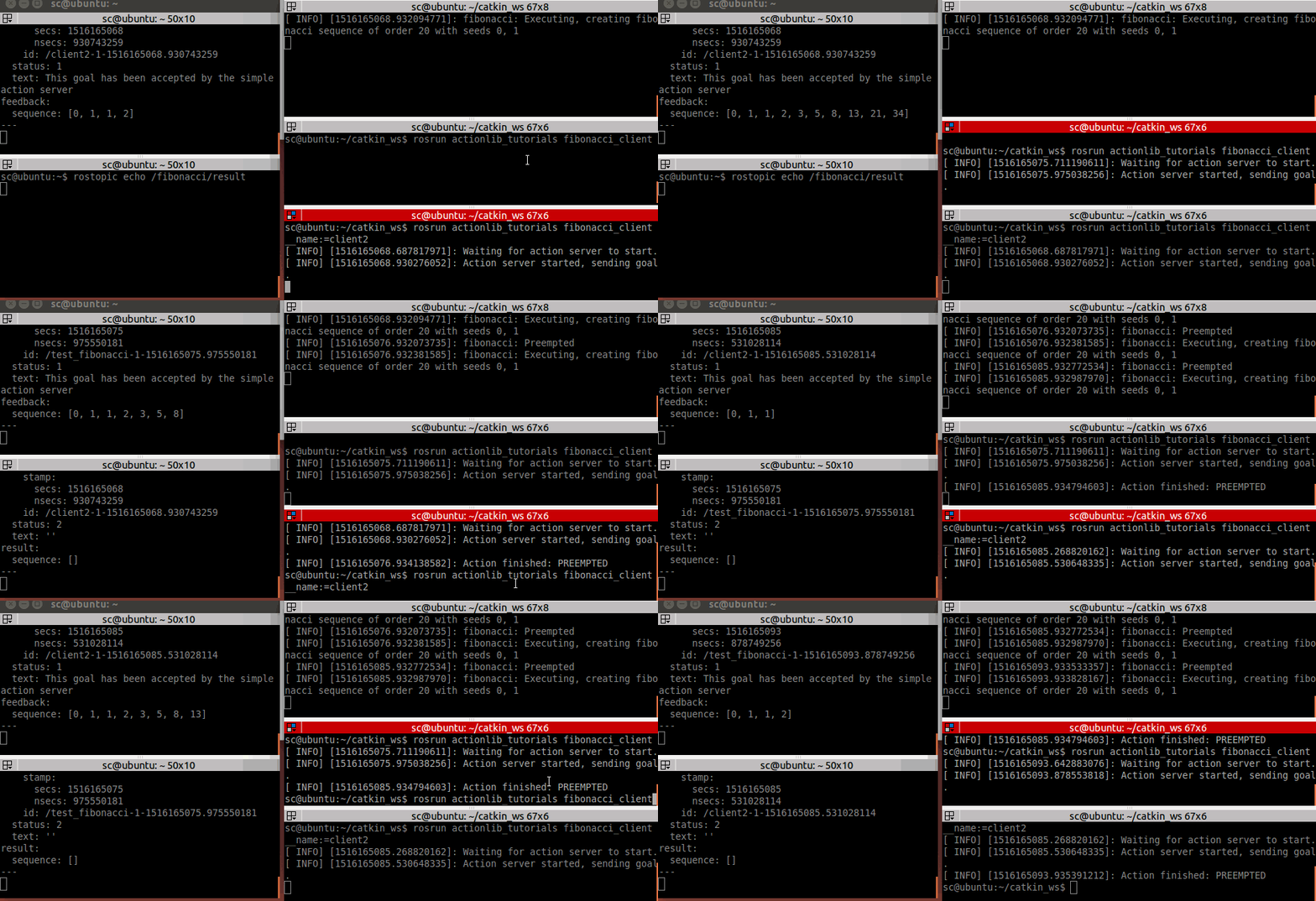
SimpleActionServer在ActionServer类上实现了single goal policy,就是在某一时刻只能有一个goal是处于active状态,并且新的goal可以抢占先前的goal:
- Only one goal can have an active status at a time
- New goals preempt previous goals based on the stamp in their GoalID field (later goals preempt earlier ones)
- An explicit preempt goal preempts all goals with timestamps that are less than or equal to the stamp associated with the preempt
- Accepting a new goal implies successful preemption of any old goal and the status of the old goal will be changed automatically to reflect this
参考:
ROS actionlib学习(二)的更多相关文章
- ROS actionlib学习(三)
下面这个例子将展示用actionlib来计算随机变量的均值和标准差.首先在action文件中定义goal.result和feedback的数据类型,其中goal为样本容量,result为均值和标准差, ...
- ROS actionlib学习(一)
actionlib是ROS中一个很重要的功能包集合,尽管在ROS中已经提供了srevice机制来满足请求—响应式的使用场景,但是假如某个请求执行时间很长,在此期间用户想查看执行的进度或者取消这个请求的 ...
- emberjs学习二(ember-data和localstorage_adapter)
emberjs学习二(ember-data和localstorage_adapter) 准备工作 首先我们加入ember-data和ember-localstorage-adapter两个依赖项,使用 ...
- ReactJS入门学习二
ReactJS入门学习二 阅读目录 React的背景和基本原理 理解React.render() 什么是JSX? 为什么要使用JSX? JSX的语法 如何在JSX中如何使用事件 如何在JSX中如何使用 ...
- TweenMax动画库学习(二)
目录 TweenMax动画库学习(一) TweenMax动画库学习(二) TweenMax动画库学习(三) Tw ...
- Hbase深入学习(二) 安装hbase
Hbase深入学习(二) 安装hbase This guidedescribes setup of a standalone hbase instance that uses the local fi ...
- Struts2框架学习(二) Action
Struts2框架学习(二) Action Struts2框架中的Action类是一个单独的javabean对象.不像Struts1中还要去继承HttpServlet,耦合度减小了. 1,流程 拦截器 ...
- Python学习二:词典基础详解
作者:NiceCui 本文谢绝转载,如需转载需征得作者本人同意,谢谢. 本文链接:http://www.cnblogs.com/NiceCui/p/7862377.html 邮箱:moyi@moyib ...
- Quartz学习--二 Hello Quartz! 和源码分析
Quartz学习--二 Hello Quartz! 和源码分析 三. Hello Quartz! 我会跟着 第一章 6.2 的图来 进行同步代码编写 简单入门示例: 创建一个新的java普通工程 ...
随机推荐
- String对象的常用属性和方法
属性 描述 length 在大多数情况下返回字符串中的字符数 方法 描述 toUpperCase() 将字符串修改为大写字母 toLowerCase() 将字符串修改为小写字母 charAt() 以索 ...
- 2018-2019 2 20165203 《网络对抗技术》Exp5 MSF基础
2018-2019 2 20165203 <网络对抗技术>Exp5 MSF基础 实验内容 本实践目标是掌握metasploit的基本应用方式,重点常用的三种攻击方式的思路.具体需要完成: ...
- Promise in Chakra
http://www.ecma-international.org/ecma-262/#sec-fulfillpromise 25.4.1.3.1 and 25.4.1.3.2 Promise Rej ...
- 《剑指offer》-前n项和不准用通解和各种判断
题目描述 求1+2+3+...+n,要求不能使用乘除法.for.while.if.else.switch.case等关键字及条件判断语句(A?B:C). 这题目简直没事找事...为啥这么说,因为没有限 ...
- JQuery中的事件(三)
一:页面载入 ready(fn)当DOM载入就绪可以查询及操纵时绑定一个要执行的函数.这是事件模块中最重要的一个函数,因为它可以极大地提高web应用程序的响应速度.简单地说,这个方法纯粹是对向wind ...
- android修改默认输入法
方案一:adb命令设置?方案2:系统配置:方案3:调用系统API接口设置---------------------------adb shell cmdadb rootadb remountadb p ...
- hdu 5256 最少修改多少个数 能使原数列严格递增 (LIS)
Problem Description我们有一个数列A1,A2...An,你现在要求修改数量最少的元素,使得这个数列严格递增.其中无论是修改前还是修改后,每个元素都必须是整数. 请输出最少需要修改多少 ...
- 在django中使用FormView,success_url死活不能生效的问题
真的不知道是怎么回事, 以前都是手动的, form使用modelform. view使用createview. 今天写新系统时,为了更灵活. form使用form,(这样一来,可以在form是随便按数 ...
- linux命令之grep用法
grep是linux中很常用的一个命令,主要功能就是进行字符串数据的对比,能使用正则表达式搜索文本,并将符合用户需求的字符串打印出来.grep全称是Global Regular Expression ...
- JavaWeb 之 清理错误的无奈之举
1. Project -> Clean 2. 清空浏览器缓存 (得先按了F2,出了调试窗口,才可以右键它) 3. 右键项目 -> Maven -> Update -> Forc ...