
az nginx install and other
Nginx
1◆ nginx install
- 源码:https://trac.nginx.org/nginx/browser
- 官网:http://www.nginx.org/

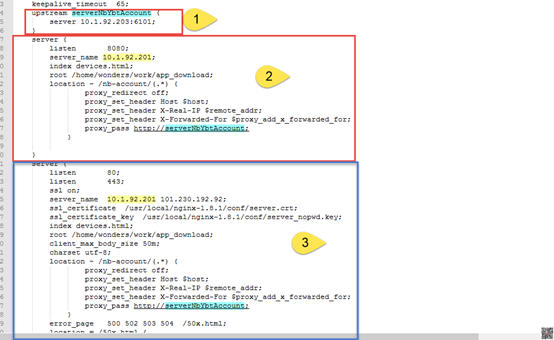
=====>安装编译工具及库文件
|
yum -y install make zlib zlib-devel gcc-c++ libtool openssl openssl-devel |
=====>下载 PCRE 安装包
|
=====>解压安装包
|
|
|
|
=====>编译安装
|
=====>search version
pcre-config --version
=====>下载 Nginx
|
=====>unrar
|
cd nginx-1.6.2
=====>编译安装
|
make install |
./configure
make
make install
=====>search nginx version
|
创建 Nginx 运行使用的用户 www
[root@bogon conf]#

								/usr/sbin/groupadd www
[root@bogon conf]#

								/usr/sbin/useradd -g www www
|
yum install -y pcre pcre-devel yum install -y zlib zlib-devel yum install -y openssl openssl-devel |
=====>
|
tar -zxvf nginx-1.6.2.tar.gz -C /usr/local/ |
|
tar -zxvf nginx-1.6.2.tar.gz -C /usr/local/ |
=====>进行configure配置
|
./configure --prefix=/usr/local/nginx |
make && make install
/usr/local/nginx/sbin/nginx
=====>ps -ef | grep nginx

=====>close ngnix
|
/usr/local/nginx/sbin/nginx -s stop |
=====>重新热启动nginx
|
重新热启动nginx, |
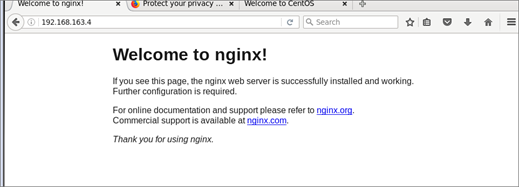
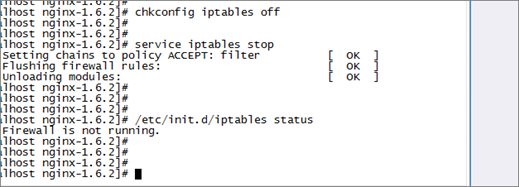
=====>配置防火墙,nginx默认的端口是80
|
firewall-cmd --zone=public --add-port=80/tcp –permanent firewall-cmd --reload |
|
worker_processes 1;
events { worker_connections 1024; }
http {
include mime.types; default_type application/octet-stream; sendfile on; upstream mytest { server 10.2.4.149:8080; } server { listen 8080; server_name 192.168.163.4; index devices.html; root /home/wonders/work/app_download; location ~ /test/(.*) { proxy_redirect off; proxy_set_header Host $host; proxy_set_header X-Real-IP $remote_addr; proxy_set_header X-Forwarded-For $proxy_add_x_forwarded_for; proxy_pass http://mytest; }
}
log_format access '$remote_addr - $remote_user [$time_local] "$request" $status $body_bytes_sent "$http_referer" "$http_user_agent" $http_x_forwarded_for' server_ip $server_addr proxy_host $proxy_host upstream_server_ip $upstream_addr'; access_log logs/access.log access;
}
} |
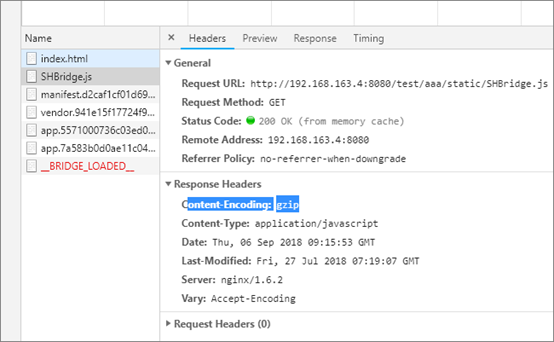
=====> gzip
|
gzip on; #开启gzip gzip_min_length 1k; #低于1kb的资源不压缩 gzip_comp_level 3; #压缩级别【1-9】,越大压缩率越高,同时消耗cpu资源也越多,建议设置在4左右。 gzip_types text/plain application/javascript application/x-javascript text/javascript text/xml text/css; #需要压缩哪些响应类型的资源,多个空格隔开。不建议压缩图片,下面会讲为什么。 gzip_disable "MSIE [1-6]\."; #配置禁用gzip条件,支持正则。此处表示ie6及以下不启用gzip(因为ie低版本不支持) gzip_vary on; #是否添加"Vary: Accept-Encoding"响应头 |
az nginx install and other的更多相关文章
- CentOS 6.6 nginx install
/************************************************************************* * CentOS 6.6 nginx instal ...
- nginx install in centos
1.在nginx下载rpm包,如nginx-release-centos-6-0.el6.ngx.noarch.rpm ,并安装(可用yum直接安装): 注:rpm包只是提供一个nginx源. 2.使 ...
- 第七篇、Nginx Install On Mac
方式一: 在mac上安装nginx,依次安装对应的依赖 pcre ./configure --prefix=/usr/local/pcre-8.37 --libdir=/usr/local/lib/p ...
- nginx install lua module
#install luajit #http://luajit.org/download.html .tar.gz cd LuaJIT- make install PREFIX=/home/allen. ...
- Nginx Install 记录
一.安装编译工具及库文件 yum -y install gcc yum -y install gcc-c++ yum -y install zlib; yum -y install pcre-deve ...
- centos nginx install openssl
1.查看是否已经安装 ssl 组件 [root@localhost wwwlogs]# cd /usr/local/nginx/sbin/ [root@localhost sbin]# ./nginx ...
- nginx install
./configure --prefix=/home/allen.mh/local/nginx --with-http_ssl_module --with-http_sub_module --with ...
- nginx HttpLuaModule
http://wiki.nginx.org/HttpLuaModule#Directives Name ngx_lua - Embed the power of Lua into Nginx This ...
- LVS+Keepalived+Squid+Nginx+MySQL主从高性能集群架构部署方案
方案一,在tomcat的workers.properties里面配置相关条件 worker.tomcat.lbfactor= worker.tomcat.cachesize= worker.tomca ...
随机推荐
- P2002 消息扩散
其实这道题蛮水的 思路: 根据题意,他说有环,自然想到要用tarjan,后面就很简单了: 缩完点之后重新建图,开一个inin数组表示该点的入度是多少(psps:该点表示缩完点之后的大点): 最后统计一 ...
- 9. spring项目中web.xml详解解读
引言:本篇博客的内容大部分都来自网上,有的是直接copy,有的是自己整理而来.既然网上已经有了,为啥还有自己copy呢? 感觉是因为网上的东西太散了或者是样式不够美观,所以自己又copy了一遍.如有侵 ...
- L1-044. 稳赢
这种题不是考思维,就是考你细心程度还有基础知识的,代码如下: #include <iostream> #include <string> using namespace std ...
- django模型表单ModelForm
如果你正在构建一个数据库驱动的应用,那么你可能会有与Django的模型紧密映射的表单.比如,你有个BlogComment模型,并且你还想创建一个表单让大家提交评论到这个模型中.在这种情况下,写一个fo ...
- mkdir -p a/b 表示创建目录a,并创建目录a的子目录b
mkdir -p 命令解释 2016年01月13日 14:24:03 阅读数:742 mkdir -p a/b 表示创建目录a,并创建目录a的子目录b, 若不使用命令-p的话,想要达到同样的效果,需要 ...
- R语言矩阵栅格显示矩阵颜色显示
效果如下:
- 浅谈Java简单实现的生产者与消费者问题
一.面对生产者和消费者的问题,首先我们得明白几点: 生产者:生产数据:消费者:消费数据.消费者在没有数据可供消费的情况下,不能消费:生产者在原数据没有被消费掉的情况下,不能生产新数据.假设,数据空间只 ...
- Error updating database:线程异常
SLF4J: Failed to load class "org.slf4j.impl.StaticLoggerBinder".SLF4J: See http://www.slf4 ...
- Webpack 常见静态资源处理 - 模块加载器(Loaders)+ExtractTextPlugin插件
Webpack 常见静态资源处理 - 模块加载器(Loaders)+ExtractTextPlugin插件 webpack系列目录 webpack 系列 一:模块系统的演进 webpack 系列 二: ...
- 使用getCurrentPosition方法实时获取当前Geolocation信息(附源码文件)--html5、JavaScript
使用getCurrentPosition方法实时获取当前Geolocation信息: 1.getCurrentPosition方法的使用 navigator.geolocation.getCurren ...