
Hive之示例一:基本操作与案例
1. 创建数据库,切换数据库
create database testdb;

use testdb;
2. 创建管理表

create table emp(

empno int,

empname string,

job string,

mgr int,

hiredate string,

salary double,

comm double,

deptno int)

row format delimited

fields terminated by '\t';

加载数据

load data local inpath '/opt/test/emp.txt' overwrite into table emp;
emp.txt文件内容如下:
101    'duan'    'it'    1,    'hiredate'    100.0    10.0    1

102    'duan2'    'product'    1,    '2018'    200.0    20.0    1

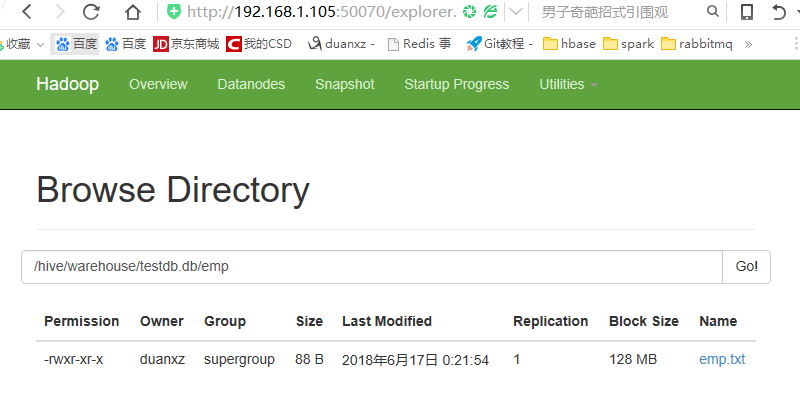
在hadoop中查看数据,如下:
3. 创建外部表
创建外部表时直接指定表位置
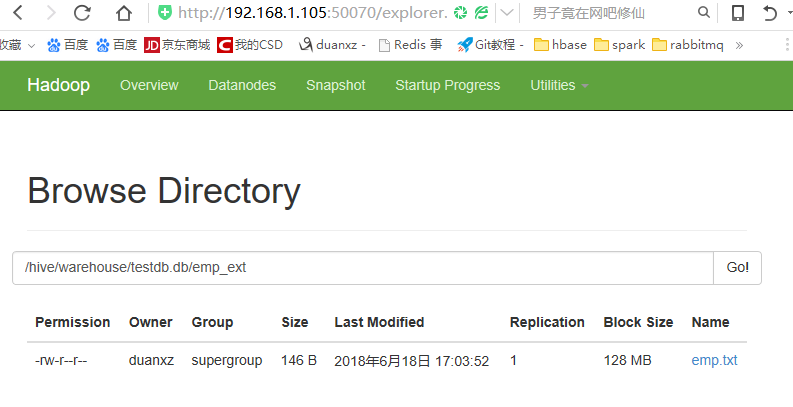
上传数据文件到指定路径
duanxz@three:~/hive/hivelocal$ hdfs dfs -mkdir /hive/warehouse/testdb.db/emp_ext

duanxz@three:~/hive/hivelocal$ hdfs dfs -put emp.txt /hive/warehouse/testdb.db/emp_ext/

duanxz@three:~/hive/hivelocal$
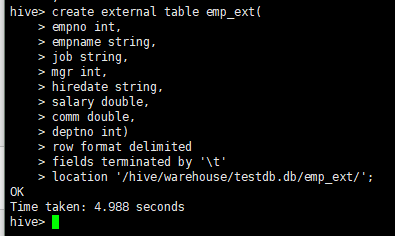
在hive中创建数据表指定location
create external table emp_ext(

empno int,

empname string,

job string,

mgr int,

hiredate string,

salary double,

comm double,

deptno int)

row format delimited

fields terminated by '\t'

location '/hive/warehouse/testdb.db/emp_ext/';
4. 创建分区表
create table emp_part(

empno int,

empname string,

job string,

mgr int,

hiredate string,

salary double,

comm double,

deptno int)

partitioned by (year string, month string)

row format delimited

fields terminated by '\t';
注:分区字段不能与表中其他字段重复,否则报错
FAILED: SemanticException [Error 10035]: Column repeated in partitioning columns
加载数据
1、将txt的文本文件导入hive
从本地拷贝emp.txt到分区表目录中
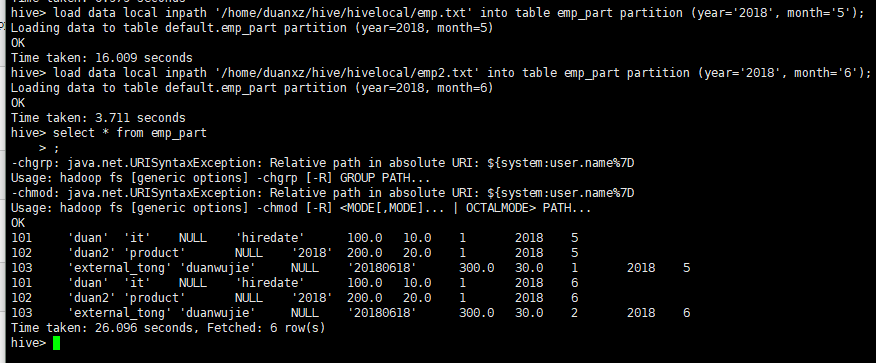
load data local inpath '/home/duanxz/hive/hivelocal/emp.txt' into table emp_part partition (year='', month='');

load data local inpath '/home/duanxz/hive/hivelocal/emp2.txt' into table emp_part partition (year='', month='');
用hdfs中指定位置的数据,增加分区表中数据,此操作不会移动数据文件到分区表目录中
alter table emp_part add partition (year='2016', month='5') location '/data';
把hdfs中指定位置的数据移动到分区表目录中,增加数据
load data inpath '/emp.txt' into table emp_part partition (year='2016', month='6');
2、将csv导入hive
create table feizhou_china_part2(

merchant string,

pay_time string,

currency string,

amount double,

fee double,

transaction_reference string,

feizhou_reference string,

link_reference string,

narration string,

account_number string,

account_name string,

bank string,

bank_code string,

status string,

source string)

partitioned by (year string, month string, day string)

row format delimited

fields terminated by '?';
导入:
load data local inpath '/home/duanxz/hive/hivelocal/china-pay-disburse-transactions.csv' into table feizhou_china_part2 partition (year='',month='',day='');
说明:上面的为什么将分隔符调整为"?"呢,是因为csv中默认的分隔符是',',内容中如果有',',这样导入后,内容就乱了。
如何修改CSV文件的分隔符
5.其他创建表的方式
(1) create-as
create table emp3

as

select * from emp;
(2) create-like
create table emp4 like emp;

load data local inpath '/opt/test/emp.txt' overwrite into table emp4;
(3)插入数据
insert overwrite table emp4 select * from emp;
6.指定表存储格式与压缩格式
(1) 指定orc格式
create table emp_orc(

empno int,

empname string,

job string,

mgr int,

hiredate string,

salary double,

comm double,

deptno int)

stored as orc;
指定为非文本格式时无需再指定row format delimited fields terminated by '\t'
插入数据

insert into table emp_orc select * from emp;
可以利用已有的ORC存储格式的表创建新的ORC表
create table emp_orc2 like emp_orc;

插入数据

insert overwrite table emp_orc2 select * from emp;
(2) 指定orc+snappy格式
a)先创建表,再插入数据
create table emp_orc_snappy(

empno int,

empname string,

job string,

mgr int,

hiredate string,

salary double,

comm double,

deptno int)

stored as orc tblproperties("orc.compression"="snappy");

插入数据

insert overwrite table emp_orc_snappy select * from emp;
b)利用已有的orc表格式创建orc+snappy格式表
create table emp_orc_snappy2 like emp_orc tblproperties ("orc.compression"="snappy");

insert overwrite table emp_orc_snappy2 select * from emp;
c)利用非压缩表直接创建orc+snappy表并导入数据
create table emp_orc_snappy3

stored as orc tblproperties("orc.compression"="snappy")

as select * from emp;
7.hive执行参数-e,-f,--hiveconf
(1)命令行直接执行hql语句
hive -e "select * from db_hive01.emp"
(2)执行hql文件中的语句
hive -f emp.hql
(3)打开调试模式
hive --hiveconf hive.root.logger=DEBUG,console
8.数据导出
(1)导出数据到本地
a)insert
insert overwrite local directory '/opt/test/local'

row format delimited fields terminated by '\t'

select * from emp;
如果不指定row format delimited fields terminated by '\t',字段间默认没有分割符
b)
hive -e 'select * from testdb2.emp' >> ./emp_export.txt
(2)导出到hdfs
a)
insert overwrite directory '/export_data'

select * from emp;
hive 0.13.1版本还不支持导出数据到hdfs时指定分隔符row format delimited fields terminated by '\t'
b)
export table emp to '/export_data';
导出后会在会生成/export_data/data目录, emp.txt存放在此目录中,即/export_data/data/emp.txt
9. 排序
(1)order by 全局排序
insert overwrite local directory '/opt/test/local'

row format delimited fields terminated by '\t'

select * from emp order by empno;
(2)sort by 与 distributed by
类似MR中partition,进行分区,结合sort by使用
每个reduce内部进行排序,全局不是排序, distribute by 一定是放在sort by 前面,
且必须要指定mapreduce.job.reduces数量,否则导出结果还是在一个文件中
set mapreduce.job.reduces=3;

insert overwrite local directory '/opt/test/local'

row format delimited fields terminated by '\t'

select * from emp distribute by deptno sort by empno;
(3)cluster by
当distributed by和sort by 字段一样的时候,直接使用cluster by
10.常用函数
select upper(empname) from emp;

select unix_timestamp(trackTime) from bflog limit 3 ;

select year(hiredate) from emp ;

select month(hiredate) from emp ;

select hour(hiredate) from emp ;

select substr(hiredate,1,4) from .emp ;

select split(hiredate,'-')[1] from emp ;

select reverse(hiredate) from emp ;

select concat(empno,'-',empname) from emp ;

case when 条件1  then  ...

     when 条件2  then  ...

     else  end
可以使用desc function substr 查看函数说明, substr第二个参数为index 从1技术,第三个参数为length
11. 自定义UDF
add jar /opt/test/mylower.jar ;

CREATE TEMPORARY FUNCTION mylower AS 'org.gh.hadoop.hive.MyLower';
12. 使用正则表达式加载数据字段
create table beifenglog(

remote_addr string,

remote_user string,

time_local string,

request string,

status string,

body_bytes_sent string,

request_body string,

http_referer string,

http_user_agent string,

http_x_forwarded_for string,

host string)

row format serde 'org.apache.hadoop.hive.contrib.serde2.RegexSerDe'

with serdeproperties(

"input.regex" = "(\\\"[\\d\\.]+\\\") (\\\"[^ ]+\\\") (\\\".*?\\\") (\\\".*?\\\") (\\\"\\d+\\\") (\\\"\\d+\\\") ([^ ]+) (\\\"[^ ]+\\\") (\\\".*?\\\") (\\\"[^ ]+\\\") (\\\"[^ ]+\\\")"

)

stored as textfile;

加载原表数据

load data local inpath '/opt/test/beifenglog.data' overwrite into table beifenglog;
可以使用工具调试正则:http://tool.chinaz.com/regex
13.注意点
(1)在创建表(无论管理表还是外部表)时,如果没有指定location,可以使用load data加载数据
a) 指定本地目录中的数据,会上传数据文件到hdfs中
b) 指定hdfs中数据文件,如果指定的路径与表所在的目录不一致,则移动数据文件到表目录中
create external table emp_ext2 like emp;

load data inpath '/emp.txt' into table emp_ext2;

会把/emp.txt移动到/user/hive/warehouse/testdb2.db/emp_ext2/目录中
create table emp2 like emp;

load data inpath '/emp.txt' into table emp2;

会把/emp.txt移动到/user/hive/warehouse/testdb2.db/emp2/目录中
(2)create-like时不能指定stored as为其他格式,否则报错
以下操作会报错 FAILED: ParseException line 1:31 missing EOF at 'stored' near 'emp'
create table emp_orc2 like emp stored as orc;
Hive之示例一:基本操作与案例的更多相关文章
- hive的表的基本操作
环境简介 实验环境使用的是cloudera-quickstart-vm-5.0环境. 内容摘要 创建表 修改表名 修改表中的列名 添加列 删除列 替换列 正文 Alter Table 语句 上面所述的 ...
- 三、hive JavaAPI示例
在上文中https://www.cnblogs.com/lay2017/p/9973370.html 我们通过hive shell去操作hive,本文我们以Java代码的示例去对hive执行加载数据和 ...
- Struts 2相关配置与基本操作演示(案例Demo)
基本介绍 Struts 2 Struts 2是Struts的下一代产品,是在 struts 1和WebWork的技术基础上进行了合并的全新的Struts 2框架.其全新的Struts 2 ...
- Hive环境搭建及基本操作
伪分布式 一.安装及配置Hive 1.配置HADOOP_HOME和Hive conf 目录hive-env.sh # Set HADOOP_HOME to point to a specific ha ...
- 理解线程3 c语言示例线程基本操作
Table of Contents 1. 基本线程的动作 1.1. 设置线程属性 1.1.1. 设置脱离状态 1.1.2. 设置调度属性 1.2. 取消线程 1.3. 主线程创建多个线程示例 2. 了 ...
- Apache Hive处理数据示例
继上一篇文章介绍如何使用Pig处理HDFS上的数据,本文将介绍使用Apache Hive进行数据查询和处理. Apache Hive简介 首先Hive是一款数据仓库软件 使用HiveQL来结构化和查询 ...
- Hadoop生态圈-Hive快速入门篇之HQL的基础语法
Hadoop生态圈-Hive快速入门篇之HQL的基础语法 作者:尹正杰 版权声明:原创作品,谢绝转载!否则将追究法律责任. 本篇博客的重点是介绍Hive中常见的数据类型,DDL数据定义,DML数据操作 ...
- Hive学习笔记(二)—— 安装配置
Hive安装配置及基本操作 1. Hive安装及配置 (1). 上传文件到Hadoop102节点,解压到/opt/moudle (2). 修改/opt/module/hive/conf目录下的hive ...
- Hadoop: the definitive guide 第三版 拾遗 第十二章 之Hive初步
Hive简介 Hive是建立在 Hadoop 上的数据仓库基础构架.它提供了一系列的工具,可以用来进行数据提取转化加载(ETL),这是一种可以存储.查询和分析存储在 Hadoop 中的大规模数据的机制 ...
随机推荐
- 1001.A+B Format (20)题目解答
前言 最开始看到这个题目,我的第一个想法是有没有那种输出格式可以直接拿来用的,然后我百度了一下,想偷懒,然而并没有这种东西.只好动动自己的脑子了. 关于GitHub 这个问题,当初我弄了五天才建立好联 ...
- java.lang.NoClassDefFoundError: org/apache/commons/logging/LogFactory解决方案
导入commons-logging-1.2.jar辅助类包即可. 报错提示: Exception in thread "main" java.lang.NoClassDefFoun ...
- MySQL--Semi-join(半连接)优化策略
Semi-join(半连接)半连接主要场景:检查一个结果集(外表)的记录是否在另外一个结果集(字表)中存在匹配记录,半连接仅关注”子表是否存在匹配记录”,而并不考虑”子表存在多少条匹配记录”,半连接的 ...
- Abstract Data Types in C
Interface declares operations, not data structure Implementation is hidden from client (encapsulatio ...
- 03基于python玩转人工智能最火框架之TensorFlow介绍
一句话介绍: Google开源的基于数据流图的科学计算库,适用于机器学习 不局限于机器学习,但目前被大多用于机器学习等. TensorFlow计算流图的概念图 Tensor在图中流动. TensorF ...
- ESB雏形 -- 项目企业服务总线初始
今天要厚着脸皮给大家推荐一个自己做的通信中间件——ServiceAnt,目前已经在我们团队的两个产品线上投入了使用. ServiceAnt是什么 它最初的定位是ESB(企业服务总线),但目前还没有达到 ...
- 递归和非递归分别实现strlen
思路:strlren主要是字符串是以'\0'为结尾标识来计算字符串的长度,所以要实现自己去写strlen也要从这方面下手. 非递归思想:应用循环的思路,以'\0'为循环结束的标识,每循环一次计数加一. ...
- ~ # himm -sh: himm: not found的解决方法
ls /bin发现没有himm 海思根文件默认没有把himm工具集成在bin里,但是在sdk中 /home/swann/Hi3516CV300_SDK_V1.0.3.0/osdrv/tools/boa ...
- python, 用filter实现素数
# _*_ coding:utf-8 _*_ #step1: 生成一个序列def _odd_iter(): n = 1 while True: n = n + 1 yield n #Step2: 定义 ...
- spring-boot-dependencies jar 不完整的问题
集成 springboot 有两种方式. 1 直接 父项目指向 springboot <parent> <groupId>org.springframework.boot&l ...