
搭建Spring + SpringMVC + Mybatis框架之三(整合Spring、Mybatis和Spring MVC)
整合Spring和SpringMVC
之前已经整合了spring和mybatis,现在在此基础上整合SSM。
项目目录:
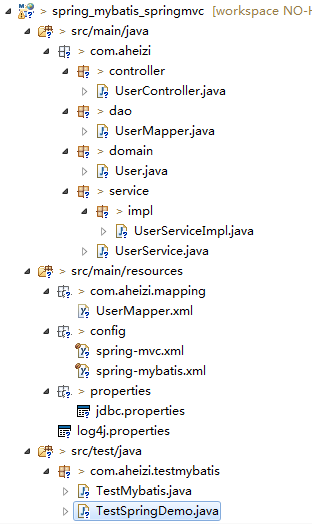
思路:SpringMVC的配置文件独立,然后在web.xml中配置整合。
(1)配置spring-mvc.xml
主要是自动扫描控制器,视图模式。
<?xml version="1.0" encoding="UTF-8"?>

<beans xmlns="http://www.springframework.org/schema/beans"

  xmlns:p="http://www.springframework.org/schema/p"

  xmlns:xsi="http://www.w3.org/2001/XMLSchema-instance"

  xmlns:context="http://www.springframework.org/schema/context"

  xmlns:mvc="http://www.springframework.org/schema/mvc"

  xsi:schemaLocation="

    http://www.springframework.org/schema/beans

    http://www.springframework.org/schema/beans/spring-beans-3.2.xsd

    http://www.springframework.org/schema/context

    http://www.springframework.org/schema/context/spring-context-3.2.xsd

    http://www.springframework.org/schema/mvc

    http://www.springframework.org/schema/mvc/spring-mvc-3.2.xsd">

	<!-- 自动扫描该包,使SpringMVC认为包下用了@controller注解的类是控制器 -->

	<context:component-scan base-package="com.aheizi.controller"/>

	<!-- 避免IE在ajax请求时,返回json出现下载 -->

	<bean id="jacksonMessageConverter" class="org.springframework.http.converter.json.MappingJacksonHttpMessageConverter">

	     <property name="supportedMediaTypes">

	         <list>

	             <value>text/html;charset=UTF-8</value>

	         </list>

	     </property>

	 </bean>

	<!-- 定义跳转的文件的前后缀 ,视图模式配置-->

	<bean class="org.springframework.web.servlet.view.InternalResourceViewResolver">

	    <!-- 这里的配置我的理解是自动给后面action的方法return的字符串加上前缀和后缀,变成一个 可用的url地址 -->

	    <property name="prefix" value="/WEB-INF/jsp/" />

	    <property name="suffix" value=".jsp" />

	</bean>

</beans>
(2)配置Web.xml
包含spring和mybatis的配置文件,编码过滤器,日志记录,spring监听器,防止spring内存溢出监听器,springmvc 核心配置和错误跳转页面。
<?xml version="1.0" encoding="UTF-8"?>

<web-app xmlns:xsi="http://www.w3.org/2001/XMLSchema-instance" xmlns="http://java.sun.com/xml/ns/javaee" xsi:schemaLocation="http://java.sun.com/xml/ns/javaee http://java.sun.com/xml/ns/javaee/web-app_3_0.xsd" id="WebApp_ID" version="3.0">

	<display-name>spring_mybatis_springmvc</display-name>

	<!-- Spring和mybatis的配置文件 -->

    <context-param>

        <param-name>contextConfigLocation</param-name>

        <param-value>classpath:config/spring-mybatis.xml</param-value>

    </context-param>

    <!-- 编码过滤器 -->

    <filter>

        <filter-name>encodingFilter</filter-name>

        <filter-class>org.springframework.web.filter.CharacterEncodingFilter</filter-class>

        <async-supported>true</async-supported>

        <init-param>

            <param-name>encoding</param-name>

            <param-value>UTF-8</param-value>

        </init-param>

    </filter>

    <filter-mapping>

        <filter-name>encodingFilter</filter-name>

        <url-pattern>/*</url-pattern>

    </filter-mapping>

    <!-- 日志记录 (必须在ContextLoaderListener之前)-->

    <context-param>

        <!-- 日志配置文件路径 -->

        <param-name>log4jConfigLocation</param-name>

        <param-value>classpath:properties/log4j.properties</param-value>

    </context-param>

    <context-param>

        <!-- 日志页面的刷新间隔 -->

        <param-name>log4jRefreshInterval</param-name>

        <param-value>6000</param-value>

    </context-param>

    <listener>

        <listener-class>org.springframework.web.util.Log4jConfigListener</listener-class>

    </listener>

    <!-- Spring监听器 -->

    <listener>

        <listener-class>org.springframework.web.context.ContextLoaderListener</listener-class>

    </listener>

    <!-- 防止Spring内存溢出监听器 -->

    <listener>

        <listener-class>org.springframework.web.util.IntrospectorCleanupListener</listener-class>

    </listener>

    <!-- Spring MVC 核心配置 -->

    <servlet>

        <servlet-name>SpringMVC</servlet-name>

        <servlet-class>org.springframework.web.servlet.DispatcherServlet</servlet-class>

        <init-param>

            <param-name>contextConfigLocation</param-name>

            <param-value>classpath:spring-mvc.xml</param-value>

        </init-param>

        <load-on-startup>1</load-on-startup>

        <async-supported>true</async-supported>

    </servlet>

    <!-- 后缀 -->

    <servlet-mapping>

        <servlet-name>SpringMVC</servlet-name>

        <url-pattern>*.do</url-pattern>

    </servlet-mapping>

    <!-- 欢迎页面 -->

    <welcome-file-list>

        <welcome-file>/index.jsp</welcome-file>

    </welcome-file-list>

    <!-- 错误跳转页面 -->

    <error-page>

        <!-- 路径不正确 -->

        <error-code>404</error-code>

        <location>/WEB-INF/errorpage/404.html</location>

    </error-page>

    <error-page>

        <!-- 没有访问权限,访问被禁止 -->

        <error-code>405</error-code>

        <location>/WEB-INF/errorpage/405.html</location>

    </error-page>

    <error-page>

        <!-- 内部错误 -->

        <error-code>500</error-code>

        <location>/WEB-INF/errorpage/500.html</location>

    </error-page>

</web-app>
(3)创建showUser.jsp页面
<%@ page language="java" import="java.util.*" pageEncoding="UTF-8"%>

<!DOCTYPE html>

<html>

<head>

<meta charset="UTF-8">

<title>User Index</title>

</head>

<body>

		<h3>hello</h3><br/>

		${user.userName}

</body>

</html>
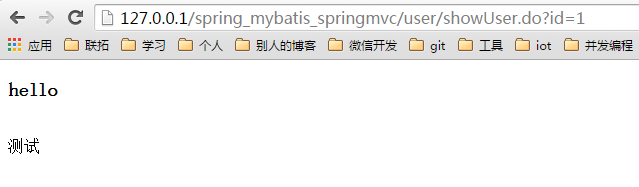
执行maven clean install,运行tomcat,输入
127.0.0.1/spring_mybatis_springmvc/user/showUser.do?id=1(我把tomcat端口设置成了80)
页面如下:
OK,搞定!
源码下载地址:源码
搭建Spring + SpringMVC + Mybatis框架之三(整合Spring、Mybatis和Spring MVC)的更多相关文章
- myBatis,Spring,SpringMVC三大框架ssm整合模板
整合步骤 创建web工程 导入整合所需的所有jar包 编写各层需要的配置文件 1) mybatis的全局配置文件 <configuration> <!-- 批量别名的设置 -- ...
- SSH(Spring SpringMVC Hibernate)框架整合
项目说明: 使用SSH(Spring SpringMVC Hibernate)框架整合添加部门功能 项目结构 1.导入依赖jar包 <!--单测--> <dependency&g ...
- (转)MyBatis框架的学习(六)——MyBatis整合Spring
http://blog.csdn.net/yerenyuan_pku/article/details/71904315 本文将手把手教你如何使用MyBatis整合Spring,这儿,我本人使用的MyB ...
- (转)MyBatis框架的学习(七)——MyBatis逆向工程自动生成代码
http://blog.csdn.net/yerenyuan_pku/article/details/71909325 什么是逆向工程 MyBatis的一个主要的特点就是需要程序员自己编写sql,那么 ...
- (转)MyBatis框架的学习(二)——MyBatis架构与入门
http://blog.csdn.net/yerenyuan_pku/article/details/71699515 MyBatis框架的架构 MyBatis框架的架构如下图: 下面作简要概述: S ...
- [置顶]
Java Web学习总结(24)——SSM(Spring+SpringMVC+MyBatis)框架快速整合入门教程
1.基本概念 1.1.Spring Spring是一个开源框架,Spring是于2003 年兴起的一个轻量级的Java 开发框架,由Rod Johnson 在其著作Expert One-On-One ...
- ssm框架(Spring Springmvc Mybatis框架)整合及案例增删改查
三大框架介绍 ssm框架是由Spring springmvc和Mybatis共同组成的框架.Spring和Springmvc都是spring公司开发的,因此他们之间不需要整合.也可以说是无缝整合.my ...
- Maven搭建简单的SPring+SpringMVC+Hibernate框架
公司的项目用到的框架是Spring+SpringMVC+Hibernate 以前没有用过,所以要系统的学习一下,首先要学会怎么搭建 第一步 创建一个Maven的web项目 创建方法以前的博客中有提 ...
- 在spring+springMvc+mabatis框架下集成swagger
我是在ssm框架下集成swagger的,具体的ssm搭建可以看这篇博文: Intellij Idea下搭建基于Spring+SpringMvc+MyBatis的WebApi接口架构 本项目的GitHu ...
- Spring+SpringMVC+Hibernate 与 shiro 整合步骤
目录 1. 业务需求分析 2. 创建数据库 3. 创建 maven webapp 工程 4. 创建实体类(POJO) 5. 配置 Hibernate 和 Mapping 5.1 Hibernate 主 ...
随机推荐
- db file sequential read (数据文件顺序读取)
转载:http://www.dbtan.com/2010/04/db-file-sequential-read.html db file sequential read (数据文件顺序读取): db ...
- Android百度地图开发(三)范围搜索
// 1.新建项目 将地图API添加进classpath中: 2.在activity_main.xml中添加一个MapView,用来显示地图: <LinearLayout xmlns:andro ...
- Linux-sed用法
本文为转载,原地址:http://www.cnblogs.com/dong008259/archive/2011/12/07/2279897.html sed是一个很好的文件处理工具,本身是一个管道命 ...
- 【转】Android Intent Action 大全
String ADD_SHORTCUT_ACTION 动作:在系统中添加一个快捷方式.. “android.intent.action.ADD_SHORTCUT” String ALL_APPS_AC ...
- STL源码分析读书笔记--第三章--迭代器(iterator)概念与traits编程技法
1.准备知识 typename用法 用法1:等效于模板编程中的class 用法2:用于显式地告诉编译器接下来的名称是类型名,对于这个区分,下面的参考链接中说得好,如果编译器不知道 T::bar 是类型 ...
- 使用Log.isLoggable方法
在Audio Debug过程中想打开AudioService.java文件中的log,比如想打开setmode这段log: if (DEBUG_MODE) { Log.v(TAG, "set ...
- Hibernate中openSession() 与 getCurrentSession()的区别
1 getCurrentSession创建的session会和绑定到当前线程,而openSession每次创建新的session. 2 getCurrentSession创建的线程会在事务回滚或事物提 ...
- HDU ACM 1515 Anagrams by Stack
Anagrams by Stack Time Limit: 2000/1000 MS (Java/Others) Memory Limit: 65536/32768 K (Java/Others ...
- CXF整合Spring发布WebService实例
一.说明: 上一篇简单介绍了CXF以及如何使用CXF来发布一个简单的WebService服务,并且介绍了客户端的调用. 这一篇介绍如何使用CXF与spring在Web项目中来发布WebService服 ...
- C++11无限制的unions
[C++11无限制的unions] 在标准 C++ 中,并非任意的类型都能做为 union 的成员.比方说,带有 non-trivial 构造函数的类型就不能是 union 的成员.在新的标准里,移除 ...