
Database and models
Database and models
The database
Now that we have the Album module set up with controller action methods and view scripts, it is time to look at the model section of our application. Remember that the model is the part that deals with the application's core purpose (the so-called “business rules”) and, in our case, deals with the database. We will make use of zend-db's Zend\Db\TableGateway\TableGateway to find, insert, update, and delete rows from a database table.
We are going to use Sqlite, via PHP's PDO driver. Create a text filedata/schema.sql with the following contents:
CREATE TABLE album ( id INTEGER PRIMARY KEY AUTOINCREMENT, artist varchar(100) NOT NULL, title varchar(100) NOT NULL);

INSERT INTO album (artist, title) VALUES  ('The  Military  Wives',  'In  My  Dreams');

INSERT INTO album (artist, title) VALUES  ('Adele',  '21');

INSERT INTO album (artist, title) VALUES  ('Bruce  Springsteen',  'Wrecking Ball (Deluxe)');

INSERT INTO album (artist, title) VALUES  ('Lana  Del  Rey',  'Born  To  Die');

INSERT INTO album (artist, title) VALUES  ('Gotye',  'Making  Mirrors');
(The test data chosen happens to be the Bestsellers on Amazon UK at the time of writing!)
Now create the database using the following:
$ sqlite data/zftutorial.db < data/schema.sqlSome systems, including Ubuntu, use the command sqlite3; check to see which one to use on your system.
Using PHP to create the database
If you do not have Sqlite installed on your system, you can use PHP to load the database using the same SQL schema file created earlier. Create the file
data/load_db.phpwith the following contents:<?php
$db = new PDO('sqlite:' . realpath(__DIR__) . '/zftutorial.db');
$fh = fopen(__DIR__ . '/schema.sql', 'r');
while ($line = fread($fh, 4096)) {
$db->exec($line);
}
fclose($fh);Once created, execute it:
$ php data/load_db.php
We now have some data in a database and can write a very simple model for it.
The model files
Zend Framework does not provide a zend-model component because the model is your business logic, and it's up to you to decide how you want it to work. There are many components that you can use for this depending on your needs. One approach is to have model classes represent each entity in your application and then use mapper objects that load and save entities to the database. Another is to use an Object-Relational Mapping (ORM) technology, such as Doctrine or Propel.
For this tutorial, we are going to create a model by creating an AlbumTable class that consumes a Zend\Db\TableGateway\TableGateway, and in which each album will be represented as an Album object (known as an entity). This is an implementation of the Table Data Gateway design pattern to allow for interfacing with data in a database table. Be aware, though, that the Table Data Gateway pattern can become limiting in larger systems. There is also a temptation to put database access code into controller action methods as these are exposed by Zend\Db\TableGateway\AbstractTableGateway. Don't do this!
Let's start by creating a file called Album.php under module/Album/src/Model:
namespace Album\Model;

class Album

{

    public $id;

    public $artist;

    public $title;

    public function exchangeArray(array $data)

    {

        $this->id     = (!empty($data['id'])) ? $data['id'] : null;

        $this->artist = (!empty($data['artist'])) ? $data['artist'] : null;

        $this->title  = (!empty($data['title'])) ? $data['title'] : null;

    }

}
Our Album entity object is a PHP class. In order to work with zend-db'sTableGateway class, we need to implement the exchangeArray() method; this method copies the data from the provided array to our entity's properties. We will add an input filter later to ensure the values injected are valid.
Next, we create our AlbumTable.php file in module/Album/src/Model directory like this:
namespace Album\Model;

use RuntimeException;

use Zend\Db\TableGateway\TableGatewayInterface;

class AlbumTable

{

    private $tableGateway;

    public function __construct(TableGatewayInterface $tableGateway)

    {

        $this->tableGateway = $tableGateway;

    }

    public function fetchAll()

    {

        return $this->tableGateway->select();

    }

    public function getAlbum($id)

    {

        $id = (int) $id;

        $rowset = $this->tableGateway->select(['id' => $id]);

        $row = $rowset->current();

        if (! $row) {

            throw new RuntimeException(sprintf(

                'Could not find row with identifier %d',

                $id

            ));

        }

        return $row;

    }

    public function saveAlbum(Album $album)

    {

        $data = [

            'artist' => $album->artist,

            'title'  => $album->title,

        ];

        $id = (int) $album->id;

        if ($id === 0) {

            $this->tableGateway->insert($data);

            return;

        }

        if (! $this->getAlbum($id)) {

            throw new RuntimeException(sprintf(

                'Cannot update album with identifier %d; does not exist',

                $id

            ));

        }

        $this->tableGateway->update($data, ['id' => $id]);

    }

    public function deleteAlbum($id)

    {

        $this->tableGateway->delete(['id' => (int) $id]);

    }

}
There's a lot going on here. Firstly, we set the protected property$tableGateway to the TableGateway instance passed in the constructor, hinting against the TableGatewayInterface (which allows us to provide alternate implementations easily, including mock instances during testing). We will use this to perform operations on the database table for our albums.
We then create some helper methods that our application will use to interface with the table gateway. fetchAll() retrieves all albums rows from the database as a ResultSet, getAlbum() retrieves a single row as an Album object,saveAlbum() either creates a new row in the database or updates a row that already exists, and deleteAlbum() removes the row completely. The code for each of these methods is, hopefully, self-explanatory.
Using ServiceManager to configure the table gateway and inject into the AlbumTable
In order to always use the same instance of our AlbumTable, we will use theServiceManager to define how to create one. This is most easily done in theModule class where we create a method called getServiceConfig() which is automatically called by the ModuleManager and applied to the ServiceManager. We'll then be able to retrieve when we need it.
To configure the ServiceManager, we can either supply the name of the class to be instantiated or a factory (closure, callback, or class name of a factory class) that instantiates the object when the ServiceManager needs it. We start by implementing getServiceConfig() to provide a factory that creates anAlbumTable. Add this method to the bottom of themodule/Album/src/Module.php file:
namespace Album;

// Add these import statements:

use Zend\Db\Adapter\AdapterInterface;

use Zend\Db\ResultSet\ResultSet;

use Zend\Db\TableGateway\TableGateway;

use Zend\ModuleManager\Feature\ConfigProviderInterface;

class Module implements ConfigProviderInterface

{

    // getConfig() method is here

    // Add this method:

    public function getServiceConfig()

    {

        return [

            'factories' => [

                Model\AlbumTable::class =>  function($container) {

                    $tableGateway = $container->get(Model\AlbumTableGateway::class);

                    return new Model\AlbumTable($tableGateway);

                },

                Model\AlbumTableGateway::class => function ($container) {

                    $dbAdapter = $container->get(AdapterInterface::class);

                    $resultSetPrototype = new ResultSet();

                    $resultSetPrototype->setArrayObjectPrototype(new Model\Album());

                    return new TableGateway('album', $dbAdapter, null, $resultSetPrototype);

                },

            ],

        ];

    }

}
This method returns an array of factories that are all merged together by theModuleManager before passing them to the ServiceManager. The factory forAlbum\Model\AlbumTable uses the ServiceManager to create anAlbum\Model\AlbumTableGateway service representing a TableGateway to pass to its constructor. We also tell the ServiceManager that the AlbumTableGatewayservice is created by fetching a Zend\Db\Adapter\AdapterInterfaceimplementation (also from the ServiceManager) and using it to create aTableGateway object. The TableGateway is told to use an Album object whenever it creates a new result row. The TableGateway classes use the prototype pattern for creation of result sets and entities. This means that instead of instantiating when required, the system clones a previously instantiated object. See PHP Constructor Best Practices and the Prototype Pattern for more details.
Factories
The above demonstrates building factories as closures within your module class. Another option is to build the factory as a class, and then map the class in your module configuration. This approach has a number of benefits:
- The code is not parsed or executed unless the factory is invoked.
- You can easily unit test the factory to ensure it does what it should.
- You can extend the factory if desired.
- You can re-use the factory across multiple instances that have related construction.
Creating factories is covered in the zend-servicemanager documentation.
The Zend\Db\Adapter\AdapterInterface service is registered by the zend-db component. You may have noticed earlier that config/modules.config.phpcontains the following entries:
return [

    'Zend\Form',

    'Zend\Db',

    'Zend\Router',

    'Zend\Validator',

    /* ... */

],
All Zend Framework components that provide zend-servicemanager configuration are also exposed as modules themselves; the prompts as to where to register the components during our initial installation occurred to ensure that the above entries are created for you.
The end result is that we can already rely on having a factory for theZend\Db\Adapter\AdapterInterface service; now we need to provide configuration so it can create an adapter for us.
Zend Framework's ModuleManager merges all the configuration from each module's module.config.php file, and then merges in the files inconfig/autoload/ (first *.global.php files, and then *.local.php files). We'll add our database configuration information to global.php, which you should commit to your version control system. You can use local.php (outside of the VCS) to store the credentials for your database if you want to. Modifyconfig/autoload/global.php (in the project root, not inside the Album module) with following code:
return [

    'db' => [

        'driver' => 'Pdo',

        'dsn'    => sprintf('sqlite:%s/data/zftutorial.db', realpath(getcwd())),

    ],

);
If you were configuring a database that required credentials, you would put the general configuration in your config/autoload/global.php, and then the configuration for the current environment, including the DSN and credentials, in the config/autoload/local.php file. These get merged when the application runs, ensuring you have a full definition, but allows you to keep files with credentials outside of version control.
Back to the controller
Now that we have a model, we need to inject it into our controller so we can use it.
Firstly, we'll add a constructor to our controller. Open the filemodule/Album/src/Controller/AlbumController.php and add the following property and constructor:
namespace Album\Controller;

// Add the following import:

use Album\Model\AlbumTable;

use Zend\Mvc\Controller\AbstractActionController;

use Zend\View\Model\ViewModel;

class AlbumController extends AbstractActionController

{

    // Add this property:

    private $table;

    // Add this constructor:

    public function __construct(AlbumTable $table)

    {

        $this->table = $table;

    }

    /* ... */

}
Our controller now depends on AlbumTable, so we will need to create a factory for the controller. Similar to how we created factories for the model, we'll create in in our Module class, only this time, under a new method,Album\Module::getControllerConfig():
namespace Album;

use Zend\Db\Adapter\Adapter;

use Zend\Db\ResultSet\ResultSet;

use Zend\Db\TableGateway\TableGateway;

use Zend\ModuleManager\Feature\ConfigProviderInterface;

class Module implements ConfigProviderInterface

{

    // getConfig() and getServiceConfig methods are here

    // Add this method:

    public function getControllerConfig()

    {

        return [

            'factories' => [

                Controller\AlbumController::class =>  function($container) {

                    return new Controller\AlbumController(

                        $container->get(Model\AlbumTable::class)

                    );

                },

            ],

        ];

    }

}
Because we're now defining our own factory, we can modify ourmodule.config.php to remove the definition. Openmodule/Album/config/module.config.php and remove the following lines:
<?php

namespace Album;

// Remove this:

use Zend\ServiceManager\Factory\InvokableFactory;

return [

    // And remove the entire "controllers" section here:

    'controllers' => [

        'factories' => [

            Controller\AlbumController::class => InvokableFactory::class,

        ],

    ],

    /* ... */

];
We can now access the property $table from within our controller whenever we need to interact with our model.
Listing albums
In order to list the albums, we need to retrieve them from the model and pass them to the view. To do this, we fill in indexAction() within AlbumController. Update the AlbumController::indexAction() as follows:
// module/Album/src/Controller/AlbumController.php:

// ...

    public function indexAction()

    {

        return new ViewModel([

            'albums' => $this->table->fetchAll(),

        ]);

    }

// ...
With Zend Framework, in order to set variables in the view, we return aViewModel instance where the first parameter of the constructor is an array containing data we wish to represent. These are then automatically passed to the view script. The ViewModel object also allows us to change the view script that is used, but the default is to use{module name}/{controller name}/{action name}. We can now fill in theindex.phtml view script:
<?php
// module/Album/view/album/album/index.phtml:
$title = 'My albums';
$this->headTitle($title);
?>
<h1><?= $this->escapeHtml($title); ?></h1>
<p>
<a href="<?= $this->url('album', ['action'=>'add']) ?>">Add new album</a>
</p>
<table class="table">
<tr>
<th>Title</th>
<th>Artist</th>
<th> </th>
</tr>
<?php foreach ($albums as $album) : ?>
<tr>
<td><?= $this->escapeHtml($album->title) ?></td>
<td><?= $this->escapeHtml($album->artist) ?></td>
<td>
<a href="<?= $this->url('album', ['action'=>'edit', 'id' => $album->id]) ?>">Edit</a>
<a href="<?= $this->url('album', ['action'=>'delete', 'id' => $album->id]) ?>">Delete</a>
</td>
</tr>
<?php endforeach; ?>
</table>The first thing we do is to set the title for the page (used in the layout) and also set the title for the <head> section using the headTitle() view helper which will display in the browser's title bar. We then create a link to add a new album.
The url() view helper is provided by zend-mvc and zend-view, and is used to create the links we need. The first parameter to url() is the route name we wish to use for construction of the URL, and the second parameter is an array of variables to substitute into route placeholders. In this case we use our albumroute which is set up to accept two placeholder variables: action and id.
We iterate over the $albums that we assigned from the controller action. zend-view automatically ensures that these variables are extracted into the scope of the view script; you may also access them using $this->{variable name} in order to differentiate between variables provided to the view script and those created inside it.
We then create a table to display each album's title and artist, and provide links to allow for editing and deleting the record. A standard foreach: loop is used to iterate over the list of albums, and we use the alternate form using a colon and endforeach; as it is easier to scan than to try and match up braces. Again, the url() view helper is used to create the edit and delete links.
Escaping
We always use the
escapeHtml()view helper to help protect ourselves fromCross Site Scripting (XSS) vulnerabilities.
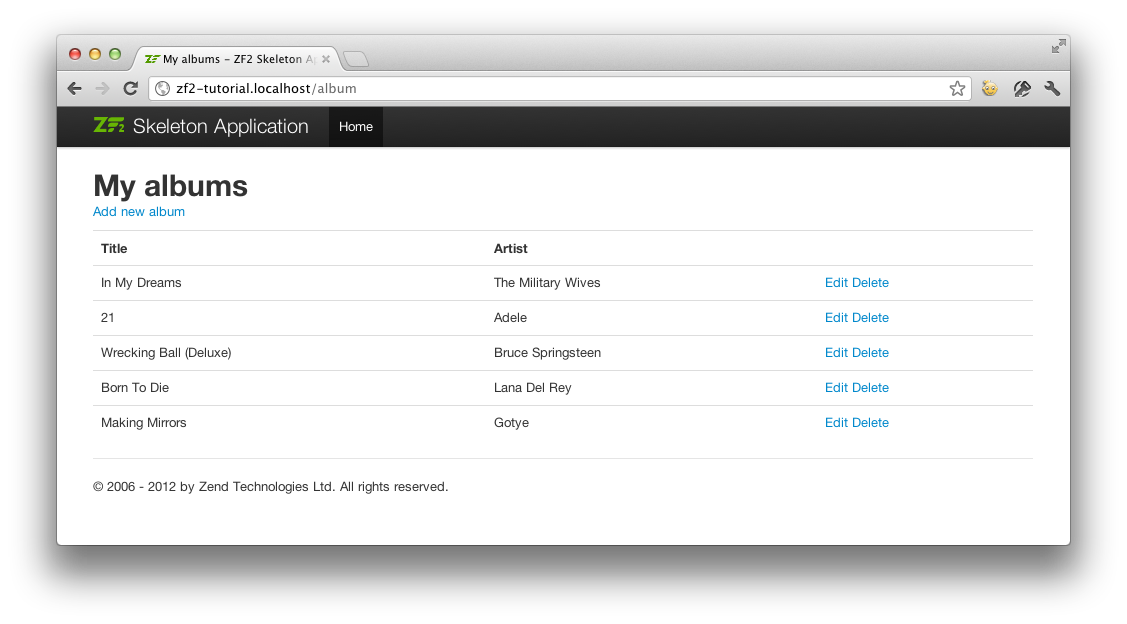
If you open http://localhost:8080/album (orhttp://zf2-tutorial.localhost/album if you are using self-hosted Apache) you should see this:
Database and models的更多相关文章
- ADF_Database Develop系列3_通过UML进行数据库开发之将Database Diagram转为Class Diagram
2013-05-01 Created By BaoXinjian
- ADF_Database Develop系列2_通过UML数据库开发之将Logical UML转为Physical Models
2013-05-01 Created By BaoXinjian
- Models
Models Models control the data source, they are used for collecting and issuing data, this could be ...
- [转]Entity FrameWork利用Database.SqlQuery<T>执行存储过程并返回参数
本文转自:http://www.cnblogs.com/xchit/p/3334782.html 目前,EF对存储过程的支持并不完善.存在以下问题: EF不支持存储过程返回多表联合查询的 ...
- Entity FrameWork利用Database.SqlQuery<T>执行存储过程并返回参数
目前,EF对存储过程的支持并不完善.存在以下问题: EF不支持存储过程返回多表联合查询的结果集. EF仅支持返回返回某个表的全部字段,以便转换成对应的实体.无法支持返回部分字段的情况. 虽然可以正常导 ...
- Android Weekly Notes Issue #225
Android Weekly Issue #225 October 2nd, 2016 Android Weekly Issue #225 本期内容包括: Android 7.0的Quick Sett ...
- EF CodeFirst 创建数据库
最近悟出来一个道理,在这儿分享给大家:学历代表你的过去,能力代表你的现在,学习代表你的将来. 十年河东十年河西,莫欺少年穷 学无止境,精益求精 话说EF支持三种模式:Code First M ...
- Entity FrameWork初始化数据库的四种策略
程序猿就是苦逼,每天还得分出一些时间去写博文.天真的很热,今天就随便写一点啦! 1.EF初始化数据库的四中策略 EF可以根据项目中的模型自动创建数据库.下面我们就分类看看Entity Framewor ...
- EF 存储过程
今天我们利用EF执行sql语句的方式来执行存储过程,并得到OutPut的值. 首先新建存储过程: Create PROCEDURE proc_testEF ( @id int, @ ...
随机推荐
- 理解dojo.require机制
转自:http://blog.csdn.net/dojotoolkit/article/details/5935844 Dojo 提供了一个非常强大的javascript控件库. 在使用dojo之前, ...
- 《Python基础教程(第二版)》学习笔记 -> 第二章 列表和元组
本章将引入一个新的概念:数据结构. 数据结构是通过某种方式阻止在一起的数据元素的集合,这些数据元素可以是数字或者字符,设置可以是其他数据结构. Python中,最基本的数据结构是序列(Sequence ...
- North America Qualifier (2015)
https://icpc.baylor.edu/regionals/finder/north-america-qualifier-2015 一个人打.... B 概率问题公式见代码 #include ...
- php支持rewrite 时创建.htaccess文件
1.win+r 快捷键 运行中输入cmd 2.进入dos界面:输入copy con .htaccess 3.回车后可以输入内容,再次回车即可产生文件
- 自编译安装nginx
1. 下载nginx,并解压 http://nginx.org/ 2. 下载health check模块 p.p1 { margin: 0.0px 0.0px 0.0px 0.0px; font: 1 ...
- 基于Qt的P2P局域网聊天及文件传送软件设计
基于Qt的P2P局域网聊天及文件传送软件设计 zouxy09@qq.com http://blog.csdn.net/zouxy09 这是我的<通信网络>的课程设计作业,之 ...
- RecyclerView设置verticalSapcing等
RecyclerView没有像GridView那样有提供verticalSpacing属性,上StackOverflow找到了一种替代方法,代码如下 public class SpacesItemDe ...
- Thinking in java——Generics
Ordinary classes and methods work with specific types: either primitives or class types. If you are ...
- Java & XML Tool Overview
As mentioned in the introduction Sun now provides these tools for XML Processing in Java: StAX Reade ...
- oracle 修改用户下部分表现有表空间
工作日记之<修改用户表现有表空间> //user_tables可查询出当前登录用户的所有表,以及部分表信息,可以灵活运用于其他用途 //假设现有表空间TS1.TS2,需要迁移所有表空间TS ...