
Spring 4 Ehcache Configuration Example with @Cacheable Annotation
http://www.concretepage.com/spring-4/spring-4-ehcache-configuration-example-with-cacheable-annotation
Spring 4 Ehcache Configuration Example with @Cacheable Annotation
In this page, we will learn Spring 4 Ehcache configuration example with @Cacheable annotation. Ehcache manages cache for boosting performance. Spring provides @Cacheable annotation that uses cache name defined in Ehcache xml file. Spring provides EhCacheManagerFactoryBean and EhCacheCacheManager classes to configure and instantiate Ehcache. The configuration class must be annotated with @EnableCaching annotation which enables annotation driven cache management. Here we will provide a complete example for Spring Ehcache Configuration.
build.gradle
Find the Gradle file to resolve JAR dependency for Spring and Ehcache.
build.gradle
apply plugin: 'java'

apply plugin: 'eclipse'

archivesBaseName = 'concretepage'

version = '1'

repositories {

        mavenCentral()

}

dependencies {

	compile 'org.springframework.boot:spring-boot-starter:1.2.2.RELEASE'

	compile 'org.springframework:spring-context-support:4.1.5.RELEASE'

	compile 'net.sf.ehcache:ehcache-core:2.6.10'

}
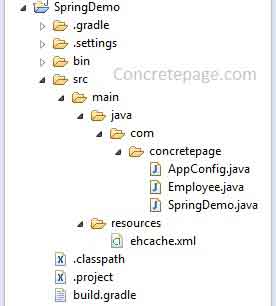
Project Structure in Eclipse
Find the project structure in eclipse that will help to learn fast.
Configuration Class for EhCacheManagerFactoryBean and EhCacheCacheManager
The configuration class will be annotated with @EnableCaching annotation and we need to create bean for EhCacheManagerFactoryBean and EhCacheCacheManager class.
@EnableCaching: It enables annotation driven cache management in spring and is same as using<cache:annotation-driven />.
EhCacheManagerFactoryBean: Assign ehcache XML file by calling EhCacheManagerFactoryBean.setConfigLocation(). By passing true to setShared() method, we enable our cache to be shared as singleton at the ClassLoader level. By default it is set to false.
EhCacheCacheManager: This is a CacheManager backed by an EhCache. We can instantiate it by passing argument of EhCacheManagerFactoryBean.getObject().
Find the Configuration file.
AppConfig.java
package com.concretepage;

import org.springframework.beans.factory.annotation.Configurable;

import org.springframework.cache.CacheManager;

import org.springframework.cache.annotation.EnableCaching;

import org.springframework.cache.ehcache.EhCacheCacheManager;

import org.springframework.cache.ehcache.EhCacheManagerFactoryBean;

import org.springframework.context.annotation.Bean;

import org.springframework.core.io.ClassPathResource;

@Configurable

@EnableCaching

public class AppConfig {

	@Bean

	public Employee getEmployee(){

	        return  new Employee();

	}

	@Bean

	public CacheManager getEhCacheManager(){

	        return  new EhCacheCacheManager(getEhCacheFactory().getObject());

	}

	@Bean

	public EhCacheManagerFactoryBean getEhCacheFactory(){

		EhCacheManagerFactoryBean factoryBean = new EhCacheManagerFactoryBean();

		factoryBean.setConfigLocation(new ClassPathResource("ehcache.xml"));

		factoryBean.setShared(true);

		return factoryBean;

	}

}
The equivalent ehcache configuration in spring xml is given below.
<cache:annotation-driven />

<bean id="employee" class="com.concretepage.Employee"/>

<bean id="cacheManager" class="org.springframework.cache.ehcache.EhCacheCacheManager"

                p:cache-manager-ref="ehcache"/>

<bean id="ehcache" class="org.springframework.cache.ehcache.EhCacheManagerFactoryBean"

                p:config-location="classpath:ehcache.xml" p:shared="true"/>
ehcache.xml
Find the sample ehcache.xml file. We have created a cache with the name empcache that will be used by spring @Cacheable annotation. Here maximum 5000 elements will be cached in memory and after that it will overflow to local disk. Any element will expire if it is idle for more than 200 seconds and alive for more than 500 seconds.
ehcache.xml
<?xml version="1.0" encoding="UTF-8"?>

<ehcache xmlns:xsi="http://www.w3.org/2001/XMLSchema-instance"

     xsi:noNamespaceSchemaLocation="ehcache.xsd"

     updateCheck="true" monitoring="autodetect" dynamicConfig="true">

    <cache name="empcache"

      maxEntriesLocalHeap="5000"

      maxEntriesLocalDisk="1000"

      eternal="false"

      diskSpoolBufferSizeMB="20"

      timeToIdleSeconds="200"

      timeToLiveSeconds="500"

      memoryStoreEvictionPolicy="LFU"

      transactionalMode="off">

        <persistence strategy="localTempSwap"/>

    </cache>

  </ehcache>
Using @Cacheable on Bean Method
If we annotate our bean method by Spring @Cacheable annotation, it declares that it will be cached. We need to provide cache name defined in ehcache.xml. In our example we have a cache named as empcache in ehcache.xml and we have provided this name in @Cacheable. Spring will hit the method for the first time. The result of this method will be cached and for same argument value, spring will not hit the method every time. Once the cache is expired, then the spring will hit the method again for the same argument value.
Employee.java
package com.concretepage;

import org.springframework.cache.annotation.Cacheable;

public class Employee {

	@Cacheable("empcache")

	public String getEmployee(int empId){

		System.out.println("---Inside getEmployee() Method---");

		if(empId==1){

			return "Shankar";

		}else{

			return "Vishnu";

		}

	}

}
Test Spring Ehcache Application
Now we create a main method to test the application. Here if we call the method passing a value as an argument for the first time, spring will hit the method. And for next hit, if we pass the same argument value, we will get result from cache not by running method.
SpringDemo.java
package com.concretepage;

import org.springframework.context.annotation.AnnotationConfigApplicationContext;

public class SpringDemo {

    public static void main(String... args) {

    	 AnnotationConfigApplicationContext ctx = new AnnotationConfigApplicationContext();

  	 ctx.register(AppConfig.class);

  	 ctx.refresh();

         Employee employee=(Employee) ctx.getBean(Employee.class);

         //calling getEmployee method first time.

         System.out.println("---Fetch Employee with id 1---");

         System.out.println("Employee:"+ employee.getEmployee(1));

         //calling getEmployee method second time. This time, method will not execute.

         System.out.println("---Again Fetch Employee with id 1, result will be fetched from cache---");

         System.out.println("Employee:"+employee.getEmployee(1));

         //calling getEmployee method third time with different value.

         System.out.println("---Fetch Employee with id 2---");

          System.out.println("Employee:"+employee.getEmployee(2));

     }

}
Find the output.
17:06:49.301 [main] DEBUG o.s.b.f.s.DefaultListableBeanFactory - Returning cached instance of singleton bean 'getEmployee'

---Fetch Employee with id 1---

---Inside getEmployee() Method---

17:06:49.323 [main] DEBUG net.sf.ehcache.store.disk.Segment - put added 0 on heap

Employee:Shankar

---Again Fetch Employee with id 1, result will be fetched from cache---

Employee:Shankar

---Fetch Employee with id 2---

---Inside getEmployee() Method---

17:06:49.327 [main] DEBUG net.sf.ehcache.store.disk.Segment - put added 0 on heap

Employee:Vishnu

17:06:49.332 [empcache.data] DEBUG net.sf.ehcache.store.disk.Segment - fault removed 0 from heap

17:06:49.332 [empcache.data] DEBUG net.sf.ehcache.store.disk.Segment - fault added 0 on disk
Spring 4 Ehcache Configuration Example with @Cacheable Annotation的更多相关文章
- Spring整合EHCache框架
在Spring中使用缓存可以有效地避免不断地获取相同数据,重复地访问数据库,导致程序性能恶化. 在Spring中已经定义了缓存的CacheManager和Cache接口,只需要实例化便可使用. Spr ...
- Spring整合Ehcache管理缓存
前言 Ehcache 是一个成熟的缓存框架,你可以直接使用它来管理你的缓存. Spring 提供了对缓存功能的抽象:即允许绑定不同的缓存解决方案(如Ehcache),但本身不直接提供缓存功能的实现.它 ...
- Spring整合Ehcache管理缓存(转)
目录 前言 概述 安装 Ehcache的使用 HelloWorld范例 Ehcache基本操作 创建CacheManager 添加缓存 删除缓存 实现基本缓存操作 缓存配置 xml方式 API方式 S ...
- 缓存插件 Spring支持EHCache缓存
Spring仅仅是提供了对缓存的支持,但它并没有任何的缓存功能的实现,spring使用的是第三方的缓存框架来实现缓存的功能.其中,spring对EHCache提供了很好的支持. 在介绍Spring的缓 ...
- Spring整合EhCache详解
一.EhCache介绍 EhCache 是一个纯Java的进程内缓存框架,具有快速.精干等特点,是Hibernate中默认的CacheProvider.Ehcache是一种广泛使用的开 源Java分布 ...
- 以Spring整合EhCache为例从根本上了解Spring缓存这件事(转)
前两节"Spring缓存抽象"和"基于注解驱动的缓存"是为了更加清晰的了解Spring缓存机制,整合任何一个缓存实现或者叫缓存供应商都应该了解并清楚前两节,如果 ...
- spring中ehcache的配置和使用方法
继续上篇,这篇介绍服务层缓存,ehcache一般的配置和用法 一.添加jar包引用 修改pom.xml文件,加入: <dependency> <groupId>org.spri ...
- spring+shiro+ehcache整合
1.导入jar包(pom.xml文件) <!-- ehcache缓存框架 --> <dependency> <groupId>net.sf.ehcache</ ...
- Unit Testing of Spring MVC Controllers: Configuration
Original Link: http://www.petrikainulainen.net/programming/spring-framework/unit-testing-of-spring-m ...
随机推荐
- HDU 5698 瞬间移动
瞬间移动 Time Limit: 4000/2000 MS (Java/Others) Memory Limit: 65536/65536 K (Java/Others)Total Submis ...
- linux下socket keep alive讲解
[需求] 不影响服务器处理的前提下,检测客户端程序是否被强制终了.[现状]服务器端和客户端的Socket都设定了keepalive属性.服务器端设定了探测次数等参数,客户端.服务器只是打开了keepa ...
- 《深入Java虚拟机学习笔记》- 第17章 异常
<深入Java虚拟机学习笔记>- 第17章 异常
- 【JMeter】JMeter在linux下运行
之前在用JMeter做性能测试时基本都用自己的笔记本电脑. 考虑到网络传输和占用系统资源情况时进行了以下分析: 1 在笔记本上,开始-cmd "ping 服务器",得到传输时间.在 ...
- 劳动节BT5 aircrack-ng战记
劳动节最后一天没事,想捣鼓一下BT5破解无线wep/wpa,BT5+virtual box早已准备就绪,上网专门找了一些资料,并买了一个据评测很兼容的usb网卡tp-link wn722n,芯片代号A ...
- Android选项卡TabHost方式实现
1.布局XML: <?xml version="1.0" encoding="utf-8"?> <TabHost xmlns:android= ...
- lua协程实现简析
协程,简单来说就是新创建一个协助程序(co = coroutine.create(func)),然后需要手动去启动它(coroutine.resume(co)),在它最终退出之前,它有可能暂停多次返回 ...
- 8.1.C++ AMP简介
C++ AMP是专为设计支持C++的异构并行模型. 全程是: Accelerator Massive Parallelism 下面是一个Vector C++ AMP的代码,通过这段代码来解释C++ A ...
- 使用GitHub进行团队协作
当进行团队协作完成一个项目时,GitHub是个不错的选择.下面是记录我和朋友做项目的时候协作的方法. 首先下载Github for windows 客户端,http://windows.github. ...
- SQL2008-备份SQL数据库的语句
SQL2008:1.备份库BACKUP DATABASE CDJQ_CEM2008 TO DISK = 'd:\zhu\123.bak'2.开启RAR加压功能EXEC sp_configure 'sh ...