
【转】Android fill_parent和wrap_content分析
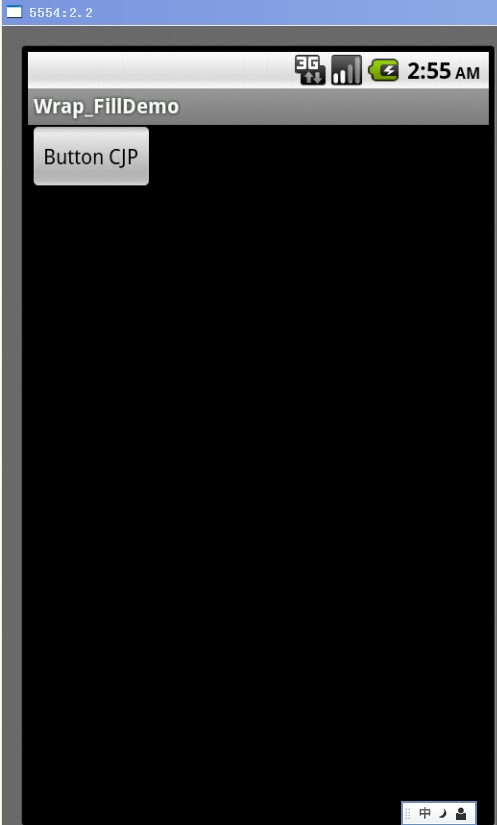
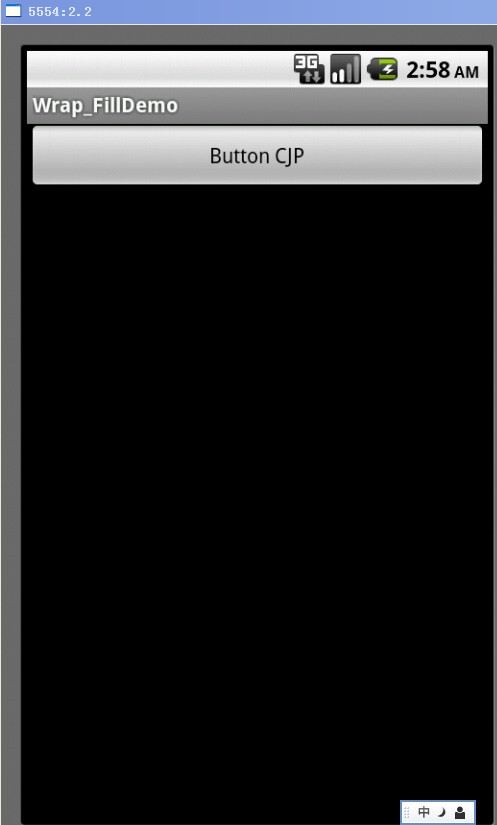
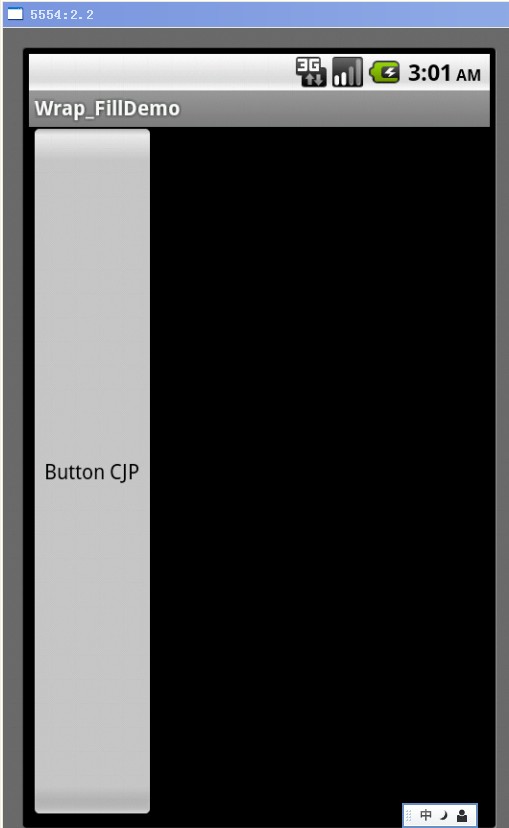
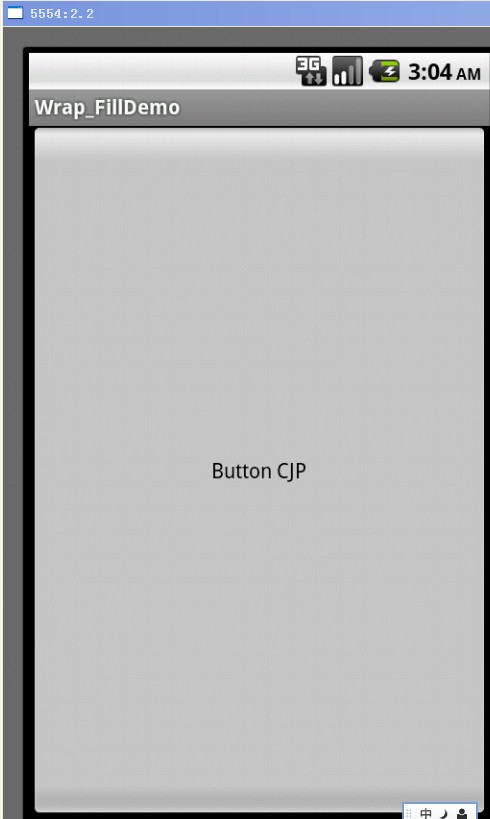
fill_parent设置一个顶部布局或控件强制性让它布满整个屏幕。
wrap_content布局指根据视图内部内容自动扩展以适应其大小。
1. wrap_content
<?xml version="1.0" encoding="utf-8"?>
<RelativeLayout xmlns:android="http://schemas.android.com/apk/res/android"
android:layout_width="fill_parent"
android:layout_height="fill_parent" >
<Button
android:id="@+id/btnButton1"
android:layout_width="wrap_content"
android:layout_height="wrap_content"
android:text="Button CJP"/>
</RelativeLayout>
2. fill_parent – width
<?xml version="1.0" encoding="utf-8"?>
<RelativeLayout xmlns:android="http://schemas.android.com/apk/res/android"
android:layout_width="fill_parent"
android:layout_height="fill_parent" >
<Button
android:id="@+id/btnButton1"
android:layout_width="fill_parent"
android:layout_height="wrap_content"
android:text="Button CJP"/>
</RelativeLayout>
3. fill_parent – height
<?xml version="1.0" encoding="utf-8"?>
<RelativeLayout xmlns:android="http://schemas.android.com/apk/res/android"
android:layout_width="fill_parent"
android:layout_height="fill_parent" >
<Button
android:id="@+id/btnButton1"
android:layout_width="wrap_content"
android:layout_height="fill_parent"
android:text="Button CJP"/>
</RelativeLayout>
4. fill_parent – width, height
<?xml version="1.0" encoding="utf-8"?>
<RelativeLayout xmlns:android="http://schemas.android.com/apk/res/android"
android:layout_width="fill_parent"
android:layout_height="fill_parent" >
<Button
android:id="@+id/btnButton1"
android:layout_width="fill_parent"
android:layout_height="fill_parent"
android:text="Button CJP"/>
</RelativeLayout>
from :http://blog.csdn.net/jumping_android/article/details/7397991
【转】Android fill_parent和wrap_content分析的更多相关文章
- Android fill_parent和wrap_content分析
fill_parent设置一个顶部布局或控件强制性让它布满整个屏幕.(这是不管内容大小,直接适应整个屏幕的大小,例长度设置了这,就只有长度适应屏幕的长度) wrap_content布局指根据视图内部内 ...
- android布局--Android fill_parent、wrap_content和match_parent的区别
来自:http://www.cnblogs.com/nikyxxx/archive/2012/06/15/2551390.html 三个属性都用来适应视图的水平或垂直大小,一个以视图的内容或尺寸为基础 ...
- Android fill_parent、wrap_content和match_parent的区别
三个属性都用来适应视图的水平或垂直大小,一个以视图的内容或尺寸为基础的布局比精确地指定视图范围更加方便. 1)fill_parent 设置一个构件的布局为fill_parent将强制性地使构件扩展,以 ...
- 【转】android布局--Android fill_parent、wrap_content和match_parent的区别
三个属性都用来适应视图的水平或垂直大小,一个以视图的内容或尺寸为基础的布局比精确地指定视图范围更加方便. 1)fill_parent 设置一个构件的布局为fill_parent将强制性地使构件扩展,以 ...
- fill_parent和wrap_content的区别
在Android布局文件中定义视图垂直或水平大小: android:layout_width和android_layout_height的属性有fill_parent.wrap_content和mat ...
- android wifi ANR问题分析总结
android wifi ANR问题分析总结 1 看看main进程阻塞在那里? 2 调用关系的函数阻塞在那里? 3 最终阻塞函数的阻塞前的log以及状态
- 从Android系统出发,分析Android控件构架
从Android系统出发,分析Android控件构架 Android中所有的控件追溯到根源,就是View 和ViewGroup,相信这个大家都知道,但是大家也许会不太清楚它们之间的具体关系是什么,在A ...
- [转] Android实时抓包分析 : 善用adb调试桥
Android实时抓包分析 : 善用adb调试桥 谈到android网络抓包,很多人都能想到牛逼轰轰的神器tcpdump.方法就是在android机器上面安装tcpdump,然后通过-w参数把抓包 ...
- [置顶] Android开发之serviceManager分析
Android 开发之serviceManager分析 在Android系统中用到最多的通信机制就是Binder,Binder主要由Client.Server.ServiceManager和Binde ...
随机推荐
- Socket 阻塞模式和非阻塞模式
阻塞I/O模型: 简介:进程会一直阻塞,直到数据拷贝 完成 应用程序调用一个IO函数,导致应用程序阻塞,等待数据准备好. 如果数据没有准备好,一直等待….数据准备好了,从内核拷贝到用户空间,IO函数返 ...
- Redis学习笔记(十)——过期时间、访问限制与缓存
http://irfen.me/redis-learn-10-time-expire-limit-cache/ 过期时间 之前应该提到过 redis 的特性之一是可以设置键的超时时间.命令是expir ...
- C# 在vs2010中打开vs2012的项目(转)
在vs2010中打开vs2012的项目 今天在自己的电脑上装了vs2010然后要打开之前在vs2012上创建的sln文件 被提示-- 无法打开在新版本上创建的sln--解决方案--文件 其实vs201 ...
- 一天,python搞个分析NGINX日志的脚本
准备给ZABBIX用的. 统计接口访问字次,平均响应时间,4XX,5XX次数 以后可以再改进.. #!/usr/bin/env python # coding: utf-8 ############# ...
- 关于inline-block在IE8下无效的解决方法
<style> .divClass{ width:500px; border:1px solid #ccc; } /*IE8下可以不用加(*zoom:1;*display:inline;需 ...
- lintcode: 二叉树的锯齿形层次遍历
题目 二叉树的锯齿形层次遍历 给出一棵二叉树,返回其节点值的锯齿形层次遍历(先从左往右,下一层再从右往左,层与层之间交替进行) 样例 给出一棵二叉树 {3,9,20,#,#,15,7}, 3 / \ ...
- 【Linux高频命令专题(15)】more
more命令,功能类似 cat ,cat命令是整个文件的内容从上到下显示在屏幕上. more会以一页一页的显示方便使用者逐页阅读,而最基本的指令就是按空白键(space)就往下一页显示,按 b 键就会 ...
- Hibernate逍遥游记-第12章 映射值类型集合-005对集合排序Map(<order-by>\<sort>)
1. <?xml version="1.0"?> <!DOCTYPE hibernate-mapping PUBLIC "-//Hibernate/Hi ...
- 【Effective c++】条款6:若不想使用编译器自动生成的函数就应该明确拒绝
地产中介卖的是房子,其使用的中介软件系统应该有个类用来描述卖掉的房子 class HomeFoeSale { ......} 但是任何房子都是独一无二的,不应该存在两个房子拥有同样的属性,因此以下操作 ...
- 整理了一份招PHP高级工程师的面试题
1. 基本知识点 HTTP协议中几个状态码的含义:1xx(临时响应) 表示临时响应并需要请求者继续执行操作的状态代码. 代码 说明 100 (继续) 请求者应当继续提出请求. 服务器返回此代码 ...