
javaweb学习总结二十(http响应)
一:http响应
1:http响应的组成部分
状态行、响应头、空行、响应数据
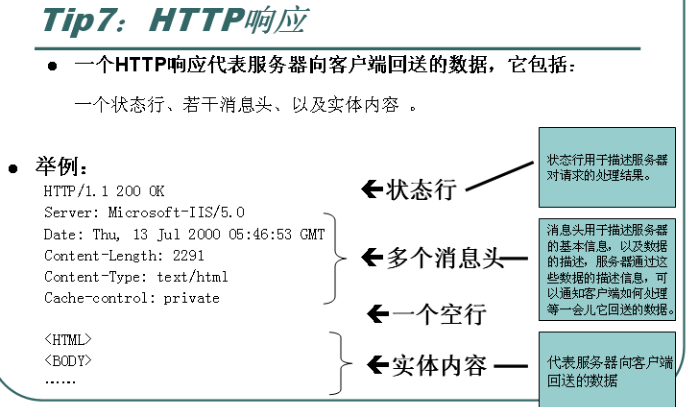
2:状态行
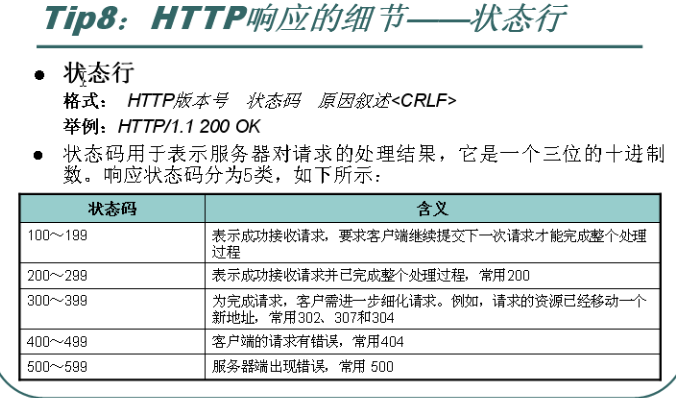
常用状态码:
200:请求成功
302:请求路径已经转移,请访问别的地址
307或者304: 请访问缓存信息
404:访问资源不存在
403:资源存在,但是没有访问权限
500:服务器内部错误
二:HTTP协议响应头
1:常用响应头
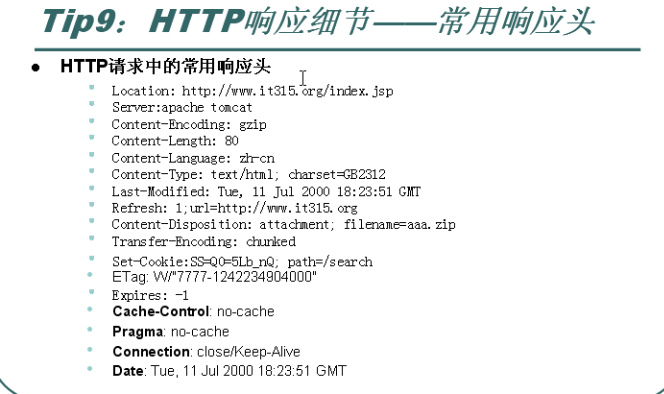
2:常用响应头分析演示
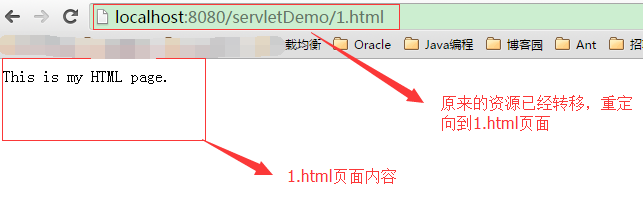
1):location:http://www.it315.org/index.jsp 和403搭配使用,告诉浏览器重定向到其他的页面
代码如下:
 public class ServletDemo extends HttpServlet {

     public void doGet(HttpServletRequest request, HttpServletResponse response)

             throws ServletException, IOException {

         doPost(request, response);

     }

     public void doPost(HttpServletRequest request, HttpServletResponse response)

             throws ServletException, IOException {

         response.setStatus(302); // 302状态码代表资源路径转移,重定向到新的资源路径

         response.setHeader("location", "/servletDemo/1.html");

     }

 }
web.xml配置:
 <?xml version="1.0" encoding="UTF-8"?>

 <web-app version="2.5"

     xmlns="http://java.sun.com/xml/ns/javaee"

     xmlns:xsi="http://www.w3.org/2001/XMLSchema-instance"

     xsi:schemaLocation="http://java.sun.com/xml/ns/javaee

     http://java.sun.com/xml/ns/javaee/web-app_2_5.xsd">

   <servlet>

     <description>This is the description of my J2EE component</description>

     <display-name>This is the display name of my J2EE component</display-name>

     <servlet-name>ServletDemo</servlet-name>

     <servlet-class>com.hlcui.servlet.ServletDemo</servlet-class>

   </servlet>

   <servlet-mapping>

     <servlet-name>ServletDemo</servlet-name>

     <url-pattern>/servlet/ServletDemo</url-pattern>

   </servlet-mapping>

   <welcome-file-list>

     <welcome-file>index.jsp</welcome-file>

   </welcome-file-list>

 </web-app>
tomcat服务器启动后,访问路径:http://localhost:8080/servletDemo/servlet/ServletDemo
2):Server Apache tomcat 告诉浏览器服务器的类型信息
3):Content-Encoding:gzip 告诉浏览器服务器回送数据的压缩类型
4):Content-Length: 80 告诉浏览器呢服务器回送数据大小
演示代码如下:
 public class ServletDemo extends HttpServlet {

     public void doGet(HttpServletRequest request, HttpServletResponse response)

             throws ServletException, IOException {

         doPost(request, response);

     }

     public void doPost(HttpServletRequest request, HttpServletResponse response)

             throws ServletException, IOException {

         String content = "wertyuiopdfghjkl;dfghjklertyuiodfghjkcvbnmcvb"

                 + "wertyuiopdfghjkl;dfghjklertyuiodfghjkcvbnmcvbtyuiopvbhnjk"

                 + "wertyuiopdfghjkl;dfghjklertyuiodfghjkcvbnmcvbtyuiopvbhnjk"

                 + "wertyuiopdfghjkl;dfghjklertyuiodfghjkcvbnmcvbtyuiopvbhnjk"

                 + "wertyuiopdfghjkl;dfghjklertyuiodfghjkcvbnmcvbtyuiopvbhnjk"

                 + "wertyuiopdfghjkl;dfghjklertyuiodfghjkcvbnmcvbtyuiopvbhnjk"

                 + "wertyuiopdfghjkl;dfghjklertyuiodfghjkcvbnmcvbtyuiopvbhnjk";

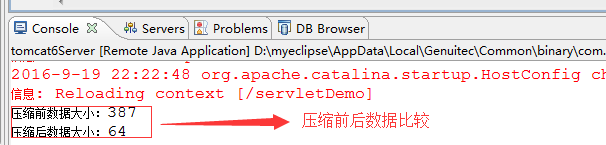
         System.out.println("压缩前数据大小:" + content.getBytes().length);

         ByteArrayOutputStream array = new ByteArrayOutputStream();

         GZIPOutputStream gzip = new GZIPOutputStream(array);

         gzip.write(content.getBytes()); // 将内容进行压缩

         gzip.close();

         System.out.println("压缩后数据大小:" + array.size());

         // 告诉浏览器数据压缩格式以及大小

         response.setHeader("Content-Encoding", "gzip");

         response.setHeader("Content-Length", array.size() + "");

         // 将内容写到浏览器

         response.getOutputStream().write(array.toByteArray());

     }

 }
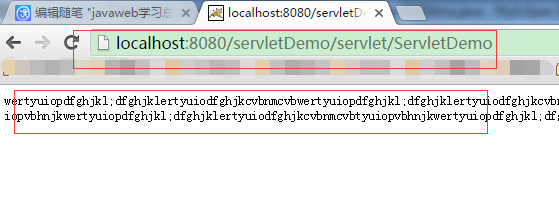
启动tomcat服务器,访问路径:http://localhost:8080/servletDemo/servlet/ServletDemo
浏览器显示压缩后的数据:
5):Content-Language:zh-cn 告诉浏览器服务器的语言环境
6):Content-Type:text/html ; charset=utf-8 告诉浏览器服务器回送数据的内容类型
代码如下:
 public class ServletDemo extends HttpServlet {

     public void doGet(HttpServletRequest request, HttpServletResponse response)

             throws ServletException, IOException {

         doPost(request, response);

     }

     public void doPost(HttpServletRequest request, HttpServletResponse response)

             throws ServletException, IOException {

         // 告诉浏览器显示内容格式

         //response.setContentType("image/jpeg");

         // 或者设置响应头的方式

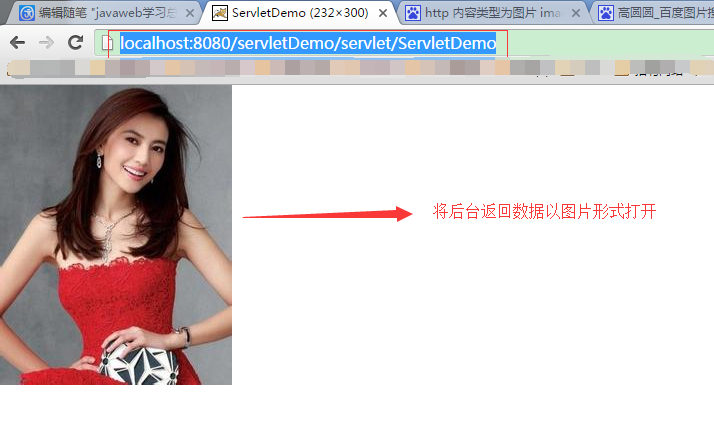
         response.setHeader("Content-Type", "image/jpeg");

         // 读取图片文件

         InputStream in = this.getServletContext().getResourceAsStream("/1.jpg");

         int len = 0;

         byte[] buf = new byte[1024];

         while ((len = in.read(buf)) > 0) {

             response.getOutputStream().write(buf, 0, len);

         }

     }

 }
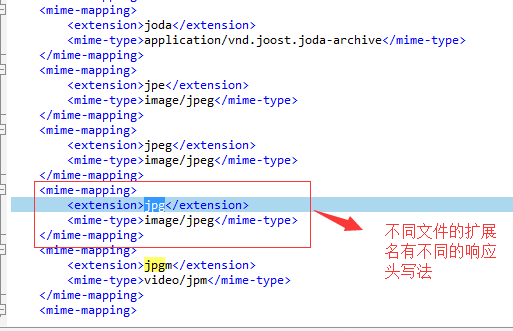
查看文件响应头的写法,tomcat服务器到 conf/web.xml
重新部署服务,访问url:http://localhost:8080/servletDemo/servlet/ServletDemo
7):Last-Modified:服务器告诉浏览器资源最后的修改时间,如果修改时间和缓存一直,那么就使用缓存时间,如果比缓存时间
更新,那么就重新发送数据到浏览器。
8):Refresh:1;url=http://www.baidu.com 服务器告诉浏览器每隔1秒刷新一次
代码如下:
 public class ServletDemo extends HttpServlet {

     public void doGet(HttpServletRequest request, HttpServletResponse response)

             throws ServletException, IOException {

         doPost(request, response);

     }

     public void doPost(HttpServletRequest request, HttpServletResponse response)

             throws ServletException, IOException {

         Date date = new Date();

         SimpleDateFormat sdf = new SimpleDateFormat("yyyy:MM:dd HH:mm:ss");

         response.setHeader("refresh", "1"); // 让日期时间每隔1秒刷新1次

         response.getOutputStream().write(sdf.format(date).getBytes());

     }

 }
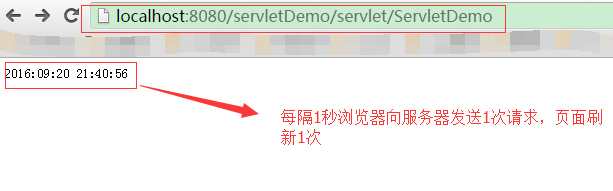
refresh请求头还可以实现定时重定向页面的作用,例如注册页面注册成功后跳转到首页:
代码如下:
 public class ServletDemo extends HttpServlet {

     public void doGet(HttpServletRequest request, HttpServletResponse response)

             throws ServletException, IOException {

         doPost(request, response);

     }

     public void doPost(HttpServletRequest request, HttpServletResponse response)

             throws ServletException, IOException {

         String msg = "页面跳转中...";

         response.setHeader("refresh", "5;url='http://www.baidu.com'"); // 让日期时间每隔1秒刷新1次

         response.getOutputStream().write(msg.getBytes());

     }

 }
访问页面5秒后进行页面跳转!!!
9): content-disposition :attachment;filename="" 服务器告诉浏览器以下载的方式处理文件
 public class ServletDemo extends HttpServlet {

     public void doGet(HttpServletRequest request, HttpServletResponse response)

             throws ServletException, IOException {

         doPost(request, response);

     }

     public void doPost(HttpServletRequest request, HttpServletResponse response)

             throws ServletException, IOException {

         if ("download".equals(request.getParameter("type"))) {

             response.setHeader("content-disposition",

                     "attachment;filename=1.jpg");

             InputStream in = this.getServletContext().getResourceAsStream(

                     "/1.jpg");

             OutputStream out = response.getOutputStream();

             int len = 0;

             byte[] buf = new byte[1024];

             while ((len = in.read(buf)) > 0) {

                 out.write(buf, 0, len);

             }

             out.flush();

             out.close();

             in.close();

         } else {

             response.setCharacterEncoding("utf-8");

             response.setContentType("text/html");

             PrintWriter pw = response.getWriter();

             pw.print("<html>");

             pw.print("<head><script type='text/javascript'>"

                     +"function download(){"

                     +"window.open('http://localhost:8080/servletDemo/servlet/ServletDemo?type=download')"

                     +"}"

                     +"</script>"

                     +"</head>");

             /*pw

                     .print("<body><a href='http://localhost:8080/servletDemo/servlet/ServletDemo?type=download'>下载</a></body>");*/

             pw.print("<body><button onclick='download();'>下载</button></body>");

             pw.print("</html>");

             pw.close();

         }

     }

 }
访问url:http://localhost:8080/servletDemo/servlet/ServletDemo
显示“下载”按钮,点击下载按钮下载文件:


10):Cache-control:no-cache 或者 pragma : no-cache 或者 expires :-1都是控制浏览器
是否缓存服务器数据,一般情况下都写上,就不会有浏览器兼容问题。
11):range 断续下载
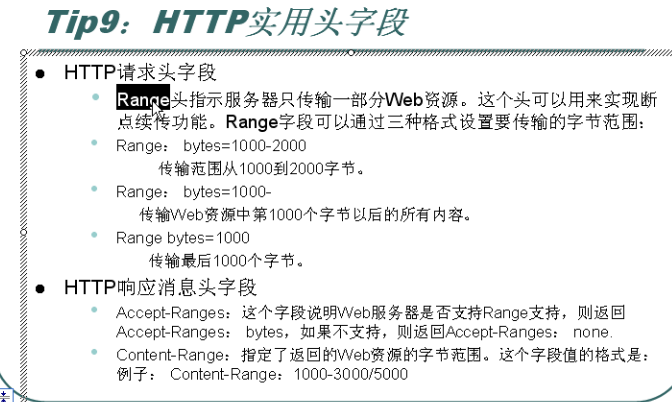
如果下载服务器的某个资源,已经下载一半,突然网络断了,下次有网络再下载另一半资源,迅雷下载比较常见:
代码演示:
 /**

  *

  */

 package com.hlcui.socket;

 import java.io.FileOutputStream;

 import java.io.IOException;

 import java.io.InputStream;

 import java.net.HttpURLConnection;

 import java.net.MalformedURLException;

 import java.net.URL;

 /**

  * @author Administrator 实现断续下载文件

  */

 public class DownloadRange {

     /**

      * @param args

      * @throws IOException

      */

     public static void main(String[] args) throws IOException {

         URL url = new URL("http://localhost:8080/servletDemo/111.txt");

         HttpURLConnection conn = (HttpURLConnection) url.openConnection();

         // 设置断续下载,从第4个字符开始下载

         conn.addRequestProperty("range", "bytes=4-");

         InputStream in = conn.getInputStream();

         FileOutputStream out = new FileOutputStream("F:\\111.txt",true); //追加到内容的末尾

         int len = 0;

         byte[] buf = new byte[1024];

         while ((len = in.read(buf)) > 0) {

             out.write(buf, 0, len);

         }

         in.close();

         out.close();

     }

 }
代码均已经验证!
javaweb学习总结二十(http响应)的更多相关文章
- javaweb学习总结二十五(response对象的用法一)
一:Reponse对象的概念 当客户端发送http请求时,服务器端会对每一次请求,创建request对象和response对象. response对象包括三个部分:响应头.响应状态码以及响应体 二:r ...
- javaweb学习总结(二十六)——jsp简单标签标签库开发(二)
一.JspFragment类介绍 javax.servlet.jsp.tagext.JspFragment类是在JSP2.0中定义的,它的实例对象代表JSP页面中的一段符合JSP语法规范的JSP片段, ...
- javaweb学习总结(二十五)——jsp简单标签开发(一)
一.简单标签(SimpleTag) 由于传统标签使用三个标签接口来完成不同的功能,显得过于繁琐,不利于标签技术的推广, SUN公司为降低标签技术的学习难度,在JSP 2.0中定义了一个更为简单.便于编 ...
- javaweb学习总结(二十四)——jsp传统标签开发
一.标签技术的API 1.1.标签技术的API类继承关系 二.标签API简单介绍 2.1.JspTag接口 JspTag接口是所有自定义标签的父接口,它是JSP2.0中新定义的一个标记接口,没有任何属 ...
- javaweb学习总结(二十二)——基于Servlet+JSP+JavaBean开发模式的用户登录注册
一.Servlet+JSP+JavaBean开发模式(MVC)介绍 Servlet+JSP+JavaBean模式(MVC)适合开发复杂的web应用,在这种模式下,servlet负责处理用户请求,jsp ...
- javaweb学习总结(二十)——JavaBean总结
一.什么是JavaBean JavaBean是一个遵循特定写法的Java类,它通常具有如下特点: 这个Java类必须具有一个无参的构造函数 属性必须私有化. 私有化的属性必须通过public类型的方法 ...
- javaweb学习总结二十六(response对象的用法二 下载文件)
一:浏览器打开服务器上的文件 1:读取服务器上面的资源,如果在web层,可以直接使用servletContext,如果在非web层 可以使用类加载器读取文件 2:向浏览器写数据,实际上是把数据封装到r ...
- javaweb学习总结二十四(servlet经常用到的对象)
一:ServletConfig对象 1:用来封装数据初始化参数,在服务器web.xml配置文件中可以使用<init-param>标签配置初始化参数. 2:实例演示 web.xml文件中配置 ...
- javaweb学习总结二十二(servlet开发中常见的问题汇总)
一:web应用的映射问题 通常我们从别人那里拷贝来的代码,自己会修改应用的名称,但是web映射的访问路径并没有修改,还是原来的映射. 解决方法: 工程右键--properties--myeclipse ...
随机推荐
- 基于互联网的VOIP电话系统组建
原创作品,允许转载,转载时请务必以超链接形式标明文章 原始出处 .作者信息和本声明.否则将追究法律责任.http://wangchunhai.blog.51cto.com/225186/42379 ...
- 关闭SELinux的两种方法
1 永久方法 – 需要重启服务器 修改/etc/selinux/config文件中设置SELINUX=disabled ,然后重启服务器. 2 临时方法 – 设置系统参数 使用命令setenforce ...
- UIImageView旋转任意角度---实现方法
转自:http://blog.csdn.net/trandy/article/details/6626281 -(UIImageView *) makeRotation:(UIImageView *) ...
- HDU 4462 Scaring the Birds (暴力求解,二进制法)
题意:给定一个 n*n的矩阵,在一些位置放上稻草人,每个稻草人的范围是一定,问你最少几个能覆盖整个矩阵. 析:稻草人最多才10个,所以考虑暴力,然后利用二进制法,很容易求解,并且时间很少0ms,注意有 ...
- Serializable 序列化使用限制
序列化不能跨语言 如果单纯为了传数据,完全可以被json代替.
- UVa 10801 Lift Hopping / floyd
乘电梯 求到目标层的最短时间 有n个电梯 换一个电梯乘需要额外60秒 所以建图时每个电梯自己能到的层数先把时间算好 这是不需要60秒的 然后做floyd时 如果松弛 肯定是要换电梯 所以要加60秒 # ...
- 三、FreeMarker 模版开发指南 第三章 模版
章节内容如下: 总体结构 指令 表达式 插值 一.总体结构 实际上你用程序语言编写的程序就是模板,模板也被称为FTL(代表FreeMarker模板语言).这是为编写模板设计的非常简单的编程语言. ...
- DbHelper数据操作类
摘要:本文介绍一下DbHelper数据操作类 微软的企业库中有一个非常不错的数据操作类.但是,不少公司(起码我遇到的几个...),对一些"封装"了些什么的东西不太敢用,虽然我推荐过 ...
- VS 2012单元测试和测试资源管理器
时间:2012-08-27 17:29 来源:张善友 博客园 字体:[大 中 小] 现在您可以在您的项目当中自行选择 NUnit 或是 xUnit 之类的套件. 而且这次的测试资源管理器也完全以”信息 ...
- ldap
年1月份最新的包. 安装前的准备工作 # mkdir ?p /data/packages//习惯性的把一些包放在一个位置 # yum install openldap-devel zlib ...