
Linux 线程 条件变量
//等待条件

int pthread_cond_wait(pthread_cond_t *restrict cond, pthread_mutex_t *restric mutex);

:把调用线程放到所等待条件的线程列表上

:对传进来已经加过锁的互斥量解锁

:线程进入休眠状态等待被唤醒

注:、2步为原子操作

//通知条件

int pthread_cond_signal(pthread_cond_t *cond);

:通知指定条件已经满足

:等待线程重新锁定互斥锁

:等待线程需要重新测试条件是否满足
 #include <iostream>

 #include <queue>

 #include <stdlib.h>

 #include <unistd.h>

 #include <pthread.h>

 using std::cout;

 using std::endl;

 using std::queue;

 #define N 100

 #define ST 10

 pthread_mutex_t lock = PTHREAD_MUTEX_INITIALIZER;

 pthread_cond_t ready = PTHREAD_COND_INITIALIZER;

 queue<int> que;

 void* threadProducer(void* arg)

 {

     while(true)

     {

         sleep(rand() % ST);

         cout << "Produce try in...\n";

         pthread_mutex_lock(&lock);

         cout << "Produce in!\n";

         int source = rand() % N;

         cout << "Produce " << source << endl;

         que.push(source);

         pthread_mutex_unlock(&lock);

         cout << "Produce out\n";

         pthread_cond_signal(&ready);

     }

 }

 void* threadConsumer(void* arg)

 {

     while(true)

     {

         sleep(rand() % ST);

         cout << "Consum try in...\n";

         pthread_mutex_lock(&lock);

         cout << "Consum in!\n";

         while(que.empty())

         {

             pthread_cond_wait(&ready, &lock);

             cout << "Consum from sleep\n";

         }

         cout << "Consum " << que.front() << endl;

         que.pop();

         pthread_mutex_unlock(&lock);

         cout << "Consum out\n\n";

     }

 }

 int main(void)

 {

     pthread_t tProducer, tConsumer;

     pthread_create(&tProducer, NULL, threadProducer, NULL);

     pthread_create(&tConsumer, NULL, threadConsumer, NULL);

     pthread_join(tProducer, NULL);

     pthread_join(tConsumer, NULL);

     exit();

 }
生消

看到倒数的三四行,消费者进去了,发现没有数据了,则睡眠了,然后生产者进去生产了。
#include <iostream>

#include <stdlib.h>

#include <unistd.h>

#include <pthread.h>

using std::cout;

using std::endl;

pthread_mutex_t lock = PTHREAD_MUTEX_INITIALIZER;

pthread_cond_t ready = PTHREAD_COND_INITIALIZER;

int data = ;

void* threadProducer(void* arg)

{

    int i;

    for(i = ; i < ; i++)

    {

        sleep();

        if(i %  != )

        {

            cout << "thread1:" << i << endl;

        }

        else

        {

            pthread_mutex_lock(&lock);

            data = i;

            pthread_mutex_unlock(&lock);

            pthread_cond_signal(&ready);

        }

    }

}

void* threadConsumer(void* arg)

{

    while(true)

    {

        pthread_mutex_lock(&lock);

        while(data == )    //no data

            pthread_cond_wait(&ready, &lock);

        cout <<"thread2:" << data << endl;

        if(data == )

            break;

        else

            data = ;    //empty data

        pthread_mutex_unlock(&lock);

    }

}

int main(void)

{

    pthread_t tProducer, tConsumer;

    pthread_create(&tProducer, NULL, threadProducer, NULL);

    pthread_create(&tConsumer, NULL, threadConsumer, NULL);

    pthread_join(tProducer, NULL);

    pthread_join(tConsumer, NULL);

    exit();

}
3打印

程序大致这样:线程1中的循环,如果i不是3的倍数就自己打印了,如果是的话,把这个数放到一个地方(由于这个地方可以被线程2发现,所以要加锁访问),然后唤醒等待数据的线程2(如果线程2还没有在等待,那么这个唤醒则丢失,这是个bug,见下),线程2被唤醒后,消费了这个3的倍数,清空数据区。
 #include <iostream>

 #include <stdlib.h>

 #include <unistd.h>

 #include <pthread.h>

 using std::cout;

 using std::endl;

 pthread_mutex_t lock = PTHREAD_MUTEX_INITIALIZER;

 pthread_cond_t ready = PTHREAD_COND_INITIALIZER;

 int data = ;

 void* threadProducer(void* arg)

 {

     int i;

     for(i = ; i < ; i++)

     {

         sleep();

         if(i %  != )

         {

             cout << "thread1:" << i << endl;

         }

         else

         {

             pthread_mutex_lock(&lock);

             data = i;

             pthread_mutex_unlock(&lock);

             pthread_cond_signal(&ready);

         }

     }

 }

 void* threadConsumer(void* arg)

 {

     sleep();

     while(true)

     {

         pthread_mutex_lock(&lock);

         while(data == )    //no data

             pthread_cond_wait(&ready, &lock);

         cout <<"thread2:" << data << endl;

         if(data == )

             break;

         else

             data = ;    //empty data

         pthread_mutex_unlock(&lock);

     }

 }

 int main(void)

 {

     pthread_t tProducer, tConsumer;

     pthread_create(&tProducer, NULL, threadProducer, NULL);

     pthread_create(&tConsumer, NULL, threadConsumer, NULL);

     pthread_join(tProducer, NULL);

     pthread_join(tConsumer, NULL);

     exit();

 }
bug
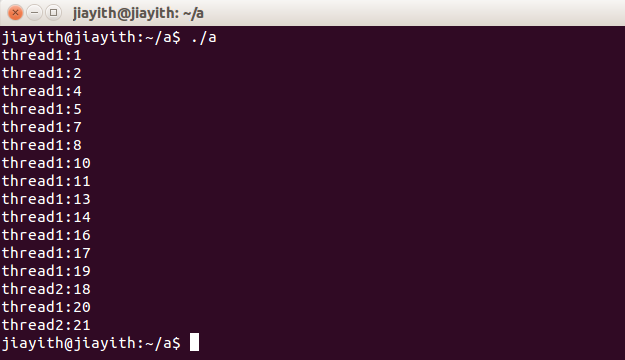
//下面是生产者

pthread_mutex_lock(&lock);    //加锁访问临界区

/*在这里生产数据*/

pthread_mutex_unlock(&lock);    //解锁

pthread_cond_signal(&ready);    //通知消费者

//下面是消费者

pthread_mutex_lock(&lock);    //加锁访问临界区

while(没有待消费数据)

        pthread_cond_wait(&ready, &lock);    //睡在这里,等待被唤醒

/*被叫醒了,在这里消费数据*/

pthread_mutex_unlock(&lock);    //解锁
Linux 线程 条件变量的更多相关文章
- python线程条件变量Condition(31)
对于线程与线程之间的交互我们在前面的文章已经介绍了 python 互斥锁Lock / python事件Event , 今天继续介绍一种线程交互方式 – 线程条件变量Condition. 一.线程条件变 ...
- Linux Posix线程条件变量
生产者消费者模型 .多个线程操作全局变量n,需要做成临界区(要加锁--线程锁或者信号量) .调用函数pthread_cond_wait(&g_cond,&g_mutex)让这个线程锁在 ...
- Linux 多线程条件变量同步
条件变量是线程同步的另一种方式,实际上,条件变量是信号量的底层实现,这也就意味着,使用条件变量可以拥有更大的自由度,同时也就需要更加小心的进行同步操作.条件变量使用的条件本身是需要使用互斥量进行保护的 ...
- Linux:条件变量
条件变量: 条件变量本身不是锁!但它也可以造成线程阻塞.通常与互斥锁配合使用.给多线程提供一个会合的场所. 主要应用函数: pthread_cond_init函数 pthrea ...
- 笔记3 linux 多线程 条件变量+互斥锁
//cond lock #include<stdio.h> #include<unistd.h> #include<pthread.h> struct test { ...
- Linux Qt使用POSIX多线程条件变量、互斥锁(量)
今天团建,但是文章也要写.酒要喝好,文要写美,方为我辈程序员的全才之路.嘎嘎 之前一直在看POSIX的多线程编程,上个周末结合自己的理解,写了一个基于Qt的用条件变量同步线程的例子.故此来和大家一起分 ...
- linux 互斥锁和条件变量
为什么有条件变量? 请参看一个线程等待某种事件发生 注意:本文是linux c版本的条件变量和互斥锁(mutex),不是C++的. mutex : mutual exclusion(相互排斥) 1,互 ...
- Linux 线程管理
解析1 LINUX环境下多线程编程肯定会遇到需要条件变量的情况,此时必然要使用pthread_cond_wait()函数.但这个函数的执行过程比较难于理解. pthread_cond_wait()的工 ...
- c++ 条件变量
.条件变量创建 静态创建:pthread_cond_t cond=PTHREAD_COND_INITIALIZER; 动态创建:pthread_cond _t cond; pthread_cond_i ...
随机推荐
- Viewport解决分辨率适配问题
Viewport : 字面意思为视图窗口,在移动 web 开发中使用.表示将设备浏览器宽度虚拟成一个特定的值(或计算得出),这样利于移动 web 站点跨设备显示效果基本一致. 基本写法: &l ...
- C#面向对象(三)接口实现多态
一.如何用接口实现多态? 1.定义一个接口. using System; using System.Collections.Generic; using System.Linq; using Syst ...
- react-redux-react-router直通车
简单说明 这篇文章是我学习react一个多月来的总结,从基础开始(包括编辑器设置,构建工具搭建),一步一步走向react开发.相信我,看完这篇文章,跟着文章的步骤走,保证让你入门react并爱上rea ...
- 【Shell脚本学习10】Shell运算符:Shell算数运算符、关系运算符、布尔运算符、字符串运算符等
Bash 支持很多运算符,包括算数运算符.关系运算符.布尔运算符.字符串运算符和文件测试运算符. 原生bash不支持简单的数学运算,但是可以通过其他命令来实现,例如 awk 和 expr,expr 最 ...
- error和exception的区别,RuntimeException和非RuntimeException的区别
error和exception的区别,RuntimeException和非RuntimeException的区别 1. 异常机制 异常机制是指当程序出现错误后,程序如何处理.具体来说, ...
- Composer 中国镜像
1.修改Composer的全局配置文件 config.json 使用sudo composer config -l -g 查看composer全局配置信息,在这些信息中查找 [home] 配置项就是 ...
- maven的update project是什么意思
一个是更新依赖,然后是clean projects,重新编译
- 判断当前是否运行于Design Mode
在使用Visual Studio设计XAML时,设计器运行在[设计时]状态.VS在内部运行这些代码,帮你把界面的类真实效果展示出来.一般情况下也不会有什么问题,但是当代码中存在外部资源时,XAML可能 ...
- Jfinal----Handler之责任链设计模式
Jfinal handler的处理采用了责任链设计模式 有关责任链模式,推荐看: <JAVA与模式>之责任链模式 1.实现Handler只需要继承Handler public class ...
- Java之组合数组2
编写函数Fun,其功能是将两个两位数的正整数A.B合并为一个整数放在C中,将A数的十位和个位一次放在C的个位和十位上,A数的十位和个位一次放在C的百位和千位上.例如,当 A=16,B=35,调用该函数 ...