
Python和C++交互
关键字:Python 2.7,VS 2010,swig
OS:Win8.1 with update。
1.下载swig:http://www.swig.org/download.html
2.将swig的路径添加到环境变量Path,例如set path=C:\swigwin-3.0.2。
3.用VS创建一个win32 console application名为MyApp并生成解决方案,编译生成MyApp.exe。
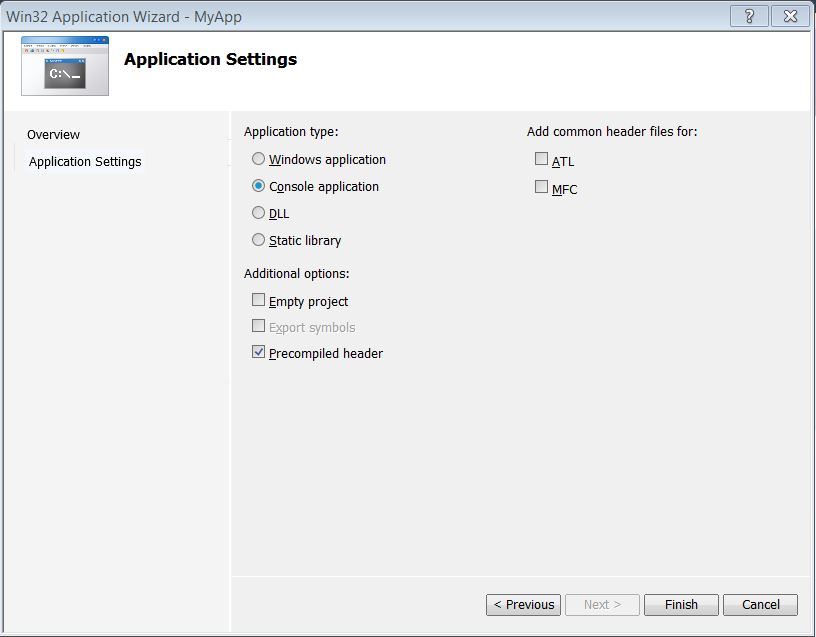
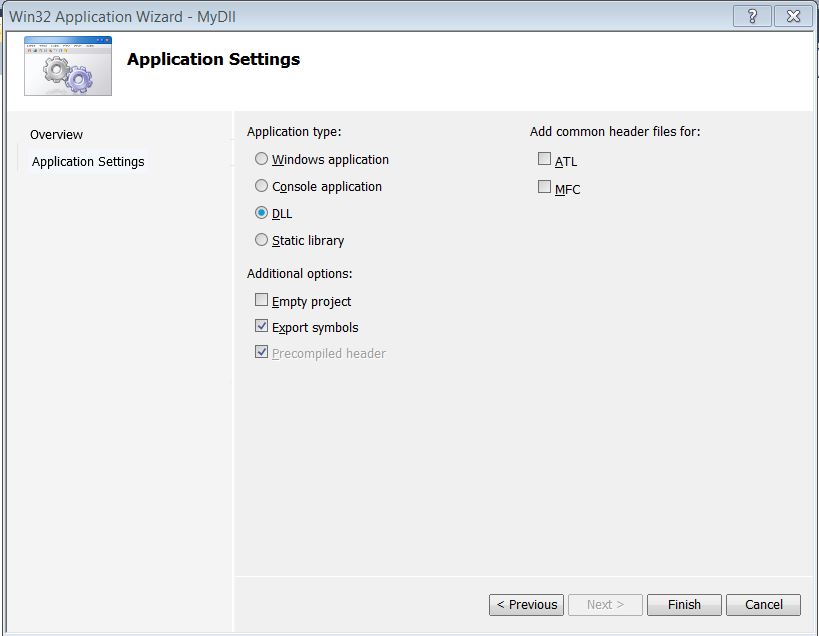
4.在MyApp解决方案里面新建一个win32 dll带导出符号项目名为MyDll,编译生成MyDll.dll。
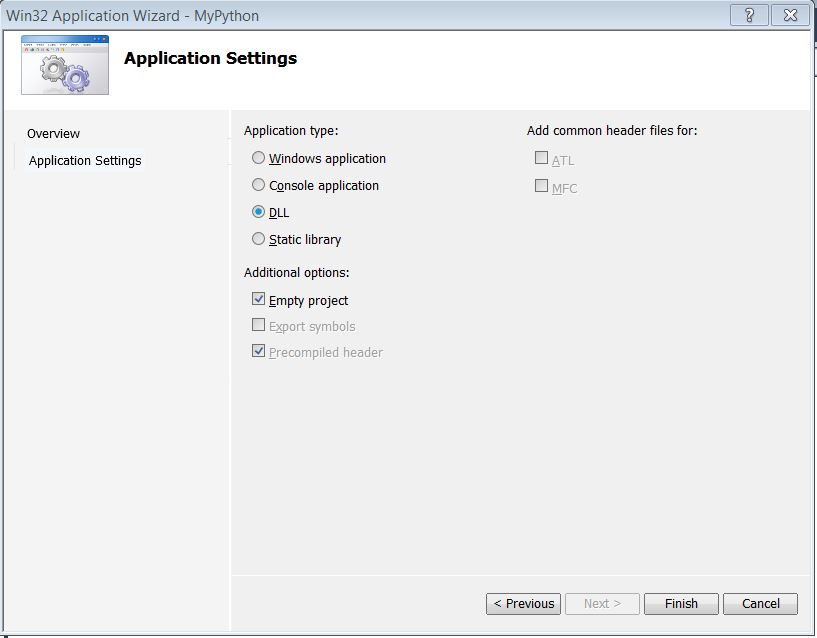
5.在MyApp解决方案里面新建一个win32 dll空项目名为MyPython。
6.修改项目依赖关系。MyApp依赖于MyDll,MyPython依赖于MyDll。
7.修改CMyDll类的实现如下:
MyDll.h
#pragma once

#include <string>

using namespace std;

#ifdef MYDLL_EXPORTS

#define MYDLL_API __declspec(dllexport)

#else

#define MYDLL_API __declspec(dllimport)

#endif

// This class is exported from the MyDll.dll

class MYDLL_API CMyDll {

public:

    CMyDll(void);

    virtual ~CMyDll() {}

    string SayHello(string name);

    double add(double i, double j);

    virtual string location();

};
MyDll.cpp
#include "stdafx.h"

#include "MyDll.h"

CMyDll::CMyDll()

{

    return;

}

string CMyDll::SayHello(string name)

{

    return "Hello " + name + ". I'm from " + location() + ".";

}

double CMyDll::add(double i, double j)

{

    return i + j;

}

string CMyDll::location()

{

     return "C++";

}
8.在MyPython项目里添加接口文件MyPython.i。
%module(directors="1") MyPython
%{
#include "../MyDll/MyDll.h"
%}
%feature("director") CMyDll;
%include <windows.i>
%include <std_string.i>
%include "../MyDll/MyDll.h"
9.在MyPython.i的属性设置里面设置Custom Build Tool。
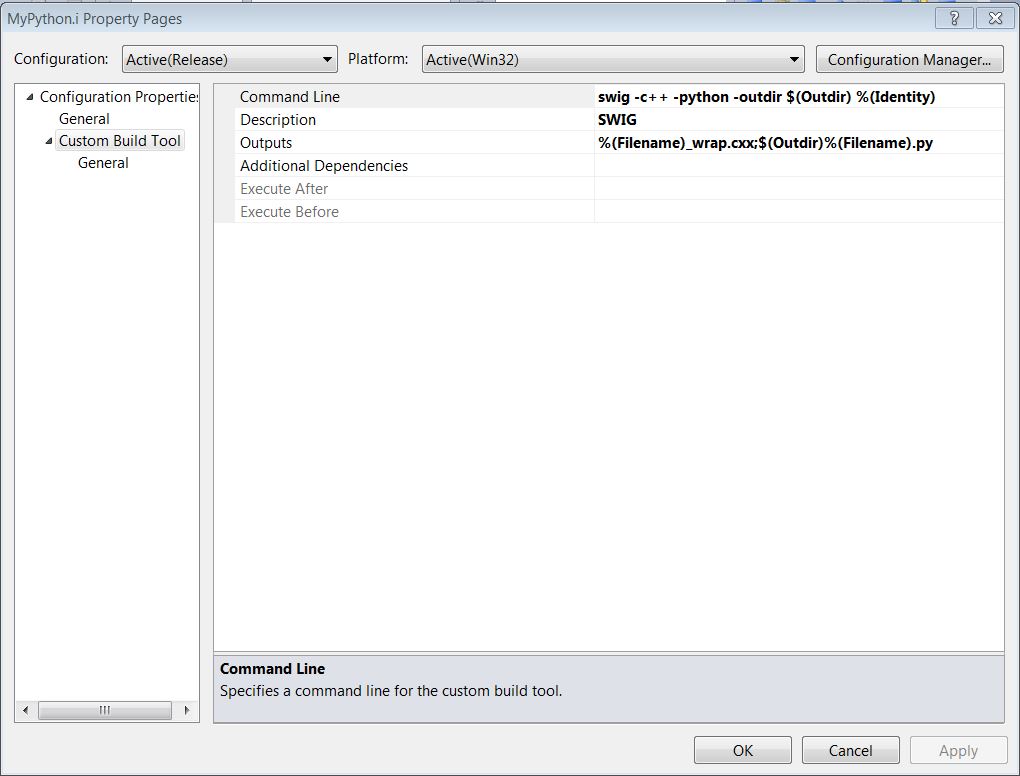
10.编译MyPython.i生成MyPython.py和MyPython_wrap.cxx,把MyPython_wrap.cxx添加到工程MyPython,并设置工程如下,Build工程MyPython生成_MyPython.pyd.
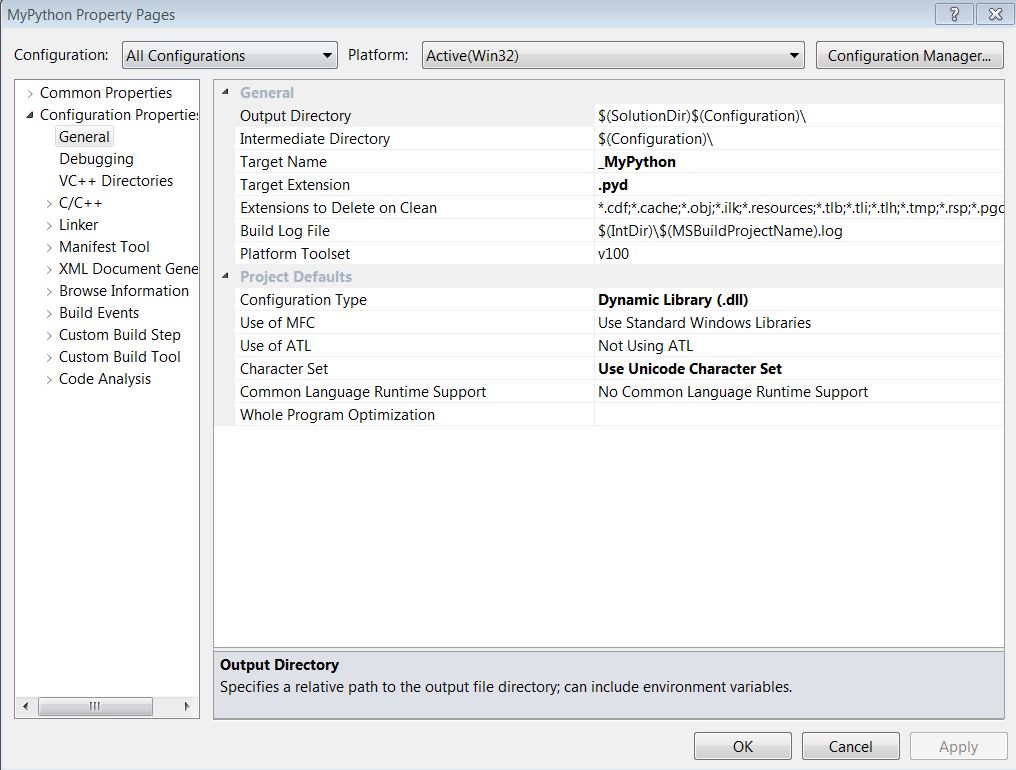
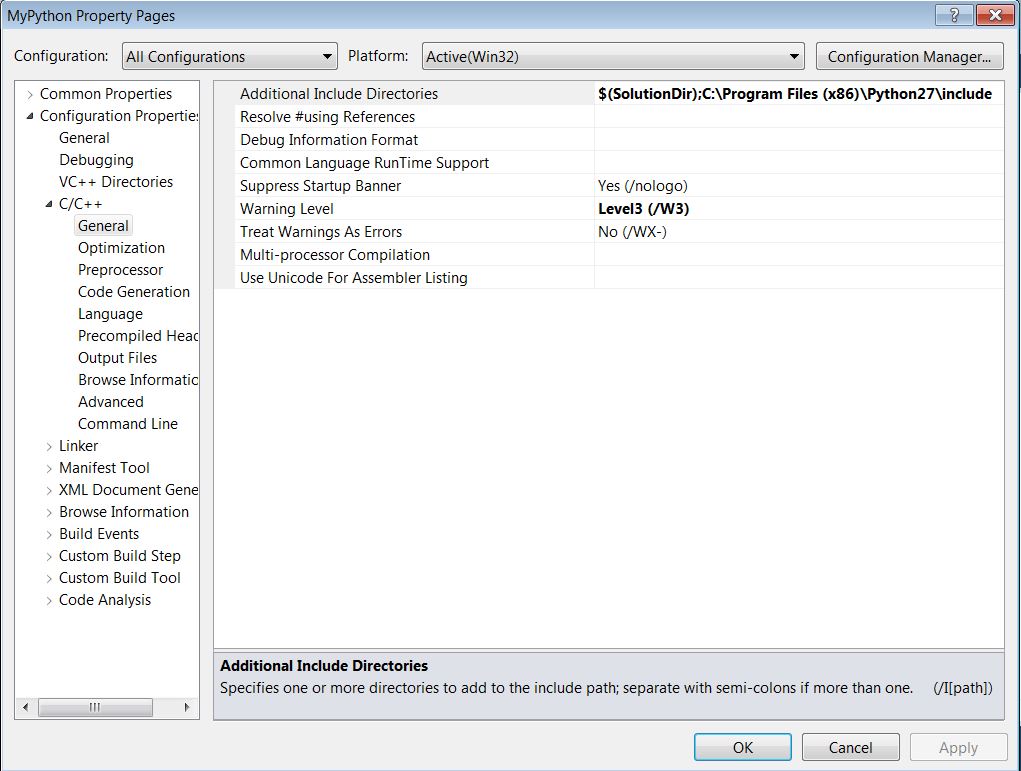
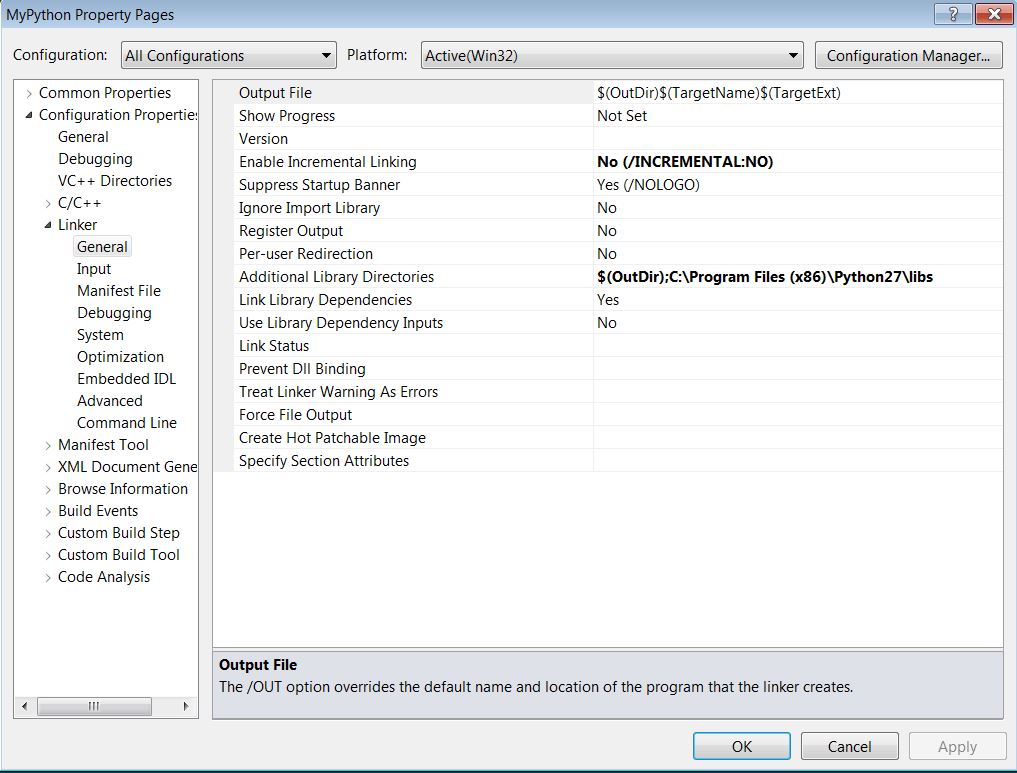
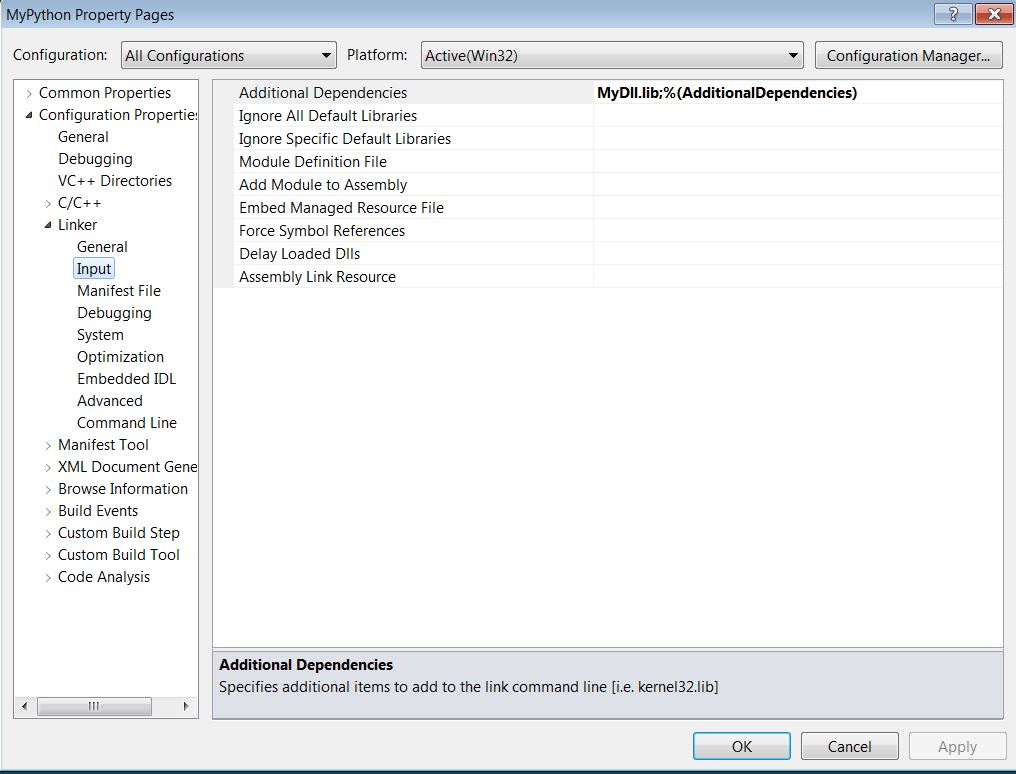
11.添加TestMyPython.py如下,在_MyPython.pyd的文件夹目录下运行TestMyPython.py.
import MyPython

import os

o = MyPython.CMyDll()

print(o.SayHello("World"))

class MyPyDll(MyPython.CMyDll):

    def __init__(self):

        MyPython.CMyDll.__init__(self)

    def location(self):

        return "Python"

o1 = MyPyDll();

print(o1.SayHello("World"))

os.system("pause")
运行结果如下:
Hello World. I'm from C++.
Hello World. I'm from Python.
Press any key to continue . . .
12.Run python in MyApp。
修改MyApp的工程属性,添加python头文件的文件夹,和lib文件的文件夹。
修改MyApp.cpp的代码如下:
#include "stdafx.h"

#include <Python.h>

int _tmain(int argc, _TCHAR* argv[])

{

    Py_Initialize();

    PyObject * pModule = PyImport_ImportModule("TestMyPython");

    Py_Finalize();

    return ;

}
编译运行MyApp.exe,结果如下:
Hello World. I'm from C++.
Hello World. I'm from Python.
Press any key to continue . . .
源代码下载:https://github.com/ldlchina/CppPythonSwig/tree/839e3e50993d209c83c4b5c587369c98a8f05d5a
Python和C++交互的更多相关文章
- Python和Excel交互
Python和Excel交互 使用的python包为XlsxWriter 下载的链接 https://pypi.python.org/pypi/XlsxWriter 初级的例子: def write_ ...
- 【转】Python之系统交互(subprocess)
[转]Python之系统交互(subprocess) 本节内容 os与commands模块 subprocess模块 subprocess.Popen类 总结 我们几乎可以在任何操作系统上通过命令行指 ...
- Python与Mysql交互
#转载请联系 在写内容之前,先放一张图,bling- 这张图算是比较详细的表达出了web开发都需要什么.用户访问网页,就是访问服务器的网页文件.这些网页文件由前端工程师编写的.服务器通常用nginx/ ...
- Python实现用户交互,显示省市县三级联动的选择
题目:Python实现用户交互,显示省市县三级联动的选择 定义的字典为: dic = { "江西": { "萍乡": ["安源", &quo ...
- 二十、Python与Mysql交互
先安装一个python与MySQL交互的包:MySQL-python $ gunzip MySQL-python-1.2.2.tar.gz $ tar -xvf MySQL-python-1.2.2. ...
- python与C++交互
python和C++能进行有效的交互,c++调用Python的一些小用法 写了一个python脚本导入发生异常,可能是编码问题(如存在中文),Python默认的是ASCII可加上:#!/usr/bin ...
- Python之系统交互(subprocess)
本节内容 os与commands模块 subprocess模块 subprocess.Popen类 总结 我们几乎可以在任何操作系统上通过命令行指令与操作系统进行交互,比如Linux平台下的shell ...
- Python的用户交互程序及格式化输出
1. 用户输入 在Python 3 中,用户输入用input()函数即可实现用户交互程序. 例如,我们根据程序提示输入用户名和密码,并且打印输入的信息. 2. 字符串格式化输出 例如,我们根据程序提 ...
- Python与RabbitMQ交互
RabbitMQ 消息队列 成熟的中间件RabbitMQ.ZeroMQ.ActiveMQ等等 RabbitMQ使用erlang语言开发,使用RabbitMQ前要安装erlang语言 RabbitMQ允 ...
- python与mysql交互中的各种坑
开始学python 交互MySQLdb,踩了很多坑 第一个 %d format: a number is required, not str 参照以下博客: https://blog.csdn.net ...
随机推荐
- PAT 1006
1006. Sign In and Sign Out (25) At the beginning of every day, the first person who signs in the com ...
- C#_datatable_读取
private void button5_Click(object sender, EventArgs e) { string 价格编号 = txtnum.Text; if (价格编号!= " ...
- JPA OpenJPA 简单例子
JPA 全称,Java Persistence API,Java持久化API JPA是一套持久化标准,相当于JDBC标准,针对于此标准的实现目前有OpenJAP,TOPLINK,Hibernate等. ...
- Helpers Overview
Helpers Overview Helpers are classes that are not part of the core system but can greatly improve it ...
- Models
Models Models control the data source, they are used for collecting and issuing data, this could be ...
- C++第五章函数
书上的点: 这次直接写写画画了,遇到的bug也就直接敲了,忘记记录了,好在都在书上,所以勾画一下,提一下.发现每一章后面的小结,都蛮有意思的.可以抄一遍. 1.返回值的函数成为返回值函数(value- ...
- Redis命令参考(Keys & String)
r = redis.Redis(ip, port, index) 如此实例化一个redis对象,index取值0-15,一个redis对象有16个库. Keys 函数 功能 返回值 备注 keys(s ...
- php中的匿名函数(Anonymous functions)和闭包函数(closures)
一:匿名函数 (在php5.3.0 或以上才能使用) php中的匿名函数(Anonymous functions), 也叫闭包函数(closures), 允许指定一个没有名称的函数.最常用的就是回调函 ...
- ionic+cordova+angularJs监听刷新
普通的js返回并刷新这里就不多说了,百度就有很多方法. 下面说的是使用了angularjs.ionic开发的一个手机app中我使用的返回上一页并刷新的方法. 场景:回复的页面是单独的,点击保存回复后会 ...
- android基本知识(一)
今天开始更新一下android的基本知识,下面是敲代码遇到的问题. 1)我们来谈谈android.intent.category.DEFAULT的用途. 在谈这个tag的用途之前,读者要明白什 ...