
Centos 7配置ntp时间同步
1.NTP时钟同步方式说明
NTP在linux下有两种时钟同步方式,分别为直接同步和平滑同步:
1)直接同步
使用ntpdate命令进行同步,直接进行时间变更。如果服务器上存在一个12点运行的任务,当前服务器时间是13点,但标准时间时11点,使用此命令可能会造成任务重复执行。因此使用ntpdate同步可能会引发风险,因此该命令也多用于配置时钟同步服务时第一次同步时间时使用。
2)平滑同步
使用ntpd进行时钟同步,可以保证一个时间不经历两次,它每次同步时间的偏移量不会太陡,是慢慢来的,正是因为这样,ntpd平滑同步可能耗费的时间比较长。
标准时钟同步服务
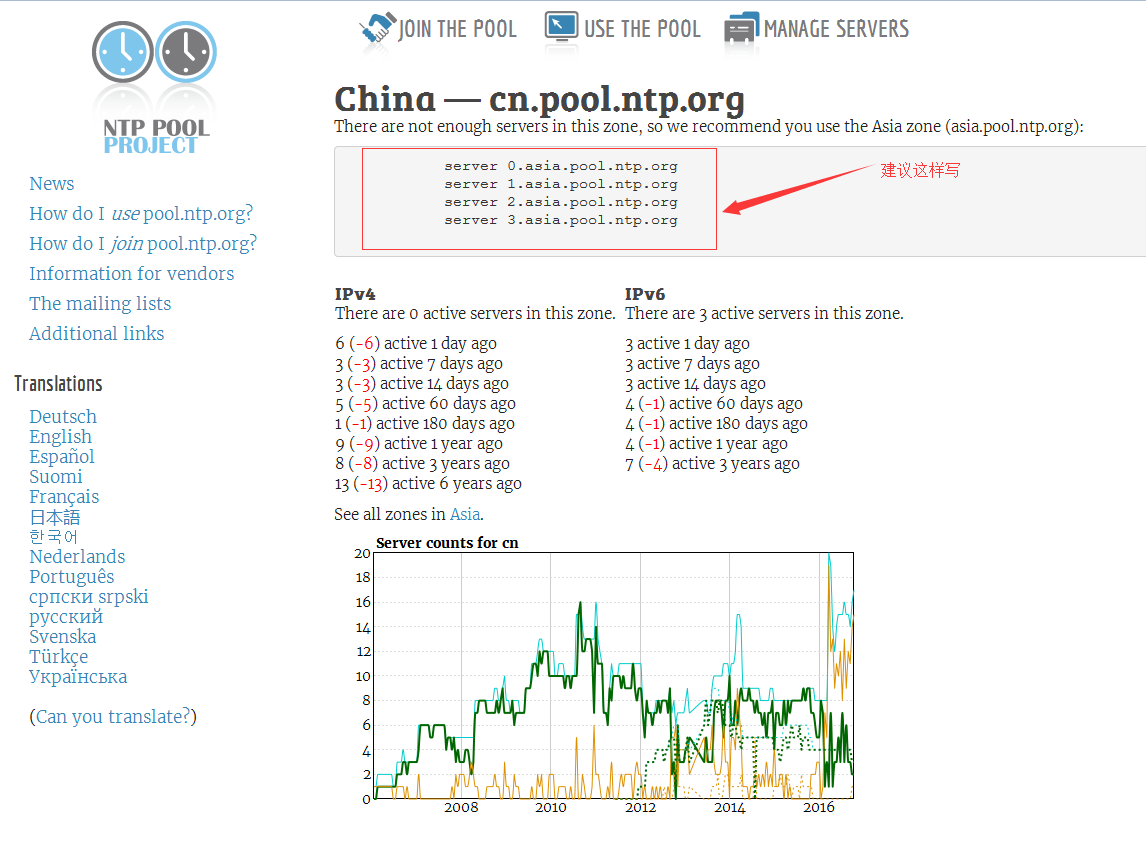
http://www.pool.ntp.org/zone/cn网站包含全球的标准时间同步服务,也包括对中国时间的同步,对应的URL为cn.pool.ntp.org,在其中也描述了ntp配置文件中的建议写法:
2.
环境情况
准备四台电脑,分别为:
|
|
||
|
192.168.11.212 |
ntpd服务器,用于与外部公共ntpd同步标准时间 |
||
|
172.16.248.129 |
ntpd客户端,用于与ntpd同步时间 |
||
|
172.16.248.130 |
ntpd客户端,用于与ntpd同步时间 |
||
|
172.16.248.131 |
ntpd客户端,用于与ntpd同步时间 |
3. 检查服务是否安装
1)使用rpm检查ntp包是否安装

2)如果已经安装则略过此步,否则使用yum进行安装,并设置系统开机自动启动并启动服务(每个节点都要安装)
[root@hadoop1 ~]# yum -y install ntp

[root@ hadoop1 ~]# systemctl enable ntpd(设置开机自启动)

[root@ hadoop1 ~]# systemctl start ntpd(启动ntp服务)
3)查看是否设置为开机自启动

4. 设置ntp服务器: 192.168.11.212
配置前先使用命令:ntpdate -u 0.asia.pool.ntp.org,同步服务器
1)修改/etc/ntp.conf文件
# For more information about this file, see the man pages

# ntp.conf(), ntp_acc(), ntp_auth(), ntp_clock(), ntp_misc(), ntp_mon().

driftfile /var/lib/ntp/drift

# Permit time synchronization with our time source, but do not

# permit the source to query or modify the service on this system.

restrict default nomodify notrap nopeer noquery

# Permit all access over the loopback interface.  This could

# be tightened as well, but to do so would effect some of

# the administrative functions.

restrict 127.0.0.1

restrict ::

# Hosts on local network are less restricted.

#restrict 192.168.1.0 mask 255.255.255.0 nomodify notrap

restrict 172.16.248.0 mask 255.255.255.0 nomodify notrap

只允许192.168.2.0网段的客户机进行时间同步

# Use public servers from the pool.ntp.org project.

# Please consider joining the pool (http://www.pool.ntp.org/join.html).

#server .centos.pool.ntp.org iburst

server .cn.pool.ntp.org

server .asia.pool.ntp.org

server .asia.pool.ntp.org

#broadcast 192.168.1.255 autokey        # broadcast server

#broadcastclient                        # broadcast client

#broadcast 224.0.1.1 autokey            # multicast server

#multicastclient 224.0.1.1              # multicast client

#manycastserver 239.255.254.254         # manycast server

#manycastclient 239.255.254.254 autokey # manycast client

# 允许上层时间服务器主动修改本机时间

restrict .cn.pool.ntp.org nomodify notrap noquery

restrict .asia.pool.ntp.org nomodify notrap noquery

restrict .asia.pool.ntp.org nomodify notrap noquery

server    127.127.1.0     # local clock

fudge     127.127.1.0 stratum

# Enable public key cryptography.

#crypto

includefile /etc/ntp/crypto/pw

# Key file containing the keys and key identifiers used when operating

# with symmetric key cryptography.

keys /etc/ntp/keys

# Specify the key identifiers which are trusted.

#trustedkey

# Specify the key identifier to use with the ntpdc utility.

#requestkey

# Specify the key identifier to use with the ntpq utility.

#controlkey

# Enable writing of statistics records.

#statistics clockstats cryptostats loopstats peerstats

# Disable the monitoring facility to prevent amplification attacks using ntpdc

# monlist command when default restrict does not include the noquery flag. See

# CVE-- for more details.

# Note: Monitoring will not be disabled with the limited restriction flag.

disable monitor
修改完成后重启ntpd服务systemctl restart ntpd 使用ntpq -p 查看网络中的NTP服务器,同时显示客户端和每个服务器的关系使用ntpstat 命令查看时间同步状态,这个一般需要5-10分钟后才能成功连接 和同步。所以,服务器启动后需要稍等下:
刚启动的时候,一般是:
连接并同步后:
5. 设置ntp客户端: 172.16.248.129|130|131 安装ntp服务并设置为自动启动,和前面的设置方式相同。然后编辑/etc/ntp.conf文件。
# For more information about this file, see the man pages

# ntp.conf(), ntp_acc(), ntp_auth(), ntp_clock(), ntp_misc(), ntp_mon().

driftfile /var/lib/ntp/drift

# Permit time synchronization with our time source, but do not

# permit the source to query or modify the service on this system.

restrict default nomodify notrap nopeer noquery

# Permit all access over the loopback interface.  This could

# be tightened as well, but to do so would effect some of

# the administrative functions.

restrict 127.0.0.1

restrict ::

# Hosts on local network are less restricted.

#restrict 192.168.1.0 mask 255.255.255.0 nomodify notrap

# Use public servers from the pool.ntp.org project.

# Please consider joining the pool (http://www.pool.ntp.org/join.html).

#server .centos.pool.ntp.org iburst

server 172.16.248.1

restrict 172.16.248.1 nomodify notrap noquery

server    127.127.1.0     # local clock

fudge     127.127.1.0 stratum

#broadcast 192.168.1.255 autokey        # broadcast server

#broadcastclient                        # broadcast client

#broadcast 224.0.1.1 autokey            # multicast server

#multicastclient 224.0.1.1              # multicast client

#manycastserver 239.255.254.254         # manycast server

#manycastclient 239.255.254.254 autokey # manycast client

# Enable public key cryptography.

#crypto

includefile /etc/ntp/crypto/pw

# Key file containing the keys and key identifiers used when operating

# with symmetric key cryptography.

keys /etc/ntp/keys

# Specify the key identifiers which are trusted.

#trustedkey

# Specify the key identifier to use with the ntpdc utility.

#requestkey

# Specify the key identifier to use with the ntpq utility.

#controlkey

# Enable writing of statistics records.

#statistics clockstats cryptostats loopstats peerstats

# Disable the monitoring facility to prevent amplification attacks using ntpdc

# monlist command when default restrict does not include the noquery flag. See

# CVE-- for more details.

# Note: Monitoring will not be disabled with the limited restriction flag.

disable monitor
重启ntpd服务
#systemctl restart ntpd
启动后,查看同步情况
# ntpq -p
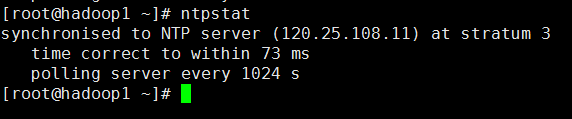
# ntpstat
因为是内网,一般ntpstat很快就可以同步上。
Centos 7配置ntp时间同步的更多相关文章
- 如何在linux 上配置NTP 时间同步?
故障现象: 有些应用场景,对时间同步的要求严格,需要用到NTP同步,如何在linux上配置NTP时间同步? 解决方案: 在linux 上配置NTP 时间同步,具休操作步骤,整理如下: 1.安装软件包( ...
- Linux集群之间配置NTP时间同步ntp
NTP时间同步 注意事项 要注意的是,ntpd 有一个自我保护设置: 如果本机与上源时间相差太大, ntpd 不运行. 所以新设置的时间服务器一定要先 ntpdate 从上源取得时间初值, 然后启动 ...
- Linux集群配置ntp时间同步服务
集群中时间不同步有可能会让大数据的应用程序运行混乱,造成不可预知的问题,比如Hbase,当时间差别过大时就会挂掉,所以在大数据集群中,ntp服务,应该作为一种基础的服务,以下在演示在CentOS 7. ...
- 【转】Linux配置NTP时间同步服务器
分布式程序通常需要运行在一个统一的时间环境里. 转自:http://blog.csdn.net/mengfanzhundsc/article/details/62046562 安装NTP:yum in ...
- CentOS装个NTP时间同步服务器
服务端: driftfile /var/lib/ntp/drift restrict default nomodify notrap nopeer noquery restrict 127.0.0.1 ...
- yum仓库客户端搭建和NTP时间同步客户端配置
一.yum仓库客户端搭建 yum源仓库搭建分为服务器端和客户端. 服务端主要提供软件(rpm包)和yumlist.也就是提供yum源的位置.一般是通过http或者ftp提供位置. 客户端的配置:yum ...
- centos6.5安装配置NTP,集群各机器间时间同步
试验环境 提君博客原创 >>提君博客原创 http://www.cnblogs.com/tijun/ << IP 主机名 角色 描述 同步方式 192.168.11.11 ...
- 关于linux下ntp时间同步服务的安装与配置
1.安装ntp服务,要使用时间同步.那么服务端与客户端都需要使用如下命令安装NTP软件包 [root@ ~]# yum install ntp -y 2.如果只是作为客户端的话,配置则可以非常简单,编 ...
- CentOS和RedHat等系列系统 yum源配置、时间同步
一.yum源配置 1,进入yum源配置目录cd /etc/yum.repos.d 2,备份系统自带的yum源mv CentOS-Base.repo CentOS-Base.repo.bk下载163网易 ...
随机推荐
- Ext.Form 自动填写表单内容
前台: 表单必须含有name属性 if (action == 'edit' || action == 'show') { MyForm1.getForm().load({ url: '/data/cu ...
- iOS7 下去掉状态栏(全屏)
具体步骤如下: 1.在项目的-Info.plist文件中,添加Row: Key:View controller-based status bar appearance Value:NO 2.选择项目在 ...
- docker错误
错误:cannot enable tty mode on non tty input 错误产生: root@machine1:/data# echo test|docker exec -i 68 ...
- 错误记录,找不到sqlite dll
Could not load file or assembly'System.Data.SQLite.dll' or one of its depedencies.找不到指定模块. 在CSDN找到解决 ...
- css margin-top设置html元素之间的距离
css margin-top属性设置的是一个元素的顶端与另一个元素之间的距离.这个距离称为上外边距,本文章向大家介绍css margin-top属性的用法和实例,需要的朋友可以参考一下. css ma ...
- Android WebView Long Press长按保存图片到手机
<span style="font-size:18px;">首先要先注册长按监听菜单 private String imgurl = ""; /** ...
- 菜鸟学sql,Oracle数据库结构比较
转载自:http://www.cnblogs.com/tianqing/archive/2008/06/25/1229419.html 做oracle下数据库结构比较,比较具体详细差异,例如:2个库具 ...
- 使用eclipse上传项目到开源中国代码托管Git@osc教程
创建项目 安装EGit插件 没有的话看下图 生成公钥 注册git账号 新建git项目 添加公钥 建立本地代码库 本文章版权归博主所有,如需转载请私信.
- php中若干模块的安装
1.php的mysql扩展pdo_mysql(在php源码所在目录) 1.1 进入 PHP 的软件包 pdo 扩展目录中 cd /usr/local/services/php-5.6.5/ext/ ...
- 学习练习 java 不重复的三位偶数
编写一个Java程序,计算一下1,2,…,9这9个数字可以组成多少个互不相同的.无重复数字的三位偶数. package com.hanqi; //编写一个Java程序,计算一下1,2,…,9 //这9 ...