
DropDownList的用法
DropDownList是一个下拉列表菜单,平时我们也会经常用到,下面就来看看如何绑定值
1> 静态添加,就是说在值都很明确的情况下
ListItem list1 = new ListItem("a","1");
ListItem list2 = new ListItem("b", "2");
ListItem list3 = new ListItem("c", "3");
ListItem list4 = new ListItem("d", "4");
this.DropDownList2.Items.Add(list1);
this.DropDownList2.Items.Add(list2);
this.DropDownList2.Items.Add(list3);
this.DropDownList2.Items.Add(list4);
如果是要特别放置,明确每个的具体索引,我们可以采用insert方法添加
This.DropDownList2.Items.insert(int index,Listitem item)
也可以在后台html直接添加:
<asp:DropDownList ID="DropDownList2" runat="server" >
<asp:ListItem Value="1">a</asp:ListItem>
<asp:ListItem Value="2">b</asp:ListItem>
<asp:ListItem Value="3">c</asp:ListItem>
<asp:ListItem Value="4">d</asp:ListItem>
</asp:DropDownList>
转为html就是
<select id="select">
<option value="1">a</option>
<option value="2">a</option>
<option value="3">a</option>
<option value="4">a</option>
</select>
2> 动态绑定
@ 视图绑定
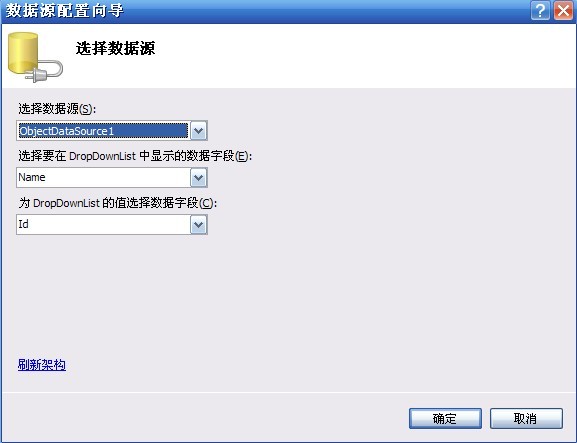
<asp:DropDownList ID="DropDownList1" runat="server"
DataTextField="Name" DataValueField="Id">
</asp:DropDownList>
<asp:ObjectDataSource ID="ObjectDataSource2" runat="server"
OldValuesParameterFormatString="original_{0}" SelectMethod="GetAllUser"
TypeName="MyBookShop.BLL.UserManager"></asp:ObjectDataSource>
这样绑定唯一不好的一点就是无法再第一个列表中显示“—请选择—”
@ 代码绑定
这种绑定方式非常灵活,也能很好的解决上面的问题,下面就来看看如何绑定
this.DropDownList1.DataSource = UserManager.GetAllUser();
this.DropDownList1.DataBind();
具体有两种方法:
1 ListItem list = new ListItem("--请选择--","0");
this.DropDownList1.DataSource = UserManager.GetAllUser();
this.DropDownList1.Items.Insert(0, list);
this.DropDownList1.DataTextField = "name";
this.DropDownList1.DataValueField = "id";
this.DropDownList1.DataBind();
但是当我绑定是DataSet的时候,上面那样写的话就没有加上("--请选择--"),这个要放在下面写才可以,如
protected void LinkBind()
{
DataSet ds = linkManager.GetList(" jh_checked='是'");
DroUrl.DataSource = ds;
DroUrl.DataTextField = "jh_linkname";
DroUrl.DataValueField = "jh_linkurl";
DroUrl.DataBind();
ListItem item = new ListItem("--请选择---", "#");
DroUrl.Items.Insert(0,item);
}
2 IList<DepartInfo> departList = DepartInfoManager.GetDepartList();
departList.Insert(0, new DepartInfo { DepartId = 0, DepartName = "--请选择--" });
ddDepart.DataSource = departList;
ddDepart.DataTextField = "DepartName";
ddDepart.DataValueField = "DepartId";
ddDepart.DataBind();
平时我们会在友情链接中使用,选择一项的时候链接会改变,而且打开一个新的页面,这个很好实现
protected void DropDownList1_TextChanged(object sender, EventArgs e)
{
string link = this.DropDownList1.SelectedValue;
Response.Write("<script>window.open('"+link+"','_Blank')</script>");
}
灵活掌握就可以了
DropDownList的用法的更多相关文章
- Html.DropDownList的用法
直接上代码 页面代码 <td> <%= Html.DropDownList("selCity") %> </td> controller里面的代 ...
- Html.DropDownList()的用法
页面代码如下: <%= Html.DropDownList("Category", ViewData["Categories"] as SelectLis ...
- [转]Html.DropDownList()的用法 ( Asp.Net MVC)
Html.DropDownList()赋默认值: 页面代码如下: <% List<SelectListItem> list = new List<SelectListItem& ...
- DropDownList和GridView用法
DropDownList和GridView用法 DropDownList控件和GridView控件在Asp.net中相当常用,以下是控件的解释,有些是常用的,有些是偶尔的,查找.使用.记录,仅此而 ...
- [摘]在ASP.NET MVC中使用DropDownList
在ASP.NET MVC中,尽管我们可以直接在页面中编写HTML控件,并绑定控件的属性,但更方便的办法还是使用HtmlHelper中的辅助方法.在View中,包含一个类型为HtmlHelper的属性H ...
- ASP.NET MVC中使用DropDownList
在ASP.NET MVC中,尽管我们可以直接在页面中编写HTML控件,并绑定控件的属性,但更方便的办法还是使用HtmlHelper中的辅助方法.在View中,包含一个类型为HtmlHelper的属性H ...
- GridView的常规用法
GridView控件在Asp.net中相当常用,以下是控件的解释,有些是常用的,有些是偶尔用到的,查找.使用.记录,仅此而已.(最后附带DropDownList控件) ASP.NET中GridView ...
- 在ASP.NET MVC中使用DropDownList
在ASP.NET MVC中,尽管我们可以直接在页面中编写HTML控件,并绑定控件的属性,但更方便的办法还是使用HtmlHelper中的辅助方法.在View中,包含一个类型为HtmlHelper的属性H ...
- <转>ASP.NET学习笔记之在ASP.NET MVC中使用DropDownList
看到一篇关于dropdownlist的用法很好的阐述,比较清楚,留着,防止以后自己不记得,还可以瞅瞅. 在ASP.NET MVC中,尽管我们可以直接在页面中编写HTML控件,并绑定控件的属性,但更方便 ...
随机推荐
- nginx重写规则报nginx: [emerg] directive "rewrite" is not terminated by ";"
对于下面的重写规则 rewrite ^/gongying/([\d]{8})_([\d]+).html$ /index.php?app=support&act=view&pts=$1& ...
- linux free命令(转载)
来源:http://www.cnblogs.com/peida/archive/2012/12/25/2831814.html free命令可以显示Linux系统中空闲的.已用的物理内存及swap内存 ...
- 漫谈刑事辩护 z
各位律师,各位助理: 大家好!今天的律师沙龙由我来给大家谈一谈刑事辩护方面的问题.这次我谈的,主要是我这么多年来办理刑事案件,从事刑事辩护中的一些体会. 刑事辩护,大家最关心的莫过于收费问题了.我认为 ...
- [SQL]sql介绍
SQL语言概述 结构化查询语言(Structured Query Language,简称SQL)是一种介于关系代数与关系演算之间的语言,是一种用来与关系数据库管理系统通信的标准计算机语言.其功能包括数 ...
- poj 2240 Arbitrage bellman-ford算法
点击打开链接 Arbitrage Time Limit: 1000MS Memory Limit: 65536K Total Submissions: 13434 Accepted: 5657 ...
- Git简单使用
删除本地旧分支,拉取新分支 #!/bin/bash set -e cd /project/ git pull git fetch ori --prune git branch -r|sed 's/or ...
- phpmyadmin #2003 无法登录 MySQL服务器的解决方法
本文章向大家介绍phpmyadmin #2003 无法登录 MySQL服务器的解决方法,需要的码农可以参考一下. 通过phpmyadmin连接mysql数据库时提示:"2003 无法登录 M ...
- transform的使用
*:first-child { margin-top: 0 !important; } body > *:last-child { margin-bottom: 0 !important; } ...
- HDU 4786 Fibonacci Tree
Fibonacci Tree Time Limit: 4000/2000 MS (Java/Others) Memory Limit: 32768/32768 K (Java/Others) P ...
- 增量升级(省流量更新)的Android客户端实现
转载与 zhouhuiah的专栏 http://blog.csdn.net/zhouhuiah/article/details/16939937 本文在以上两篇博客的基础上再增加了异常处理,并将生成的 ...