
OUT函数及其熟练使用,split的用法
using System;

using System.Collections.Generic;

using System.Linq;

using System.Text;

using System.Threading.Tasks;

namespace OUT函数

{

    class Program

    {

        //public void outzhi(double a, double b, double c, out double j1, out double j2)

        public void outzhi(double a, double b, double c, out string  j1, out string  j2)

        {

            double de = b * b -  * a * c;

            if (de < )

            {

                Console.WriteLine("函数没有实根");

                j1 = j2 = "";

            }

            else

            {

                double x1 = (-b + Math.Sqrt(de)) / ( * a);

                double x2 = (-b - Math.Sqrt(de)) / ( * a);

                if (de == )

                {

                    Console.WriteLine("方程有两个相同的实根");

                    j1 = j2 = x1.ToString();

                }

                else

                {

                    Console.WriteLine("方程有两个不同的实根");

                    //Console.Write("x1=" + x1); Console.Write("  x2=" + x2);

                    j1 = x1.ToString();

                    j2 = x2.ToString();

                }

            }

        }

        static void Main(string[] args)

        {

            Program hanshu = new Program();

            Console.Write("请输入a=");

            double a = double.Parse(Console.ReadLine());

            Console.Write("请输入b=");

            double b = double.Parse(Console.ReadLine());

            Console.Write("请输入c=");

            double c = double.Parse(Console.ReadLine());

            //double j1 = 0;

            //double j2 = 0;

            string j1 = "";

            string j2 = "";

            hanshu.outzhi(a, b, c, out j1, out j2);

            Console.WriteLine("第一个根x1=" + j1);

            Console.Write("第二个根x2=" + j2);

            Console.ReadLine();

        }

    }

}
using System;

using System.Collections.Generic;

using System.Linq;

using System.Text;

using System.Threading.Tasks;

namespace _0630下午

{

    class Program

    {

        public void  hou()

        {

            int sum = ;

            for (int i = ; i > ; i--)

            {

                if (i == )

                {

                    sum = ;

                }

                else

                {

                    sum = (sum + ) * ;

                }

            }

            Console.Write(sum);

        }

        public int jiafen(int  a)

        {

            a+= ;

            return a;

        }

        public void jiafen2(int[] a)

        {

            int l= a.Length;

            for (int i = ; i < l; i++)

            {

                a[i] += ;

            }

        }

        public int [] jiafen4(int[] a)

        {

            int l = a.Length;

            for (int i = ; i < l; i++)

            {

                a[i] += ;

            }

            return a;

        }

        public void  jiafen3(int[] a, out int[] b)

        {

            int l = a.Length;

            for (int i = ; i < l; i++)

            {

                a  [i] = a[i] + ;

            }

            b = a;

        }

        static void Main(string[] args)

        {

            //out 传值    形式参数:只给值,不给变量名(传值)    实际参数:将变量名传给函数(传址)

            //out是实参

            Program hanshu=new Program();

            //猴子

            //hanshu.hou();

            //Console.ReadLine();

            //输入班级人数,根据人数输入每个人的成绩

            //本班都是少数民族学生,每个人+10分

            //写一个专门+10分的函数,参数是这个分数的数组

            Console.WriteLine("请输入班级的人数");

            int renshu = int.Parse(Console.ReadLine());

            int[] fen = new int[renshu];

            for (int i = ; i < renshu ;i++ )

            {

                Console.WriteLine("请输入第{0}名同学的成绩",(i+));

                fen[i] = int.Parse(Console.ReadLine());

            }

            //for(int i=0;i <renshu ;i++)

            //{

            //    fen[i ]= hanshu.jiafen(fen[i]);

            //}

            //hanshu.jiafen2(fen );

            //hanshu.jiafen3(fen,out chengji);

            int []chengji=new int [renshu ];

            hanshu.jiafen3(fen,out chengji );

            foreach(int aa in chengji  )

            {

                Console.WriteLine(aa );

            }

            foreach (int aa in fen )

            {

                Console.WriteLine(aa);

            }

            Console.ReadLine();

        }

    }

}
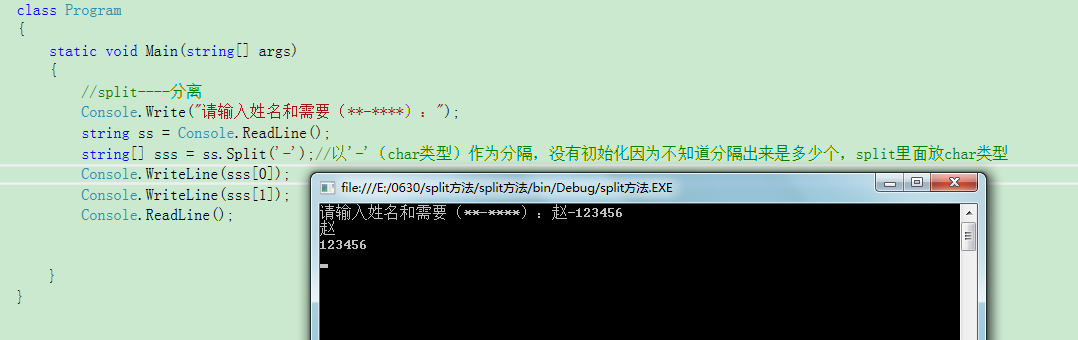
split的使用
OUT函数及其熟练使用,split的用法的更多相关文章
- 表值函数与JS中split()的联系
在公司用云平台做开发就是麻烦 ,做了很多功能或者有些收获,都没办法写博客,结果回家了自己要把大脑里面记住的写出来. split()这个函数我们并不陌生,但是当前台有许多字段然后随意勾选后的这些参数传递 ...
- C# Split的用法,Split分割字符串
C# Split的用法,Split分割字符串 分割单个字串:string str="来自张三的亲切问候!;string[] strarry=str.Split(new string[] { ...
- Java中split的用法
Java中的我们可以利用split把字符串按照指定的分割符进行分割,然后返回字符串数组,下面是string.split的用法实例及注意事项:java.lang.string.splitsplit 方法 ...
- 条目二十八《正确理解由reverse_iterator的base()成员函数所产生的iterator的用法》
条目二十八<正确理解由reverse_iterator的base()成员函数所产生的iterator的用法> 迭代器的种类一共有四种,上面已经说过了.这里就不再次写出来. 这一个条目主要是 ...
- split的用法回顾,快忘记了@ →@
split:用for循环时不要忘记是数组名.length package com.aaa; //split的用法把指定的字符串按指定的分割符进行分割,然后返回字符串 数组 public class f ...
- mysql 函数GROUP_CONCAT(temp.amount SEPARATOR ',')的用法
mysql 函数GROUP_CONCAT(temp.amount SEPARATOR ',')的用法 使用场景:例如:想要查询用户的最喜欢购买的几种商品,这个时候就需要使用group_concat(字 ...
- python 中的split()函数和os.path.split()函数
Python中有split()和os.path.split()两个函数: split():拆分字符串.通过指定分隔符对字符串进行切片,并返回分割后的字符串列表. os.path.split():将文件 ...
- C++ 字符串的分割函数split 及 用法【转载】
文章出处https://blog.csdn.net/glmushroom/article/details/80690881 之前在C#中总用到字符串的分割,使用系统函数即可,比如: string a ...
- java分割函数split的用法(二)
package com.b; public class Sysetm { public static void main(String[] args) { String a=new String(&q ...
随机推荐
- [SAP ABAP开发技术总结]ABAP读写、解析XML文件
声明:原创作品,转载时请注明文章来自SAP师太技术博客( 博/客/园www.cnblogs.com):www.cnblogs.com/jiangzhengjun,并以超链接形式标明文章原始出处,否则将 ...
- Practical Java
声明:原创作品,转载时请注明文章来自SAP师太技术博客( 博/客/园www.cnblogs.com):www.cnblogs.com/jiangzhengjun,并以超链接形式标明文章原始出处,否则将 ...
- Mac : 强大的截图
来源:http://irising.me/2011/11/12135/ Mac的截图功能扩展功能很强大的,不要用QQ那个COM+Ctrl+A弱爆了的截图了~ 首先说一下两种截图1.Command+sh ...
- Linux基础※※※※访问Windows共享文件夹
参考Linux公社链接:http://www.linuxidc.com/Linux/2014-06/103749.htm 实际上,可以直接用sambaclient程序访问共享资源. 列出共享主机的列表 ...
- canvas背景透明
var can=document.getElementById("canv"); c=can.getContext("2d"); c.globalAlpha=. ...
- XAF应用开发教程(二)业务对象模型之简单类型属性
使用过ORM的朋友对这一部分理解起来会非常快,如果没有请自行补习吧:D. 不说废话,首先,我们来开发一个简单的CRM系统,CRM系统第一个信息当然是客户信息.我们只做个简单 的客户信息来了解一下XAF ...
- FlexSlider插件的详细设置参数 http://www.woothemes.com/flexslider/ -----幻灯片插件
$(window).load(function() { $('.flexslider').flexslider({ namespace: 'flex-', //控件的命名空间,会影响样式前缀 anim ...
- [转载] 根据多年经验整理的《互联网MySQL开发规范》
原文: http://weibo.com/p/2304181380b3f180102vsg5 根据多年经验整理的<互联网MySQL开发规范> 写在前面:无规矩不成方圆.对于刚加入互联网的朋 ...
- [css] 认识margin
原文链接http://www.zhangxinxu.com/wordpress/2009/08/css-margin%E7%9A%84%E7%9B%B8%E5%85%B3%E5%B1%9E%E6%80 ...
- 转载---jboss简单使用
初学Jboss,对于Jboss的基础认识以及配置做一些记录 Jboss基础: JBoss是什么–基于J2EE的应用服务器–开放源代码–JBoss核心服务不包括支持servlet/JSP的WEB容器,一 ...