
第三篇——Struts2的动态方法调用
Struts2动态方法调用
默认方式:默认执行方法中的execute方法,若指定类中没有该方法,默认返回success;
method方式:执行method属性中定义的方法,没有该方法,页面报错;
通配符方式:使用 * 作为通配符,若没有配置method,默认执行execute,若没有execute方法,默认返回success;
感叹号方法:在 !后面指定方法名,需要在package中设置strict-method-invocation="false" ,并且开启动态方法调用<constant name="struts.enable.DynamicMethodInvocation" value="true"/>
项目实例:
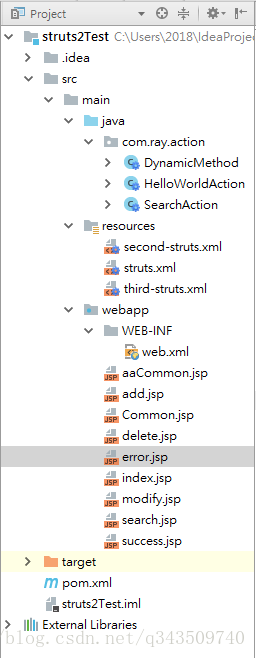
1、项目结构
2、pom.xml
<project xmlns="http://maven.apache.org/POM/4.0.0" xmlns:xsi="http://www.w3.org/2001/XMLSchema-instance"
  xsi:schemaLocation="http://maven.apache.org/POM/4.0.0 http://maven.apache.org/maven-v4_0_0.xsd">
  <modelVersion>4.0.0</modelVersion>
  <groupId>com.ray</groupId>
  <artifactId>struts2Test</artifactId>
  <packaging>war</packaging>
  <version>1.0-SNAPSHOT</version>
  <name>struts2Test Maven Webapp</name>
  <url>http://maven.apache.org</url>

  <dependencies>

    <dependency>
      <groupId>junit</groupId>
      <artifactId>junit</artifactId>
      <version>3.8.1</version>
      <scope>test</scope>
    </dependency>

    <!-- https://mvnrepository.com/artifact/org.apache.struts/struts2-core -->
    <dependency>
      <groupId>org.apache.struts</groupId>
      <artifactId>struts2-core</artifactId>
      <version>2.5.16</version>
    </dependency>

  </dependencies>

  <build>
    <finalName>struts2Test</finalName>
  </build>

</project>
3、web.xml
<web-app xmlns="http://java.sun.com/xml/ns/javaee"
         xmlns:xsi="http://www.w3.org/2001/XMLSchema-instance"
         xsi:schemaLocation="http://java.sun.com/xml/ns/javaee
                      http://java.sun.com/xml/ns/javaee/web-app_3_0.xsd"
         version="3.0" metadata-complete="true">
  <display-name>Archetype Created Web Application</display-name>

  <!-- 过滤所有请求交给Struts2处理 -->
  <filter>
    <filter-name>struts2</filter-name>
    <filter-class>
      org.apache.struts2.dispatcher.filter.StrutsPrepareAndExecuteFilter
    </filter-class>
  </filter>

  <filter-mapping>
    <filter-name>struts2</filter-name>
    <url-pattern>/*</url-pattern>
  </filter-mapping>

</web-app>
4、DynamicMethod.java
package com.ray.action;

import com.opensymphony.xwork2.ActionSupport;

/**
 * Created by Ray on 2018/3/26 0026.
 **/
public class DynamicMethod extends ActionSupport {

    public String add(){
        return "add";
    }

    public String modify(){
        return "modify";
    }

    public String delete(){
        return "delete";
    }
}
5、third-struts.xml
<?xml version="1.0" encoding="UTF-8"?>

<!DOCTYPE struts PUBLIC
        "-//Apache Software Foundation//DTD Struts Configuration 2.5//EN"
        "http://struts.apache.org/dtds/struts-2.5.dtd">

<struts>

    <!-- 只有感叹号动态调用方法时需要设置strict-method-invocation="false" -->
    <package name="dynamic" extends="struts-default" namespace="/" strict-method-invocation="false">

        <!-- 默认,无execute方法,执行name="success"的result -->
        <action name="search" class="com.ray.action.DynamicMethod">
            <result>/search.jsp</result>
            <result name="error">/error.jsp</result>
        </action>

        <!-- 指定method属性 -->
        <action name="add" class="com.ray.action.DynamicMethod" method="add">
            <result name="add">/add.jsp</result>
            <result name="error">/error.jsp</result>
        </action>

        <!-- 感叹号方式 -->
        <action name="modify" class="com.ray.action.DynamicMethod">
            <result name="modify">/modify.jsp</result>
            <result name="error">/error.jsp</result>
        </action>

        <!-- 通配符方式 -->
        <action name="delete_*" class="com.ray.action.DynamicMethod" method="{1}">
            <result name="delete">/{1}.jsp</result>
            <result name="error">/error.jsp</result>
        </action>

    </package>

    <!-- 开启动态方法调用,只有使用感叹号动态调用方法时需要开启 -->
    <constant name="struts.enable.DynamicMethodInvocation" value="true"/>
</struts>
6、struts.xml
<?xml version="1.0" encoding="UTF-8"?>

<!DOCTYPE struts PUBLIC
        "-//Apache Software Foundation//DTD Struts Configuration 2.5//EN"
        "http://struts.apache.org/dtds/struts-2.5.dtd">

<struts>

    <package name="default" namespace="/" extends="struts-default">

        <action name="helloWorld" class="com.ray.action.HelloWorldAction">
            <result name="success">/success.jsp</result>
        </action>
    </package>

    <include file="second-struts.xml"/>
    <include file="third-struts.xml"/>
</struts>
7、index.jsp
<%@ page language="java" contentType="text/html; charset=UTF-8"
         pageEncoding="UTF-8"%>
<!DOCTYPE html PUBLIC "-//W3C//DTD HTML 4.01 Transitional//EN" "http://www.w3.org/TR/html4/loose.dtd">
<html>
<head>
    <meta http-equiv="Content-Type" content="text/html; charset=UTF-8">
    <title>动态方法调用测试</title>
<body>
    <a href="search">查询</a>
    <a href="add">新增</a>
    <a href="modify!modify">修改</a>
    <a href="delete_delete">删除</a>
</body>
</html>
8、delete.jsp
<%@ page language="java" import="java.util.*" pageEncoding="UTF-8" %>
<%
    String path = request.getContextPath();
    String basePath = request.getScheme() + "://" + request.getServerName() + ":" + request.getServerPort() + path + "/";
%>

<!DOCTYPE HTML PUBLIC "-//W3C//DTD HTML 4.01 Transitional//EN">
<html>
<head>
    <base href="<%=basePath%>">

    <title>This is delete.jsp</title>

    <meta http-equiv="pragma" content="no-cache">
    <meta http-equiv="cache-control" content="no-cache">
    <meta http-equiv="expires" content="0">
    <meta http-equiv="keywords" content="keyword1,keyword2,keyword3">
    <meta http-equiv="description" content="This is my page">
    <!--
	<link rel="stylesheet" type="text/css" href="styles.css">
	-->

</head>

<body>
    This is delete.jsp
</body>
</html>
9、add.jsp
<%@ page language="java" import="java.util.*" pageEncoding="UTF-8" %>
<%
    String path = request.getContextPath();
    String basePath = request.getScheme() + "://" + request.getServerName() + ":" + request.getServerPort() + path + "/";
%>

<!DOCTYPE HTML PUBLIC "-//W3C//DTD HTML 4.01 Transitional//EN">
<html>
<head>
    <base href="<%=basePath%>">

    <title>This is add.jsp</title>

    <meta http-equiv="pragma" content="no-cache">
    <meta http-equiv="cache-control" content="no-cache">
    <meta http-equiv="expires" content="0">
    <meta http-equiv="keywords" content="keyword1,keyword2,keyword3">
    <meta http-equiv="description" content="This is my page">
    <!--
	<link rel="stylesheet" type="text/css" href="styles.css">
	-->

</head>

<body>
    This is add.jsp
</body>
</html>
10、modify.jsp
<%@ page language="java" import="java.util.*" pageEncoding="UTF-8" %>
<%
    String path = request.getContextPath();
    String basePath = request.getScheme() + "://" + request.getServerName() + ":" + request.getServerPort() + path + "/";
%>

<!DOCTYPE HTML PUBLIC "-//W3C//DTD HTML 4.01 Transitional//EN">
<html>
<head>
    <base href="<%=basePath%>">

    <title>This is modify.jsp</title>

    <meta http-equiv="pragma" content="no-cache">
    <meta http-equiv="cache-control" content="no-cache">
    <meta http-equiv="expires" content="0">
    <meta http-equiv="keywords" content="keyword1,keyword2,keyword3">
    <meta http-equiv="description" content="This is my page">
    <!--
	<link rel="stylesheet" type="text/css" href="styles.css">
	-->

</head>

<body>
    This is modify.jsp
</body>
</html>
11、search.jsp
<%@ page language="java" import="java.util.*" pageEncoding="UTF-8" %>
<%
    String path = request.getContextPath();
    String basePath = request.getScheme() + "://" + request.getServerName() + ":" + request.getServerPort() + path + "/";
%>

<!DOCTYPE HTML PUBLIC "-//W3C//DTD HTML 4.01 Transitional//EN">
<html>
<head>
    <base href="<%=basePath%>">

    <title>This is search.jsp</title>

    <meta http-equiv="pragma" content="no-cache">
    <meta http-equiv="cache-control" content="no-cache">
    <meta http-equiv="expires" content="0">
    <meta http-equiv="keywords" content="keyword1,keyword2,keyword3">
    <meta http-equiv="description" content="This is my page">
    <!--
	<link rel="stylesheet" type="text/css" href="styles.css">
	-->

</head>

<body>
    This is search.jsp
</body>
</html>
12、error.jsp
<%@ page language="java" import="java.util.*" pageEncoding="UTF-8" %>
<%
    String path = request.getContextPath();
    String basePath = request.getScheme() + "://" + request.getServerName() + ":" + request.getServerPort() + path + "/";
%>

<!DOCTYPE HTML PUBLIC "-//W3C//DTD HTML 4.01 Transitional//EN">
<html>
<head>
    <base href="<%=basePath%>">

    <title>This is error.jsp</title>

    <meta http-equiv="pragma" content="no-cache">
    <meta http-equiv="cache-control" content="no-cache">
    <meta http-equiv="expires" content="0">
    <meta http-equiv="keywords" content="keyword1,keyword2,keyword3">
    <meta http-equiv="description" content="This is my page">
    <!--
	<link rel="stylesheet" type="text/css" href="styles.css">
	-->

</head>

<body>
    This is error.jsp
</body>
</html>
13、页面效果
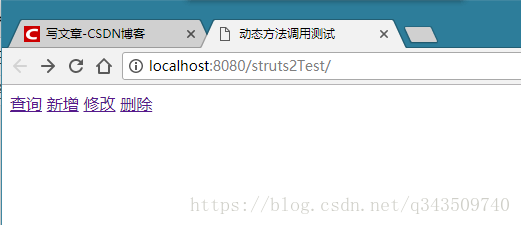
13.1 主界面
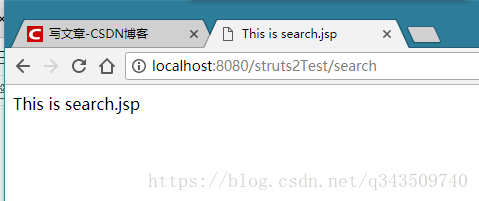
13.2 查询(默认方式,类中无execute方法,默认返回name="success"的result对应的界面)
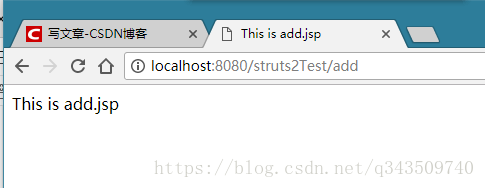
13.3 新增 (指定method属性,执行add方法)
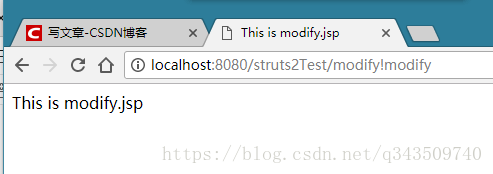
13.4 修改 (感叹号方式,执行modify方法)
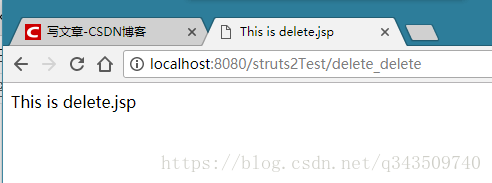
13.5 删除 (通配符方式,执行delete方法)
ok!
第三篇——Struts2的动态方法调用的更多相关文章
- struts2之动态方法调用(转)
转自:http://blog.csdn.net/longwentao/article/details/6940289 当我们访问一个Action时,默认是访问execute()方法,但当在一个Acti ...
- struts2的动态方法调用(DMI)和通配符映射
动态方法调用 1.Struts2默认关闭DMI功能,需要使用需要手动打开,配置常量 struts.enable.DynamicMethodInvocation = true 2.使用“!”方法,即 ...
- Struts2之动态方法调用
1.感叹号 前台页面 <%@ page language="java" contentType="text/html; charset=UTF-8" pa ...
- Struts2中动态方法的调用
Struts2中动态方法调用就是为了解决一个action对应多个请求的处理,以免action太多. 主要有一下三种方法:指定method属性.感叹号方式和通配符方式.推荐使用第三种方式. 1.指定me ...
- Struts2 Action中动态方法调用、通配符的使用
一.Struts2执行过程图: 二.struts2配置文件的加载顺序 struts-default.xml---struts-plugin.xml---struts.xml 具体步骤: 三.Actio ...
- Struts2之action 之 感叹号 ! 动态方法调用
struts2的动态方法调用的方式: 1.第一种方式:设置method属性 在Action类中定义一个签名与execute方法相同.只是名字不同的方法,如定义为: public String logi ...
- Struts2学习笔记 - Action篇<动态方法调用>
有三种方法可以使一个Action处理多个请求 动态方法调用DMI 定义逻辑Acton 在配置文件中使用通配符 这里就说一下Dynamic Method nvocation ,动态方法调用,什么是动态方 ...
- 第三章Struts2 Action中动态方法调用、通配符的使用
01.Struts 2基本结构 使用Struts2框架实现用登录的功能,使用struts2标签和ognl表达式简化了试图的开发,并且利用struts2提供的特性对输入的数据进行验证,以及访问Servl ...
- Struts2学习---基本配置,action,动态方法调用,action接收参数
首先我们先来直接配置,然后再来讲原理: 第一步:jar包的引入: 我们可以到struts2的官网上下载: http://struts.apache.org/download.cgi#struts251 ...
随机推荐
- [转] Android开发之如何保证Service不被杀掉(broadcast+system/app)
转发:原文链接http://blog.csdn.net/mad1989/article/details/22492519 序言 最近项目要实现这样一个效果:运行后,要有一个service始终保持在后台 ...
- 万能分布式消费框架,添加基于redis中间件的方式。
框架目的是分布式调度起一切任何函数(当然也包括调度起一切任何方法). 之前写的是基于rabbitmq的,作为专用的消息队列好处比redis的list结构好很多.但有的人还是强烈喜欢用redis,以及r ...
- How to write threats to validity?
Paper reference Threats to construct validity are concerned with the relationship between theory and ...
- 八、Sql Server 基础培训《进度8-查询多种写法》(实际操作)
知识点: 假设学生表.班级表.年级表 学生表(student) 内码 学生姓名 班级内码 001 张三 1002 002 李四 1002 003 王五 1003 004 钱六 1001 班级表(cla ...
- memoization提升递归效率
从开通博客到目前为止,也有一年了,刚开始的写了一篇工作的感想,然后就一直不知道写什么,看园子里的文章实在是很专业,怕自己写的太水.但是,写一些东西总归是好的,于是就当作是记笔记一样,开始写第一篇技术类 ...
- 【登录异常解决】Ubuntu 输入正确的密码后重新返回到登陆界面
症状 Ubuntu 输入正确的密码后,黑屏一闪,重新返回到登陆界面. 原因一:主目录下的.Xauthority文件拥有者变成了root,从而以用户登陆的时候无法都取.Xauthority文件.说明:X ...
- 三、CSS语言
CSS语言 1.概述:CSS (Cascading Style Sheets)是层叠样式表用来定义网页的显示效果.可以解决html代码对样式定义的重复,提高了后期样式代码的可维护性,并增强了网页的显示 ...
- try 和 catch 和 finally
try块中出现异常走进catch,异常后面的代码不会再被执行:finally块里try和catch执行完后要执行的代码,且一定会执行. 在释放资源的时候,不要多个放在一个try块里面. 流的关闭顺序: ...
- 20175320 2018-2019-2 《Java程序设计》第1周学习总结
20175320 2018-2019-2 <Java程序设计>第1周学习总结 教材学习内容总结 本周学习了教材的第一章内容.在这一章中,我了解了Java这门编程语言的特点和地位,而本章的重 ...
- [Day10]继承、抽象类
1.继承:在一个现有类的基础上去构建一个新的类,构建出来的新类被称为子类,现有类被称作父类,子类会自动拥有父类所有可继承的属性和方法. 2.继承的格式 : class 子类 extends 父类{} ...