
使用POI读写word docx文件
目录
1 读docx文件
1.1 通过XWPFWordExtractor读
1.2 通过XWPFDocument读
2 写docx文件
2.1 直接通过XWPFDocument生成
2.2 以docx文件作为模板
POI在读写word docx文件时是通过xwpf模块来进行的,其核心是XWPFDocument。一个XWPFDocument代表一个docx文档,其可以用来读docx文档,也可以用来写docx文档。XWPFDocument中主要包含下面这几种对象:
l XWPFParagraph:代表一个段落。
l XWPFRun:代表具有相同属性的一段文本。
l XWPFTable:代表一个表格。
l XWPFTableRow:表格的一行。
l XWPFTableCell:表格对应的一个单元格。
1 读docx文件
跟读doc文件一样,POI在读docx文件的时候也有两种方式,通过XWPFWordExtractor和通过XWPFDocument。在XWPFWordExtractor读取信息时其内部还是通过XWPFDocument来获取的。
1.1 通过XWPFWordExtractor读
在使用XWPFWordExtractor读取docx文档的内容时,我们只能获取到其文本,而不能获取到其文本对应的属性值。下面是一段使用XWPFWordExtractor来读取docx文档内容的示例代码:
- public class XwpfTest {
- /**
- * 通过XWPFWordExtractor访问XWPFDocument的内容
- * @throws Exception
- */
- @Test
- public void testReadByExtractor() throws Exception {
- InputStream is = new FileInputStream("D:\\test.docx");
- XWPFDocument doc = new XWPFDocument(is);
- XWPFWordExtractor extractor = new XWPFWordExtractor(doc);
- String text = extractor.getText();
- System.out.println(text);
- CoreProperties coreProps = extractor.getCoreProperties();
- this.printCoreProperties(coreProps);
- this.close(is);
- }
- /**
- * 输出CoreProperties信息
- * @param coreProps
- */
- private void printCoreProperties(CoreProperties coreProps) {
- System.out.println(coreProps.getCategory()); //分类
- System.out.println(coreProps.getCreator()); //创建者
- System.out.println(coreProps.getCreated()); //创建时间
- System.out.println(coreProps.getTitle()); //标题
- }
- /**
- * 关闭输入流
- * @param is
- */
- private void close(InputStream is) {
- if (is != null) {
- try {
- is.close();
- } catch (IOException e) {
- e.printStackTrace();
- }
- }
- }
- }
1.2 通过XWPFDocument读
在通过XWPFDocument读取docx文档时,我们就可以获取到文本比较精确的属性信息了。比如我们可以获取到某一个XWPFParagraph、XWPFRun或者是某一个XWPFTable,包括它们对应的属性信息。下面是一个使用XWPFDocument读取docx文档的示例:
- public class XwpfTest {
- /**
- * 通过XWPFDocument对内容进行访问。对于XWPF文档而言,用这种方式进行读操作更佳。
- * @throws Exception
- */
- @Test
- public void testReadByDoc() throws Exception {
- InputStream is = new FileInputStream("D:\\table.docx");
- XWPFDocument doc = new XWPFDocument(is);
- List<XWPFParagraph> paras = doc.getParagraphs();
- for (XWPFParagraph para : paras) {
- //当前段落的属性
- // CTPPr pr = para.getCTP().getPPr();
- System.out.println(para.getText());
- }
- //获取文档中所有的表格
- List<XWPFTable> tables = doc.getTables();
- List<XWPFTableRow> rows;
- List<XWPFTableCell> cells;
- for (XWPFTable table : tables) {
- //表格属性
- // CTTblPr pr = table.getCTTbl().getTblPr();
- //获取表格对应的行
- rows = table.getRows();
- for (XWPFTableRow row : rows) {
- //获取行对应的单元格
- cells = row.getTableCells();
- for (XWPFTableCell cell : cells) {
- System.out.println(cell.getText());;
- }
- }
- }
- this.close(is);
- }
- /**
- * 关闭输入流
- * @param is
- */
- private void close(InputStream is) {
- if (is != null) {
- try {
- is.close();
- } catch (IOException e) {
- e.printStackTrace();
- }
- }
- }
- }
2 写docx文件
2.1 直接通过XWPFDocument生成
在使用XWPFDocument写docx文件时不需要像使用HWPFDocument写doc文件那样必须从一个doc文件开始,我们可以直接new一个空的XWPFDocument,之后再往这个XWPFDocument里面填充内容,然后再把它写入到对应的输出流中。下面是使用XWPFDocument生成docx文件的示例代码:
- public class XwpfTest {
- /**
- * 基本的写操作
- * @throws Exception
- */
- @Test
- public void testSimpleWrite() throws Exception {
- //新建一个文档
- XWPFDocument doc = new XWPFDocument();
- //创建一个段落
- XWPFParagraph para = doc.createParagraph();
- //一个XWPFRun代表具有相同属性的一个区域。
- XWPFRun run = para.createRun();
- run.setBold(true); //加粗
- run.setText("加粗的内容");
- run = para.createRun();
- run.setColor("FF0000");
- run.setText("红色的字。");
- OutputStream os = new FileOutputStream("D:\\simpleWrite.docx");
- //把doc输出到输出流
- doc.write(os);
- this.close(os);
- }
- /***
- * 写一个表格
- * @throws Exception
- */
- @Test
- public void testWriteTable() throws Exception {
- XWPFDocument doc = new XWPFDocument();
- //创建一个5行5列的表格
- XWPFTable table = doc.createTable(5, 5);
- //这里增加的列原本初始化创建的那5行在通过getTableCells()方法获取时获取不到,但通过row新增的就可以。
- // table.addNewCol(); //给表格增加一列,变成6列
- table.createRow(); //给表格新增一行,变成6行
- List<XWPFTableRow> rows = table.getRows();
- //表格属性
- CTTblPr tablePr = table.getCTTbl().addNewTblPr();
- //表格宽度
- CTTblWidth width = tablePr.addNewTblW();
- width.setW(BigInteger.valueOf(8000));
- XWPFTableRow row;
- List<XWPFTableCell> cells;
- XWPFTableCell cell;
- int rowSize = rows.size();
- int cellSize;
- for (int i=0; i<rowSize; i++) {
- row = rows.get(i);
- //新增单元格
- row.addNewTableCell();
- //设置行的高度
- row.setHeight(500);
- //行属性
- // CTTrPr rowPr = row.getCtRow().addNewTrPr();
- //这种方式是可以获取到新增的cell的。
- // List<CTTc> list = row.getCtRow().getTcList();
- cells = row.getTableCells();
- cellSize = cells.size();
- for (int j=0; j<cellSize; j++) {
- cell = cells.get(j);
- if ((i+j)%2==0) {
- //设置单元格的颜色
- cell.setColor("ff0000"); //红色
- } else {
- cell.setColor("0000ff"); //蓝色
- }
- //单元格属性
- CTTcPr cellPr = cell.getCTTc().addNewTcPr();
- cellPr.addNewVAlign().setVal(STVerticalJc.CENTER);
- if (j == 3) {
- //设置宽度
- cellPr.addNewTcW().setW(BigInteger.valueOf(3000));
- }
- cell.setText(i + ", " + j);
- }
- }
- //文件不存在时会自动创建
- OutputStream os = new FileOutputStream("D:\\table.docx");
- //写入文件
- doc.write(os);
- this.close(os);
- }
- /**
- * 关闭输出流
- * @param os
- */
- private void close(OutputStream os) {
- if (os != null) {
- try {
- os.close();
- } catch (IOException e) {
- e.printStackTrace();
- }
- }
- }
- }
2.2 以docx文件作为模板
当然,我们也可以像写doc文件那样,先以一个docx文件作为模板,然后建立基于该docx文件的XWPFDocument对象,再把里面一些变化的信息在运行时进行替换,之后将XWPFDocument进行输出就可以了。所不同的是XWPFDocument中没有像HWPFDocument中那样的Range可以用来直接替换内容。而且底层的XWPFParagraph和XWPFRun也不支持直接将文本进行替换。倒是XWPFRun提供了一个设置文本的方法,不过新的文本不会替换旧的文本,而是会追加到原来的文本之后。现在的一个做法是先找出含有需要替换的变量的XWPFRun,然后将其移除,之后在原来的位置新增一个XWPFRun,其对应的文本是替换变量之后的文本。不过你设置的那个的变量的位置不一定就在一个XWPFRun里面,它有可能会被拆分到两个甚至更多的XWPFRun中,所以不是很有必要的话还是不推荐使用这种方式。
假设我们有一个docx文件,其内容是这样的:
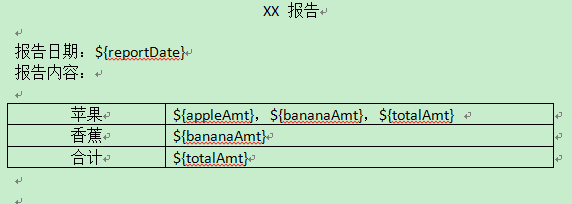
之后我们以该文件作为模板,利用相关数据把里面的变量进行替换,然后把替换后的文档输出到另一个docx文件中。具体做法如下:
- public class XwpfTest {
- /**
- * 用一个docx文档作为模板,然后替换其中的内容,再写入目标文档中。
- * @throws Exception
- */
- @Test
- public void testTemplateWrite() throws Exception {
- Map<String, Object> params = new HashMap<String, Object>();
- params.put("reportDate", "2014-02-28");
- params.put("appleAmt", "100.00");
- params.put("bananaAmt", "200.00");
- params.put("totalAmt", "300.00");
- String filePath = "D:\\word\\template.docx";
- InputStream is = new FileInputStream(filePath);
- XWPFDocument doc = new XWPFDocument(is);
- //替换段落里面的变量
- this.replaceInPara(doc, params);
- //替换表格里面的变量
- this.replaceInTable(doc, params);
- OutputStream os = new FileOutputStream("D:\\word\\write.docx");
- doc.write(os);
- this.close(os);
- this.close(is);
- }
- /**
- * 替换段落里面的变量
- * @param doc 要替换的文档
- * @param params 参数
- */
- private void replaceInPara(XWPFDocument doc, Map<String, Object> params) {
- Iterator<XWPFParagraph> iterator = doc.getParagraphsIterator();
- XWPFParagraph para;
- while (iterator.hasNext()) {
- para = iterator.next();
- this.replaceInPara(para, params);
- }
- }
- /**
- * 替换段落里面的变量
- * @param para 要替换的段落
- * @param params 参数
- */
- private void replaceInPara(XWPFParagraph para, Map<String, Object> params) {
- List<XWPFRun> runs;
- Matcher matcher;
- if (this.matcher(para.getParagraphText()).find()) {
- runs = para.getRuns();
- for (int i=0; i<runs.size(); i++) {
- XWPFRun run = runs.get(i);
- String runText = run.toString();
- matcher = this.matcher(runText);
- if (matcher.find()) {
- while ((matcher = this.matcher(runText)).find()) {
- runText = matcher.replaceFirst(String.valueOf(params.get(matcher.group(1))));
- }
- //直接调用XWPFRun的setText()方法设置文本时,在底层会重新创建一个XWPFRun,把文本附加在当前文本后面,
- //所以我们不能直接设值,需要先删除当前run,然后再自己手动插入一个新的run。
- para.removeRun(i);
- para.insertNewRun(i).setText(runText);
- }
- }
- }
- }
- /**
- * 替换表格里面的变量
- * @param doc 要替换的文档
- * @param params 参数
- */
- private void replaceInTable(XWPFDocument doc, Map<String, Object> params) {
- Iterator<XWPFTable> iterator = doc.getTablesIterator();
- XWPFTable table;
- List<XWPFTableRow> rows;
- List<XWPFTableCell> cells;
- List<XWPFParagraph> paras;
- while (iterator.hasNext()) {
- table = iterator.next();
- rows = table.getRows();
- for (XWPFTableRow row : rows) {
- cells = row.getTableCells();
- for (XWPFTableCell cell : cells) {
- paras = cell.getParagraphs();
- for (XWPFParagraph para : paras) {
- this.replaceInPara(para, params);
- }
- }
- }
- }
- }
- /**
- * 正则匹配字符串
- * @param str
- * @return
- */
- private Matcher matcher(String str) {
- Pattern pattern = Pattern.compile("\\$\\{(.+?)\\}", Pattern.CASE_INSENSITIVE);
- Matcher matcher = pattern.matcher(str);
- return matcher;
- }
- /**
- * 关闭输入流
- * @param is
- */
- private void close(InputStream is) {
- if (is != null) {
- try {
- is.close();
- } catch (IOException e) {
- e.printStackTrace();
- }
- }
- }
- /**
- * 关闭输出流
- * @param os
- */
- private void close(OutputStream os) {
- if (os != null) {
- try {
- os.close();
- } catch (IOException e) {
- e.printStackTrace();
- }
- }
- }
- }
经过上面的代码所示的过程处理后,我们替换变量后新输出来的docx文件的内容是这样的:
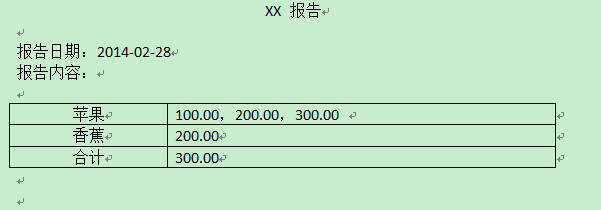
使用POI读写word docx文件的更多相关文章
- POI读写Word docx文件
使用POI读写word docx文件 目录 1 读docx文件 1.1 通过XWPFWordExtractor读 1.2 通过XWPFDocument读 2 写docx ...
- 使用POI读写Word doc文件
使用POI读写word doc文件 目录 1 读word doc文件 1.1 通过WordExtractor读文件 1.2 通过HWPFDocument读文件 2 写w ...
- android使用POI读写word doc文件
目录 1 读word doc文件 1.1 通过WordExtractor读文件 1.2 通过HWPFDocument读文件 2 写word doc文件 Apache p ...
- 解决 apache poi 转换 word(docx) 文件到 html 文件表格没边框的问题
一.起因 这几天在做电子签章问题,要通过替换docx文件中的占位符生成包含业务数据的合同数据,再转换成html文件,转换成pdf文件.遇到的问题是:通过apache poi转换docx到html时,原 ...
- POI读word docx 07 文件的两种方法
POI在读写word docx文件时是通过xwpf模块来进行的,其核心是XWPFDocument.一个XWPFDocument代表一个docx文档,其可以用来读docx文档,也可以用来写docx文档. ...
- POI写入word docx 07 的两种方法
下载最新jar包:http://poi.apache.org/download.html 以及API 1.写入word 1.1 直接通过XWPFDocument生成 在使用XWPFDocument写d ...
- 使用POI转换word doc文件
目录 1 转换为Html文件 2 转换为Xml文件 3 转换为Text文件 在POI中还存在有针对于word doc文件进行格式转换的功能.我们可以将word的内容 ...
- POI转换word doc文件为(html,xml,txt)
在POI中还存在有针对于word doc文件进行格式转换的功能.我们可以将word的内容转换为对应的Html文件,也可以把它转换为底层用来描述doc文档的xml文件,还可以把它转换为底层用来描述doc ...
- poi读写word模板 / java生成word文档
有一word文档表格 形如: 姓名 ${name} 电话 ${tel} 从数据库读取记录替换上述变量 import java.io.FileOutputStream; import java.util ...
随机推荐
- 通过 Ansible 创建 Jenkins Server
创建 CI 流程的第一件事应该是安装 CI 工具,本文以最常见的 Jenkins 为例,介绍如何使用 Ansible 自动安装 Jenkins Server.说明:本文的演示环境为 ubuntu 16 ...
- spring AOP 之二:@AspectJ注解的3种配置
@AspectJ相关文章 <spring AOP 之二:@AspectJ注解的3种配置> <spring AOP 之三:使用@AspectJ定义切入点> <spring ...
- Django 学习笔记(四) --- 模型和数据库
人生苦短 ~ Tips:仅适用于 Python 3+(反正差别不大,py2 改改也能用).因为据 Python 之父 Guido van Rossum 说会在 2020 年停止对 Python 2 的 ...
- netty源码解解析(4.0)-10 ChannelPipleline的默认实现--事件传递及处理
事件触发.传递.处理是DefaultChannelPipleline实现的另一个核心能力.在前面在章节中粗略地讲过了事件的处理流程,本章将会详细地分析其中的所有关键细节.这些关键点包括: 事件触发接口 ...
- Trie(字典树)解析及其在编程竞赛中的典型应用举例
摘要: 本文主要讲解了Trie的基本思想和原理,实现了几种常见的Trie构造方法,着重讲解Trie在编程竞赛中的一些典型应用. 什么是Trie? 如何构建一个Trie? Trie在编程竞赛中的典型应用 ...
- 【手记】解决涉及office的程序报“Unable to cast COM object of type System._ComObject...”的问题
报错内容大概像这种: 如果该电脑曾经装过WPS,那解决方法就是把WPS装回来,可以不用,但别卸,把它供着,惹不起.
- element split 将多个单号分隔
const condeid = this.formData.WayBillCode; var item = ""; const codes = condeid.split(&quo ...
- 【Spring】5、利用自定义注解在SpringMVC中实现自定义权限检查
转自:http://www.tuicool.com/articles/6z2uIvU 先描述一下应用场景,基于Spring MVC的WEB程序,需要对每个Action进行权限判断,当前用户有权限则允许 ...
- 通过写一个Demo展示C#中多种常用的集合排序方法
不多说,程序很简单,就是将集合中的数据进行排序,但使用到的知识点还是比较多的,大牛勿喷,谨献给初学者!直接上程序吧! namespace Demo { /// <summary> /// ...
- Python 操作文件
open() 函数 模式 说明 r 只读模式 w 只写模式,文件不存在自动创建:存在则清空再写 a 只追加写,在文件最后追加写 r+ 打开一个文件用于读写.文件指针将会放在文件的开头. w+ 打开一个 ...