
vuejs_01项目启动
知识点
.npm 相关命令

npm list -g --depth=  查看全局安装了哪些依赖

项目启动
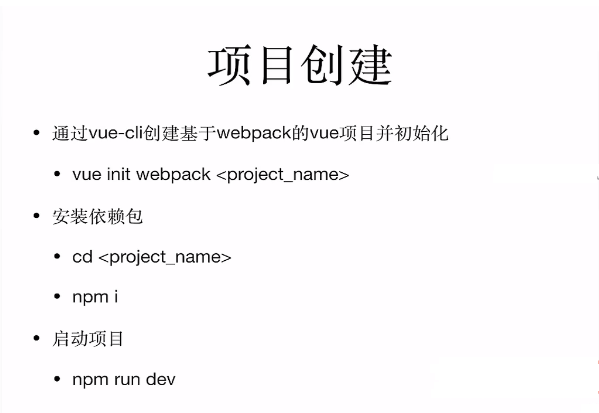
npm install vue-cli -g                安装vue脚手架

vue init webpack foldername        用webpack构建项目

//npm init -y                         生成package.json文件

npm i                                 下载项目依赖(是根据package.json来安装)

npm start                             下载完依赖后 运行项目

选择 git 进行版本控制
项目目录

build   构建脚本

config  配置文件

src      写前端vue项目

   —main.js 整个前端项目的入口,引vue

   —app.vue 根组件

static   静态资源
src->router->index.js 路由路径设置不区分大小写
path: '/GoodsList',//路径这里不区分大小写
import Vue from 'vue'

import Router from 'vue-router'

import HelloWorld from '@/components/HelloWorld'

import GoodsList from '@/views/GoodsList'

import Cart from '@/views/Cart'

Vue.use(Router)

export default new Router({

  routes: [

    {

      path: '/',

      name: 'HelloWorld',

      component: HelloWorld

    },

    {

      path: '/GoodsList',//路径这里不区分大小写

      name: 'GoodsList',

      component: GoodsList

    },

    {

      path: '/Cart',

      name: 'Cart',

      component: Cart

    },

  ]

})
根组件app.vue
vue模板里面只能有一个顶层div
<template>

  <div id="app">

    <!-- <img src="./assets/logo.png"> logo图标-->

    <!-- router-view 写的是所有的组件在main.js引入,所有的页面由router-view进行控制 -->

    <router-view/>

  </div>

</template>

<script>

export default {

  name: 'app'

}

</script>

<style>

#app {

  font-family: 'Avenir', Helvetica, Arial, sans-serif;

  -webkit-font-smoothing: antialiased;

  -moz-osx-font-smoothing: grayscale;

  text-align: center;

  color: #2c3e50;

  margin-top: 60px;

}

</style>
config->index.js 文件夹默认路径配置
'use strict'

// Template version: 1.2.1

// see http://vuejs-templates.github.io/webpack for documentation.

const path = require('path')

module.exports = {

  dev: {

    // Paths

    assetsSubDirectory: 'static',

    //默认静态资源目录,调用的时候直接用/static/img/1.jpg

    assetsPublicPath: '/',


    proxyTable: {},

    // Various Dev Server settings

    host: 'localhost', // can be overwritten by process.env.HOST

    port: 8080, // can be overwritten by process.env.HOST, if port is in use, a free one will be determined

    autoOpenBrowser: false,

    errorOverlay: true,

    notifyOnErrors: true,

    poll: false, // https://webpack.js.org/configuration/dev-server/#devserver-watchoptions-

    // Use Eslint Loader?

    // If true, your code will be linted during bundling and

    // linting errors and warnings will be shown in the console.

    useEslint: true,

    // If true, eslint errors and warnings will also be shown in the error overlay

    // in the browser.

    showEslintErrorsInOverlay: false,

    /**

     * Source Maps

     */

    // https://webpack.js.org/configuration/devtool/#development

    devtool: 'eval-source-map',

    // If you have problems debugging vue-files in devtools,

    // set this to false - it *may* help

    // https://vue-loader.vuejs.org/en/options.html#cachebusting

    cacheBusting: true,

    // CSS Sourcemaps off by default because relative paths are "buggy"

    // with this option, according to the CSS-Loader README

    // (https://github.com/webpack/css-loader#sourcemaps)

    // In our experience, they generally work as expected,

    // just be aware of this issue when enabling this option.

    cssSourceMap: false,

  },

  build: {

    // Template for index.html

    index: path.resolve(__dirname, '../dist/index.html'),

    // Paths

    assetsRoot: path.resolve(__dirname, '../dist'),

    assetsSubDirectory: 'static',

    assetsPublicPath: '/',

    /**

     * Source Maps

     */

    productionSourceMap: true,

    // https://webpack.js.org/configuration/devtool/#production

    devtool: '#source-map',

    // Gzip off by default as many popular static hosts such as

    // Surge or Netlify already gzip all static assets for you.

    // Before setting to `true`, make sure to:

    // npm install --save-dev compression-webpack-plugin

    productionGzip: false,

    productionGzipExtensions: ['js', 'css'],

    // Run the build command with an extra argument to

    // View the bundle analyzer report after build finishes:

    // `npm run build --report`

    // Set to `true` or `false` to always turn it on or off

    bundleAnalyzerReport: process.env.npm_config_report

  }

}
开发过程中的技巧:
1.页面报错信息:找Error关键字
Failed to compile.

./node_modules/vue-loader/lib/template-compiler?{"id":"data-v-21894420","hasScoped":true,"transformToRequire":{"video":"src","source":"src","img":"src","image":"xlink:href"},"buble":{"transforms":{}}}!./node_modules/vue-loader/lib/selector.js?type=template&index=&bustCache!./src/views/GoodsList.vue

Module not found: Error: Can't resolve './../img/.jpg' in 'F:\.es6+node.jsl练习\vuejs实战练习-动脑20171030\vue2-shop-lesson\src\views'

 @ ./node_modules/vue-loader/lib/template-compiler?{"id":"data-v-21894420","hasScoped":true,"transformToRequire":{"video":"src","source":"src","img":"src","image":"xlink:href"},"buble":{"transforms":{}}}!./node_modules/vue-loader/lib/selector.js?type=template&index=&bustCache!./src/views/GoodsList.vue :-

 @ ./src/views/GoodsList.vue

 @ ./src/router/index.js

 @ ./src/main.js

 @ multi (webpack)-dev-server/client?http://localhost:8080 webpack/hot/dev-server ./src/main.js
vuejs_01项目启动的更多相关文章
- maven 项目启动tomcat报错 java.lang.ClassNotFoundException: org.springframework.web.context.ContextLoaderListener
maven项目启动tomcat报错: java.lang.ClassNotFoundException: org.springframework.web.context.ContextLoaderLi ...
- eclipse java项目中明明引入了jar包 为什么项目启动的时候不能找到jar包 项目中已经 引入了 com.branchitech.app 包 ,但时tomcat启动的时候还是报错? java.lang.ClassNotFoundException: com.branchitech.app.startup.AppStartupContextListener java.lang.ClassN
eclipse java项目中明明引入了jar包 为什么项目启动的时候不能找到jar包 项目中已经 引入了 com.branchitech.app 包 ,但时tomcat启动的时候还是报错?java. ...
- 项目启动异常java.lang.OutOfMemoryError: PermGen space
java.lang.OutOfMemoryError: PermGen space 解决办法: Eclipse-->window-->Tomcat -->JVM setting - ...
- 【项目启动】 tomcat启动,项目无法启动,无法正常访问/项目可以启动,报错:java.lang.ClassNotFoundException: ContextLoaderListener
使用maven搭建项目(这个错误和是不是使用maven搭建项目没有关系),然后部署到tomcat中运行. 出现问题1: tomcat跑起来了,但是启动时间很短,没有报错,项目不能正常访问 项目启动时间 ...
- SpringMVC——项目启动时从数据库查询数据
SpringMVC项目中遇到这样的问题: 1.很多数据字典需要从数据库中查询: 2.懒得修改SQL语句: 3.想在项目中声明静态变量存储数据字典,但是希望这个字典可以在项目启动时进行加载. 当遇到这样 ...
- eclipse 中导入 maven项目 启动报错
导入Maven项目到Eclipse中时,出现问题如下: java.lang.ClassNotFoundException: org.springframework.web.context.Contex ...
- 关于ionic开发的一些总结(项目启动设置,app图标名称更改)
1.更改包名称 一般项目刚生成时,ionic会根据项目名称自动给你生成一个包名.要修改包名的话,在根目录的config配置文件中,<widget id="x.x.x"换成自己 ...
- 在web项目启动时,使用监听器来执行某个方法
在web项目中有很多时候需要在项目启动时就执行一些方法,而且只需要执行一次,比如:加载解析自定义的配置文件.初始化数据库信息等等,在项目启动时就直接执行一些方法,可以减少很多繁琐的操作. 这里写了个简 ...
- web项目启动流程探索
在web项目的启动过程中,我们希望知道它的一般流程是什么,这样我们就可以在各个流程中加入相应的功能,或者对于我们排错也有帮助. 我们知道,当我们启动tomcat容器以后,容器首先初始化一些必要的组件, ...
随机推荐
- 实验吧 php
Once More 题目地址:http://ctf5.shiyanbar.com/web/more.php 打开直接有源码: <?php if (isset ($_GET['password'] ...
- FFmpeg时间戳详解
本文为作者原创,转载请注明出处:https://www.cnblogs.com/leisure_chn/p/10584910.html 1. I帧/P帧/B帧 I帧:I帧(Intra-coded pi ...
- .net网站上传图片换电脑不显示
当不用网站的IP地址访问图片,只用相对路径访问时,在发布网站的时候,将上传图片的目标文件夹,包含在项目中再发布即可.
- C#时间格式转换为时间戳互转
/// <summary> /// 将 DateTime时间格式转换为Unix时间戳格式 /// </summary> /// <param name="tim ...
- Hive案例05-学生成绩表综合案例
1. 数据说明 (1) student表 hive> select * from student; # 学生ID 学生姓名 性别 年龄 所在系 # sid sname sex age dept ...
- [PHP] 算法-复制复杂链表的PHP实现
复杂链表的复制: 1.在旧链表中每个结点的后面复制出一个结点,隔代 2.把旧链表的随机指向部分,复制到新添加的结点上 3.把新结点从旧链表中拆分出来成新链表 1. linklist=head whil ...
- R0~R16寄存器作用
R0-R3 用作传入函数参数,传出函数返回值.在子程序调用之间,可以将 r0-r3 用于任何用途. 被调用函数在返回之前不必恢复 r0-r3.如果调用函数需要再次使用 r0-r3 的内容,则它 ...
- Java学习笔记之——switch-case条件结构
语法: switch(变量){ case 常量1: 执行语句: break: case 常量2: 执行语句: break: case 常量3: 执行语句: break: ………… default: 语 ...
- 随机生成n个不重复的数,范围是2-32,并让其在新页面打开
var n = 5 var timer; function suiji(){ var arr = [] // 循环生成n个随机数 for(var i=0;i<n;i++){ var num = ...
- blfs(systemv版本)学习笔记-wget的安装与配置
我的邮箱地址:zytrenren@163.com欢迎大家交流学习纠错! blfs wget项目地址:http://www.linuxfromscratch.org/blfs/view/8.3/basi ...