
20.2.翻译系列:EF 6中基于代码的数据库迁移技术【EF 6 Code-First系列】
原文链接:https://www.entityframeworktutorial.net/code-first/code-based-migration-in-code-first.aspx
EF 6 Code-First系列文章目录:
- 1 翻译系列:什么是Code First(EF 6 Code First 系列)
- 2.翻译系列:为EF Code-First设置开发环境(EF 6 Code-First系列)
- 3.翻译系列:EF Code-First 示例(EF 6 Code-First系列)
- 4.翻译系列:EF 6 Code-First默认约定(EF 6 Code-First系列)
- 5.翻译系列:EF 6中数据库的初始化(EF 6 Code-First 系列)
- 6.翻译系列:EF 6 Code-First中数据库初始化策略(EF 6 Code-First系列
- 7.翻译系列:EF 6中的继承策略(EF 6 Code-First 系列)
- 8.翻译系列: EF 6中配置领域类(EF 6 Code-First 系列)
- 9.翻译系列:EF 6以及EF Core中的数据注解特性(EF 6 Code-First系列)
- 9.1 翻译系列:数据注解特性之----Table【EF 6 Code-First 系列】
- 9.2 翻译系列:数据注解特性之---Column【EF 6 Code First系列】
- 9.3 翻译系列:数据注解特性之Key【EF 6 Code-First 系列】
- 9.4 翻译系列:EF 6以及 EF Core中的NotMapped特性(EF 6 Code-First系列)
- 9.5 翻译系列:数据注解之ForeignKey特性【EF 6 Code-First系列】
- 9.6 翻译系列:数据注解之Index特性【EF 6 Code-First系列】
- 9.7 翻译系列:EF数据注解特性之--InverseProperty【EF 6 Code-First系列】
- 9.8 翻译系列:数据注解特性之--Required 【EF 6 Code-First系列】
- 9.9 翻译系列:数据注解特性之--MaxLength 【EF 6 Code-First系列】
- 9.10 翻译系列:EF数据注解特性之StringLength【EF 6 Code-First系列】
- 9.11 翻译系列:数据注解特性之--Timestamp【EF 6 Code-First系列】
- 9.12 翻译系列:数据注解特性之ConcurrencyCheck【EF 6 Code-First系列】
- 10.翻译系列:EF 6中的Fluent API配置【EF 6 Code-First系列】
- 10.1.翻译系列:EF 6中的实体映射【EF 6 Code-First系列】
- 10.2.翻译系列:使用Fluent API进行属性映射【EF 6 Code-First】
- 11.翻译系列:在EF 6中配置一对零或者一对一的关系【EF 6 Code-First系列】
- 12.翻译系列:EF 6 中配置一对多的关系【EF 6 Code-First系列】
- 13.翻译系列:Code-First方式配置多对多关系【EF 6 Code-First系列】
- 14.翻译系列:从已经存在的数据库中生成上下文类和实体类【EF 6 Code-First系列】
- 15.翻译系列:EF 6中的级联删除【EF 6 Code-First 系列】
- 16.翻译系列:EF 6 Code -First中使用存储过程【EF 6 Code-First系列】
- 17.翻译系列:将Fluent API的配置迁移到单独的类中【EF 6 Code-First系列】
- 18.翻译系列:EF 6 Code-First 中的Seed Data(种子数据或原始测试数据)【EF 6 Code-First系列】
- 19.翻译系列:EF 6中定义自定义的约定【EF 6 Code-First约定】
- 20.翻译系列:Code-First中的数据库迁移技术【EF 6 Code-First系列】
- 20.1翻译系列:EF 6中自动数据迁移技术【EF 6 Code-First系列】
- 20.2.翻译系列:EF 6中基于代码的数据库迁移技术【EF 6 Code-First系列】
- 21.翻译系列:Entity Framework 6 Power Tools【EF 6 Code-First系列】
在前面的一节中,你学习了自动迁移技术,当实体改变的时候,自动进行数据库迁移。这里你将会学习基于代码的数据库迁移技术。
基于代码的数据库迁移技术,在迁移的时候,提供了更多的控制。例如允许你配置添加额外的字符串,例如设置列的默认值,配置计算列等等。
为了使用基于代码的数据库迁移,你需要在程序包管理控制台中输入:
- Enable-Migrations:在项目中启用数据库迁移,然后会创建一个Configuration类
- Add-Migration:创建了一个迁移类,其中指定了Up和Down方法。
- Update-Database:执行Add_migration指令中创建的迁移,将改变应用到数据库中。
为了使用基于代码的数据库迁移,首先在程序包管理控制台中执行enable-migrations命令。

Enable-Migrations指令会创建Configuration类,这个Configuration类继承自DbMigrationsConfiguration ,Configuration类中包含这句代码:AutomaticMigrationsEnabled = false.
现在你需要在上下文类中设置数据库初始化策略为MigrateDatabaseToLatestVersion :
public class SchoolContext: DbContext

{

    public SchoolDBContext(): base("SchoolDB")

    {

        Database.SetInitializer(new MigrateDatabaseToLatestVersion<SchoolDBContext, EF6Console.Migrations.Configuration>());

    }

    public DbSet<Student> Students { get; set; }

    protected override void OnModelCreating(DbModelBuilder modelBuilder)

    {

    }

}
现在使用Add-Migration命令创建一个迁移类 ,后面跟着迁移类的名称:

上面的命令将会创建一个时间戳_SchoolDB-v1.cs文件,类里面包含Up和Down方法:
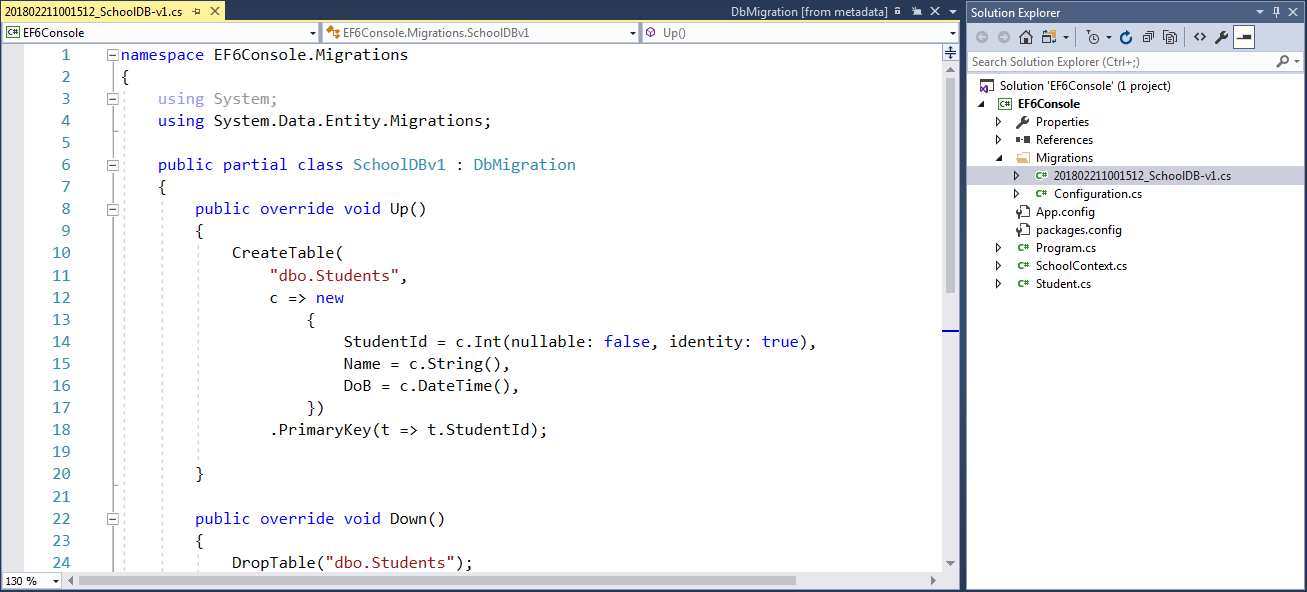
正如你所见,Up方法包含创建数据库对象的代码,并且Down方法包含删除数据库的代码。你同样可以编写代码,进行额外的配置。这就是优于自动迁移的地方。
为了了解更多add-migrations命令参数,你可以执行get-help add-migration或者get-help add-migration -detailed:
PM> get-help add-migration

NAME

    Add-Migration

SYNOPSIS

    Scaffolds a migration script for any pending model changes.

SYNTAX

    Add-Migration [-Name] <String> [-Force] [-ProjectName <String>] [-StartUpProjectName <String>]

        [-ConfigurationTypeName <String>]     [-ConnectionStringName <String>] [-IgnoreChanges]

        [-AppDomainBaseDirectory <String>] [<CommonParameters>]

    Add-Migration [-Name] <String> [-Force] [-ProjectName <String>] [-StartUpProjectName <String>]

        [-ConfigurationTypeName <String>] -ConnectionString <String> -ConnectionProviderName <String>

        [-IgnoreChanges] [-AppDomainBaseDirectory <String>] [<CommonParameters>]

DESCRIPTION

    Scaffolds a new migration script and adds it to the project.

RELATED LINKS

REMARKS

    To see the examples, type: "get-help Add-Migration -examples".

    For more information, type: "get-help Add-Migration -detailed".

    For technical information, type: "get-help Add-Migration -full".
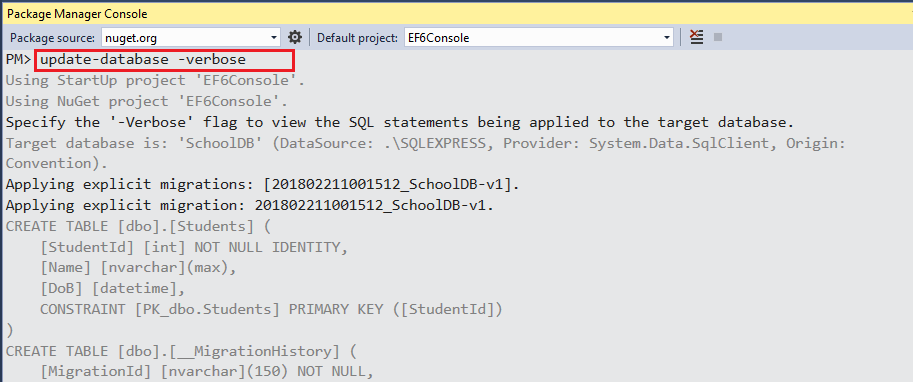
在使用Add-Migration命令之后,你需要更新数据库。通过执行Update-Database命令,来提交修改到数据库中,还可以在后面加上–verbose 就可以看到生成的SQL脚本:
执行get-help update-database或者get-help update-database -detailed命令:
PM> get-help update-database

NAME

    Update-Database

SYNOPSIS

    Applies any pending migrations to the database.

SYNTAX

    Update-Database [-SourceMigration <String>] [-TargetMigration <String>] [-Script] [-Force]

    [-ProjectName <String>] [-StartUpProjectName <String>] [-ConfigurationTypeName <String>]

    [-ConnectionStringName <String>] [-AppDomainBaseDirectory <String>] [<CommonParameters>]

    Update-Database [-SourceMigration <String>] [-TargetMigration <String>] [-Script] [-Force]

    [-ProjectName <String>] [-StartUpProjectName <String>] [-ConfigurationTypeName <String>]

    -ConnectionString <String> -ConnectionProviderName <String> [-AppDomainBaseDirectory <String>]

    [<CommonParameters>]

DESCRIPTION

    Updates the database to the current model by applying pending migrations.

RELATED LINKS

REMARKS

    To see the examples, type: "get-help Update-Database -examples".

    For more information, type: "get-help Update-Database -detailed".

    For technical information, type: "get-help Update-Database -full".
到这个时候,数据库就被创建或更新了,现在不管什么时候,模型发生改变的时候,执行Add-Migration 带上参数名,就创建一个新的迁移文件,然后执行Update-Database命令,就将修改提交到数据库了。
迁移回退
假设你想要回退到之前的任何一个状态,那么你可以执行update-database后面跟着–TargetMigration,指定你想要回退的版本。例如,假设SchoolDB数据库有很多迁移记录,但是你想回退到第一个版本,那么你可以执行下面的代码:
PM> update-database -TargetMigration:SchoolDB-v1
20.2.翻译系列:EF 6中基于代码的数据库迁移技术【EF 6 Code-First系列】的更多相关文章
- 20.翻译系列:Code-First中的数据库迁移技术【EF 6 Code-First系列】
原文链接:https://www.entityframeworktutorial.net/code-first/migration-in-code-first.aspx EF 6 Code-First ...
- 12.翻译系列:EF 6 中配置一对多的关系【EF 6 Code-First系列】
原文链接:https://www.entityframeworktutorial.net/code-first/configure-one-to-many-relationship-in-code-f ...
- Entity Framework入门教程(18)---EF6中基于代码进行配置方式
EF6中基于代码进行配置方式 我们以前对EF进行配置时是在app.config/web.config下的<entityframework>节点下进行配置的,EF6引进了基于代码的配置方法. ...
- 2.EF中 Code-First 方式的数据库迁移
原文链接:http://www.c-sharpcorner.com/UploadFile/3d39b4/code-first-migrations-with-entity-framework/ 系列目 ...
- EF中 Code-First 方式的数据库迁移
原文链接:http://www.c-sharpcorner.com/UploadFile/3d39b4/code-first-migrations-with-entity-framework/ 系列目 ...
- 2017.11.12 web中JDBC 方式访问数据库的技术
JavaWeb------ 第四章 JDBC数据库访问技术 在JavaWeb应用程序中数据库访问是通过Java数据库连接(JavaDateBase Connectivity简称JDBC)数据库的链接一 ...
- [更新中]【South使用总结】django开发中使用South进行数据库迁移
Django开发中使用South进行数据库迁移的使用总结 South的详细资料可产看官方文档http://south.readthedocs.org/en/latest South安装配置 pip i ...
- Android开发中使用代码删除数据库
更多信息参考:Android开发中使用代码删除数据库 在Android开发中,如果用到数据库,就会有一个很麻烦的问题,就是有时候需要删除数据库很麻烦,要打开Android Device Monitor ...
- EF Core 中多次从数据库查询实体数据,DbContext跟踪实体的情况
使用EF Core时,如果多次从数据库中查询一个表的同一行数据,DbContext中跟踪(track)的实体到底有几个呢?我们下面就分情况讨论下. 数据库 首先我们的数据库中有一个Person表,其建 ...
随机推荐
- linux 学习笔记 软件包管理
>查询文件所属软件包 #rpm -qf /usr/share/pixmaps/xplns.png 查询某个文件所属软件包 >查询软件包所包含文件列表 #rpm -ql xplus-3.3. ...
- linux 学习笔记 mysql安装总结
1 安装方式 下载2禁制源码安装包 mysql-5.5.27-linux2.6-i686.tar.gz 备注:2禁制额包解压缩后直接就可以使用 不用Make 2 步骤 shell>groupad ...
- asp.net core选项Options模块的笔记
这篇博客是写给自己看的.已经不止一次看到AddOptions的出现,不管是在.net core源码还是别人的框架里面,都充斥着AddOptions.于是自己大概研究了下,没有深入,因为,我的功力还是不 ...
- 解决Python自带的json不能序列化data,datetime类型数据问题
官方文档中的一个Demo: >>> import json >>> class ComplexEncoder(json.JSONEncoder): ... def ...
- Javascript你必须要知道的面试题
1.使用 typeof bar === "object" 判断 bar 是不是一个对象有神马潜在的弊端?如何避免这种弊端? 使用 typeof 的弊端是显而易见的(这种弊端同使用 ...
- C语言中存储类别又分为四类:自动(auto)、静态(static)、寄存器的(register)和外部的(extern)。
除法运算中注意: 如果相除的两个数都是整数的话,则结果也为整数,小数部分省略,如8/3 = 2:而两数中有一个为小数,结果则为小数,如:9.0/2 = 4.500000. 取余运算中注意: 该运算只适 ...
- RFID的winform程序心得1
/// 根据日期获取当周星期一 /// </summary> /// <param name="dt"></param> /// <ret ...
- linux修改文件为可执行文件
修改shell为可执行文件 chmod +x test2.sh chmod 751 file 给file的属主分配读.写.执行(7)的权限,给file的所在组分配读.执行(5)的权限,给其他用户分 ...
- equals()与hashCode()
两个都可以用来判断两个对象是否相同一致. hashCode相同的不一定是同一个对象:hashCode不同的一定不是相同对象 equals相同的一定是相同对象,是绝对可靠的 既然equals这么可靠,那 ...
- React Native小白入门学习路径——四
上一周一直在弄着老师布置的各种任务,再加上要做的都还没做完.所以上周的总结到现在才写完发出来..真的觉得老师太高估我们这些菜鸡了. 也许是我太着急了,在自己还没有足够储备去完成自己的项目,总觉得先找一 ...