
Spring实现WebSocket通信
WebSocket是两个应用之间全双工的通信通道。WebSocket最常见的应用场景是实现服务器和基于浏览器的应用之间的通信。
浏览器中的javascript客户端开启一个到服务器的连接,服务器通过这个连接发送更新给浏览器。相比轮询服务端以查找更新的
方案,这种技术更加高效。
下面将通过两种方式(XML配置和Java类配置)实现WebSocket的简单应用。
需要说明的是,由于本人浏览器无法支持WebSocket(这也是WebSocket令人遗憾的地方),所以使用WebSocket的备用方案
SockJS。SockJS会优先选用WebSocket,但是如果WebSocket不可用的话,它将会从其他方案中挑选最优方案。
不论哪种方案,首先要在maven项目中添加相关依赖:
<!-- WebSocket依赖 -->

    <dependency>

      <groupId>org.springframework</groupId>

      <artifactId>spring-websocket</artifactId>

        <version>5.1.3.RELEASE</version>

    </dependency>

<!-- 处理json数据 -->

    <dependency>

      <groupId>com.fasterxml.jackson.core</groupId>

      <artifactId>jackson-core</artifactId>

      <version>2.9.8</version>

    </dependency>

    <dependency>

      <groupId>com.fasterxml.jackson.core</groupId>

      <artifactId>jackson-databind</artifactId>

      <version>2.9.8</version>

    </dependency>
注意,后两个依赖不能忘记,不然会在通信时出错
一、通过XML配置
在之前的项目中,我们首先创建example.websocket包,用于存放我们定义的处理器类。在该包中创建我们的
WebSocket处理器类MyHandler:
package example.websocket;

import org.slf4j.Logger;

import org.slf4j.LoggerFactory;

import org.springframework.web.socket.CloseStatus;

import org.springframework.web.socket.TextMessage;

import org.springframework.web.socket.WebSocketSession;

import org.springframework.web.socket.handler.TextWebSocketHandler;

/**

 * webSocket处理器

 */

public class MyHandler extends TextWebSocketHandler {

    private static final Logger log = LoggerFactory.getLogger(MyHandler.class);

    /**

     * 处理接收的信息行为

     * @param session

     * @param message

     * @throws Exception

     */

    @Override

    protected void handleTextMessage(WebSocketSession session, TextMessage message) throws Exception {

        log.info("Received message: " + message.getPayload());

        session.sendMessage(new TextMessage("Server has received your message"));

    }

    /**

     * 处理建立连接后的事件

     * @param session

     * @throws Exception

     */

    @Override

    public void afterConnectionEstablished(WebSocketSession session) throws Exception {

        log.info("Connection established");

    }

    /**

     * 处理连接关闭事件

     * @param session

     * @param status

     * @throws Exception

     */

    @Override

    public void afterConnectionClosed(WebSocketSession session, CloseStatus status) throws Exception {

        log.info("Connection closed. Status: " + status);

    }

}
接下来我们要在DispatcherServlet中配置我们的WebSocket:
<websocket:handlers>

        <websocket:mapping path="/myHandler" handler="myHandler"/>

        <websocket:sockjs/>

    </websocket:handlers>

    <bean id="myHandler" class="example.websocket.MyHandler"/>
注意,这段代码应放入dispatcher-servlet.xml中,其中<websocket:sockjs/>标签配置了SockJS
接下来我们创建一个新的Controller类用于加载一个独立的视图:
package example.controller;

import org.springframework.stereotype.Controller;

import org.springframework.web.bind.annotation.RequestMapping;

import org.springframework.web.bind.annotation.RequestMethod;

import org.springframework.web.servlet.ModelAndView;

@Controller

@RequestMapping(value = "websocket")

public class CommunicationController {

    @RequestMapping(method = RequestMethod.GET)

    public ModelAndView webSocketView() {

        ModelAndView modelAndView = new ModelAndView("webSocketClient");

        return modelAndView;

    }

}
下面我们来编写一个简易的前端代码,创建webSocketClient.jsp文件,需要注意,在使用SockJS之前,需要引入相应的库,
具体参见https://github.com/sockjs/sockjs-client,这里借用了其他博主的代码https://blog.csdn.net/dadiyang/article/details/83715569
<%--

  Created by IntelliJ IDEA.

  User: asus1

  Date: 2019/1/24

  Time: 21:58

  To change this template use File | Settings | File Templates.

--%>

<%@ page contentType="text/html;charset=UTF-8" language="java" %>

<html>

<head>

    <title>webSocket客户端</title>

</head>

<body>

<h1>Welcome!</h1>

<ul id="ul">

</ul>

<script  type="text/javascript" src="${pageContext.request.contextPath}/statics/js/sockjs-1.0.0.min.js"></script>

<script>

    var url = '/myHandler';

    var sock = new SockJS(url);

    sock.onopen = function (ev) {

        console.log("opening");

        sayHey();

    };

    sock.onmessage = function (ev) {

        console.log(ev.data);

        var li = document.createElement("li");

        li.innerText = ev.data;

        document.getElementById("ul").appendChild(li);

        setTimeout(sayHey, 2000);

    };

    sock.onclose = function (ev) {

        console.log("closed");

    };

    function sayHey() {

        console.log("sending 'Hey guy!'");

        sock.send("Hey guy!");

    };

</script>

</body>

</html>
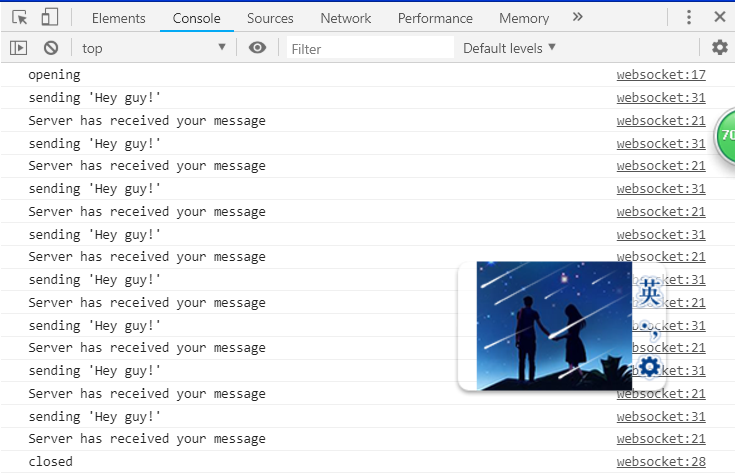
运行项目结果:



二、通过java类配置
完全依照其他博主的方法重新创建了一个项目,整个项目通过java类进行配置
参考资料:https://blog.csdn.net/dadiyang/article/details/83715569
《Spring 实战(第4版)》
下面直接粘代码:
配置类:
RootConfig:
package com.example.config;

import org.springframework.context.annotation.ComponentScan;

import org.springframework.context.annotation.Configuration;

import org.springframework.context.annotation.FilterType;

import org.springframework.web.servlet.config.annotation.EnableWebMvc;

@Configuration

@ComponentScan(basePackages = {"com.example"},

    excludeFilters = {

        @ComponentScan.Filter(type = FilterType.ANNOTATION, value = EnableWebMvc.class)

    })

public class RootConfig {

}
WebConfig:
package com.example.config;

import org.springframework.context.annotation.ComponentScan;

import org.springframework.context.annotation.Configuration;

import org.springframework.web.servlet.config.annotation.DefaultServletHandlerConfigurer;

import org.springframework.web.servlet.config.annotation.EnableWebMvc;

import org.springframework.web.servlet.config.annotation.ViewResolverRegistry;

import org.springframework.web.servlet.config.annotation.WebMvcConfigurer;

import org.springframework.web.servlet.view.InternalResourceViewResolver;

/**

 * WebMvcConfigurerAdapter在新版本中已被弃用

 * 可以通过实现WebMvcConfigurer或者拓展WebMvcConfigurerSupport

 * 替代WebMvcConfigurerAdapter的拓展

 */

@Configuration

@EnableWebMvc

@ComponentScan(basePackages = {"com.example"})

public class WebConfig implements WebMvcConfigurer {

    /**

     * 配置jsp视图解析器

     * @param registry

     */

    @Override

    public void configureViewResolvers(ViewResolverRegistry registry) {

        registry.jsp("/WEB-INF/views/", ".jsp");

    }

    /**

     * 配置静态资源的处理

     * @param configurer

     */

    @Override

    public void configureDefaultServletHandling(DefaultServletHandlerConfigurer configurer) {

        configurer.enable();

    }

}
WebSocketConfig:
package com.example.config;

import com.example.websocket.MyHandler;

import org.springframework.context.annotation.Bean;

import org.springframework.context.annotation.Configuration;

import org.springframework.web.socket.config.annotation.EnableWebSocket;

import org.springframework.web.socket.config.annotation.WebSocketConfigurer;

import org.springframework.web.socket.config.annotation.WebSocketHandlerRegistry;

@Configuration

@EnableWebSocket

public class WebSocketConfig implements WebSocketConfigurer {

    @Override

    public void registerWebSocketHandlers(WebSocketHandlerRegistry webSocketHandlerRegistry) {

        webSocketHandlerRegistry.addHandler(myHandler(), "/myHandler").withSockJS();

    }

    @Bean

    public MyHandler myHandler() {

        return new MyHandler();

    }

}
WebApp初始化类:
package com.example.webappinit;

import com.example.config.RootConfig;

import com.example.config.WebConfig;

import org.springframework.web.servlet.support.AbstractAnnotationConfigDispatcherServletInitializer;

public class wsWebAppInitializer extends AbstractAnnotationConfigDispatcherServletInitializer {

    @Override

    protected Class<?>[] getRootConfigClasses() {

        return new Class[] {RootConfig.class};

    }

    @Override

    protected String[] getServletMappings() {

        return new String[] {"/"};

    }

    @Override

    protected Class<?>[] getServletConfigClasses() {

        return new Class[] {WebConfig.class};

    }

}
其他代码与XML配置一样
运行项目结果:


Spring实现WebSocket通信的更多相关文章
- spring整合websocket通信
1. maven依赖 <?xml version="1.0" encoding="UTF-8"?> <project xmlns=" ...
- spring boot websocket stomp 实现广播通信和一对一通信聊天
一.前言 玩.net的时候,在asp.net下有一个叫 SignalR 的框架,可以在ASP .NET的Web项目中实现实时通信.刚接触java寻找相关替代品,发现 java 体系中有一套基于stom ...
- 【Java Web开发学习】Spring MVC整合WebSocket通信
Spring MVC整合WebSocket通信 目录 ========================================================================= ...
- Spring Boot WebSocket从入门到放弃
在构建Spring boot项目时已经提供webSocket依赖的勾选.webSocket是TCP之上的一个非常薄的轻量级层 ,webSocket主要的应用场景离不开即时通讯与消息推送,但只要应用程序 ...
- Spring之WebSocket网页聊天以及服务器推送
Spring之WebSocket网页聊天以及服务器推送 转自:http://www.xdemo.org/spring-websocket-comet/ /Springframework /Spring ...
- spring对websocket的集成和使用
WebSocket是HTML5提出的一个用于通信的协议规范,该协议通过一个握手机制,在客户端和服务端之间建立一个类似于TCP的连接,从而方便客户端和服务端之间的通信. WebSocket协议本质上是一 ...
- Spring整合WebSocket
WebSocket,干什么用的?我们有了HTTP,为什么还要用WebSocket?很多同学都会有这样的疑问.我们先来看一个场景,大家的手机里都有微信,在微信中,只要有新的消息,这个联系人的前面就会有一 ...
- C#(SuperWebSocket)与websocket通信
原文:C#(SuperWebSocket)与websocket通信 客户端代码 点击可以查看一些关于websocket的介绍 <!DOCTYPE html> <html> &l ...
- 玩转spring boot——websocket
前言 QQ这类即时通讯工具多数是以桌面应用的方式存在.在没有websocket出现之前,如果开发一个网页版的即时通讯应用,则需要定时刷新页面或定时调用ajax请求,这无疑会加大服务器的负载和增加了客户 ...
随机推荐
- knative
office Doc Knative 简介 Install sevice example (knative) There is only one node in the cluster so we u ...
- AndroidStudio生成APK注意的几个问题
生成APK遇到两个问题:一是生成的APK安装失败(没有勾选V1所致),二是生成APK后,百度与谷歌地图不显示(SHA1值改变所致). 通过Build>Generate Signed APK生成A ...
- CH 5102Mobile Service题解
题目: 用动态规划很容易将完成任务量作为dp的阶段,通过指派服务员,从当前i-1个任务转移到i个任务: 我们可以用一个四维数组f[i][x][y][z]来表示在完成当前任务i时,三个机器人分别在x,y ...
- MongoDB --- 02. 基本操作,增删改查,数据类型,比较符,高级用法,pymongo
一.基本操作 . mongod 启动服务端 2. mongo 启动客户端 3. show databses 查看本地磁盘的数据库 4. use 库名 切换到要使用的数据库 5. db 查看当前使用的数 ...
- 对Activity的DecorView的包装(二)
看了下公司的系统代码对于根布局decor_layout.xml的修改, 有所获. 前些时候才开始做系统开发的时候, 总想改改系统的源码, 至于原因: 人总是想装装, 在踩过几个别人修改的坑后, 还是觉 ...
- C#Razor模板引擎简单使用
引用 install-package RazorEngine 使用 public class TestDemo { private string name; public int Age { get ...
- oracle sql生成临时递增数据
1.生成1至10记录 select rownum from dual connect 结果: 12345678910 2.生成最近12个月记录 ), 'yyyyMM') time from dual ...
- Mybatis注解和配置文件命名规范所引发的问题
最近做SSM项目,在编写完login方法后,运行测试就发生错误. 报错如下: Error querying database. Cause: org.springframework.jdbc.Cann ...
- VS Code插件配置
常用 VS Code 插件: Auto Import 有了这个插件,就不需要再手动引入文件了.如果是基于组件的项目,直接输入组件名插件会自动处理 imported. ** Add jsdoc comm ...
- hibernate 一对多关系中的孤儿属性
@OneToMany(targetEntity = BenefitType.class, mappedBy = "sitePerson",cascade = CascadeType ...