
React native 中 SectionList用法
一、代码
 import React, { Component } from 'react';

 import {

     AppRegistry,

     View,

     Text,

     SectionList,

 } from 'react-native';

 export default class App extends React.Component {

     constructor(props) {

         super(props);

     }

     _renderItem = (info) => {

         var txt = '  ' + info.item.title;

         return <Text

             style={{ height: 60, textAlignVertical: 'center', backgroundColor: "#ffffff", color: '#5C5C5C', fontSize: 15 }}>{txt}</Text>

     }

     _sectionComp = (info) => {

         var txt = info.section.key;

         return <Text

             style={{ height: 50, textAlign: 'center', textAlignVertical: 'center', backgroundColor: '#9CEBBC', color: 'white', fontSize: 30 }}>{txt}</Text>

     }

     render() {

         var sections = [

             { key: "A", data: [{ title: "爱" }, { title: "啊" }, { title: "奥" }] },

             { key: "B", data: [{ title: "不" }, { title: "吧" }, { title: "包" }] },

             { key: "C", data: [{ title: "吃" }, { title: "车" }] },

             { key: "W", data: [{ title: "王者" }, { title: "王者荣耀" }] },

         ];

         return (

             <View style={{ flex: 1 }}>

                 <SectionList

                     numColumns ={3}

                     horizontal={false}

                     renderSectionHeader={this._sectionComp}

                     renderItem={this._renderItem}

                     sections={sections}

                     ItemSeparatorComponent={() => <View><Text></Text></View>}

                     ListHeaderComponent={() => <View style={{ backgroundColor: '#25B960', alignItems: 'center', height: 30 }}><Text style={{ fontSize: 18, color: '#ffffff' }}>通讯录</Text></View>}

                     ListFooterComponent={() => <View style={{ backgroundColor: '#25B960', alignItems: 'center', height: 30 }}><Text style={{ fontSize: 18, color: '#ffffff' }}>通讯录尾部</Text></View>}

                 />

             </View>

         );

     }

 }
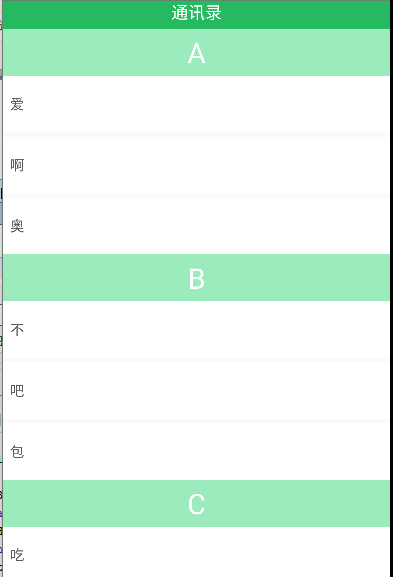
二、效果图
React native 中 SectionList用法的更多相关文章
- [转] 「指尖上的魔法」 - 谈谈 React Native 中的手势
http://gold.xitu.io/entry/55fa202960b28497519db23f React-Native是一款由Facebook开发并开源的框架,主要卖点是使用JavaScrip ...
- [转] 在React Native中使用ART
http://bbs.reactnative.cn/topic/306/%E5%9C%A8react-native%E4%B8%AD%E4%BD%BF%E7%94%A8art 前半个月捣腾了一下Rea ...
- React Native 中 CSS 的使用
首先声明,此文原作者为黎 跃春 React Native中CSS 内联样式 对象样式 使用Stylesheet.Create 样式拼接 导出样式对象 下面的代码是index.ios.js中的代码: / ...
- react native中的欢迎页(解决首加载白屏)
参照网页: http://blog.csdn.net/fengyuzhengfan/article/details/52712829 首先是在原生中写一些方法,然后通过react native中js去 ...
- React Native中的网络请求fetch和简单封装
React Native中的网络请求fetch使用方法最为简单,但却可以实现大多数的网络请求,需要了解更多的可以访问: https://segmentfault.com/a/1190000003810 ...
- react native中使用echarts
开发平台:mac pro node版本:v8.11.2 npm版本:6.4.1 react-native版本:0.57.8 native-echarts版本:^0.5.0 目标平台:android端收 ...
- react native中一次错误排查 Error:Error: Duplicate resources
最近一直在使用react native中,遇到了很多的坑,同时也学习到了一些移动端的开发经验. 今天在做一个打包的测试时,遇到了一个问题,打包过程中报错“Error:Error: Duplicate ...
- 在React Native中,使用fetch网络请求 实现get 和 post
//在React Native中,使用fetch实现网络请求 /* fetch 是一个封装程度更高的网络API, 使用了Promise * Promise 是异步编程的一种解决方案 * Promise ...
- 《React Native 精解与实战》书籍连载「React Native 中的生命周期」
此文是我的出版书籍<React Native 精解与实战>连载分享,此书由机械工业出版社出版,书中详解了 React Native 框架底层原理.React Native 组件布局.组件与 ...
随机推荐
- 菜鸟脱壳之脱壳的基础知识(六)——手动查找IAT和修复Dump的程序
前面讲了如何寻找OEP和脱壳,有的时候,Dump出来的时候不能正常运行,是因为还有一个输入表没有进行处理,一些加密壳会在IAT加密上面大做文章,用HOOK - API的外壳地址来代替真是的IAT的地址 ...
- WebSocket 实战--转
原文地址:http://www.ibm.com/developerworks/cn/java/j-lo-WebSocket/ WebSocket 前世今生 众所周知,Web 应用的交互过程通常是客户端 ...
- react - next.js 设置body style
因为next.js可以用pages文件夹中的js文件进行route,所以不需要public文件夹和html,因此没有body tag. body自带8px的maigin,我想要给整个页面设置背景颜色, ...
- mac版mysql配置
开始下载 我选择的是最后一个dmg格式的安装包,点击download,会出现让我们注册登陆的界面,点击最下面的No thanks,just take me to downloads!直接进行下载即可: ...
- Win10系列:C#应用控件进阶6
路径 路径(Path)可以用来定义任意形状的曲线和几何图形,当然这种任意性也带来了复杂性.为了方便的绘制几何图形,微软在Visual Studio 2012安装包中为程序开发者提供了免费的Blend ...
- go报错unimplemented: 64-bit mode not compiled in与mingw 64位安装报错ERROR res已解决
问题一:cc1.exe: sorry, unimplemented: 64-bit mode not compiled in 参考:https://www.cnblogs.com/lesroad/p/ ...
- mysql 查询时指定校对规则
为了能在查询时忽略字段大小写,又不想修改数据表的属性配置,就在SQL语句中做了修改.结果在alibaba druid 执行时报错 com.alibaba.druid.sql.parser.Parser ...
- nginx + gunicorn + flask项目发布
程序安装(linux mint) gunicorn安装:pip install gunicorn nginx安装:sudo apt-get install nginx 配置 nginx默认配置信息在/ ...
- shell脚本的多线程
shell脚本的多线程 #!/bin/bash ###这是个多线程脚本!!!! ..} do { .$i >/dev/null ];then echo "192.168.2.$i 存活 ...
- 面试html部分
1.DOM结构 —— 两个节点之间可能存在哪些关系以及如何在节点之间任意移动. DOM是文档对象模型的简称 DOM模型中两个节点可能存在的关系有两种:父子关系,兄弟关系. 添加节点:appendChi ...