
React native 中 SectionList用法
一、代码
 import React, { Component } from 'react';

 import {

     AppRegistry,

     View,

     Text,

     SectionList,

 } from 'react-native';

 export default class App extends React.Component {

     constructor(props) {

         super(props);

     }

     _renderItem = (info) => {

         var txt = '  ' + info.item.title;

         return <Text

             style={{ height: 60, textAlignVertical: 'center', backgroundColor: "#ffffff", color: '#5C5C5C', fontSize: 15 }}>{txt}</Text>

     }

     _sectionComp = (info) => {

         var txt = info.section.key;

         return <Text

             style={{ height: 50, textAlign: 'center', textAlignVertical: 'center', backgroundColor: '#9CEBBC', color: 'white', fontSize: 30 }}>{txt}</Text>

     }

     render() {

         var sections = [

             { key: "A", data: [{ title: "爱" }, { title: "啊" }, { title: "奥" }] },

             { key: "B", data: [{ title: "不" }, { title: "吧" }, { title: "包" }] },

             { key: "C", data: [{ title: "吃" }, { title: "车" }] },

             { key: "W", data: [{ title: "王者" }, { title: "王者荣耀" }] },

         ];

         return (

             <View style={{ flex: 1 }}>

                 <SectionList

                     numColumns ={3}

                     horizontal={false}

                     renderSectionHeader={this._sectionComp}

                     renderItem={this._renderItem}

                     sections={sections}

                     ItemSeparatorComponent={() => <View><Text></Text></View>}

                     ListHeaderComponent={() => <View style={{ backgroundColor: '#25B960', alignItems: 'center', height: 30 }}><Text style={{ fontSize: 18, color: '#ffffff' }}>通讯录</Text></View>}

                     ListFooterComponent={() => <View style={{ backgroundColor: '#25B960', alignItems: 'center', height: 30 }}><Text style={{ fontSize: 18, color: '#ffffff' }}>通讯录尾部</Text></View>}

                 />

             </View>

         );

     }

 }
二、效果图
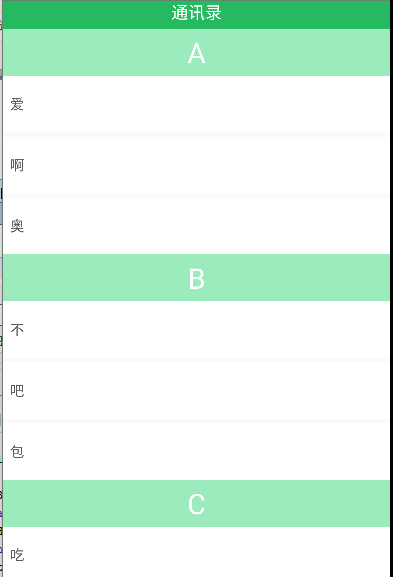
React native 中 SectionList用法的更多相关文章
- [转] 「指尖上的魔法」 - 谈谈 React Native 中的手势
http://gold.xitu.io/entry/55fa202960b28497519db23f React-Native是一款由Facebook开发并开源的框架,主要卖点是使用JavaScrip ...
- [转] 在React Native中使用ART
http://bbs.reactnative.cn/topic/306/%E5%9C%A8react-native%E4%B8%AD%E4%BD%BF%E7%94%A8art 前半个月捣腾了一下Rea ...
- React Native 中 CSS 的使用
首先声明,此文原作者为黎 跃春 React Native中CSS 内联样式 对象样式 使用Stylesheet.Create 样式拼接 导出样式对象 下面的代码是index.ios.js中的代码: / ...
- react native中的欢迎页(解决首加载白屏)
参照网页: http://blog.csdn.net/fengyuzhengfan/article/details/52712829 首先是在原生中写一些方法,然后通过react native中js去 ...
- React Native中的网络请求fetch和简单封装
React Native中的网络请求fetch使用方法最为简单,但却可以实现大多数的网络请求,需要了解更多的可以访问: https://segmentfault.com/a/1190000003810 ...
- react native中使用echarts
开发平台:mac pro node版本:v8.11.2 npm版本:6.4.1 react-native版本:0.57.8 native-echarts版本:^0.5.0 目标平台:android端收 ...
- react native中一次错误排查 Error:Error: Duplicate resources
最近一直在使用react native中,遇到了很多的坑,同时也学习到了一些移动端的开发经验. 今天在做一个打包的测试时,遇到了一个问题,打包过程中报错“Error:Error: Duplicate ...
- 在React Native中,使用fetch网络请求 实现get 和 post
//在React Native中,使用fetch实现网络请求 /* fetch 是一个封装程度更高的网络API, 使用了Promise * Promise 是异步编程的一种解决方案 * Promise ...
- 《React Native 精解与实战》书籍连载「React Native 中的生命周期」
此文是我的出版书籍<React Native 精解与实战>连载分享,此书由机械工业出版社出版,书中详解了 React Native 框架底层原理.React Native 组件布局.组件与 ...
随机推荐
- windows+Apache+mod_wsgi+flask部署笔记
windows是用的2008 server 64位. 照着网上教程即可:https://www.jianshu.com/p/0aa1c7097976 但是有个问题: Apache2.4怎么配置???跟 ...
- vue-文字块收缩与展开功能
在设计图中要求的效果为: 文字限制超过9行即隐藏,并显示“展开”按钮,点击按钮进行切换,控制文本全部展示和部分展示 在原本的实现过程中,使用了红框内的判断方式: 页面代码: 样式则规定嵌套元素给一个死 ...
- Spring官方文档下载
Spring框架是目前最流行的java web开发框架,很多时候,我们需要去查看spring的官方文档,这里就简单介绍下如何下载其官方文档. 1.搜索到spring 官网并进入 2.点击DOCS 3. ...
- python 变量之小整数池跟大整数池
在python中定义变量会有:id,type,value.对于==比较的是value,对于is比较的是id. 因此,对于相同value的变量,它的type相同,但是它的id值可能不一样.对于相同id的 ...
- css--nth-child的注意点
nth-child( n ) 里面的n可以是任何整数值. 不过要取第一位开始的元素DOM对象,那么n是从1开始的 如果n值小于0或者等于0,是不会匹配任何元素,(或者超过数量)切记切记!!!! 例子: ...
- Ubuntu18.04下安装搜狗输入法
Ubuntu18.04下安装搜狗输入法 第一步:安装 fcitx输入框架 sudo apt-get install fcitx 第二步:在官网下载 Linux 版本搜狗输入法 https://piny ...
- css三种基本选着器
<!DOCTYPE html><html> <head> <meta charset="utf-8" /> <title> ...
- 得到本地电脑IP4地址
using System.Linq;using System.Net;using System.Net.Sockets; namespace winform_udp{ public class com ...
- linux 常见报错
yum install 包名 出现安装包重复,同一个安装包出现多版本 使用 rpm -qa |grep 包名 如果出现包名,则说明已存在该包(已被安装),要安装新版本的,可以卸载已装的y ...
- 一面(3) react方面
1.react的声明周期 getDefaultProps() getInitialState() componentWillMount() 以后组件更新不调用, 只调用一次 ...