
Spring Cloud:统一异常处理
在启动应用时会发现在控制台打印的日志中出现了两个路径为 {[/error]} 的访问地址,当系统中发送异常错误时,Spring Boot 会根据请求方式分别跳转到以 JSON 格式或以界面显示的 /error 地址中显示错误信息。
2018-12-18 09:36:24.627  INFO 19040 --- [           main] s.w.s.m.m.a.RequestMappingHandlerMapping : Mapped "{[/error]}" ...

2018-12-18 09:36:24.632  INFO 19040 --- [           main] s.w.s.m.m.a.RequestMappingHandlerMapping : Mapped "{[/error],produces=[text/html]}" ...
默认异常处理
使用 AJAX 方式请求时返回的 JSON 格式错误信息。
{

    "timestamp": "2018-12-18T01:50:51.196+0000",

    "status": 404,

    "error": "Not Found",

    "message": "No handler found for GET /err404",

    "path": "/err404"

}
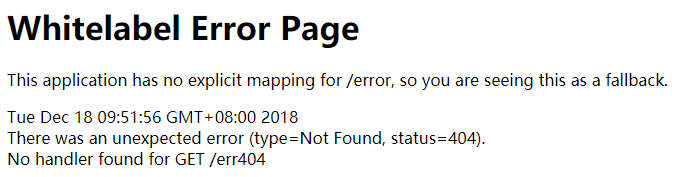
使用浏览器请求时返回的错误信息界面。
自定义异常处理
引入依赖
<dependency>

    <groupId>com.alibaba</groupId>

    <artifactId>fastjson</artifactId>

    <version>1.2.54</version>

</dependency>

<dependency>

    <groupId>org.springframework.boot</groupId>

    <artifactId>spring-boot-starter-freemarker</artifactId>

</dependency>
fastjson 是 JSON 序列化依赖, spring-boot-starter-freemarker 是一个模板引擎,用于我们设置错误输出模板。
增加配置
properties
# 出现错误时, 直接抛出异常(便于异常统一处理,否则捕获不到404)

spring.mvc.throw-exception-if-no-handler-found=true

# 不要为工程中的资源文件建立映射

spring.resources.add-mappings=false
yml
spring:

  # 出现错误时, 直接抛出异常(便于异常统一处理,否则捕获不到404)

  mvc:

    throw-exception-if-no-handler-found: true

  # 不要为工程中的资源文件建立映射

  resources:

    add-mappings: false
新建错误信息实体
/**

 * 信息实体

 */

public class ExceptionEntity implements Serializable {

    private static final long serialVersionUID = 1L;

    private String message;

    private int    code;

    private String error;

    private String path;

    @JSONField(format = "yyyy-MM-dd hh:mm:ss")

    private Date timestamp = new Date();

    public static long getSerialVersionUID() {

        return serialVersionUID;

    }

    public String getMessage() {

        return message;

    }

    public void setMessage(String message) {

        this.message = message;

    }

    public int getCode() {

        return code;

    }

    public void setCode(int code) {

        this.code = code;

    }

    public String getError() {

        return error;

    }

    public void setError(String error) {

        this.error = error;

    }

    public String getPath() {

        return path;

    }

    public void setPath(String path) {

        this.path = path;

    }

    public Date getTimestamp() {

        return timestamp;

    }

    public void setTimestamp(Date timestamp) {

        this.timestamp = timestamp;

    }

}
新建自定义异常
/**

 * 自定义异常

 */

public class BasicException extends RuntimeException {

    private static final long serialVersionUID = 1L;

    private int code = 0;

    public BasicException(int code, String message) {

        super(message);

        this.code = code;

    }

    public int getCode() {

        return this.code;

    }

}
/**

 * 业务异常

 */

public class BusinessException extends BasicException {

    private static final long serialVersionUID = 1L;

    public BusinessException(int code, String message) {

        super(code, message);

    }

}
BasicException 继承了 RuntimeException ,并在原有的 Message 基础上增加了错误码 code 的内容。而 BusinessException 则是在业务中具体使用的自定义异常类,起到了对不同的异常信息进行分类的作用。
新建 error.ftl 模板文件
位置:/src/main/resources/templates/ 用于显示错误信息
<!DOCTYPE html>

<html>

<head>

    <meta name="robots" content="noindex,nofollow" />

    <meta name="viewport" content="width=device-width, initial-scale=1, user-scalable=no">

    <style>

        h2{

            color: #4288ce;

            font-weight: 400;

            padding: 6px 0;

            margin: 6px 0 0;

            font-size: 18px;

            border-bottom: 1px solid #eee;

        }

        /* Exception Variables */

        .exception-var table{

            width: 100%;

            max-width: 500px;

            margin: 12px 0;

            box-sizing: border-box;

            table-layout:fixed;

            word-wrap:break-word;

        }

        .exception-var table caption{

            text-align: left;

            font-size: 16px;

            font-weight: bold;

            padding: 6px 0;

        }

        .exception-var table caption small{

            font-weight: 300;

            display: inline-block;

            margin-left: 10px;

            color: #ccc;

        }

        .exception-var table tbody{

            font-size: 13px;

            font-family: Consolas,"Liberation Mono",Courier,"微软雅黑";

        }

        .exception-var table td{

            padding: 0 6px;

            vertical-align: top;

            word-break: break-all;

        }

        .exception-var table td:first-child{

            width: 28%;

            font-weight: bold;

            white-space: nowrap;

        }

        .exception-var table td pre{

            margin: 0;

        }

    </style>

</head>

<body>

<div class="exception-var">

    <h2>Exception Datas</h2>

    <table>

        <tbody>

        <tr>

            <td>Code</td>

            <td>

                ${(exception.code)!}

            </td>

        </tr>

        <tr>

            <td>Time</td>

            <td>

                ${(exception.timestamp?datetime)!}

            </td>

        </tr>

        <tr>

            <td>Path</td>

            <td>

                ${(exception.path)!}

            </td>

        </tr>

        <tr>

            <td>Exception</td>

            <td>

                ${(exception.error)!}

            </td>

        </tr>

        <tr>

            <td>Message</td>

            <td>

                ${(exception.message)!}

            </td>

        </tr>

        </tbody>

    </table>

</div>

</body>

</html>
编写全局异常控制类
/**

 * 全局异常控制类

 */

@ControllerAdvice

public class GlobalExceptionHandler {

    /**

     * 404异常处理

     */

    @ExceptionHandler(value = NoHandlerFoundException.class)

    @ResponseStatus(HttpStatus.NOT_FOUND)

    public ModelAndView errorHandler(HttpServletRequest request, NoHandlerFoundException exception, HttpServletResponse response) {

        return commonHandler(request, response,

                exception.getClass().getSimpleName(),

                HttpStatus.NOT_FOUND.value(),

                exception.getMessage());

    }

    /**

     * 405异常处理

     */

    @ExceptionHandler(HttpRequestMethodNotSupportedException.class)

    public ModelAndView errorHandler(HttpServletRequest request, HttpRequestMethodNotSupportedException exception, HttpServletResponse response) {

        return commonHandler(request, response,

                exception.getClass().getSimpleName(),

                HttpStatus.METHOD_NOT_ALLOWED.value(),

                exception.getMessage());

    }

    /**

     * 415异常处理

     */

    @ExceptionHandler(HttpMediaTypeNotSupportedException.class)

    public ModelAndView errorHandler(HttpServletRequest request, HttpMediaTypeNotSupportedException exception, HttpServletResponse response) {

        return commonHandler(request, response,

                exception.getClass().getSimpleName(),

                HttpStatus.UNSUPPORTED_MEDIA_TYPE.value(),

                exception.getMessage());

    }

    /**

     * 500异常处理

     */

    @ExceptionHandler(value = Exception.class)

    public ModelAndView errorHandler (HttpServletRequest request, Exception exception, HttpServletResponse response) {

        return commonHandler(request, response,

                exception.getClass().getSimpleName(),

                HttpStatus.INTERNAL_SERVER_ERROR.value(),

                exception.getMessage());

    }

    /**

     * 业务异常处理

     */

    @ExceptionHandler(value = BasicException.class)

    private ModelAndView errorHandler (HttpServletRequest request, BasicException exception, HttpServletResponse response) {

        return commonHandler(request, response,

                exception.getClass().getSimpleName(),

                exception.getCode(),

                exception.getMessage());

    }

    /**

     * 表单验证异常处理

     */

    @ExceptionHandler(value = BindException.class)

    @ResponseBody

    public ExceptionEntity validExceptionHandler(BindException exception, HttpServletRequest request, HttpServletResponse response) {

        List<FieldError> fieldErrors = exception.getBindingResult().getFieldErrors();

        Map<String,String> errors = new HashMap<>();

        for (FieldError error:fieldErrors) {

            errors.put(error.getField(), error.getDefaultMessage());

        }

        ExceptionEntity entity = new ExceptionEntity();

        entity.setMessage(JSON.toJSONString(errors));

        entity.setPath(request.getRequestURI());

        entity.setCode(HttpStatus.INTERNAL_SERVER_ERROR.value());

        entity.setError(exception.getClass().getSimpleName());

        response.setStatus(HttpStatus.INTERNAL_SERVER_ERROR.value());

        return entity;

    }

    /**

     * 异常处理数据处理

     */

    private ModelAndView commonHandler (HttpServletRequest request, HttpServletResponse response,

                                            String error, int httpCode, String message) {

        ExceptionEntity entity = new ExceptionEntity();

        entity.setPath(request.getRequestURI());

        entity.setError(error);

        entity.setCode(httpCode);

        entity.setMessage(message);

        return determineOutput(request, response, entity);

    }

    /**

     * 异常输出处理

     */

    private ModelAndView determineOutput(HttpServletRequest request, HttpServletResponse response, ExceptionEntity entity) {

        if (!(

                request.getHeader("accept").contains("application/json")

                || (request.getHeader("X-Requested-With") != null && request.getHeader("X-Requested-With").contains("XMLHttpRequest"))

        )) {

            ModelAndView modelAndView = new ModelAndView("error");

            modelAndView.addObject("exception", entity);

            return modelAndView;

        } else {

            response.setStatus(HttpStatus.INTERNAL_SERVER_ERROR.value());

            response.setCharacterEncoding("UTF8");

            response.setHeader("Content-Type", "application/json");

            try {

                response.getWriter().write(ResultJsonTools.build(

                        ResponseCodeConstant.SYSTEM_ERROR,

                        ResponseMessageConstant.APP_EXCEPTION,

                        JSONObject.parseObject(JSON.toJSONString(entity))

                ));

            } catch (IOException e) {

                e.printStackTrace();

            }

            return null;

        }

    }

}
@ControllerAdvice
作用于类上,用于标识该类用于处理全局异常。
@ExceptionHandler
作用于方法上,用于对拦截的异常类型进行处理。value 属性用于指定具体的拦截异常类型,如果有多个 ExceptionHandler 存在,则需要指定不同的 value 类型,由于异常类拥有继承关系,所以 ExceptionHandler 会首先执行在继承树中靠前的异常类型。
BindException
该异常来自于表单验证框架 Hibernate validation,当字段验证未通过时会抛出此异常。
编写测试 Controller
@RestController

public class TestController {

    @RequestMapping(value = "err")

    public void error(){

        throw new BusinessException(400, "业务异常错误信息");

    }

    @RequestMapping(value = "err2")

    public void error2(){

        throw new NullPointerException("手动抛出异常信息");

    }

    @RequestMapping(value = "err3")

    public int error3(){

        int a = 10 / 0;

        return a;

    }

}
使用 AJAX 方式请求时返回的 JSON 格式错误信息。
# /err

{

    "msg": "应用程序异常",

    "code": -1,

    "status_code": 0,

    "data": {

        "path": "/err",

        "code": 400,

        "error": "BusinessException",

        "message": "业务异常错误信息",

        "timestamp": "2018-12-18 11:09:00"

    }

}

# /err2

{

    "msg": "应用程序异常",

    "code": -1,

    "status_code": 0,

    "data": {

        "path": "/err2",

        "code": 500,

        "error": "NullPointerException",

        "message": "手动抛出异常信息",

        "timestamp": "2018-12-18 11:15:15"

    }

}

# /err3

{

    "msg": "应用程序异常",

    "code": -1,

    "status_code": 0,

    "data": {

        "path": "/err3",

        "code": 500,

        "error": "ArithmeticException",

        "message": "/ by zero",

        "timestamp": "2018-12-18 11:15:46"

    }

}

# /err404

{

    "msg": "应用程序异常",

    "code": -1,

    "status_code": 0,

    "data": {

        "path": "/err404",

        "code": 404,

        "error": "NoHandlerFoundException",

        "message": "No handler found for GET /err404",

        "timestamp": "2018-12-18 11:16:11"

    }

}
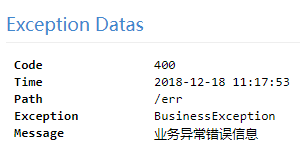
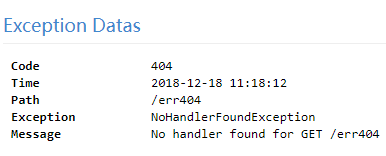
使用浏览器请求时返回的错误信息界面。


示例代码:https://github.com/BNDong/spring-cloud-examples/tree/master/spring-cloud-zuul/cloud-zuul
参考资料
《微服务 分布式架构开发实战》 龚鹏 著
https://www.jianshu.com/p/1a49fa436623
Spring Cloud:统一异常处理的更多相关文章
- Spring MVC 统一异常处理
Spring MVC 统一异常处理 看到 Exception 这个单词都心慌 如果有一天你发现好久没有看到Exception这个单词了,那你会不会想念她?我是不会的.她如女孩一样的令人心动又心慌,又或 ...
- 编程小白入门分享三:Spring AOP统一异常处理
Spring AOP统一异常处理 简介 在Controller层,Service层,可能会有很多的try catch代码块.这将会严重影响代码的可读性."美观性".怎样才可以把更多 ...
- 使用Spring MVC统一异常处理实战
1 描述 在J2EE项目的开发中,不管是对底层的数据库操作过程,还是业务层的处理过程,还是控制层的处理过程,都不可避免会遇到各种可预知的.不可预知的异常需要处理.每个过程都单独处理异常,系统的代码耦合 ...
- 笔记:Spring Cloud Hystrix 异常处理、缓存和请求合并
异常处理 在 HystrixCommand 实现的run方法中抛出异常,除了 HystrixBadRequestException之外,其他异常均会被Hystrix 认为命令执行失败并触发服务降级处理 ...
- Spring Boot统一异常处理实践
摘要: SpringBoot异常处理. 原文:Spring MVC/Boot 统一异常处理最佳实践 作者:赵俊 前言 在 Web 开发中, 我们经常会需要处理各种异常, 这是一件棘手的事情, 对于很多 ...
- 使用Spring MVC统一异常处理实战<转>
1 描述 在J2EE项目的开发中,不管是对底层的数据库操作过程,还是业务层的处理过程,还是控制层的处理过程,都不可避免会遇到各种可预知的.不可预知的异常需要处理.每个过程都单独处理异常,系统的代码耦合 ...
- 使用Spring MVC统一异常处理实战(转载)
原文地址:http://blog.csdn.net/ufo2910628/article/details/40399539 种方式: (1)使用Spring MVC提供的简单异常处理器SimpleMa ...
- spring的统一异常处理
在控制器(controller)中添加统一异常处理的方法,在方法前面加@ExceptionHandler[(异常类.class)]注解
- Spring Boot☞ 统一异常处理
效果区: 代码区: package com.wls.integrateplugs.exception.dto; public class ErrorInfo<T> { public st ...
- 从零开始学 Java - Spring MVC 统一异常处理
看到 Exception 这个单词都心慌 如果有一天你发现好久没有看到Exception这个单词了,那你会不会想念她?我是不会的.她如女孩一样的令人心动又心慌,又或者你已经练功到了孤独求败,等了半辈子 ...
随机推荐
- 算法工程师想进一步提高竞争力?向TensorFlow开源社区贡献你的代码吧
算法工程师为什么也要向社区贡献代码? [作者:DeepLearningStack,阿里巴巴算法工程师,开源TensorFlow Contributor] “做算法的人要熟悉算法框架源码吗?算法工程师难 ...
- Android ios嵌套web页面
我们现在做一个活动页面,Android和ios的活动页面用web来做,方便更改,下面有几个小问题: 1.在Android和ios中,虽然web上面可以存localstorage,但是到了Android ...
- selinux基本
TE模型 主体划分为若干组,称为域 客体划分为若干组,每个组称为一个类型 DDT(Domain Definition Table,域定义表,二维),表示域和类型的对应访问权限,权限包括读写执行 一 ...
- Linux系统命令行整理
1.pwd 查看当前所在目录 2.cd / 跳往根目录 3.ls 查看当前目录所有子目录或文件 4.ls -l 列出当前目录详细信息 5.ls -lh h=human 人性化列出当前目录详细 ...
- 变量内容的删除、取代与替换 (Optional)
变量除了可以直接设置来修改原本的内容之外,有没有办法通过简单的动作来将变量的内容进行微调呢? 举例来说,进行变量内容的删除.取代与替换等!是可以的!我们可以通过几个简单的小步骤来进行变量内容的微调喔! ...
- js获取文件后缀
//获取文件后缀 function getType(file){ var filename=file; var index1=filename.lastIndexOf("."); ...
- 01-html介绍和head标签
[转]01-html介绍和head标签 主要内容 web标准 浏览器介绍 开发工具介绍 HTML介绍 HTML颜色介绍 HTML规范 HTML结构详解 一.web标准 web准备介绍: w3c:万维网 ...
- 使用newtonsoft序列化
如果将字符串序列化为datatable 时,字符串中包含null,序列化会报错,此时将datatabel 添加到dataset 中,在序列化成字符串,然后在将字符串反序列化成dataset
- 【代码笔记】Web-CSS-CSS Margin(外边距)
一,效果图. 二,代码. <!DOCTYPE html> <html> <head> <meta charset="utf-8"> ...
- 命令行以及Python交互模式下python程序的编写
一.命令行模式 在Windows开始菜单选择“命令提示符”,就进入到命令行模式,它的提示符类似C:\>: 二.Python交互模式 在命令行模式下敲命令python,就看到类似如下的一堆文本输出 ...