
WebAPI的压缩
有时候为了提升WebAPI的性能,减少响应时间,我们会使用压缩和解压,而现在大多数客户端浏览器都提供了内置的解压支持。在WebAPI请求的资源越大时,使用压缩对性能提升的效果越明显,而当请求的资源很小时则不需要使用压缩和解压,因为压缩和解压同样也是需要耗费一定的时间的。
看见老外写了一篇ASP.NET Web API GZip compression ActionFilter with 8 lines of code
说实话被这标题吸引了,8行代码实现GZip压缩过滤器,我就照着他的去实践了一番,发现居然中文出现乱码。
按照他的实现方式:
1、下载DotNetZipLib库
2、解压后添加Ionic.Zlib.dll的dll引用
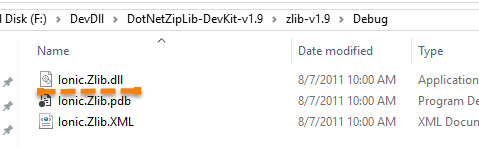
3、新建DeflateCompression特性和GZipCompression特性,分别代表Deflate压缩和GZip压缩,这两种压缩方式的实现代码很相似
不同的地方就是
actContext.Response.Content.Headers.Add("Content-encoding", "gzip");
actContext.Response.Content.Headers.Add("Content-encoding", "deflate");
和
  var compressor = new DeflateStream(

                    output, CompressionMode.Compress,

                    CompressionLevel.BestSpeed)
 var compressor = new GZipStream(

                    output, CompressionMode.Compress,

                    CompressionLevel.BestSpeed)
using System.Net.Http;

using System.Web.Http.Filters;

namespace WebAPI.Filter

{

    public class GZipCompressionAttribute : ActionFilterAttribute

    {

        public override void OnActionExecuted(HttpActionExecutedContext actContext)

        {

            var content = actContext.Response.Content;

            var bytes = content == null ? null : content.ReadAsByteArrayAsync().Result;

            var zlibbedContent = bytes == null ? new byte[] :

            CompressionHelper.GZipByte(bytes);

            actContext.Response.Content = new ByteArrayContent(zlibbedContent);

            actContext.Response.Content.Headers.Remove("Content-Type");

            actContext.Response.Content.Headers.Add("Content-encoding", "gzip");

            actContext.Response.Content.Headers.Add("Content-Type", "application/json");

            base.OnActionExecuted(actContext);

        }

    }

}

using System.Net.Http;

using System.Web.Http.Filters;

namespace WebAPI.Filter

{

    public class DeflateCompressionAttribute : ActionFilterAttribute

    {

        public override void OnActionExecuted(HttpActionExecutedContext actContext)

        {

            var content = actContext.Response.Content;

            var bytes = content == null ? null : content.ReadAsByteArrayAsync().Result;

            var zlibbedContent = bytes == null ? new byte[] :

            CompressionHelper.DeflateByte(bytes);

            actContext.Response.Content = new ByteArrayContent(zlibbedContent);

            actContext.Response.Content.Headers.Remove("Content-Type");

            actContext.Response.Content.Headers.Add("Content-encoding", "deflate");

            actContext.Response.Content.Headers.Add("Content-Type", "application/json");

            base.OnActionExecuted(actContext);

        }

    }
4、添加一个压缩帮助类CompressionHelper
using System.IO;

using Ionic.Zlib;

namespace WebAPI.Filter

{

    public class CompressionHelper

    {

        public static byte[] DeflateByte(byte[] str)

        {

            if (str == null)

            {

                return null;

            }

            using (var output = new MemoryStream())

            {

                using (

                    var compressor = new DeflateStream(

                    output, CompressionMode.Compress,

                    CompressionLevel.BestSpeed))

                {

                    compressor.Write(str, , str.Length);

                }

                return output.ToArray();

            }

        }

        public static byte[] GZipByte(byte[] str)

        {

            if (str == null)

            {

                return null;

            }

            using (var output = new MemoryStream())

            {

                using (

                    var compressor = new GZipStream(

                    output, CompressionMode.Compress,

                    CompressionLevel.BestSpeed))

                {

                    compressor.Write(str, , str.Length);

                }

                return output.ToArray();

            }

        }

    }

}
5、控制器调用,这里我写的测试代码:
    public class TestController : ApiController

    {

        StringBuilder sb = new StringBuilder();

        [GZipCompression]

        public string Get(int id)

        {

            for (int i = ; i < ;i++ )

            {

                sb.Append("这里是中国的领土" + i);

            }

            return sb.ToString() + DateTime.Now.ToLocalTime() + "," + id;

        }

    }
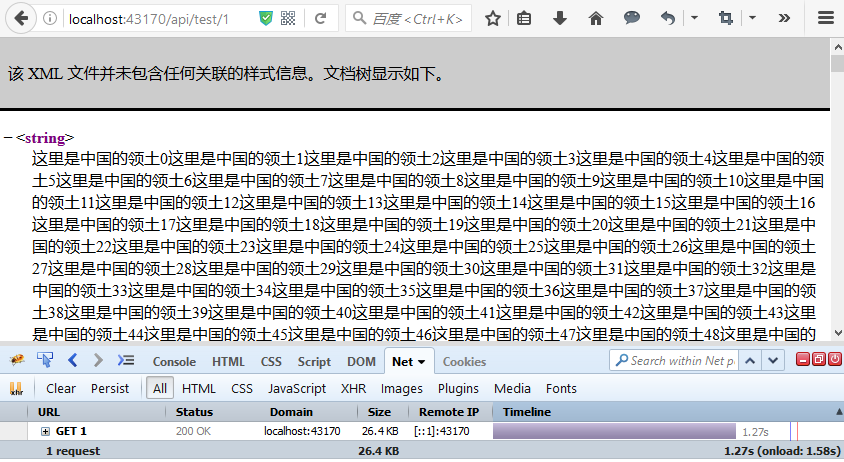
先看下不使用压缩,注释//[GZipCompression] 标记,文件大小是26.4kb,请求时间是1.27s
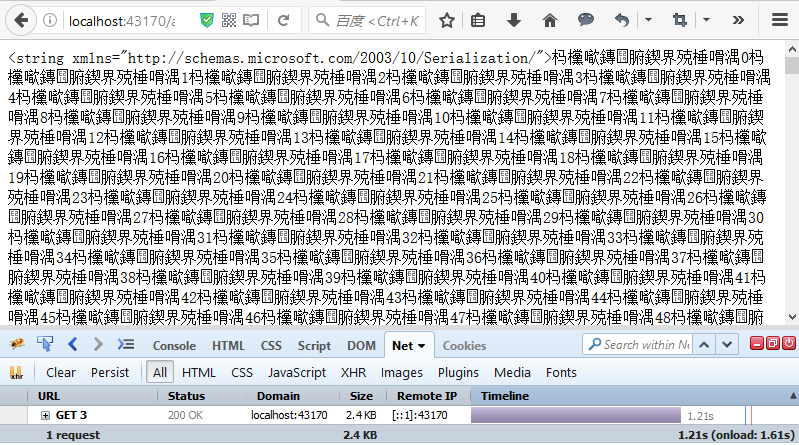
使用[GZipCompression]标记,添加压缩后,文件大小是2.4kb,响应时间是1.21,Respouse Body明显小了很多,但是响应时间少得并不明显,因为在本地环境下载太快了,而压缩解压却要消耗一定的时间,界面加载的时间主要消耗在onload上了。有个问题:中文显示乱码了。
使用.net自带的压缩,在System.IO.Compression中提供了对应的类库——GZipStream与DeflateStream。控制器调用代码不变,新建一个CompressContentAttribute.cs类,代码如下:
using System.Web;

using System.Web.Http.Controllers;

using System.Web.Http.Filters;

namespace WebAPI.Filter

{

    // <summary>

    /// 自动识别客户端是否支持压缩,如果支持则返回压缩后的数据

    /// Attribute that can be added to controller methods to force content

    /// to be GZip encoded if the client supports it

    /// </summary>

    public class CompressContentAttribute : ActionFilterAttribute

    {

        /// <summary>

        /// Override to compress the content that is generated by

        /// an action method.

        /// </summary>

        /// <param name="filterContext"></param>

        public override void OnActionExecuting(HttpActionContext filterContext)

        {

            GZipEncodePage();

        }

        /// <summary>

        /// Determines if GZip is supported

        /// </summary>

        /// <returns></returns>

        public static bool IsGZipSupported()

        {

            string AcceptEncoding = HttpContext.Current.Request.Headers["Accept-Encoding"];

            if (!string.IsNullOrEmpty(AcceptEncoding) &&

                    (AcceptEncoding.Contains("gzip") || AcceptEncoding.Contains("deflate")))

                return true;

            return false;

        }

        /// <summary>

        /// Sets up the current page or handler to use GZip through a Response.Filter

        /// IMPORTANT:

        /// You have to call this method before any output is generated!

        /// </summary>

        public static void GZipEncodePage()

        {

            HttpResponse Response = HttpContext.Current.Response;

            if (IsGZipSupported())

            {

                string AcceptEncoding = HttpContext.Current.Request.Headers["Accept-Encoding"];

                if (AcceptEncoding.Contains("deflate"))

                {

                    Response.Filter = new System.IO.Compression.DeflateStream(Response.Filter,

                                               System.IO.Compression.CompressionMode.Compress);

                    #region II6不支持此方法,(实际上此值默认为null 也不需要移除)

                    //Response.Headers.Remove("Content-Encoding");

                    #endregion

                    Response.AppendHeader("Content-Encoding", "deflate");

                }

                else

                {

                    Response.Filter = new System.IO.Compression.GZipStream(Response.Filter,

                                                 System.IO.Compression.CompressionMode.Compress);

                    #region II6不支持此方法,(实际上此值默认为null 也不需要移除)

                    //Response.Headers.Remove("Content-Encoding");

                    #endregion

                    Response.AppendHeader("Content-Encoding", "gzip");

                }

            }

            // Allow proxy servers to cache encoded and unencoded versions separately

            Response.AppendHeader("Vary", "Content-Encoding");

        }

    }

    /// <summary>

    /// 强制Defalte压缩

    /// Content-encoding:gzip,Content-Type:application/json

    /// DEFLATE是一个无专利的压缩算法,它可以实现无损数据压缩,有众多开源的实现算法。

    /// </summary>

    public class DeflateCompressionAttribute : ActionFilterAttribute

    {

        public override void OnActionExecuting(HttpActionContext filterContext)

        {

            HttpResponse Response = HttpContext.Current.Response;

            Response.Filter = new System.IO.Compression.DeflateStream(Response.Filter,

                                              System.IO.Compression.CompressionMode.Compress);

            #region II6不支持此方法,(实际上此值默认为null 也不需要移除)

            //Response.Headers.Remove("Content-Encoding");

            #endregion

            Response.AppendHeader("Content-Encoding", "deflate");

        }

    }

    /// <summary>

    /// 强制GZip压缩,application/json

    /// Content-encoding:gzip,Content-Type:application/json

    /// GZIP是使用DEFLATE进行压缩数据的另一个压缩库

    /// </summary>

    public class GZipCompressionAttribute : ActionFilterAttribute

    {

        public override void OnActionExecuting(HttpActionContext filterContext)

        {

            HttpResponse Response = HttpContext.Current.Response;

            Response.Filter = new System.IO.Compression.GZipStream(Response.Filter,

                                              System.IO.Compression.CompressionMode.Compress);

            #region II6不支持此方法,(实际上此值默认为null 也不需要移除)

            //Response.Headers.Remove("Content-Encoding");

            #endregion

            Response.AppendHeader("Content-Encoding", "gzip");

        }

    }

}
运行查看结果,压缩能力比DotNetZipLib略差,但是不再出现乱码了。
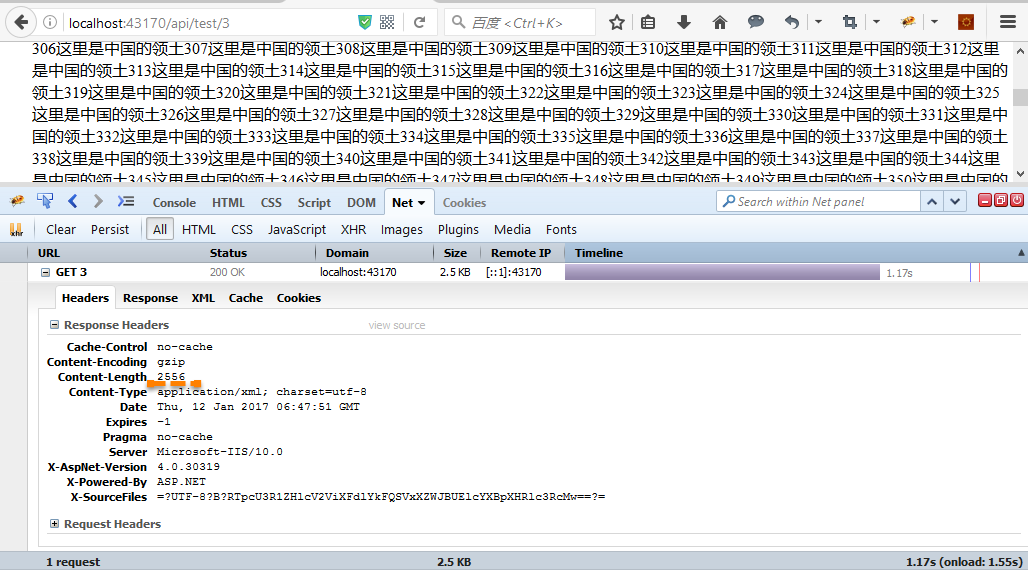
把控制器代码中的标记改为 [DeflateCompression],使用Deflate压缩再来看下效果:
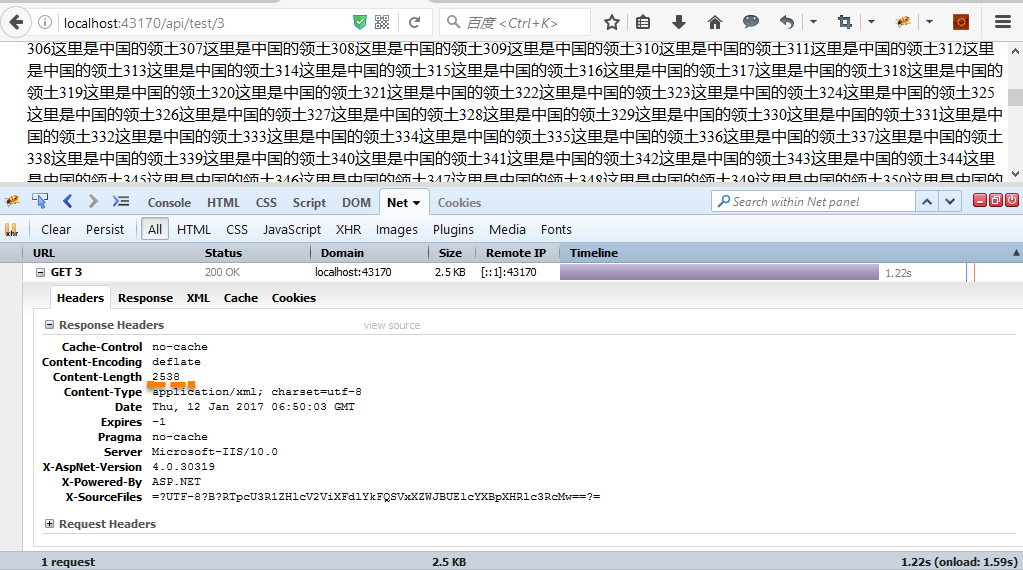
Deflate压缩后,Content-Length值为2538,而GZip压缩Content-Length值为2556,可见Deflate压缩效果更好。
这里,WebAPI的压缩我都是通过Action过滤器的方式来实现,当然你也可以写在WebAPI中的全局配置中,考虑到有些API接口并不需要使用到压缩,所以就通过Action过滤器的方式来实现了。
dudu的这篇文章HttpClient与APS.NET Web API:请求内容的压缩与解压在客户端压缩、在服务端解压。
WebAPI的压缩的更多相关文章
- Asp.net WebAPi gzip压缩和json格式化
现在webapi越来越流行了,很多时候它都用来做接口返回json格式的数据,webapi原本是根据客户端的类型动态序列化为json和xml的,但实际很多时候我们都是序列化为json的,所以webapi ...
- asp.net core系列 77 webapi响应压缩
一.介绍 背景:目前在开发一个爬虫框架,使用了.net core webapi接口作为爬虫调用入口,在调用 webapi时发现爬虫耗时很短(1秒左右),但客户端获取响应时间却在3~4秒.对于这个问题考 ...
- webapi使用压缩
支持GZIP.DEFLATE压缩 /// <summary> /// Gzip 压缩 /// </summary> public sealed class Compressio ...
- WebAPI性能优化之压缩解压
有时候为了提升WebAPI的性能,减少响应时间,我们会使用压缩和解压,而现在大多数客户端浏览器都提供了内置的解压支持.在WebAPI请求的资源越大时,使用压缩对性能提升的效果越明显,而当请求的资源很小 ...
- WebAPI性能优化
WebAPI性能优化之压缩解压 有时候为了提升WebAPI的性能,减少响应时间,我们会使用压缩和解压,而现在大多数客户端浏览器都提供了内置的解压支持.在WebAPI请求的资源越大时,使用压缩对性能提升 ...
- .NET压缩图片保存 .NET CORE WebApi Post跨域提交 C# Debug和release判断用法 tofixed方法 四舍五入 (function($){})(jQuery); 使用VUE+iView+.Net Core上传图片
.NET压缩图片保存 需求: 需要将用户后买的图片批量下载打包压缩,并且分不同的文件夹(因:购买了多个用户的图片情况) 文章中用到了一个第三方的类库,Nuget下载 SharpZipLib 目前用 ...
- webapi 开启gzip压缩
1.nuget安装Microsoft.AspNet.WebApi.Extensions.Compression.Server 2.global.asax.cs里引用System.Net.Http.Ex ...
- WebApi Gzip(Deflate) 压缩请求数据
由于不能直接访问指定数据库,只能通过跳板机查询Oracle数据,所以要做一个数据中转接口, 查询数据就要压缩,于是就找资料,代码如下,其中要注意的是Response.Headers.Remove(&q ...
- 如何在 webApi 当中接收 Gzip 压缩或者加密后的 请求消息内容!
今天在上班的时候遇到个问题,移动端要求我们用GZIP加密.当时一想着多简单,但是在做的时候发现个问题. 就是移动端Post到 服务端的数据也是经过 Gzip的,并不是单一的像网站那样只针对网页进行 压 ...
随机推荐
- PHP 17: MySQL的简单介绍
原文:PHP 17: MySQL的简单介绍 这一章将简单介绍MySQL的基本知识. 本文来自http://lib.hackbase.com/html/8/35125.htm. MySQL是最受欢迎的开 ...
- ANDROID定义自己的观点——模仿瀑布布局(源代码)
转载请注明本文出自大苞米的博客(http://blog.csdn.net/a396901990),谢谢支持! 简单介绍: 在自己定义view的时候,事实上非常easy,仅仅须要知道3步骤: 1.測量- ...
- ACM-光滑最小生成树project——hdu1863
***************************************转载请注明出处:http://blog.csdn.net/lttree************************** ...
- php调用webservice报错Class 'SoapClient' not found
原文:php调用webservice报错Class 'SoapClient' not found php在调用webservice时,报告如下类似错误: ( ! ) Fatal error: Clas ...
- 地图坐标Base64转换数字坐标
测试地图源码==百读Demo<html> <head> </head> <body> <script type="text/javasc ...
- Android项目--tabhost
所有牵扯到自定义布局的layout中尽量用RelativeLayout 在通讯录中如果像小米手机的UI那就是viewpager,在这里,我们做成静态的.通过tabhost来做. 1.布局 a) 直接用 ...
- jquery dialog的关闭事件不触发,触发不了
在网上大部分是: close:function(event,ui){}; 但不管用,不过onClose:function(){};挺好使的,终于找到了
- IDE编程环境
Vim配置及说明——IDE编程环境 目录 Vim配置及说明——IDE编程环境 1.基本及字体 2.插件管理 3.主题风格 4.窗口设置 5.目录树导航 6.标签导航 7.taglist 8.多文档编辑 ...
- uva 305 Joseph
点击打开链接uva 305 思路: 数学+打表 分析: 1 传统的约瑟夫问题是给定n个人和m,每次数m次把当前这个人踢出局,问最后留下的一个人的编号 2 这一题是前k个人是好人,后面k个是坏人.现在要 ...
- DLL文件的引用
首先我们先要写一个DLL文件: 我先创建一个win32的DLL工程,在工程中添加了Math.h和Math.cpp文件,具体内容如下: Math.h: #pragma once #include &qu ...