
跟我学ASP.NET MVC之九:SportsStrore产品管理
摘要:
在这篇文章中,我将继续完成SportsStore应用程序,让站点管理者可以管理产品列表。我将添加创建、修改和删除产品功能。
本篇文章将分模块的方式,逐个介绍SportsStore站点管理功能的开发过程。
数据管理部分
修改IProductRepository.cs接口代码文件。
 using SportsStore.Domain.Entities;

 using System.Collections.Generic;

 namespace SportsStore.Domain.Abstract

 {

     public interface IProductRepository

     {

         IEnumerable<Product> Products { get; }

         void SaveProduct(Product product);

         Product DeleteProduct(int productID);

     }

 }
添加了两个接口方法SaveProduct和DeleteProduct。
修改EFProductRepository.cs代码文件,添加这两个新添加的接口的实现。
 using SportsStore.Domain.Abstract;

 using SportsStore.Domain.Entities;

 using System.Collections.Generic;

 namespace SportsStore.Domain.Concrete

 {

     public class EFProductRepository : IProductRepository

     {

         private EFDbContext context = new EFDbContext();

         public IEnumerable<Product> Products

         {

             get

             {

                 try

                 {

                     return context.Products;

                 }

                 catch (System.Exception e)

                 {

                     return null;

                 }

             }

         }

         public void SaveProduct(Product product)

         {

             if (product.ProductID == )

             {

                 context.Products.Add(product);

             }

             else

             {

                 Product dbEntry = context.Products.Find(product.ProductID);

                 if (dbEntry != null)

                 {

                     dbEntry.Name = product.Name;

                     dbEntry.Description = product.Description;

                     dbEntry.Price = product.Price;

                     dbEntry.Category = product.Category;

                 }

             }

             context.SaveChanges();

         }

         public Product DeleteProduct(int productID)

         {

             Product dbEntry = context.Products.Find(productID);

             if (dbEntry != null)

             {

                 context.Products.Remove(dbEntry);

                 context.SaveChanges();

             }

             return dbEntry;

         }

     }

 }
这两个方法SaveProduct和方法DeleteProduct,调用EntifyFramework,实现了保存(添加和修改)和删除产品功能。
产品管理控制器
添加控制器AdminController,此控制器区别于只用于显示产品的网站首页控制器ProductController,实现了增删改Action方法。
 using SportsStore.Domain.Abstract;

 using SportsStore.Domain.Entities;

 using System.Linq;

 using System.Web.Mvc;

 namespace SportsStore.WebUI.Controllers

 {

     public class AdminController : Controller

     {

         private IProductRepository repository;

         public AdminController(IProductRepository repo)

         {

             repository = repo;

         }

         public ViewResult Index()

         {

             return View(repository.Products);

         }

         public ViewResult Edit(int productId)

         {

             Product product = repository.Products.FirstOrDefault(p => p.ProductID == productId);

             return View(product);

         }

         [HttpPost]

         public ActionResult Edit(Product product)

         {

             if (ModelState.IsValid)

             {

                 repository.SaveProduct(product);

                 TempData["message"] = string.Format("{0} has been saved", product.Name);

                 return RedirectToAction("Index");

             }

             else

             {

                 // there is something wrong with the data values

                 return View(product);

             }

         }

         public ViewResult Create()

         {

             return View("Edit", new Product());

         }

         [HttpPost]

         public ActionResult Delete(int productId)

         {

             Product deletedProduct = repository.DeleteProduct(productId);

             if (deletedProduct != null)

             {

                 TempData["message"] = string.Format("{0} was deleted", deletedProduct.Name);

             }

             return RedirectToAction("Index");

         }

     }

 }
- 以Ninject构造函数注入方式生成属性IProductRepository repository。
- Index方法Action:返回产品列表
- Edit方法Action(Get方式):传入productId参数,返回带有这个产品信息的Edit视图。Edit视图的视图模型类是Product类型。
- Edit方法Action(Post方式):从视图上通过模型绑定返回产品product参数,如果绑定的模型验证结果返回的ModelState.IsValid为true,则保存修改后的product信息,使用Temp对象在页面上显示保存成功字符串,并返回产品列表视图。否则,返回原视图(Edit视图),并向视图传入正在编辑的产品对象,用户可以继续编辑该产品。
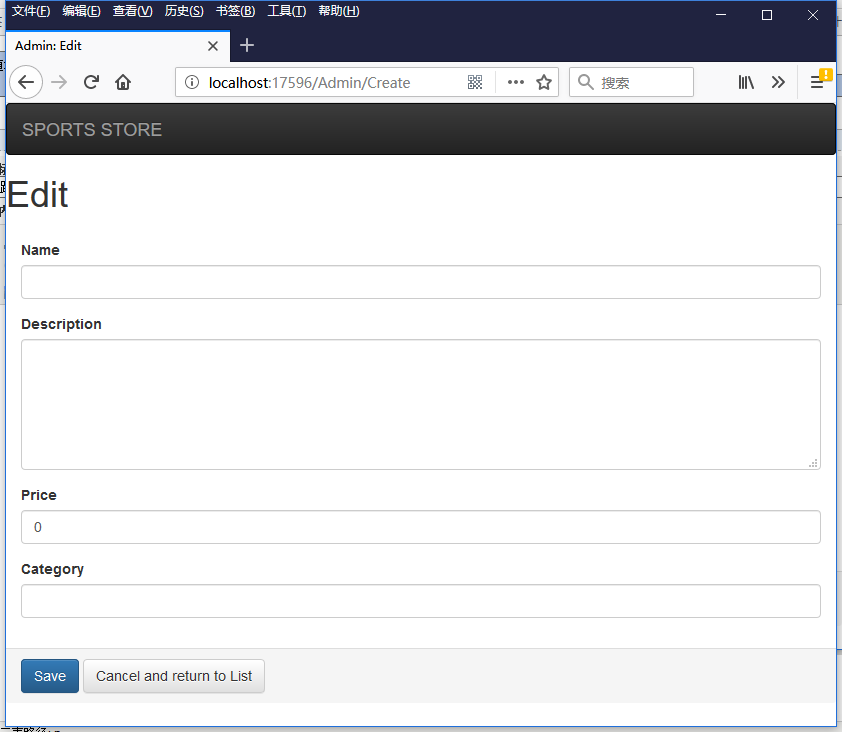
- Create方法Action:重用了Edit方法Action。返回Edit方法对应的视图,使用new Product()传入一个初始化的产品对象。
- Delete方法Action:使用了Post特性修饰,表示只能通过Post方式调用该Action,比Get方式更加安全。删除成功后,使用Temp对象在页面上显示删除成功字符串。
- 使用Temp对象保存和显示操作成功的字符串,而不能使用ViewData,因为ViewData只能在当前Action上使用。这里使用了RedirectToAction跳转到了另一个视图。
视图
在Shared文件夹中,添加_AdminLayout.cshtml视图。
 <!DOCTYPE html>

 <html>

 <head>

     <meta name="viewport" content="width=device-width" />

     <link href="~/Content/bootstrap.css" rel="stylesheet" />

     <link href="~/Content/bootstrap-theme.css" rel="stylesheet" />

     <title>@ViewBag.Title</title>

 </head>

 <body>

     <div class="navbar navbar-inverse" role="navigation">

         <a class="navbar-brand" href="#">

             <span class="hidden-xs">SPORTS STORE</span>

             <div class="visible-xs">SPORTS</div>

             <div class="visible-xs">STORE</div>

         </a>

     </div>

     <div>

         @if (TempData["message"] != null)

         {

             <div class="alert alert-success">@TempData["message"]</div>

         }

         @RenderBody()

     </div>

 </body>

 </html>
_AdminLayout.cshtml的页面布局跟网站首页的布局类似。只是在Body的上部增加了显示操作成功的字符串的DIV元素。
产品管理的Index.cshtml视图
 @model IEnumerable<SportsStore.Domain.Entities.Product>

 @{

     ViewBag.Title = "Index";

     Layout = "~/Views/Shared/_AdminLayout.cshtml";

 }

 <div class="panel panel-default">

     <div class="panel-heading">

         <h3>All Products</h3>

     </div>

     <div class="panel-body">

         <table class="table table-striped table-condensed table-bordered">

             <tr>

                 <th class="text-right">ID</th>

                 <th>Name</th>

                 <th class="text-right">Price</th>

                 <th class="text-center">Actions</th>

             </tr>

             @foreach (var item in Model)

             {

                 <tr>

                     <td class="text-right">@item.ProductID</td>

                     <td>

                         @Html.ActionLink(item.Name, "Edit", new

                         {

                             item.ProductID

                         })

                     </td>

                     <td class="text-right">@item.Price.ToString("c")</td>

                     <td class="text-center">

                         @using (Html.BeginForm("Delete", "Admin"))

                         {

                             @Html.Hidden("ProductID", item.ProductID)

                             <input type="submit" class="btn btn-default btn-xs" value="Delete" />

                         }

                     </td>

                 </tr>

             }

         </table>

     </div>

     <div class="panel-footer">

         @Html.ActionLink("Add a new product", "Create", null, new { @class = "btn btn-default" })

     </div>

 </div>
- 该视图通过语句:Layout = "~/Views/Shared/_AdminLayout.cshtml";,指定它的布局视图是刚才创建的_AdminLayout.cshtml。
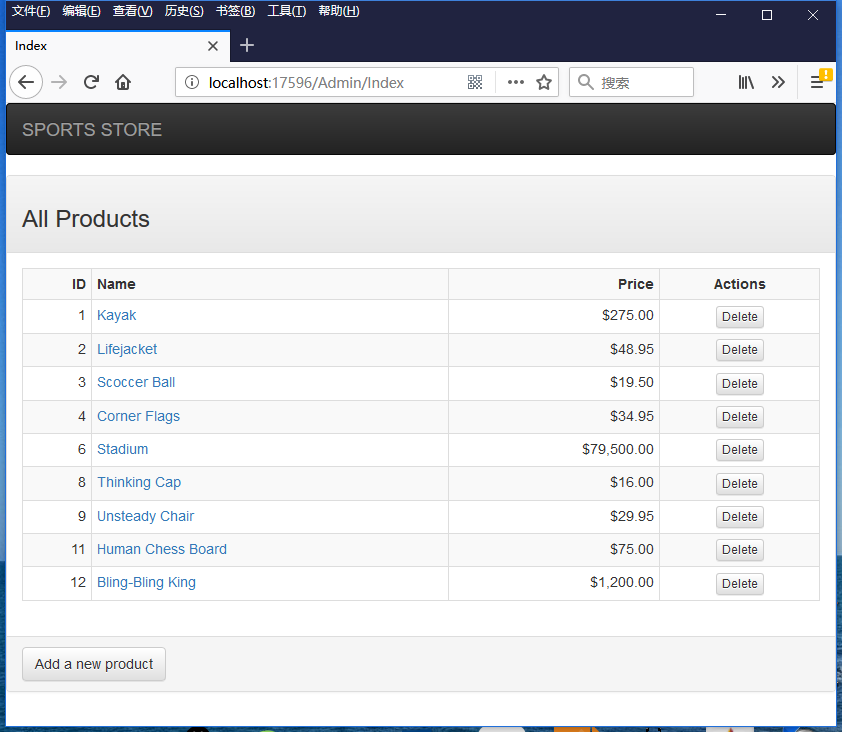
- 该视图通过表格的形式呈现了产品列表。显示产品名称的列是一个指向Edit方法Action的链接。每一行的最后一列放置一个删除产品的表单,表达内容是一个保存ProductID信息的隐藏元素和一个删除按钮。
- 页面底部显示一个创建产品的超链接,该链接通过css样式呈现成按钮样式。
最后是Edit.cshtml视图
 @model SportsStore.Domain.Entities.Product

 @{

     ViewBag.Title = "Admin: Edit " + @Model.Name;

     Layout = "~/Views/Shared/_AdminLayout.cshtml";

 }

 <h1>Edit @Model.Name</h1>

 @using (Html.BeginForm("Edit", "Admin", FormMethod.Post))

 {

     <div class="panel-body">

         @Html.HiddenFor(m => m.ProductID)

         @foreach (var property in ViewData.ModelMetadata.Properties)

         {

             switch (property.PropertyName)

             {

                 case "ProductID":

                     break;

                 default:

                     <div class="form-group">

                         <label>

                             @(property.DisplayName ?? property.PropertyName)

                         </label>

                         @if (property.PropertyName == "Description")

                         {

                             @Html.TextArea(property.PropertyName, null, new { @class = "form-control", rows = 5 })

                         }

                         else

                         {

                             @Html.TextBox(property.PropertyName, null, new { @class = "form-control" })

                         }

                     </div>

                     break;

             }

         }

     </div>

     <div class="panel-footer">

         <input type="submit" value="Save" class="btn btn-primary" />

         @Html.ActionLink("Cancel and return to List", "Index", null, new { @class = "btn btn-default" })

     </div>

 }
- 首先使用@Html.HiddenFor(m => m.ProductID)向页面发送保存有ProductID信息的隐藏元素。
- 使用ViewData.ModelMetadata.Properties,返回视图绑定类的所有属性。这里是Product类的所有属性。
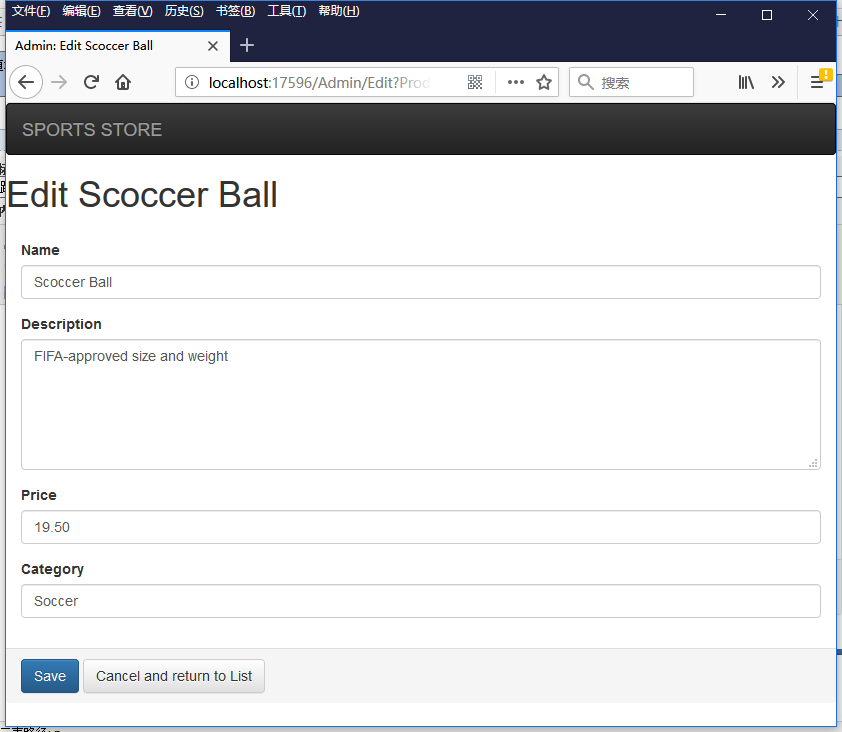
- 如果该属性名是ProductID(ProductID属性),则不生成表单HTML元素。如果该属性是Description属性,则显示成一个TextArea,通过@class指定他的行数。否则,只显示成一个普通的text输入框。
- @(property.DisplayName ?? property.PropertyName)用于显示输入元素前面的Label元素。如果属性使用了Display特性指定了属性显示在页面上的字符串,则显示这个字符串。否则,只显示这个属性名。这个对于使用了多语言的系统非常有用。
运行程序,得到运行结果。
点击任意一个产品的链接,返回Edit视图。
如果点击按钮Add a new product,返回Create视图。
添加视图模型验证
修改Product.cs类。
 using System.ComponentModel.DataAnnotations;


 namespace SportsStore.Domain.Entities

 {

     public class Product

     {

         public int ProductID { get; set; }

         [Required(ErrorMessage = "Please enter a product name")]

         public string Name { get; set; }

         [Required(ErrorMessage = "Please enter a description")]

         public string Description { get; set; }

         [Required]

         [Range(0.01, double.MaxValue, ErrorMessage = "Please enter a positive price")]

         public decimal Price { get; set; }

         [Required(ErrorMessage = "Please specify a category")]

         public string Category { get; set; }

     }

 }
需要引入名称空间System.ComponentModel.DataAnnotations;。该名称空间下包含了数量庞大的模型验证特性类。这里只使用了Required和Range。
继续编辑Edit.cshtml视图,将验证结果字符串显示在视图页面上。
 @model SportsStore.Domain.Entities.Product

 @{

     ViewBag.Title = "Admin: Edit " + @Model.Name;

     Layout = "~/Views/Shared/_AdminLayout.cshtml";

 }

 <h1>Edit @Model.Name</h1>

 @using (Html.BeginForm("Edit", "Admin", FormMethod.Post))

 {

     <div class="panel-body">

         @Html.HiddenFor(m => m.ProductID)

         @foreach (var property in ViewData.ModelMetadata.Properties)

         {

             switch (property.PropertyName)

             {

                 case "ProductID":

                     break;

                 default:

                     <div class="form-group">

                         <label>

                             @(property.DisplayName ?? property.PropertyName)

                         </label>

                         @if (property.PropertyName == "Description")

                         {

                             @Html.TextArea(property.PropertyName, null, new { @class = "form-control", rows = 5 })

                         }

                         else

                         {

                             @Html.TextBox(property.PropertyName, null, new { @class = "form-control" })

                         }

                     </div>

                     @Html.ValidationMessage(property.PropertyName)

                     break;

             }

         }

     </div>

     <div class="panel-footer">

         <input type="submit" value="Save" class="btn btn-primary" />

         @Html.ActionLink("Cancel and return to List", "Index", null, new { @class = "btn btn-default" })

     </div>

 }
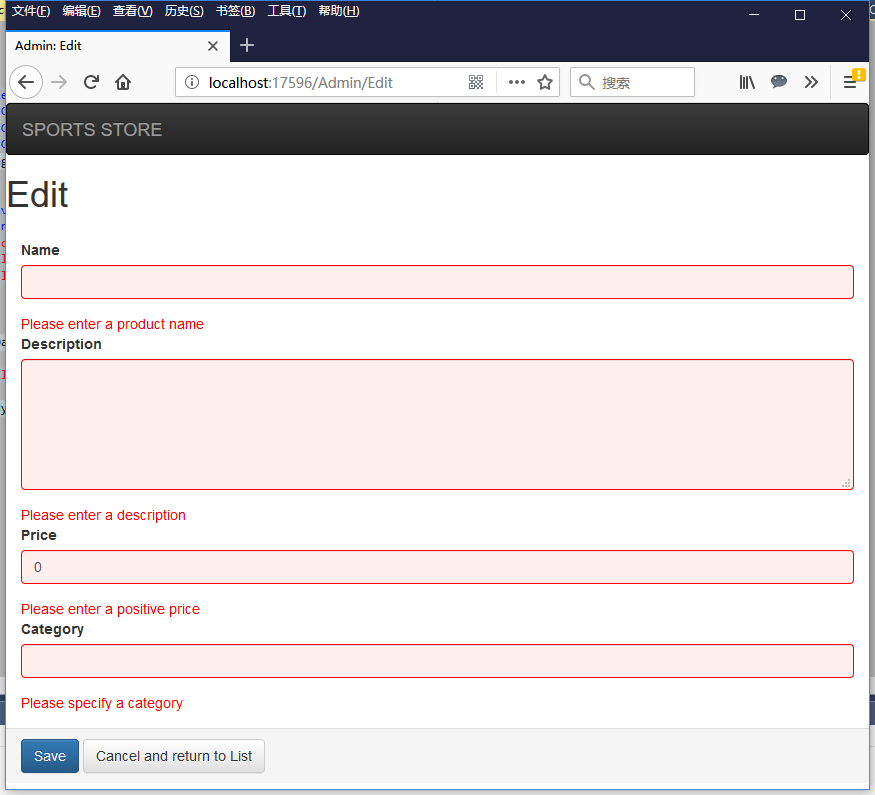
这里通过在每个表单元素所在的DIV下面,使用语句@Html.ValidationMessage(property.PropertyName)返回表单验证结果。
还要修改_AdminLayout.cshtml,引入验证出现错误时所用的CSS样式表。
 <!DOCTYPE html>

 <html>

 <head>

     <meta name="viewport" content="width=device-width" />

     <link href="~/Content/bootstrap.css" rel="stylesheet" />

     <link href="~/Content/bootstrap-theme.css" rel="stylesheet" />

     <link href="~/Content/ErrorStyles.css" rel="stylesheet" />

     <title>@ViewBag.Title</title>

 </head>

 <body>

     <div class="navbar navbar-inverse" role="navigation">

         <a class="navbar-brand" href="#">

             <span class="hidden-xs">SPORTS STORE</span>

             <div class="visible-xs">SPORTS</div>

             <div class="visible-xs">STORE</div>

         </a>

     </div>

     <div>

         @if (TempData["message"] != null)

         {

             <div class="alert alert-success">@TempData["message"]</div>

         }

         @RenderBody()

     </div>

 </body>

 </html>
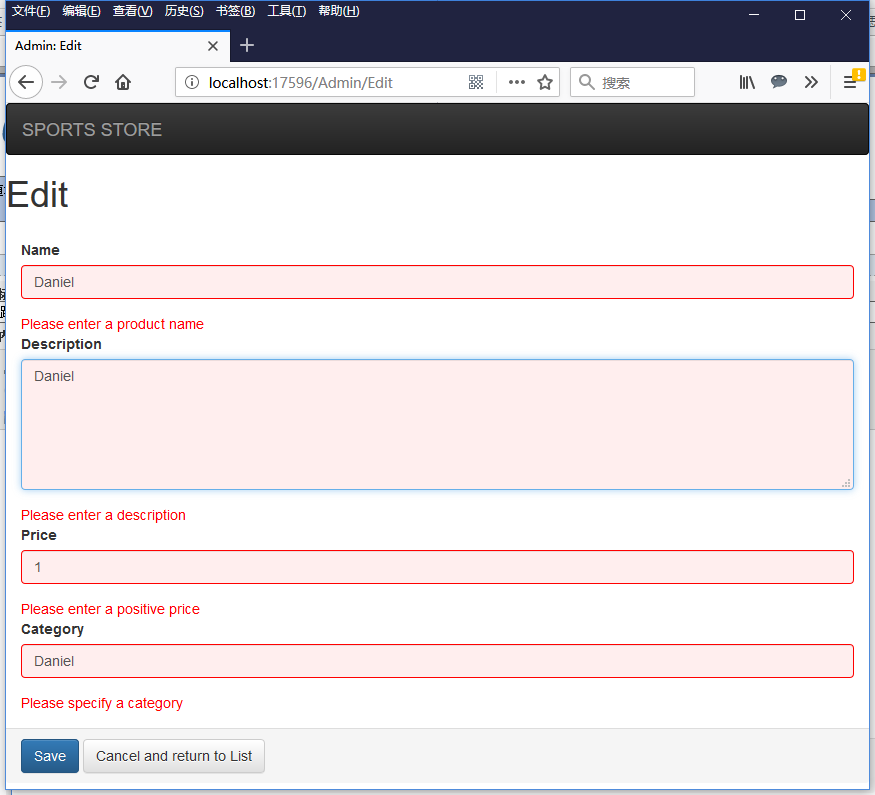
运行程序,访问/Admin/Edit视图。如果清空表单元素,则返回验证失败的Edit视图。错误消息显示在每个表单元素的下面。
如果表单元素填写正确
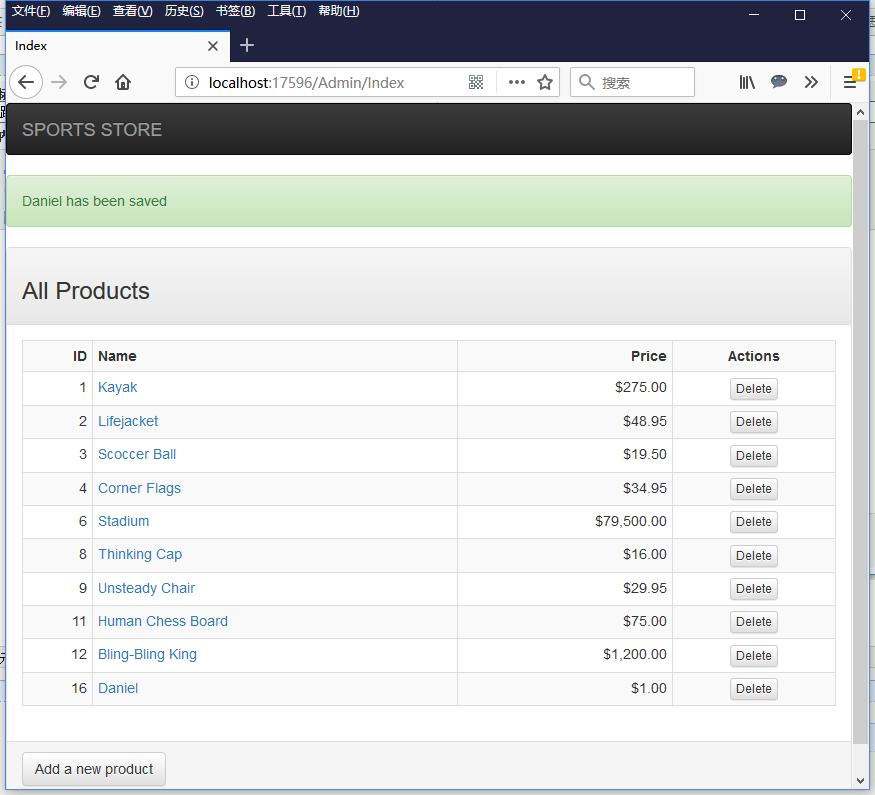
点击Save按钮,则保存成功。并返回Index视图,在Index视图上看到新创建的产品。在产品列表上部,显示保存成功的字符串。
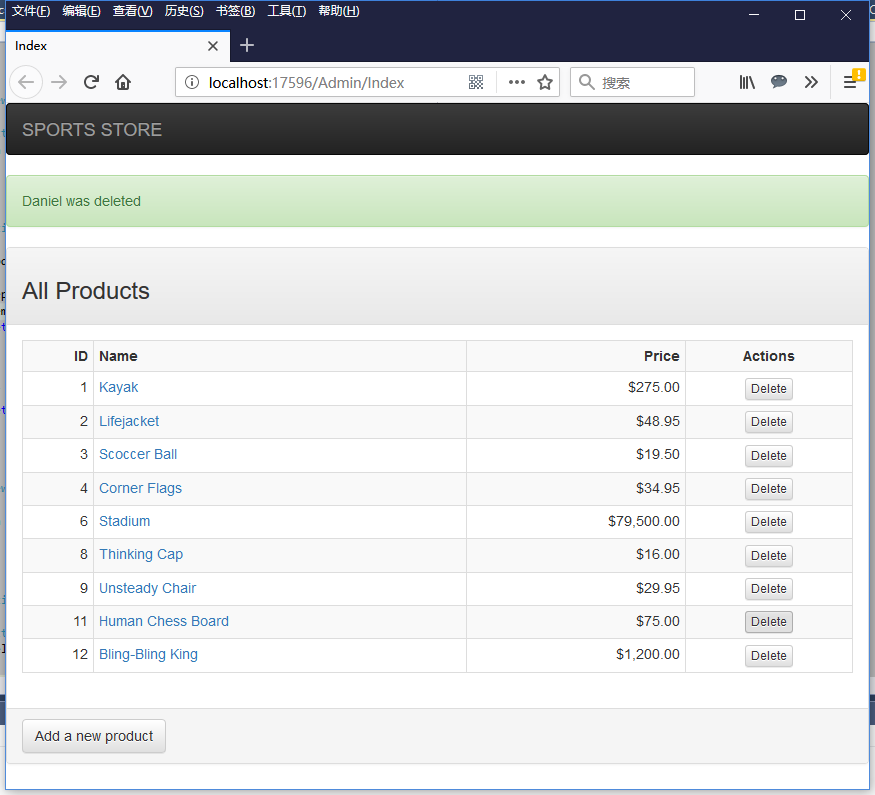
如果在Index视图上,删除Daniel这个产品。删除成功后,返回Index视图。
为表单添加客户端验证
现在使用的是服务器端验证。也就是说验证必须是发送到服务器端完成的。可以使用客户端验证方式,加快页面的访问速度。
首先使用NutGet向SportsStore.WebUI工程,添加javascript包Microsoft.jQuery.Unobtrusive.Validation 。
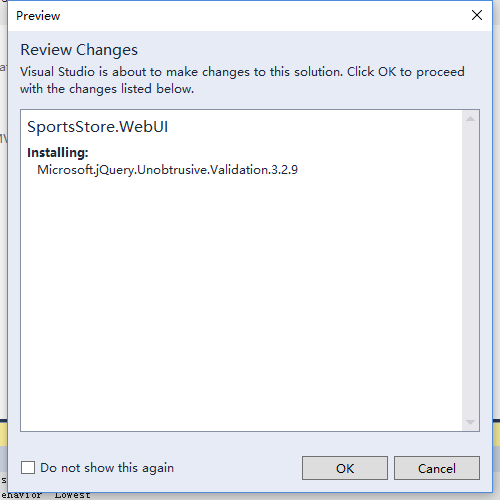
它将同时安装jquery.validate和jquery.validate.unobtrusive。
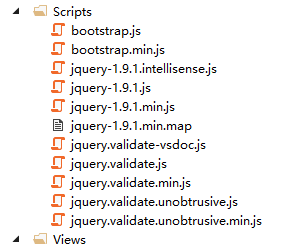
安装完成后的scrips文件夹内容是这样的。
修改_AdminLayout.cshtml视图,添加对新的JavaScript引用。
 <!DOCTYPE html>

 <html>

 <head>

     <meta name="viewport" content="width=device-width" />

     <link href="~/Content/bootstrap.css" rel="stylesheet" />

     <link href="~/Content/bootstrap-theme.css" rel="stylesheet" />

     <link href="~/Content/ErrorStyles.css" rel="stylesheet" />

     <script src="~/Scripts/jquery-1.9.1.js"></script>

     <script src="~/Scripts/jquery.validate.js"></script>

     <script src="~/Scripts/jquery.validate.unobtrusive.js"></script>

     <title>@ViewBag.Title</title>

 </head>

 <body>

     <div class="navbar navbar-inverse" role="navigation">

         <a class="navbar-brand" href="#">

             <span class="hidden-xs">SPORTS STORE</span>

             <div class="visible-xs">SPORTS</div>

             <div class="visible-xs">STORE</div>

         </a>

     </div>

     <div>

         @if (TempData["message"] != null)

         {

             <div class="alert alert-success">@TempData["message"]</div>

         }

         @RenderBody()

     </div>

 </body>

 </html>
运行程序,在/Admin/Create视图上,在空的表单元素页面上点击Save按钮,发现新的表达验证直接在客户端完成了。
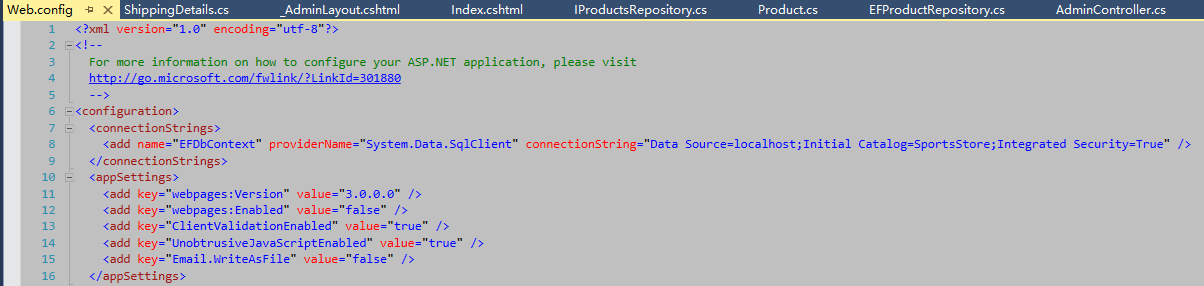
你也可以修改Web.config文件里的ClientValidationEnabled属性和UnobtrusiveJavaScriptEnabled属性,将他们都改为false(默认值都为true),来禁用客户端验证(变成服务器端验证)。
添加Admin路由规则
这时候,如果我们访问URL:/Admin,将继续返回Product控制器的List视图,将Admin字符串作为category参数传入List方法Action。而此时,我们希望访问/Admin/Index视图。
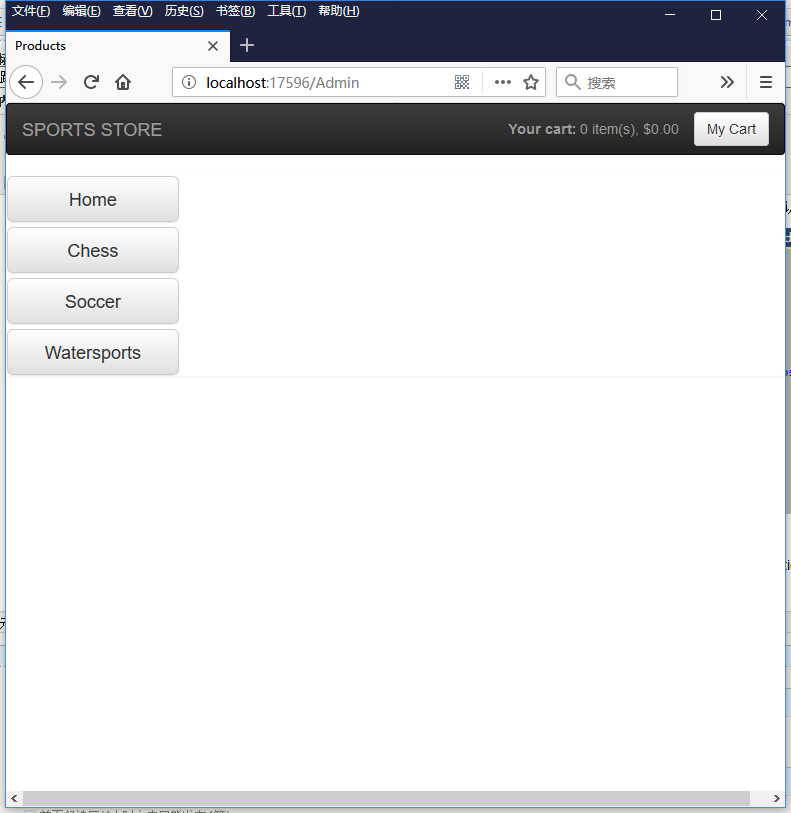
此时我们需要修改RouteConfig.cs代码文件的方法RegisterRoutes,向路由表头部插入新的路由规则(新的路由规则代码放在第二个位置)。
 using System;

 using System.Collections.Generic;

 using System.Linq;

 using System.Web;

 using System.Web.Mvc;

 using System.Web.Routing;

 namespace SportsStore

 {

     public class RouteConfig

     {

         public static void RegisterRoutes(RouteCollection routes)

         {

             routes.IgnoreRoute("{resource}.axd/{*pathInfo}");

             routes.MapRoute(

                 name: null,

                 url: "",

                 defaults: new { controller = "Product", action = "List", category = (string)null, page =  }

             );

             routes.MapRoute(

                 name: null,

                 url: "Admin",

                 defaults: new { controller = "Admin", action = "Index" }

          );


             routes.MapRoute(

                 name: null,

                 url: "Page{page}",

                 defaults: new { controller = "Product", action = "List", category = (string)null },

                 constraints: new { page = @"\d+" }

             );

             routes.MapRoute(

                 name: null,

                 url: "{category}",

                 defaults: new { controller = "Product", action = "List", page =  }

             );

             routes.MapRoute(

                 name: null,

                 url: "{category}/Page{page}",

                 defaults: new { controller = "Product", action = "List" },

                 constraints: new { page = @"\d+" }

             );

             routes.MapRoute(

                 name: "Default",

                 url: "{controller}/{action}/{id}",

                 defaults: new { controller = "Product", action = "List", id = UrlParameter.Optional }

             );

         }

     }

 }
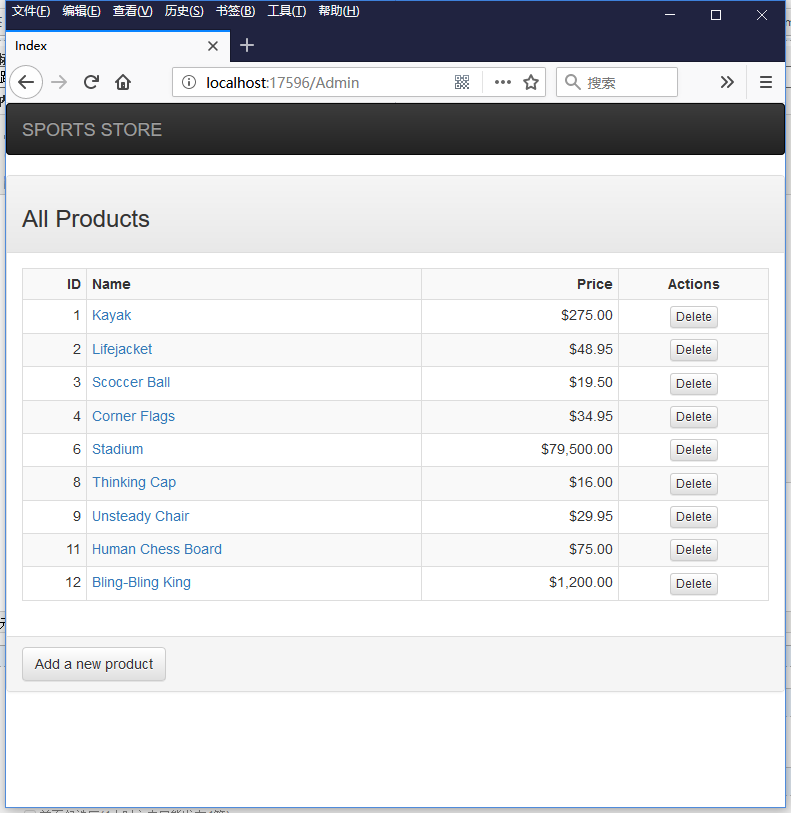
新的路由规则的url是Admin,控制器是AdminController,Action是Index方法。
这时运行程序,访问/Admin页面,将得到/Admin/Index视图。
而其他的路由规则均不受影响。
跟我学ASP.NET MVC之九:SportsStrore产品管理的更多相关文章
- 跟我学ASP.NET MVC之五:SportsStrore开始
摘要: 这篇文章将介绍一个ASP.NET应用程序SportsStore的开发过程. 开始 创建解决方案 创建工程 在New ASP.NET Project - SportsStore窗口中,选择Emp ...
- 跟我学ASP.NET MVC之八:SportsStrore移动设备
摘要: 现在的web程序开发避免不了智能手机和平板电脑上的使用,如果你希望发布你的应用程序给更广大客户使用的话,你将要拥抱可移动web浏览器的世界.向移动设备用户发布一个好的使用体验是很困难的-比只是 ...
- 跟我学ASP.NET MVC之六:SportsStrore添加产品目录导航
摘要: 上一篇文章,我建立了SportsStore应用程序的核心架构.现在我将使用这个架构向这个应用程序添加功能,你将开始看到这个基础架构的作用.我将添加重要的面向客户的简单功能,在这个过程中,你将看 ...
- 跟我学ASP.NET MVC之七:SportsStrore一个完整的购物车
摘要: SportsStore应用程序进展很顺利,但是我不能销售产品直到设计了一个购物车.在这篇文章里,我就将创建一个购物车. 在目录下的每个产品旁边添加一个添加到购物车按钮.点击这个按钮将显示客户到 ...
- bootstrap-data-target触发模态弹出窗元素的data使用 data-toggle与data-target的作用 深入ASP.NET MVC之九:Ajax支持 Asp.Net MVC4系列--进阶篇之AJAX
bootstrap-data-target触发模态弹出窗元素的data使用 时间:2017-05-27 14:22:34 阅读:4479 评论:0 收藏:0 [ ...
- [转]ASP.NET MVC 4 (九) 模型绑定
本文转自:http://www.cnblogs.com/duanshuiliu/p/3706701.html 模型绑定指的是MVC从浏览器发送的HTTP请求中为我们创建.NET对象,在HTTP请求和C ...
- 跟我学ASP.NET MVC之三:完整的ASP.NET MVC程序-PartyInvites
摘要: 在这篇文章中,我将在一个例子中实际地展示MVC. 场景 假设一个朋友决定举办一个新年晚会,她邀请我创建一个用来邀请朋友参加晚会的WEB程序.她提出了四个注意的需求: 一个首页展示这个晚会 一个 ...
- 跟我学ASP.NET MVC之二:第一个ASP.NET MVC程序
摘要: 本篇文章带你一步一步创建一个简单的ASP.NET MVC程序. 创建新ASP.NET MVC工程 点击“OK”按钮后,打开下面的窗口: 这里选择“Empty”模板以及“MVC”选项.这次不创 ...
- 跟我学ASP.NET MVC之一:开篇有益
摘要: ASP.NET MVC是微软的Web开发框架,结合了模型-视图-控制器(MVC)架构的有效性和整洁性,敏捷开发最前沿的思想和技术,以及现存的ASP.NET平台最好的部分.它是传统ASP.NET ...
随机推荐
- iOS将汉字转换为拼音
将汉字转换为拼音 - (NSString *)chineseToPinyin:(NSString *)chinese withSpace:(BOOL)withSpace { CFStringRef h ...
- hadoop容灾能力测试 分类: A1_HADOOP 2015-03-02 09:38 291人阅读 评论(0) 收藏
实验简单来讲就是 1. put 一个600M文件,分散3个replica x 9个block 共18个blocks到4个datanode 2. 我关掉了两个datanode,使得大部分的block只在 ...
- Nutch的日志系统 分类: H3_NUTCH 2015-02-17 20:14 261人阅读 评论(0) 收藏
一.Nutch日志实现方式 1.Nutch使用slf4j作为日志接口,使用log4j作为具体实现.关于二者的基础,请参考 http://blog.csdn.net/jediael_lu/article ...
- 细说CSS伪类和伪元素
原文 简书原文:https://www.jianshu.com/p/eae56b7fe7fe 大纲 1.伪元素 2.伪类元素 3.伪元素和伪类元素的区别 4.伪类和伪元素的使用 1.伪元素 伪元素在D ...
- 【66.47%】【codeforces 556B】Case of Fake Numbers
time limit per test2 seconds memory limit per test256 megabytes inputstandard input outputstandard o ...
- 【Lucene4.8教程之二】索引 2014-06-16 11:30 3845人阅读 评论(0) 收藏
一.基础内容 0.官方文档说明 (1)org.apache.lucene.index provides two primary classes: IndexWriter, which creates ...
- hdu5389 Zero Escape
Problem Description Zero Escape, is a visual novel adventure video game directed by Kotaro Uchikoshi ...
- Android Activity 悬浮 半透明边框
1.首先来创建一个Activity,在Activity的OnCreate函数里面我们设置它为全屏,然后设置Activity的宽高为全屏*0.9,然后设置背景图片为半透明的 .9 图片 .这样就已经是非 ...
- 选课 - 树型DP(孩子兄弟建树法)
题目描述 学校实行学分制.每门的必修课都有固定的学分,同时还必须获得相应的选修课程学分.学校开设了 N(N<300)门的选修课程,每个学生可选课程的数量 M 是给定的.学生选修了这M门课并考核通 ...
- Cryptographic method and system
The present invention relates to the field of security of electronic data and/or communications. In ...