
Python3 常用模块3
numpy模块
numpy模块可以用来做数据分析, 对numpy数组(既有行既有列) -- 矩阵 进行科学运算
import numpy as np

# 用array方法将列表转换为np数组

arr1 = np.array([1, 2, 3])

arr2 = np.array([4, 5, 6])

print(arr1)  # [1 2 3]

print(arr1 * arr2)  # [ 4 10 18]
创建numpy数组
# 一维数组

arr1 = np.array([1, 2, 3])

print(type(arr1), arr1)  # <class 'numpy.ndarray'> [1 2 3]

# 二维数组

arr2 = np.array([

    [1, 2, 3],

    [4, 5, 6]

])

print(arr2)

# [[1 2 3]

#  [4 5 6]]

# 三维数组

arr3 = np.array([

    [[1, 2, 3],

     [4, 5, 6]],

    [[7, 8, 9],

     [10, 11, 12]]

])

print(arr3)

'''

[[[ 1  2  3]

  [ 4  5  6]]

 [[ 7  8  9]

  [10 11 12]]]

'''

# 同过函数创建numpy数组

print(np.ones((2, 3)))  # 创建一个2行3列, 值都为1.的数组

print(np.zeros((2, 3)))
numpy数组的属性和用法
arr = np.array([

    [1, 2, 3],

    [4, 5, 6]

])

# T 数组的转置 (高维数组) ---> 行列互换

print(arr.T)

'''

[[1 4]

[2 5]

[3 6]]

'''

# dtype 数组元素的数据类型

print(arr.dtype)  # int32

# size 数组元素个数

print(arr.size)  # 6

# ndim 数组的维度

print(arr.ndim)  # 2

# shape 数组的维度长度(以元祖形式)

print(arr.shape[0])  # 2  0表示行

print(arr.shape[1])  # 3  1表示列

# astype 类型转换

arr = arr.astype(np.float64)

print(arr)

'''

[[1. 2. 3.]

 [4. 5. 6.]]

'''

# 索引取值,切片和修改值

print(arr[:, :])  # 打印所有行所有列

print(arr[0,0])  # 打印数组坐标为(1,1)的元素

print(arr[0, :]  # 打印打印第一行

# 逻辑取值

print(arr[arr > 4])  # [5. 6.]

# hstack & vstack 数组的合并

arr1 = np.array([

    [1, 2, 3],

    [4, 5, 6]

])

arr2 = np.array([

    ['a', 'b', 'c'],

    ['d', 'e', 'f']

])

print(np.hstack((arr1, arr2)))  # 拼接行 括号内只能放一个元祖(arr1, arr2)

print(np.vstack((arr1, arr2)))  # 拼接列

print(np.concatenate((arr1, arr2), axis=1))  # 默认以列合并 # 0表示列,1表示行

# arange 范围

print(np.arange(2, 10)  # [2 3 4 5 6 7 8 9]

# resharpe 重构形状

print(arr1.reshape((3, 2)))  # 3行2列

'''

[[1 2]

 [3 4]

 [5 6]]

'''

# numpy数组的运算

arr1 = np.ones((3,4)) * 4

print(arr1)

print(np.sin(arr1))

# 矩阵运算--点乘

arr1 = np.array([

    [1, 2, 3],

    [4, 5, 6]

])

arr2 = np.array([

    [1, 2],

    [3, 4],

    [5, 6]

])

#  2*3  3*2 --> 2*2

print(np.dot(arr1, arr2))

'''

[[22 28]

 [49 64]]

'''

# numpy.random生成随机数

print(np.random.rand(3, 4))

print(np.random.random((3, 4)))

# np.random.seed(1)

print(np.random.random((3, 4)))

s = np.random.RandomState(1)

print(s.random((3, 4)))

arr = np.array([[1, 2, 3], [4, 5, 6], [9, 8, 9]])

np.random.shuffle(arr)

print(arr)

# 针对一维

print(np.random.choice([1, 2, 3], 1))

# 针对某一个范围

print(np.random.randint(1, 100, (3, 4)))
matplotlib模块
matplotlib模块可以用来画图
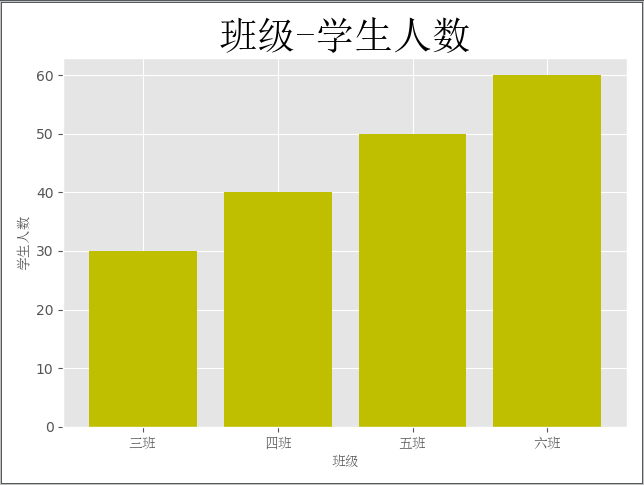
条形图
from matplotlib import pyplot as plt  # 约定俗称

from matplotlib.font_manager import FontProperties  # 修改字体

font = FontProperties(fname='C:\Windows\Fonts\simsun.ttc')

plt.style.use('ggplot')  # 设置背景

class_ = ['三班', '四班', '五班', '六班']

students = [30, 40, 50, 60]

class_index = range(len(class_))

plt.bar(class_index, students, color='y')

plt.xlabel('班级', fontproperties=font)

plt.ylabel('学生人数', fontproperties=font)

plt.title('班级-学生人数', fontproperties=font, fontsize=28, fontweight=30)

plt.xticks(class_index, class_, fontproperties=font)

plt.show()
直方图
import numpy as np

from matplotlib import pyplot as plt

from matplotlib.font_manager import FontProperties

font = FontProperties(fname='C:\Windows\Fonts\simsun.ttc')

plt.style.use('ggplot')

x1 = np.random.randn(10000)

x2 = np.random.randn(10000)

fig = plt.figure()  # 生成一张画布

ax1 = fig.add_subplot(1, 2, 1)  # 1行2列第一个

ax2 = fig.add_subplot(1, 2, 2)

ax1.hist(x1, bins=50, color='b')

ax2.hist(x2, bins=50, color='y')

fig.suptitle('两个正太分布', fontproperties=font, fontsize=20)

ax1.set_title('x1的正太分布', fontproperties=font)

ax2.set_title('x2的正太分布', fontproperties=font)

plt.show()

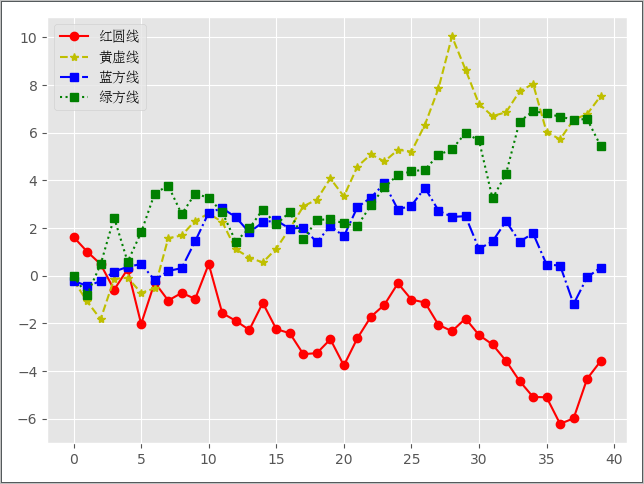
折线图
import numpy as np

from matplotlib import pyplot as plt

from matplotlib.font_manager import FontProperties

font = FontProperties(fname='C:\Windows\Fonts\simsun.ttc')

plt.style.use('ggplot')

np.random.seed(1)

x1 = np.random.randn(40).cumsum()

x2 = np.random.randn(40).cumsum()

x3 = np.random.randn(40).cumsum()

x4 = np.random.randn(40).cumsum()

plt.plot(x1, c='r', linestyle='-', marker='o', label='红圆线')

plt.plot(x2, c='y', linestyle='--', marker='*', label='黄虚线')

plt.plot(x3, c='b', linestyle='-.', marker='s', label='蓝方线')

plt.plot(x4, c='g', linestyle=':', marker='s', label='绿方线')

plt.legend(loc='best', prop=font)  # 显示label

plt.show()
散点图 + 直线图
import numpy as np

from matplotlib import pyplot as plt  # 约定俗成

from matplotlib.font_manager import FontProperties  # 修改字体

font = FontProperties(fname='C:\Windows\Fonts\simsun.ttc')

plt.style.use('ggplot')

fig = plt.figure()

ax1 = fig.add_subplot(1, 2, 1)

ax2 = fig.add_subplot(1, 2, 2)

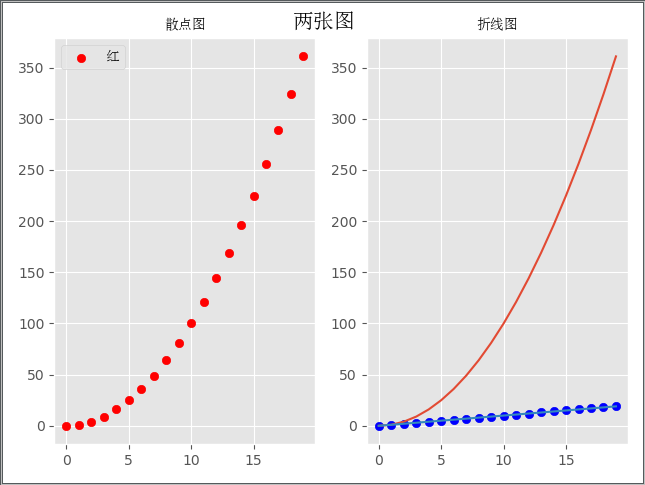
x = np.arange(20)

y = x ** 2

x2 = np.arange(20)

y2 = x2

ax1.scatter(x, y, c='r', label='红')

ax2.scatter(x2, y2, c='b', label='蓝')

ax2.plot(x, y)

ax2.plot(x2, y2)

fig.suptitle('两张图', fontproperties=font, fontsize=15)

ax1.set_title('散点图', fontproperties=font)

ax2.set_title('折线图', fontproperties=font)

ax1.legend(prop=font)

plt.show()
pandas模块
pandas模块可以用来操作excel/json/sql/ini/csv(配置文件)/等
import pandas as pd

import numpy as np

np.random.seed(1)

index = pd.date_range('2019-01-01', periods=6, freq='M')

columns = ['c1', 'c2', 'c3', 'c4']

val = np.random.randn(6, 4)

df = pd.DataFrame(index=index, columns=columns, data=val)

print(df)

'''

                  c1        c2        c3        c4

2019-01-31  1.624345 -0.611756 -0.528172 -1.072969

2019-02-28  0.865408 -2.301539  1.744812 -0.761207

2019-03-31  0.319039 -0.249370  1.462108 -2.060141

2019-04-30 -0.322417 -0.384054  1.133769 -1.099891

2019-05-31 -0.172428 -0.877858  0.042214  0.582815

2019-06-30 -1.100619  1.144724  0.901591  0.502494

'''

# 保存文件

df.to_excel('date_c.xlsx')

# 读出文件

df = pd.read_excel('date_c.xlsx', index_col=[0])

print(df)

print(df.index)

'''

DatetimeIndex(['2019-01-31', '2019-02-28', '2019-03-31', '2019-04-30',

               '2019-05-31', '2019-06-30'],

              dtype='datetime64[ns]', freq=None)

'''

print(df.columns)  # Index(['c1', 'c2', 'c3', 'c4'], dtype='object')

print(df.values)

'''

[[ 1.62434536 -0.61175641 -0.52817175 -1.07296862]

 [ 0.86540763 -2.3015387   1.74481176 -0.7612069 ]

 [ 0.3190391  -0.24937038  1.46210794 -2.06014071]

 [-0.3224172  -0.38405435  1.13376944 -1.09989127]

 [-0.17242821 -0.87785842  0.04221375  0.58281521]

 [-1.10061918  1.14472371  0.90159072  0.50249434]]

'''

print(df[['c1', 'c2']])  # 按列

'''

                  c1        c2

2019-01-31  1.624345 -0.611756

2019-02-28  0.865408 -2.301539

2019-03-31  0.319039 -0.249370

2019-04-30 -0.322417 -0.384054

2019-05-31 -0.172428 -0.877858

2019-06-30 -1.100619  1.144724

'''

# 按index取值

print(df.loc['2019-01-31'])

print(df.loc['2019-01-31':'2019-05-31'])  # 按行

# 按照values取值

print(df)

print(df.iloc[0, 0])  # 第一个值

df.iloc[0, :] = 0  # 让第一行都为0

print(df)
Python3 常用模块3的更多相关文章
- python3 常用模块详解
这里是python3的一些常用模块的用法详解,大家可以在这里找到它们. Python3 循环语句 python中模块sys与os的一些常用方法 Python3字符串 详解 Python3之时间模块详述 ...
- python3 常用模块
一.time与datetime模块 在Python中,通常有这几种方式来表示时间: 时间戳(timestamp):通常来说,时间戳表示的是从1970年1月1日00:00:00开始按秒计算的偏移量.我们 ...
- Python3常用模块的安装
1.mysql驱动:mysql-connector-python 1.安装 $ pip3 install mysql-connector-python --allow-external mysql-c ...
- Python3 常用模块2
目录 time 模块 时间戳形式 格式化时间 结构化时间 time.time() time.sleep() datetime 模块 random 模块 hashlib 模块 和 hmac 模块 typ ...
- Python3 常用模块1
目录 os模块 对文件夹操作 对文件进行操作 sys模块 json 和pickle模块 logging模块 日志等级 longging模块的四大组件 自定义配置 os模块 通过os模块我们可以与操作系 ...
- Python3基础(5)常用模块:time、datetime、random、os、sys、shutil、shelve、xml处理、ConfigParser、hashlib、re
---------------个人学习笔记--------------- ----------------本文作者吴疆-------------- ------点击此处链接至博客园原文------ 1 ...
- Python3基础笔记--常用模块
目录: 参考博客:Python 之路 Day5 - 常用模块学习 Py西游攻关之模块 一.time模块 二.random模块 三.os模块 四.sys模块 五.hashlib模块 六.logging模 ...
- day--6_python常用模块
常用模块: time和datetime shutil模块 radom string shelve模块 xml处理 configparser处理 hashlib subprocess logging模块 ...
- python基础之常用模块以及格式化输出
模块简介 模块,用一砣代码实现了某个功能的代码集合. 类似于函数式编程和面向过程编程,函数式编程则完成一个功能,其他代码用来调用即可,提供了代码的重用性和代码间的耦合.而对于一个复杂的功能来,可能需要 ...
随机推荐
- CSS中越界问题的经典解决方案
(1)如何解决父元素的第一个子元素的margin-top越界问题 1)为父元素加border-top: 1px;——有副作用 2)为父元素指定padding-top: 1px;——有副作用 3)为父元 ...
- gin索引优化实例1
GIN(Generalized Inverted Index, 通用倒排索引) 是一个存储对(key, posting list)集合的索引结构,其中key是一个键值,而posting list 是一 ...
- selenium针对浏览器滚动条的操作
我们在实际自动化测试过程中,肯定会遇到当前页面显示不到我们定位的元素.这就需要下拉滚动条才能显示出我们的元素: 而滚动条的按钮又是我们定位不到的,所以需要使用js脚本来完成: 1.先来说我们的下拉滚动 ...
- LaravelS - 基于Swoole加速Laravel/Lumen
LaravelS LaravelS是一个胶水项目,用于快速集成Swoole到Laravel或Lumen,然后赋予它们更好的性能.更多可能性.Github 特性 内置Http/WebSocket服务器 ...
- 根据json数据中某一个属性 处理数组重组的方法 (二种)
需求:根据role 的不同分组 渲染页面 进行后期操作 后台返回数据: 因为后台返回的json数据不是我们想要的 所以就得自己来了~ 要啥样整啥样 js: 第一种处理方法 使用方法: 1: th ...
- oracle表结构
表管理 新建表 语法 create table 表名 ( 列名1 类型(长度), 列名2 类型(长度), 列名3 类型(长度) ); create table:关键字,建表 后跟新建表的表名,表名长度 ...
- 新闻实时分析系统Hive与HBase集成进行数据分析
(一)Hive 概述 (二)Hive在Hadoop生态圈中的位置 (三)Hive 架构设计 (四)Hive 的优点及应用场景 (五)Hive 的下载和安装部署 1.Hive 下载 Apache版本的H ...
- day 23 复习
本来应该学习day23,由于上午未学习,下去困,导致今天未进行进度 那就做一下简单的复习吧! 1. while else结构,如果while 后的条件条件不再满足 引发循环再继续,则执行else中的内 ...
- vue当文字很多的时候实现...代替
vue当文字很多的时候实现...代替只需加三行代码 overflow: hiddenwhite-space: nowraptext-overflow: ellipsis
- C#学习笔记02--Bool,关系/逻辑运算符, if/switch语句
一. Bool类型 逻辑判断, C#中只有true和false两个值; 使用场景: 在分支和循环语句中, 常用作为判断条件来使用; 二. 关系运算符 关系运算符 (> < &g ...