
thinkcmf5 支付宝接口操作
这是我自己摸索再结合网上搜索的一大堆内容搞出来的,官方的文件对于新手来说很难理解,什么文件放什么位置,该怎么引用,都要一一尝试,我这就直接列出来了,照样放就是了.同样适用于tp5,我这个也是tp5的
1. 先把PayModel 放在app下你做项目的model里,需要修改内容: 修改的内容我会标红
<?php

/*

 * author :

 * link :

 */

namespace app\product_mall\model;

use think\Validate;

use think\Log;

use think\Db;

class PayModel extends \think\Model

{

    public static $alipay_config = [

                                        'partner'             => '2088821XXXXXXXXX',//支付宝partner,2088开头数字

                                        'seller_id'         => '208882160XXXXXXX',//支付宝partner,2088开头数字              上面这两处都是同样的内容,在支付宝开发平台->账户中心->老版wap支付密钥->合作伙伴身份(PID)

                                        'key'                 => 'yb4uaif17i9nm92kcq89rcnvf7fq1yms',//支付宝密钥             老版wap支付密钥->安全校验码(key)->md5密匙

                                        'sign_type'         => 'MD5',

                                        'input_charset'     => 'utf-8',

                                        'cacert'             => '',

                                        'transport'         => 'http',

                                        'payment_type'         => '1',

                                        'service'             => 'alipay.wap.create.direct.pay.by.user',//这个是wap支付,就是手机网站支付打开支付宝             //create_direct_pay_by_user  这个是电脑网站支付,扫码或者账号登录支付,不能同时存在
'anti_phishing_key' => '', 'exter_invoke_ip' => '', ];
public function alipay($data=[])
{
   $config = self::$alipay_config;
   vendor('alipay.alipay');
   $parameter = [
      "service"          => $config['service'],
      "partner"          => $config['partner'],
      "seller_id"       => $config['seller_id'],
      "payment_type"    => $config['payment_type'],
      "notify_url"      => $data['notify_url'],
      "return_url"      => $data['return_url'],
      "anti_phishing_key"    => $config['anti_phishing_key'],
      "exter_invoke_ip"  => $config['exter_invoke_ip'],
      "out_trade_no"    => $data['out_trade_no'],
      "subject"        => $data['subject'],
      "total_fee"          => $data['total_fee'],
      "body"          => $data['body'],
      "_input_charset"   => $config['input_charset']
   ];
   $alipaySubmit = new \AlipaySubmit($config);
       $html_text = $alipaySubmit->buildRequestForm($parameter, 'get', '正在跳转到支付页面,请稍后..................');
       echo $html_text;
}

public function notify_alipay()
{
   $config = self::$alipay_config;
   vendor('alipay.alipay');
   $alipayNotify = new \AlipayNotify($config);
   if($result = $alipayNotify->verifyNotify()){
      if(input('trade_status') == 'TRADE_FINISHED' || input('trade_status') == 'TRADE_SUCCESS') {
         // 处理支付成功后的逻辑业务
         $data['content'] = serialize($_POST);
         $data['create_time'] = time();
         $res = Db::name('temp_test')->insert($data);
         Log::init([
            'type'  =>  'File',
            'path'  =>  LOG_PATH.'../paylog1/'
         ]);
         Log::write($result,'log');

         return 'success';
      }
      Log::init([
         'type'  =>  'File',
         'path'  =>  LOG_PATH.'../paylog1/'
      ]);
      Log::write('error','log');
      return 'fail1';
   }
   return 'fail2';
}
} ?>
这个文件的存放位置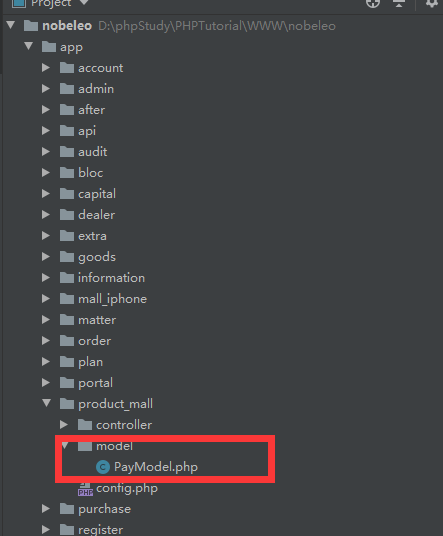 product_mall就是我的项目
2.alipay.php文件,内容:
<?php
function createLinkstring($para) {
$arg = "";
while (list ($key, $val) = each ($para)) {
$arg.=$key."=".$val."&";
}
$arg = substr($arg,0,count($arg)-2);
if(get_magic_quotes_gpc()){$arg = stripslashes($arg);}
return $arg;
}
function createLinkstringUrlencode($para) {
$arg = "";
while (list ($key, $val) = each ($para)) {
$arg.=$key."=".urlencode($val)."&";
}
$arg = substr($arg,0,count($arg)-2);
if(get_magic_quotes_gpc()){$arg = stripslashes($arg);}
return $arg;
}
function paraFilter($para) {
$para_filter = array();
while (list ($key, $val) = each ($para)) {
if($key == "sign" || $key == "sign_type" || $val == "")continue;
else $para_filter[$key] = $para[$key];
}
return $para_filter;
}
function logResult($word='') {
$fp = fopen("log.txt","a");
flock($fp, LOCK_EX) ;
fwrite($fp,"执行日期:".strftime("%Y%m%d%H%M%S",time())."\n".$word."\n");
flock($fp, LOCK_UN);
fclose($fp);
}
function getHttpResponseGET($url,$cacert_url) {
$curl = curl_init($url);
curl_setopt($curl, CURLOPT_HEADER, 0 ); // 过滤HTTP头
curl_setopt($curl,CURLOPT_RETURNTRANSFER, 1);// 显示输出结果
curl_setopt($curl, CURLOPT_SSL_VERIFYPEER, true);//SSL证书认证
curl_setopt($curl, CURLOPT_SSL_VERIFYHOST, 2);//严格认证
curl_setopt($curl, CURLOPT_CAINFO,$cacert_url);//证书地址
$responseText = curl_exec($curl);
curl_close($curl);
return $responseText;
}
function charsetEncode($input,$_output_charset ,$_input_charset) {
$output = "";
if(!isset($_output_charset) )$_output_charset = $_input_charset;
if($_input_charset == $_output_charset || $input ==null ) {
$output = $input;
} elseif (function_exists("mb_convert_encoding")) {
$output = mb_convert_encoding($input,$_output_charset,$_input_charset);
} elseif(function_exists("iconv")) {
$output = iconv($_input_charset,$_output_charset,$input);
} else die("sorry, you have no libs support for charset change.");
return $output;
}
function charsetDecode($input,$_input_charset ,$_output_charset) {
$output = "";
if(!isset($_input_charset) )$_input_charset = $_input_charset ;
if($_input_charset == $_output_charset || $input ==null ) {
$output = $input;
} elseif (function_exists("mb_convert_encoding")) {
$output = mb_convert_encoding($input,$_output_charset,$_input_charset);
} elseif(function_exists("iconv")) {
$output = iconv($_input_charset,$_output_charset,$input);
} else die("sorry, you have no libs support for charset changes.");
return $output;
}
class AlipaySubmit {
var $alipay_config;
var $alipay_gateway_new = 'https://mapi.alipay.com/gateway.do?';
function __construct($alipay_config){
$this->alipay_config = $alipay_config;
}
function AlipaySubmit($alipay_config) {
$this->__construct($alipay_config);
}
function buildRequestMysign($para_sort) {
$prestr = createLinkstring($para_sort);
$mysign = "";
switch (strtoupper(trim($this->alipay_config['sign_type']))) {
case "MD5" :
$mysign = md5($prestr.$this->alipay_config['key']);
break;
default :
$mysign = "";
}
return $mysign;
}
function buildRequestPara($para_temp) {
$para_filter = paraFilter($para_temp);
ksort($para_filter);
reset($para_filter);
$para_sort = $para_filter;
$mysign = $this->buildRequestMysign($para_sort);
$para_sort['sign'] = $mysign;
$para_sort['sign_type'] = strtoupper(trim($this->alipay_config['sign_type']));
return $para_sort;
}
function buildRequestParaToString($para_temp) {
$para = $this->buildRequestPara($para_temp);
$request_data = createLinkstringUrlencode($para);
return $request_data;
}
function buildRequestForm($para_temp, $method, $button_name) {
$para = $this->buildRequestPara($para_temp);
$sHtml = "<form id='alipaysubmit' name='alipaysubmit' action='".$this->alipay_gateway_new."_input_charset=".trim(strtolower($this->alipay_config['input_charset']))."' method='".$method."'>";
while (list ($key, $val) = each ($para)) {
$sHtml.= "<input type='hidden' name='".$key."' value='".$val."'/>";
}
$sHtml .= "<input type='submit' value='".$button_name."' style='display:none;'></form>";
$sHtml .= "<script>document.forms['alipaysubmit'].submit();</script>";
return $sHtml;
}
function query_timestamp() {
$url = $this->alipay_gateway_new."service=query_timestamp&partner=".trim(strtolower($this->alipay_config['partner']))."&_input_charset=".trim(strtolower($this->alipay_config['input_charset']));
$encrypt_key = "";
$doc = new DOMDocument();
$doc->load($url);
$itemEncrypt_key = $doc->getElementsByTagName( "encrypt_key" );
$encrypt_key = $itemEncrypt_key->item(0)->nodeValue;
return $encrypt_key;
}
}
class AlipayNotify {
var $https_verify_url = 'https://mapi.alipay.com/gateway.do?service=notify_verify&';
var $http_verify_url = 'http://notify.alipay.com/trade/notify_query.do?';
var $alipay_config;
function __construct($alipay_config){
$this->alipay_config = $alipay_config;
}
function AlipayNotify($alipay_config) {
$this->__construct($alipay_config);
}
function verifyNotify(){
if(empty($_POST)) {//判断POST来的数组是否为空
return false;
}else{
$isSign = $this->getSignVeryfy($_POST, $_POST["sign"]);
$responseTxt = 'false';
if (! empty($_POST["notify_id"])) {$responseTxt = $this->getResponse($_POST["notify_id"]);}
if (preg_match("/true$/i",$responseTxt) && $isSign) {
return true;
} else {
return false;
}
}
}
function verifyReturn(){
if(empty($_GET)) {//判断GET来的数组是否为空
return false;
}else{
$isSign = $this->getSignVeryfy($_GET, $_GET["sign"]);
$responseTxt = 'false';
if (! empty($_GET["notify_id"])) {$responseTxt = $this->getResponse($_GET["notify_id"]);}
if (preg_match("/true$/i",$responseTxt) && $isSign) {
return true;
} else {
return false;
}
}
}
function getSignVeryfy($para_temp, $sign) {
$para_filter = paraFilter($para_temp);
ksort($para_filter);
reset($para_filter);
$para_sort = $para_filter;
$prestr = createLinkstring($para_sort);
$isSgin = false;
switch (strtoupper(trim($this->alipay_config['sign_type']))) {
case "MD5" :
$isSgin = md5($prestr.$this->alipay_config['key']) == $sign ? true : false;
break;
default :
$isSgin = false;
}
return $isSgin;
}
function getResponse($notify_id) {
$transport = strtolower(trim($this->alipay_config['transport']));
$partner = trim($this->alipay_config['partner']);
$veryfy_url = '';
if($transport == 'https') {
$veryfy_url = $this->https_verify_url;
}else{
$veryfy_url = $this->http_verify_url;
}
$veryfy_url = $veryfy_url."partner=" . $partner . "¬ify_id=" . $notify_id;
$responseTxt = getHttpResponseGET($veryfy_url, $this->alipay_config['cacert']);
return $responseTxt;
}
}
把这个文件放在vendor下
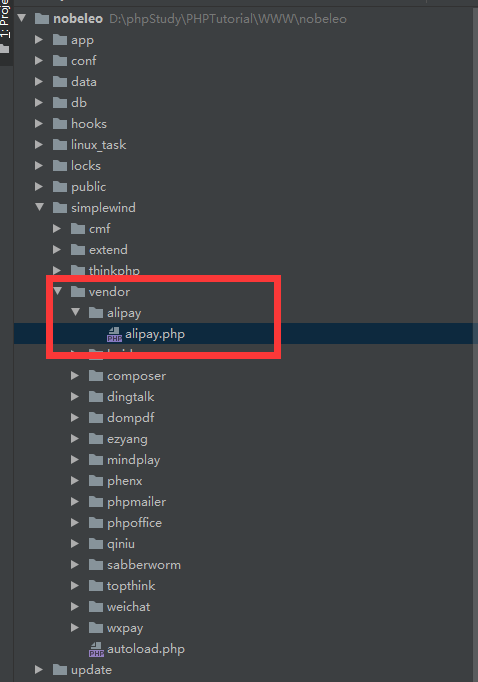
3.打开你的项目,就是controller文件夹支付的那一部
需要引用PayModel
use app\product_mall\model\PayModel;
//支付宝支付(wap)

    public function alipay($data = null)

    {//发起支付宝支付

    //$data的内容是订单的信息

        $Pay = new PayModel;

        $result = $Pay->alipay([

            "out_trade_no" => $data['order_number'], //订单号

            "subject" => '现货商城支付宝支付' ,//标题

            "total_fee" => '0.01', //金额

            "body" => '现货商城支付宝支付',//商品简介

            "notify_url"=>http://***.com/*****t_mall/i***ne/AlipayPayNotice_Succeed, //异步通知地址(选填)
            "return_url"=>http://***.com/******t_mall/****ne/AlipayPayReturn_Succeed//同步通知地址(选填)  ]);
  }
public function AlipayPayReturn_Succeed()
    {
        //同步通知代码
        $this->success("支付成功!", "product_mall/iphone/order");//这个地址是支付完成后返回的页面
    }

    public function AlipayPayNotice_Succeed()
    {
        $Pay = new PayModel;
        $config = $Pay::$alipay_config;
        vendor('alipay.alipay');
        $alipayNotify = new \AlipayNotify($config);
        if($result = $alipayNotify->verifyNotify()){
            if(input('trade_status') == 'TRADE_FINISHED' || input('trade_status') == 'TRADE_SUCCESS') {
                // 处理支付成功后的逻辑业务
                $datas = $_POST;
                $res = $this->profit($datas); //这是跳转支付成功后的操作
                if($res){
                    echo "success";
                }else{
                    echo "fail";
                }

            }else{
                echo "fail";
            }
        }else{
            echo "fail";
        }

    }
    //充值成功后处理
    public function profit($xml){

        $order = [
            "status" => 1,
            "payment" => 2,
            "notify" => json_encode($xml), //整个异步通知数据
            "pay_time" => time(),         //支付时间
            "transaction_number" => $xml['trade_no'],        //交易号
            "out_trade_no" => $xml["out_trade_no"],        //商户订单号
        ];

        Db::name('spot_order')->where('order_number',$xml["out_trade_no"])->update($order);

        //支付成功后改变库存
        $sales= Db::name('spot_order')
            ->where('order_number',$xml["out_trade_no"])
            ->field('total_number,total_account,transaction_number,notify,payment,id')
            ->find();

        $spot_goods=Db::name('spot_goods')
            ->where('oid',$sales['id'])
            ->select()
            ->toArray();

        foreach ($spot_goods as $k=>$v){
            Db::name('commodity')
                ->where('id',$spot_goods[$k]['cid'])
                ->inc('sales',$spot_goods[$k]['total_number'])//自增
                ->dec('number',$spot_goods[$k]['total_number'])//自减
                ->update();
        }

        $user=cookie('ucenter_id');

        $ucenter=Db::name('ucenter_mermber')
            ->where('id',$user)
            ->field('nickname,openid')
            ->find();

        //添加支付记录
        $record=array();
        $record['create_time']=time();
        $record['roll_name']=$ucenter['nickname'];
        $record['roll_user']=$ucenter['openid'];
        $record['receive_name']='平台';
        $record['receive_user']='001';
        $record['account']=$sales['total_account'];
        $record['receive_account']=0;
        $record['trade_no']=$sales['transaction_number'];
        $record['notify_id']=$xml;
        $record['notify']=$sales['notify'];
        $record['type']=$sales['payment'];
        $record['user']=$ucenter['nickname'];

        $ok=Db::name('spot_record')
            ->insert($record);

//        $arrdata['status'] = 1;
//        $arrdata['roll_user']=$datas['buyer_email'];
//        $arrdata['out_trade_no']=$datas['trade_no'];
//        $arrdata['notify_id']=$datas['notify_id'];
//        $data['content'] = serialize($datas);
//        $arrdata['notify']=$data['content'];
//        $arrdata['upatetime']= time();
//        $data['create_time'] = time();
//        $res = Db::name('temp_test')->insert($data);

        return true;

    }
thinkcmf5 支付宝接口操作的更多相关文章
- [转]支付宝接口程序、文档及解读(ASP.NET)
本文转自:http://www.cnblogs.com/blodfox777/archive/2009/11/03/1595223.html 最近需要为网站加入支付宝的充值接口,而目前关于支付宝接口开 ...
- 支付宝接口程序、文档及解读(ASP.NET)
最近需要为网站加入支付宝的充值接口,而目前关于支付宝接口开发的资料比较杂乱,这里就我此次开发所用到的资料进行汇总整理,希望能够帮助需要的朋友. 开发步骤: 1. 确定签约类型 支付宝的接口有多种类型, ...
- ThinkPHP实现支付宝接口功能
最近做系统,需要实现在线支付功能,毫不犹豫,选择的是支付宝的接口支付功能.这里我用的是即时到帐的接口,具体实现的步骤如下:一.下载支付宝接口包下载地址:https://doc.open.alipay. ...
- 【转载】关于Alipay支付宝接口(Java版)
转载自:http://blog.163.com/lai_chao/blog/static/70340789201412724619514/ 1.alipay 双功能支付简介 2.alipay 提交支付 ...
- android应用程序如何调用支付宝接口
最近在做一个关于购物商城的项目,项目里面付款这块我选的是调用支付宝的接口,因为用的人比较多. 在网上搜索了以下,有很多这方面的教程,但大部分教程过于陈旧,而且描述的过于简单.而且支付宝提供的接口一直在 ...
- android应用程序如何调用支付宝接口(转)
最近在做一个关于购物商城的项目,项目里面付款这块我选的是调用支付宝的接口,因为用的人比较多. 在网上搜索了以下,有很多这方面的教程,但大部分教程过于陈旧,而且描述的过于简单.而且支付宝提供的接口一直在 ...
- android开发支付宝接口开发流程(密钥篇)
参考博客:http://blog.it985.com/12276.html 官方下载地址:http://download.alipay.com/public/api/base/WS_MOBILE_PA ...
- 支付宝接口使用文档说明 支付宝异步通知(notify_url)与return_url.
支付宝接口使用文档说明 支付宝异步通知(notify_url)与return_url. 现支付宝的通知有两类. A服务器通知,对应的参数为notify_url,支付宝通知使用POST方式 B页面跳转通 ...
- 关于Alipay支付宝接口(Java版)
支付宝开发文档:https://b.alipay.com/order/techService.htm 1.alipay 双功能支付简介 2.alipay 提交支付订单 3.alipay 整合双功能支付 ...
随机推荐
- [Leetcode] 第319题 灯泡开关
一.题目描述 初始时有 n 个灯泡关闭. 第 1 轮,你打开所有的灯泡. 第 2 轮,每两个灯泡你关闭一次. 第 3 轮,每三个灯泡切换一次开关(如果关闭则开启,如果开启则关闭).第 i 轮,每 i ...
- JavaScript之基本概念(二)
今天主要介绍两个东西:JS标识符和数据类型 一 变量和常量 在介绍标识符之前有必要先了解一下JS中的变量和常量. 变量:程序执行期间可操作的临时存储数据的内存空间. 声明方式: var:函数作用域,变 ...
- Containers vs Serverless:你选择谁,何时选择?
两者都是当今技术时代的热门话题,也都被视为是开发技术的竞争对手. 首先,还有相当多的好奇和担心.此外,两者都是可供工程师使用的.高效的.机器无关的抽象. 但是,在冠军之间,有一个不可逾越的鸿沟.你要么 ...
- FPipe端口转发
目录 0x01 FPipe介绍 0x02 端口转发 0x03 msf正向上线 注: 边界机器 win08 192.168.222.175 内网机器 win7 192.168.222.137 msf机器 ...
- AJAX基础内容
1.什么是ajax?为什么要使用ajax? ajax是Asynchronous JavaScript and XML ,也称为创建交互式网页应用开发技术. 2.为什么采用ajax 1)通过异步交互,提 ...
- Android Studio [Activity的生命周期]
package com.xdw.a122; import android.support.v7.app.AppCompatActivity; import android.os.Bundle; imp ...
- selenium-01-2环境搭建
首先下载好Eclipse 和配置好Java 环境变量 步骤省略, 请百度 方法一 添加jar包 官方下载地址: http://www.seleniumhq.org/download/ 官方地址 ...
- js初学总结
基础 交换变量方式 //利用第三方变量进行交换 var num1 = 10; var num2 = 20; var temp; temp = num1; num1 = num2; num2 = tem ...
- Spring 梳理 - AOP那些学术概念—通知、增强处理连接点(JoinPoint)切面(Aspect)
Spring AOP那些学术概念—通知.增强处理连接点(JoinPoint)切面(Aspect) 1.我所知道的AOP 初看起来,上来就是一大堆的术语,而且还有个拉风的名字,面向切面编程,都说是 ...
- dubbo-spring-boot的auto-configure示例报Not found exported service的解决办法
本示例基于dubbo-spring-boot-project 2.7.3版本,可能会根据新版的发布而过时,阅读时请注意. 关于dubbo在spring-boot中该如何使用,网上有很多例子,但因为时间 ...