
Spring Cloud学习(一):Eureka服务注册与发现
1.Eureka是什么
Eureka是Netflix开发的服务发现框架,本身是一个基于REST的服务,主要用于定位运行在AWS域中的中间层服务,以达到负载均衡和中间层服务故障转移的目的。
Eureka Server提供服务注册服务,各个节点启动后,会在EurekaServer中进行注册,这样EurekaServer中的服务注册表中将会存储所有可用服务节点的信息,服务节点的信息可以在界面中直观的看到
有了服务发现与注册,只需要使用服务的标识符,就可以访问到服务,而不需要修改服务调用的配置文件了
Eureka包含两个组件:Eureka Server和Eureka Client。
2. Eureka的代码实现
Eureka服务注册和发现主要有三端构成:Eureka 服务端、Eureka 客户端 和服务消费端
2.1. Eureka 服务端
新建一个项目,这里直接使用的是idea新建 新建后的pom文件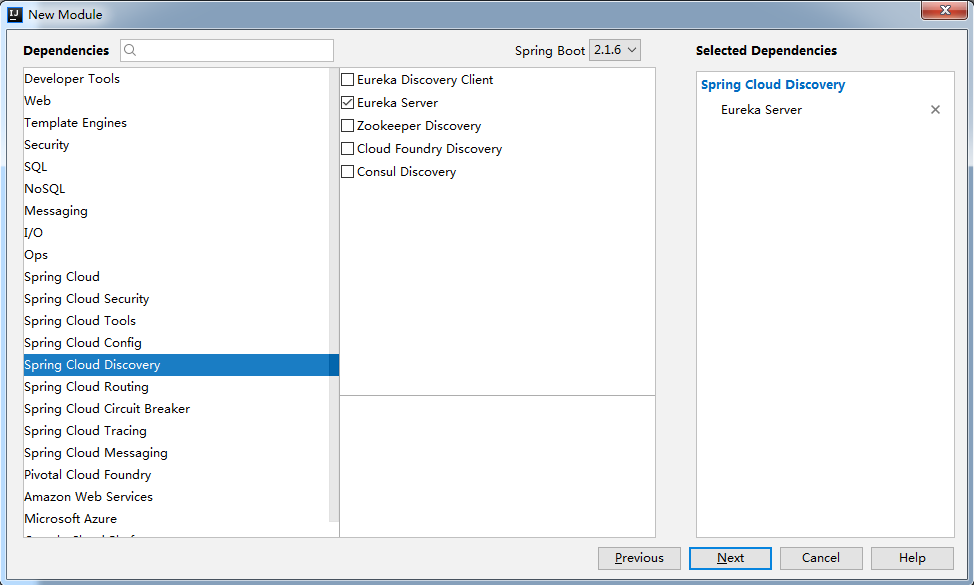
<?xml version="1.0" encoding="UTF-8"?><project xmlns="http://maven.apache.org/POM/4.0.0" xmlns:xsi="http://www.w3.org/2001/XMLSchema-instance"

         xsi:schemaLocation="http://maven.apache.org/POM/4.0.0 http://maven.apache.org/xsd/maven-4.0.0.xsd">

    <modelVersion>4.0.0</modelVersion>

    <parent>

        <groupId>org.springframework.boot</groupId>

        <artifactId>spring-boot-starter-parent</artifactId>

        <version>2.1.6.RELEASE</version>

        <relativePath/> <!-- lookup parent from repository -->

    </parent>

    <groupId>com.pikaqiu.springcloud</groupId>

    <artifactId>eureka</artifactId>

    <version>0.0.1-SNAPSHOT</version>

    <name>SpringCloud-Eureka Server</name>

    <description>Spring Cloud学习(一):Eureka服务注册与发现</description>

    <properties>

        <java.version>1.8</java.version>

        <spring-cloud.version>Greenwich.SR1</spring-cloud.version>

    </properties>

    <dependencies>

        <dependency>

            <groupId>org.springframework.cloud</groupId>

            <artifactId>spring-cloud-starter-netflix-eureka-server</artifactId>

        </dependency>

        <dependency>

            <groupId>org.springframework.boot</groupId>

            <artifactId>spring-boot-starter-test</artifactId>

            <scope>test</scope>

        </dependency>

    </dependencies>

    <dependencyManagement>

        <dependencies>

            <dependency>

                <groupId>org.springframework.cloud</groupId>

                <artifactId>spring-cloud-dependencies</artifactId>

                <version>${spring-cloud.version}</version>

                <type>pom</type>

                <scope>import</scope>

            </dependency>

        </dependencies>

    </dependencyManagement>

    <build>

        <plugins>

            <plugin>

                <groupId>org.springframework.boot</groupId>

                <artifactId>spring-boot-maven-plugin</artifactId>

            </plugin>

        </plugins>

    </build>

</project>
application.yml文件
server:

  port: 3001

eureka:

  instance:

    # 在服务中心显示的名称

    hostname: eureka-server1

  client:

    # false表示不向注册中心注册自己

    register-with-eureka: false

    # false声明是服务端

    fetch-registry: false

    service-url:

        # 设置与Eureka Server交互的地址查询服务和注册服务都需要依赖这个地址(单机)。

        defaultZone: http://${eureka.instance.hostname}:${server.port}/eureka/
如果使用hostname需要在host文件中添加127.0.0.1和hostname的映射
host文件地址在
Linux : /etc/hosts
win: C:\Windows\System32\drivers\etc
在该目录下的host文件中添加一行
127.0.0.1 eureka-server1
同样,之后如果有服务也需要这样可以一起加上
在项目的启动类加上注解@EnableEurekaServer表示该服务是 Eureka Server,接受其他微服务注册进来
package com.pikaqiu.springcloud.eureka;

import org.springframework.boot.SpringApplication;

import org.springframework.boot.autoconfigure.SpringBootApplication;

import org.springframework.cloud.netflix.eureka.server.EnableEurekaServer;

@SpringBootApplication

@EnableEurekaServer

public class SpringCloudEurekaServerApplication {

    public static void main(String[] args) {

        SpringApplication.run(SpringCloudEurekaServerApplication.class, args);

    }

}
启动项目,在浏览器输入localhost:3001,如果出现以下页面标识eureka server部署成功 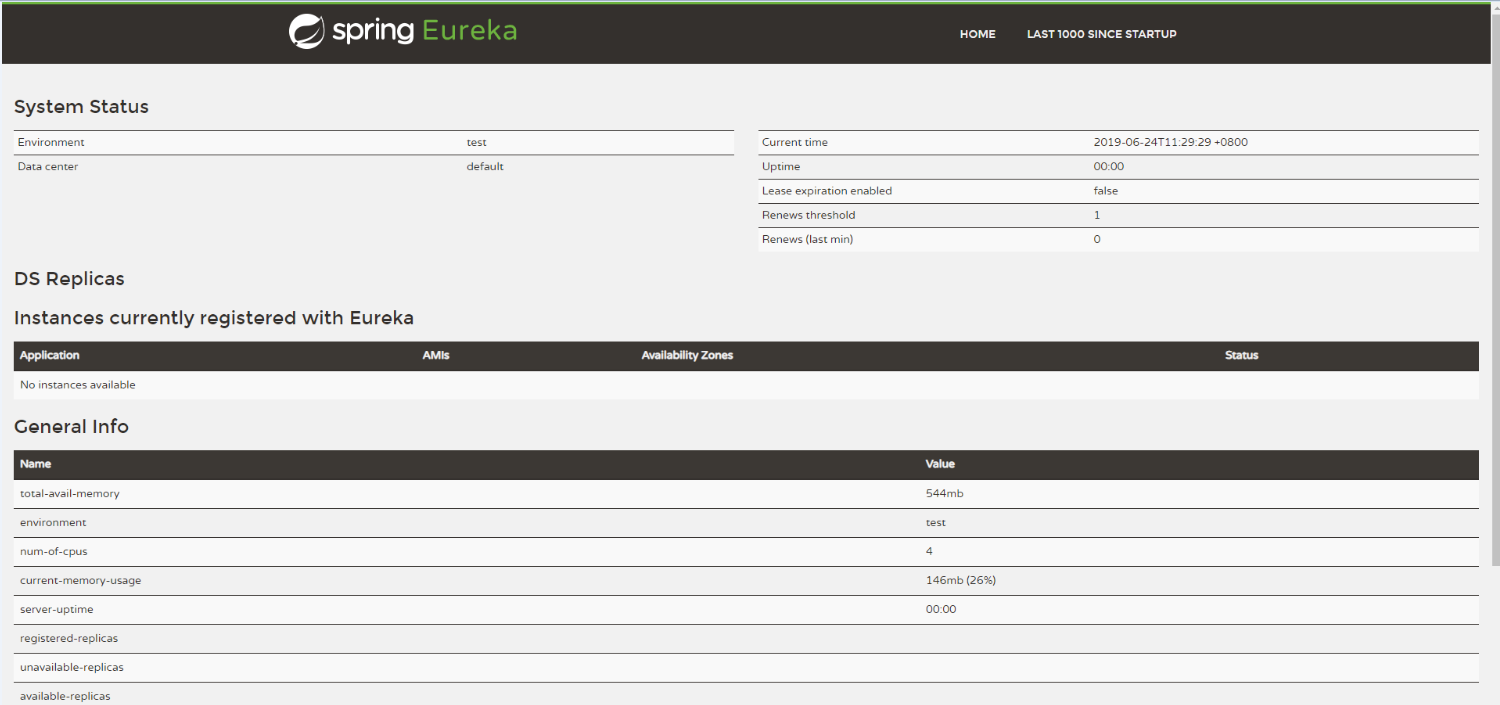
2.2 Eureka 客户端
创建方法和上面相同,只是在选择依赖的时候选择eureka client
<dependency>

    <groupId>org.springframework.cloud</groupId>

    <artifactId>spring-cloud-starter-netflix-eureka-client</artifactId>

</dependency>

<dependency>

    <groupId>org.springframework.boot</groupId>

    <artifactId>spring-boot-starter-web</artifactId>

</dependency>
注:同时也要选择web这个依赖,不然会启动失败
Completed shut down of DiscoveryClient
application.yml
server:

  port: 3002

spring:

  application:

    # 可根据自己的业务命名

    name: eureka-client1

eureka:

  client:

    service-url:

        defaultZone: http://eureka-server1:3001/eureka/
在项目的启动类加上注解@EnableEurekaClient表示该服务是 Eureka Client,启动后会自动注册到指定的 Eureka Server
package com.pikaqiu.springcloud.eureka;

import org.springframework.boot.SpringApplication;

import org.springframework.boot.autoconfigure.SpringBootApplication;

import org.springframework.cloud.netflix.eureka.EnableEurekaClient;

@SpringBootApplication

@EnableEurekaClient

public class SpringCloudEurekaClientApplication {

    public static void main(String[] args) {

        SpringApplication.run(SpringCloudEurekaClientApplication.class, args);

    }

}
刷新一下eureka server的可视界面就可以看到服务已经注册进来了

欢迎留言:http://pikaqiu.vip/article/2356.html
示例代码:https://github.com/Liangshan1994/SpringCloud
Spring Cloud学习(一):Eureka服务注册与发现的更多相关文章
- spring cloud学习一--Eureka服务注册与发现
spring cloud Eureka是基于Netflix Eureka服务发现注册产品的二次封装,它提供了服务注册功能(Service Registry)和服务发现功能(Service Discov ...
- Spring Cloud 入门教程 - Eureka服务注册与发现
简介 在微服务中,服务注册与发现对管理各个微服务子系统起着关键作用.随着系统水平扩展的越来越多,系统拆分为微服务的数量也会相应增加,那么管理和获取这些微服务的URL就会变得十分棘手,如果我们每新加一个 ...
- 一起来学Spring Cloud | 第二章:服务注册和发现组件 (Eureka)
本篇文章,很浅显的一步步讲解如何搭建一个能运行的springcloud项目(带所有操作截图).相信!看完本篇之后,你会觉得springcloud搭建如此简单~~~~ 一. Eureka简介: 1.1 ...
- 2.Spring Cloud初相识--------Eureka服务注册与消费
前言: 1.Eureka介绍: Spring Cloud Eureka,使用Netflix Eureka来实现服务注册与发现,它既包含了服务端组件,也包含了客户端组件,并且服务端与客户端均采用Java ...
- SpringCloud学习系列-Eureka服务注册与发现(1)
1.Eureka的基本架构 Spring Cloud 封装了 Netflix 公司开发的 Eureka 模块来实现服务注册和发现(请对比Zookeeper). Eureka 采用了 C-S 的设计架构 ...
- SpringCloud学习系列-Eureka服务注册与发现(2)
构建 microservicecloud-eureka-7001 eureka服务注册中心Module 1.新建microservicecloud-eureka-7001 2.pom <proj ...
- spring cloud 学习(2) - eureka server注册中心高可用及安全认证
接上节继续,注册中心单点肯定是不牢靠的,可以参考下面的方案做成注册中心集群: 弄成3个节点,每个节点向其它节点注册,这样只要集群中有一个节点正常工作即可.为了方便在本机弄出这种效果,我们先修改下hos ...
- SpringCloud学习系列-Eureka服务注册与发现(3)
修改microservicecloud-provider-dept-8001 1.修改pom 增加内容 <!-- 将微服务provider侧注册进eureka --> <depend ...
- SpringCloud学习系列-Eureka服务注册与发现(4)
actuator与注册微服务信息完善 1.主机名称:服务名称修改 当前问题 含有主机名称 修改修改microservicecloud-provider-dept-8001 的yml文件 修改内容 eu ...
- Spring Cloud 学习 (一) Eureka
微服务的功能主要有以下几个方面: 服务的注册和发现 服务的负载均衡 服务的容错 服务网关 服务配置的统一管理 链路追踪 实时日志 服务注册是指向服务注册中心注册一个服务实例,服务提供者将自己的服务信息 ...
随机推荐
- Selenium 获取动态js的网页
Selenium基于webkit实现爬虫功能 http://www.cnblogs.com/luxiaojun/p/6144748.html https://www.cnblogs.com/chenq ...
- SQLServer 事务复制中使用脚本添加某个对象的发布
原文:SQLServer 事务复制中使用脚本添加某个对象的发布 -- use [发布库] --添加表:创建项目并将其添加到发布中 exec sp_addarticle @publication = N ...
- 将多个文本文件内的数据导入到Datagridview
private BindingList listXSxxInfoList = new BindingList(); openFileDialog1.Multiselect = true;//允许选择多 ...
- WPF使用Fluent.Ribbon修改标题栏背景颜色
使用NuGet安装:Install-Package Fluent.Ribbon 修改App.xaml: <Application.Resources> <!-- Attach def ...
- 微信小程序把玩(三十八)获取设备信息 API
原文:微信小程序把玩(三十八)获取设备信息 API 获取设备信息这里分为四种, 主要属性: 网络信息wx.getNetWorkType, 系统信息wx.getSystemInfo, 重力感应数据wx. ...
- 一个基于jQuery写的弹窗效果(附源码)
最近项目中频繁遇到需要弹出窗口的功能,一直使用浏览器默认的Alert和Confirm弹窗,感觉视觉效果不是那么好,而从网上下载的话又找不到合适的,找到的话有些也是十分臃肿,有时候感觉学习配置的功夫自己 ...
- C# 中使用不安全代码(unsafe、指针)实践
命题 根据指定的字符集合(字典),按排列组合的规则(允许重复),生成指定长度的所有字符串.如下代码: class Program { static void Main(string[] args) { ...
- 用node.js(socket.io)实现数据实时推送
在做商品拍卖的时候,要求在商品的拍卖页面需要实时的更新当前商品的最高价格.实现的方式有很多,比如: 1.setInterval每隔n秒去异步拉取数据(缺点:更新不够实时) 2. AJAX轮询方式方式推 ...
- 【web自动化测试】requests-html 这个解析库,能让你更轻松的获取网页内容
1. 开始 Python 中可以进行网页解析的库有很多,常见的有 BeautifulSoup 和 lxml 等.在网上玩爬虫的文章通常都是介绍 BeautifulSoup 这个库,我平常也是常用这个库 ...
- [Java] 父类和子类拥有同名的成员变量(fields)的情况
首先,需要明确的是,无论是通过casting,还是通过将子类对象的reference赋值给父类变量,都无法改变该reference所指对象的真实类型.但当该reference的类型是父类时,将无法调用 ...