
iOS:从头捋一遍VC的生命周期
一、介绍
UIViewController是iOS开发中的核心控件,没有它那基本上任何功能都无法实现,虽然系统已经做了所有控件的生命维护,但是,了解它的生命周期是如何管理还是非常有必要的。网上有很多教程,别人写的始终是别人的,自己动手实践一下,理解才能更深刻,本文就来捋一遍VC的生命周期。
二、思路
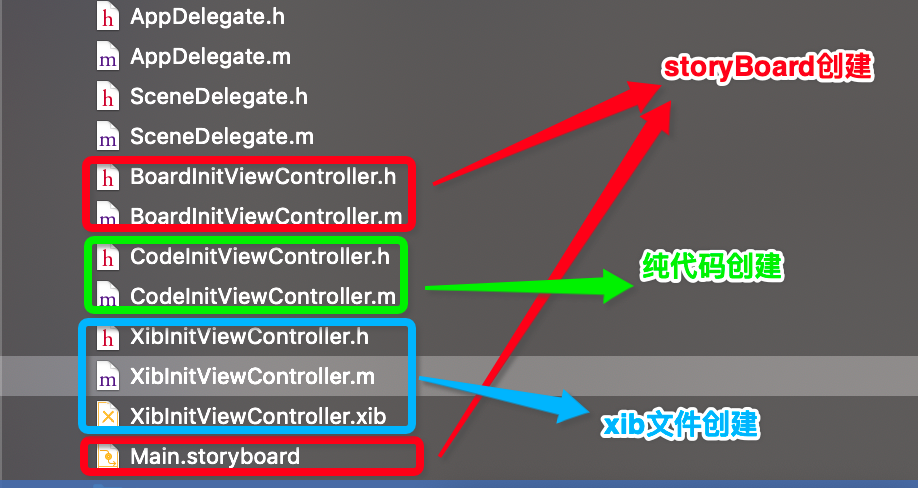
通过三个VC,第1个VC是storyBoard创建的,第2个VC是纯code创建的,第3个是xib创建的。分别称为BoardInitViewController、CodeInitViewController、XibInitViewController,这三个控制器采用导航模式进行交互,现在在VC中把所有跟初始化相关的方法都实现一下并做打印,如下:
BoardInitViewController:
//

//  BoardInitViewController.m

//  声明周期

//

//  Created by 夏远全 on 2019/11/3.

//  Copyright © 2019 Beijing Huayue Education Technology Co., Ltd. All rights reserved.

//

#import "BoardInitViewController.h"

#import "CodeInitViewController.h"

@interface BoardInitViewController ()

@end

@implementation BoardInitViewController

+(void)load {

    [super load];

    NSLog(@"boardVc---------%s",__func__);

}

+(void)initialize {

    [super initialize];

    NSLog(@"boardVc---------%s",__func__);

}

+(instancetype)alloc {

    NSLog(@"boardVc---------%s",__func__);

    return [super alloc];

}

- (nullable instancetype)initWithCoder:(NSCoder *)coder {

    NSLog(@"boardVc---------%s",__func__);

    return [super initWithCoder:coder];

}

- (instancetype)initWithNibName:(nullable NSString *)nibNameOrNil bundle:(nullable NSBundle *)nibBundleOrNil {

    NSLog(@"boardVc---------%s",__func__);

    return [super initWithNibName:nibNameOrNil bundle:nibBundleOrNil];

}

-(instancetype)init {

    NSLog(@"boardVc---------%s",__func__);

    return [super init];

}

- (void)loadView {

    [super loadView];

    NSLog(@"boardVc---------%s",__func__);

}

- (void)viewDidLoad {

    [super viewDidLoad];

    self.view.backgroundColor = [UIColor greenColor];

    self.title = @"boardVc";

    NSLog(@"boardVc---------%s",__func__);

}

- (void)viewWillAppear:(BOOL)animated  {

    [super viewWillAppear:animated];

    NSLog(@"boardVc---------%s",__func__);

}

- (void)viewDidAppear:(BOOL)animated {

    [super viewDidAppear:animated];

    NSLog(@"boardVc---------%s",__func__);

}

- (void)viewWillDisappear:(BOOL)animated {

    [super viewWillDisappear:animated];

    NSLog(@"boardVc---------%s",__func__);

}

- (void)viewDidDisappear:(BOOL)animated {

    [super viewDidDisappear:animated];

    NSLog(@"boardVc---------%s",__func__);

}

- (void)viewWillLayoutSubviews {

    [super viewWillLayoutSubviews];

    NSLog(@"boardVc---------%s",__func__);

}

- (void)viewDidLayoutSubviews {

    [super viewDidLayoutSubviews];

    NSLog(@"boardVc---------%s",__func__);

}

- (void)didReceiveMemoryWarning {

    [super didReceiveMemoryWarning];

    NSLog(@"boardVc---------%s",__func__);

}

-(void)dealloc {

    NSLog(@"boardVc---------%s",__func__);

}

-(void)touchesBegan:(NSSet<UITouch *> *)touches withEvent:(UIEvent *)event {

    CodeInitViewController *codeVc = [[CodeInitViewController alloc] init];

    [self.navigationController pushViewController:codeVc animated:YES];

}

@end
CodeInitViewController:
//

//  CodeInitViewController.m

//  声明周期

//

//  Created by 夏远全 on 2019/11/3.

//  Copyright © 2019 Beijing Huayue Education Technology Co., Ltd. All rights reserved.

//

#import "CodeInitViewController.h"

#import "XibInitViewController.h"

@interface CodeInitViewController ()

@end

@implementation CodeInitViewController

+(void)load {

    [super load];

    NSLog(@"codeVc---------%s",__func__);

}

+(void)initialize {

    [super initialize];

    NSLog(@"codeVc---------%s",__func__);

}

+(instancetype)alloc {

    NSLog(@"codeVc---------%s",__func__);

    return [super alloc];

}

- (nullable instancetype)initWithCoder:(NSCoder *)coder {

    NSLog(@"codeVc---------%s",__func__);

    return [super initWithCoder:coder];

}

- (instancetype)initWithNibName:(nullable NSString *)nibNameOrNil bundle:(nullable NSBundle *)nibBundleOrNil {

    NSLog(@"codeVc---------%s",__func__);

    return [super initWithNibName:nibNameOrNil bundle:nibBundleOrNil];

}

-(instancetype)init {

    NSLog(@"codeVc---------%s",__func__);

    return [super init];

}

- (void)loadView {

    [super loadView];

    NSLog(@"codeVc---------%s",__func__);

}

- (void)viewDidLoad {

    [super viewDidLoad];

    self.view.backgroundColor = [UIColor greenColor];

    self.title = @"codeVc";

    NSLog(@"codeVc---------%s",__func__);

}

- (void)viewWillAppear:(BOOL)animated  {

    [super viewWillAppear:animated];

    NSLog(@"codeVc---------%s",__func__);

}

- (void)viewDidAppear:(BOOL)animated {

    [super viewDidAppear:animated];

    NSLog(@"codeVc---------%s",__func__);

}

- (void)viewWillDisappear:(BOOL)animated {

    [super viewWillDisappear:animated];

    NSLog(@"codeVc---------%s",__func__);

}

- (void)viewDidDisappear:(BOOL)animated {

    [super viewDidDisappear:animated];

    NSLog(@"codeVc---------%s",__func__);

}

- (void)viewWillLayoutSubviews {

    [super viewWillLayoutSubviews];

    NSLog(@"codeVc---------%s",__func__);

}

- (void)viewDidLayoutSubviews {

    [super viewDidLayoutSubviews];

    NSLog(@"codeVc---------%s",__func__);

}

- (void)didReceiveMemoryWarning {

    [super didReceiveMemoryWarning];

    NSLog(@"codeVc---------%s",__func__);

}

-(void)dealloc {

    NSLog(@"codeVc---------%s",__func__);

}

-(void)touchesBegan:(NSSet<UITouch *> *)touches withEvent:(UIEvent *)event {

    //通过xib创建

    XibInitViewController *xibVc = [[XibInitViewController alloc] init];

    [self.navigationController pushViewController:xibVc animated:YES];

}

@end
XibInitViewController:
//

//  XibInitViewController.m

//  声明周期

//

//  Created by 夏远全 on 2019/11/3.

//  Copyright © 2019 Beijing Huayue Education Technology Co., Ltd. All rights reserved.

//

#import "XibInitViewController.h"

@interface XibInitViewController ()

@end

@implementation XibInitViewController

+(void)load {

    [super load];

    NSLog(@"xibVc---------%s",__func__);

}

+(void)initialize {

    [super initialize];

    NSLog(@"xibVc---------%s",__func__);

}

+(instancetype)alloc {

    NSLog(@"xibVc---------%s",__func__);

    return [super alloc];

}

- (nullable instancetype)initWithCoder:(NSCoder *)coder {

    NSLog(@"xibVc---------%s",__func__);

    return [super initWithCoder:coder];

}

- (instancetype)initWithNibName:(nullable NSString *)nibNameOrNil bundle:(nullable NSBundle *)nibBundleOrNil {

    NSLog(@"xibVc---------%s",__func__);

    return [super initWithNibName:nibNameOrNil bundle:nibBundleOrNil];

}

-(instancetype)init {

    NSLog(@"xibVc---------%s",__func__);

    return [super init];

}

- (void)loadView {

    [super loadView];

    NSLog(@"xibVc---------%s",__func__);

}

- (void)viewDidLoad {

    [super viewDidLoad];

    self.view.backgroundColor = [UIColor blueColor];

    self.title = @"xibVc";

    NSLog(@"xibVc---------%s",__func__);

}

- (void)viewWillAppear:(BOOL)animated  {

    [super viewWillAppear:animated];

    NSLog(@"xibVc---------%s",__func__);

}

- (void)viewDidAppear:(BOOL)animated {

    [super viewDidAppear:animated];

    NSLog(@"xibVc---------%s",__func__);

}

- (void)viewWillDisappear:(BOOL)animated {

    [super viewWillDisappear:animated];

    NSLog(@"xibVc---------%s",__func__);

}

- (void)viewDidDisappear:(BOOL)animated {

    [super viewDidDisappear:animated];

    NSLog(@"xibVc---------%s",__func__);

}

- (void)viewWillLayoutSubviews {

    [super viewWillLayoutSubviews];

    NSLog(@"xibVc---------%s",__func__);

}

- (void)viewDidLayoutSubviews {

    [super viewDidLayoutSubviews];

    NSLog(@"xibVc---------%s",__func__);

}

- (void)didReceiveMemoryWarning {

    [super didReceiveMemoryWarning];

    NSLog(@"xibVc---------%s",__func__);

}

-(void)dealloc {

    NSLog(@"xibVc---------%s",__func__);

}

@end
三、注解
 +load: 程序启动后,在系统的main函数调用之前,系统就会加载所有的load方法,提前进行一些资源包的配置或者hook,(可以打断点看看结果,本人亲测过)

 +initialize: 当前类或者其子类未被初始化过时会首次调用,若以后当前类或者子类再多次初始化时不会再调用,一般提前为初始化做一些工作

 +alloc: 系统为当前类分配内存时调用,在C语言中就是malloc这一步

 -initWithCoder: 通过storyBoard方式实例化的vc,需要经过反序列化,这个方法会被调用

 -initWithNibName:bundle: 通过xib文件或者init方法实例化的vc,这个方法都会被调用,其实init方法最终都会走该方法

 -init: 通过纯代码实例化Vc会调用,其最终会调用initWithNibName:bundle:方法

 -loadView: 实例化Vc后,可以加载一些系统常规的View

 -viewDidLoad: 一般加载自定义的view或者初始化属性,视图加载完毕后会调用

 -viewWillAppear: 视图即将出现会调用

 -viewWillDisappear: 视图即将消失会调用

 -viewWillLayoutSubviews: 视图加载完毕后即将要布局

 -viewDidLayoutSubviews: 视图加载完毕后布局也完成了

 -didReceiveMemoryWarning: 加载视图时,内存消耗太大,出现内存警告,会调用

 -dealloc: 实例化被销毁,进行内存的回收会调用
四、演示
[1] 程序启动,加载storyBoard实例化BoardInitViewController
-- ::45.724860+ 声明周期[:] codeVc---------+[CodeInitViewController load]

-- ::45.725520+ 声明周期[:] boardVc---------+[BoardInitViewController load]

-- ::45.725713+ 声明周期[:] xibVc---------+[XibInitViewController load]

-- ::45.875841+ 声明周期[:] boardVc---------+[BoardInitViewController initialize]

-- ::45.876016+ 声明周期[:] boardVc---------+[BoardInitViewController alloc]

-- ::45.876132+ 声明周期[:] boardVc----------[BoardInitViewController initWithCoder:]
-- ::45.932805+ 声明周期[:] boardVc----------[BoardInitViewController loadView]

-- ::45.935257+ 声明周期[:] boardVc----------[BoardInitViewController viewDidLoad]

-- ::45.935932+ 声明周期[:] boardVc----------[BoardInitViewController viewWillAppear:]

-- ::45.938655+ 声明周期[:] boardVc----------[BoardInitViewController viewWillLayoutSubviews]

-- ::45.938840+ 声明周期[:] boardVc----------[BoardInitViewController viewDidLayoutSubviews]

-- ::45.960117+ 声明周期[:] boardVc----------[BoardInitViewController viewDidAppear:]
[2] 从BoardInitViewController中push到纯代码实例化的CodeInitViewController中
-- ::21.027613+ 声明周期[:] codeVc---------+[CodeInitViewController initialize]

-- ::21.027858+ 声明周期[:] codeVc---------+[CodeInitViewController alloc]

-- ::21.027986+ 声明周期[:] codeVc----------[CodeInitViewController init]

-- ::21.028089+ 声明周期[:] codeVc----------[CodeInitViewController initWithNibName:bundle:]

-- ::21.032537+ 声明周期[:] codeVc----------[CodeInitViewController loadView]

-- ::21.032821+ 声明周期[:] codeVc----------[CodeInitViewController viewDidLoad]

-- ::21.032967+ 声明周期[:] boardVc----------[BoardInitViewController viewWillDisappear:]

-- ::21.033095+ 声明周期[:] codeVc----------[CodeInitViewController viewWillAppear:]

-- ::21.054149+ 声明周期[:] codeVc----------[CodeInitViewController viewWillLayoutSubviews]

-- ::21.054325+ 声明周期[:] codeVc----------[CodeInitViewController viewDidLayoutSubviews]

-- ::21.581912+ 声明周期[:] boardVc----------[BoardInitViewController viewDidDisappear:]

-- ::21.582262+ 声明周期[:] codeVc----------[CodeInitViewController viewDidAppear:]
[3] 从CodeInitViewController中push到Xib实例化的XibInitViewController中
-- ::12.506639+ 声明周期[:] codeVc---------+[CodeInitViewController alloc]

-- ::12.506831+ 声明周期[:] codeVc----------[CodeInitViewController init]

-- ::12.507020+ 声明周期[:] codeVc----------[CodeInitViewController initWithNibName:bundle:]

-- ::12.508456+ 声明周期[:] codeVc----------[CodeInitViewController loadView]

-- ::12.509038+ 声明周期[:] codeVc----------[CodeInitViewController viewDidLoad]

-- ::12.509353+ 声明周期[:] boardVc----------[BoardInitViewController viewWillDisappear:]

-- ::12.509780+ 声明周期[:] codeVc----------[CodeInitViewController viewWillAppear:]

-- ::12.520785+ 声明周期[:] codeVc----------[CodeInitViewController viewWillLayoutSubviews]

-- ::12.521002+ 声明周期[:] codeVc----------[CodeInitViewController viewDidLayoutSubviews]

-- ::13.023817+ 声明周期[:] boardVc----------[BoardInitViewController viewDidDisappear:]

-- ::13.024016+ 声明周期[:] codeVc----------[CodeInitViewController viewDidAppear:]
[4] 将XibInitViewController进行Pop后
-- ::55.287065+ 声明周期[:] xibVc----------[XibInitViewController viewWillDisappear:]

-- ::55.287238+ 声明周期[:] codeVc----------[CodeInitViewController viewWillAppear:]

-- ::55.803065+ 声明周期[:] xibVc----------[XibInitViewController viewDidDisappear:]

-- ::55.803504+ 声明周期[:] codeVc----------[CodeInitViewController viewDidAppear:]

-- ::55.803857+ 声明周期[:] xibVc----------[XibInitViewController dealloc]
[5] 将CodeInitViewController进行Pop后
-- ::07.038091+ 声明周期[:] codeVc----------[CodeInitViewController viewWillDisappear:]

-- ::07.038281+ 声明周期[:] boardVc----------[BoardInitViewController viewWillAppear:]

-- ::07.543910+ 声明周期[:] codeVc----------[CodeInitViewController viewDidDisappear:]

-- ::07.544089+ 声明周期[:] boardVc----------[BoardInitViewController viewDidAppear:]

-- ::07.544236+ 声明周期[:] codeVc----------[CodeInitViewController dealloc]
四、总结
- 程序一启动,系统在当前应用程序的所有方法被调用之前优先加载load方法;
- 控制器生命的正常流程是:初始化--->加载视图--->将要显示---->布局子视图---->完全显示---->将要显示---->完全消失----->对象销毁(有可能内存警告释放)
- 控制器交互的前后显隐流程是交叉的,在源VC即将消失和目的VC即将显示之后,目的VC会完成所有子视图的布局,然后源VC才会真正消失目的VC真正显示
- 控制器交互消失的流程也是交叉的,目的VC即将消失,源VC即将显示,目的VC完全消失,源VC完全显示,接着释放目的VC
- 通过stroyBoard创建的VC一定需要反序列化
- 通过纯代码和xib创建的VC,最终都会调用initWithNibName:bundle:方法
iOS:从头捋一遍VC的生命周期的更多相关文章
- iOS:捋一遍View的生命周期
一.介绍 前面介绍了VC的生命周期,闲着没事也来捋一捋View的生命周期,简单用两个类型的View来监测.一个View纯代码创建,另一个View使用Xib创建. 二 .代码 MyCodeView: ...
- iOS系列 基础篇 03 探究应用生命周期
iOS系列 基础篇 03 探究应用生命周期 目录: 1. 非运行状态 - 应用启动场景 2. 点击Home键 - 应用退出场景 3. 挂起重新运行场景 4. 内存清除 - 应用终止场景 5. 结尾 本 ...
- iOS系列 基础篇 04 探究视图生命周期
iOS系列 基础篇 04 探究视图生命周期 视图是应用的一个重要的组成部份,功能的实现与其息息相关,而视图控制器控制着视图,其重要性在整个应用中不言而喻. 以视图的四种状态为基础,我们来系统了解一下视 ...
- QF——iOS程序运行原理(APP的生命周期)
iOS程序的运行原理: main.m: 1. main.m 主函数是所有程序的入口函数. 2. 在main函数里是UIApplicationMain函数,开启了一个无限循环,以监听该应用. 该UIAp ...
- AIR Native Extension for iOS 接入第三方sdk 如何实现 AppDelegate 生命周期
作者:Panda Fang 出处:http://www.cnblogs.com/lonkiss/p/6492385.html 原创文章,转载请注明作者和出处,未经允许不可用于商业营利活动 去年到今年做 ...
- iOS程序执行顺序和UIViewController 的生命周期(整理)
说明:此文是自己的总结笔记,主要参考: iOS程序的启动执行顺序 AppDelegate 及 UIViewController 的生命周期 UIView的生命周期 言叶之庭.jpeg 一. iOS程序 ...
- iOS viewController 和 view 的创建消失生命周期总结
控制器创建的生命周期 1. 如果从stroryBoard 中产生一个controller,那么会先调用initWithCoder:, awakeFromNib, loadView,viewDidLoa ...
- ios开发之--VC的生命周期
当一个视图控制器被创建,并在屏幕上显示的时候. 代码的执行顺序 1. alloc 创建对象,分配空间 2.init (initWit ...
- 故事板(Storyboard) 、 iPad编程 、 App和VC的生命周期
1 创建动态TableView 1.1 问题 动态表视图就是显示多少分区,多少行以及每一行的显示内容都是根据数据源来决定.之前我们学过用xib展示动态表视图,本案例将学习如何使用Storyboard展 ...
随机推荐
- android sdk tools里找不到draw9patch.bat 如何制作.9.png 格式图片
1.什么是.9.png格式 .9.png格式的图片可以在安卓平台指定拉伸区域,防止图片失真,一般用作背景图. 2.前提 最近项目中要用到.9.png格式图片,想着这个简单使用draw9patch.ba ...
- 017.Kubernetes二进制部署检查集群
一 验证集群功能 1.1 检查节点状态 [root@k8smaster01 ~]# kubectl get nodes 1.2 创建测试文件 [root@k8smaster01 ~]# cd /opt ...
- ESP8266源码分析--打印的基本用法
缘由: 物联网小芯片中,很多都不是特别复杂,绝大多数问题都需要靠串口打印就能定位的.所以,串口打印是一个非常靠谱的玩意.一定要好好的利用.ESP8266的打印模板设计的特别好,这里我就列出来,供大家参 ...
- JavaScript的函数以及循环和判断
1.什么是函数? 这个函数跟我们数学当中的函数不太一样,我们这个函数是一段定义好的代码,可以循环使用,(这样我们更方便). 2.函数的作用: 提升代码的可复用性,将一定代码进行预定义,需要的时候才触发 ...
- 21-django-pure-pagination分页
一.django-pure-pagination分页 github上的描述(django-pure-pagination provides advanced pagination features a ...
- Ubuntu下预览raw格式图片
默认Ubuntu下资源管理器是不可以直接预览raw格式图片的,这就给查看图片带来很大的不便,下面我们就选择安装UFRaw来预览Raw格式图片 1. 首先在terminal安装UFRaw sudo ap ...
- 解决CentOS7 Local time比实际时间相差8小时
GPS系统中有两种时间区分,UTC就0时区的时间,CST为本地时间,如北京为早上八点(东八区),UTC时间比北京时晚八小时; CST:China Standard Time,UTC+8:00 中国沿海 ...
- Scrapy中response属性以及内容提取
一.属性 url :HTTP响应的url地址,str类型 status:HTTP响应的状态码, int类型 headers :HTTP响应的头部, 类字典类型, 可以调用get或者getlist方法对 ...
- Python3---标准库---urllib
前言 该文章主要说明Python3 标准库urllib的使用. 修改时间:20191216 修改时间:20191217 修改时间:20191218 添加urllib.parse.urlencode,u ...
- react-native 键盘遮挡输入框
Android上已经自动对键盘遮挡输入框做了处理,所以我们只需要关注ios. 1.首先引入 KeyboardAvoidingView import { KeyboardAvoidingView } f ...