
探究分析---利用sql批量更新部分时间的同比数据
问题:如何将social_kol_tmp表 中的字段cost_YA中日期为201901-201909中的值替换为相同brand和pltform对应18年月份的col_cost字段的数据,其他日期的cost_YA值不变?
假设:social_kol_tmp表 A,social_kol_tmp表B
难点:可以利用join on brand和pltform相等,但是日期如何匹配呢?
思路:通过对18年各月和对应19年的各个月份产生相应的字段,rn1和rn2
注意,理论上结果中同一行两个时间只相差一年
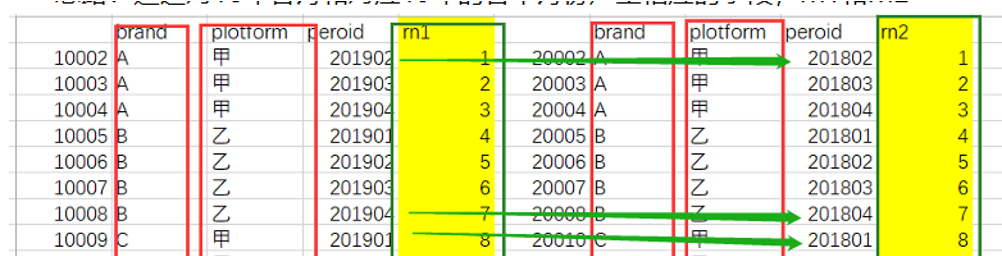
方案一:窗口函数生成rn1和rn2(结果需要看数据情况,原因如下)
1. 代码如下:
select a.brand,a.platform,a.period as Adt,b.period as Bdt,a.col_cost,b.col_cost as cost_YNew
from (select col_cost,brand,platform,period,dense_rank() over (partition by brand,platform order by period) as rn1
from social_kol_tmp
where period>='201901' and period<'201909'
) a
join
( select col_cost,brand,platform,period,dense_rank() over (partition by brand,platform order by period ) as rn2
from social_kol_tmp
where period>='201801' and period<'201809'
) b
on a.rn1=b.rn2 and a.brand=b.brand and a.platform=b.platform
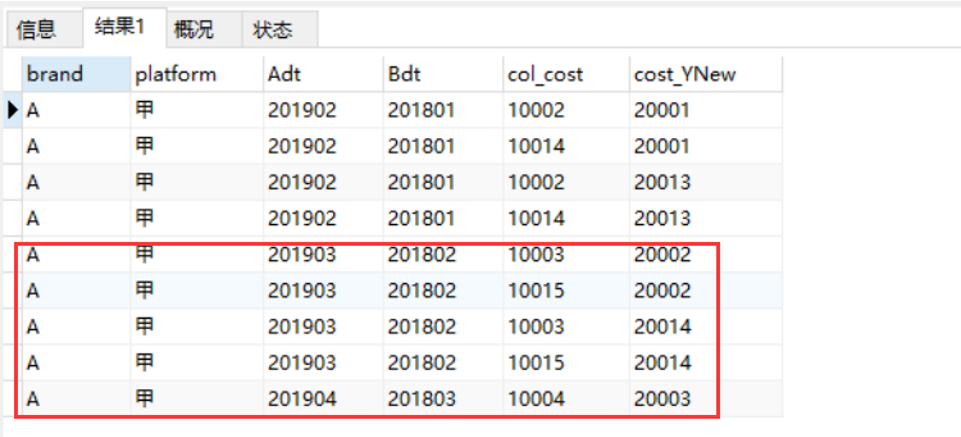
2. 出现的问题:部分时间不对应
注意,理论上结果中同一行两个时间只相差一年
3 .原因分析:
某个品牌的某一平台的数据不是每个月都有,排序产生的字段rn1和rn2出了问题,未按照对应的月份排序。
方案二:case when 生成rn1和rn2(成功)
1. 代码如下:
select a.brand,a.platform,a.period as Adt,b.period as Bdt,a.col_cost,b.col_cost as cost_YNew
from (select col_cost,brand,platform,period,
case when period='201901' then '1'
when period='201902' then '2'
when period='201903' then '3'
when period='201904' then '4'
when period='201905' then '5'
else period
end as rn1
from social_kol_tmp
where period>='201901' and period<'201909'
) a
join
( select col_cost,brand,platform,period,
case when period='201801' then '1'
when period='201802' then '2'
when period='201803' then '3'
when period='201804' then '4'
when period='201805' then '5'
else period
end as rn2
from social_kol_tmp
where period>='201801' and period<'201809'
) b
on a.rn1=b.rn2 and a.brand=b.brand and a.platform=b.platform
2.结果如下:
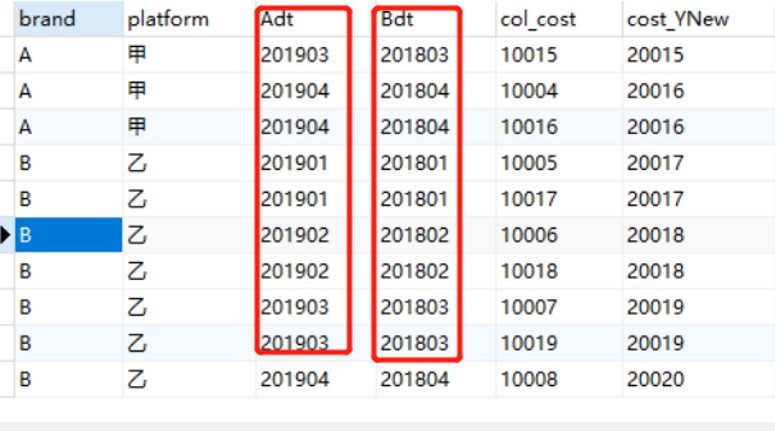
检验:
- Adt和Bdt的日期月份是对应的
- 表中的数据Adt对应的col_cost是以1开头的,Bd对应的是以2开头的,故数据校验成功
在sql中实现数据更新的方法
参考如下(sqlsever):
1.创建一个表,sMedia.social_kol_tmp_new :201901-201909中的kol_cost替换为对应18年月份的数据
Create table sMedia.social_kol_tmp_new as
select a.brand,a.platform,a.period as Adt,b.period as Bdt,a.kol_cost,b.kol_cost as cost_YNew
from (select kol_cost,brand,platform,period,
case when period='201901' then '1'
when period='201902' then '2'
when period='201903' then '3'
when period='201904' then '4'
when period='201905' then '5'
when period='201906' then '3'
when period='201907' then '4'
when period='201908' then '5'
when period='201909' then '5'
else period
end as rn1
from Media.social_kol_tmp_new
where period>='201901' and period<'201909'
) a
join
( select kol_cost,brand,platform,period,
case when period='201801' then '1'
when period='201802' then '2'
when period='201803' then '3'
when period='201804' then '4'
when period='201805' then '5'
when period='201806' then '6'
when period='201807' then '7'
when period='201808' then '8'
when period='201809' then '9'
else period
end as rn2
from Media.social_kol_tmp_new
where period>='201801' and period<'201809'
) b
on a.rn1=b.rn2 and a.brand=b.brand and a.platform=b.platform
2.在sMedia.social_kol_tmp 更新新数据
update sMedia.social_kol_tmp
set cost_YA= cost_YNew
from sMedia.social_kol_tmp a,Media.social_kol_tmp_new b
where a.period=b.Adt
探究分析---利用sql批量更新部分时间的同比数据的更多相关文章
- SQL批量更新数据库中所有用户数据表中字段类型为tinyint为int
--SQL批量更新数据库中所有用户数据表中字段类型为tinyint为int --关键说明:--1.从系统表syscolumns中的查询所有xtype='48'的记录得到类型为[tinyint]的字段- ...
- SqlServer 利用游标批量更新数据
SqlServer 利用游标批量更新数据 Intro 游标在有时候会很有用,在更新一部分不多的数据时,可以很方便的更新数据,不需要再写一个小工具来做了,直接写 SQL 就可以了 Sample 下面来看 ...
- 利用sql批量删除表,存储过程
利用sql批量删除表,存储过程. 最近用godaddy的空间,由于系统里面的表多,一个个的删除很麻烦,就网上搜集了一下解决方法. 给大家分享一下: 1.批量删除存储过程 declare @procNa ...
- SQL批量更新数据
SQL批量更新数据 step1:导入Excel数据, 具体见百度.注意点:一列中含有float型数据和文本数据的时候,导入要将Excel中的表格属性改成文本,或在数字项目前加个单引号. step2 ...
- oracle 批量更新之将一个表的数据批量更新至另一个表
oracle 批量更新之将一个表的数据批量更新至另一个表 CreationTime--2018年7月3日17点38分 Author:Marydon Oracle 将一个表的指定字段的值更新至另一个 ...
- Oracle两张表关联批量更新其中一张表的数据
Oracle两张表关联批量更新其中一张表的数据 方法一(推荐): UPDATE 表2 SET 表2.C = (SELECT B FROM 表1 WHERE 表1.A = 表2.A) WHERE EXI ...
- sql 批量更新
利用update和select进行批量更新 UPDATE Table1 SET categoryId =(SELECT Id FROM Table2 WHERE Table1 .Id=Table2.c ...
- 利用pip批量更新python库
如果python库比较旧,需要更新到最新版本,可以利用pip工具. DOS命令行下,输入pip -V查看pip版本,可以先把pip更新到新版本. 查看系统里过期的python库 pip list #列 ...
- SQL批量更新 关系表更新
很多人在做数据的批量更新时..如果更新的内容是从其他表查出来的..很容易这么写.. UPDATE TABLE1 SET COLUMN1=(SELECT SUM(SOMETHING) FROM TABL ...
随机推荐
- linux--top工具分析
top分析工具详解 第一行:10:01:23 当前系统时间126 days, 14:29 系统已经运行了126天14小时29分钟(在这期间没有重启过)2 users 当前有2个用户登录系统 loa ...
- 阿里云ECS服务器,修改实例密码,查看CPU核数,内存,阿里云服务器关机了怎么办?
新买的ECS服务器是没有密码的,需要重置密码(root,P@ssw0rd),并重启: 查看CPU核数和内存: 阿里云服务器关机了,不用怕,登录阿里云,可以启动和关闭
- linux学习(六)文件基本属性
Linux系统是一种典型的多用户系统,不同的用户处于不同的地位,拥有不同的权限.为了保护系统的安全性,Linux系统对不同的用户访问同一文件(包括目录文件)的权限做了不同的规定. 在Linux中我们可 ...
- 使用DRF来快速实现API调用服务
本帖最后由 范志远 于 2019-3-19 16:55 编辑 增加加载Djagno REST Framework模块的选项 对于settings.py文件的INSTALLED_APPS增加'rest_ ...
- 2019.6.11_MySQL进阶二:主键与外键
通过图形界面(UI)创建外键 打开设计表,在对应的栏位填写相应的内容.其中FK_deptno是限制名 # 先给主表建立主键 ALTER TABLE dept ADD PRIMARY KEY(dep ...
- [C3W1] Structuring Machine Learning Projects - ML Strategy 1
第一周:机器学习策略(1)(ML Strategy(1)) 为什么是ML策略?(Why ML Strategy) 大家好,欢迎收听本课,如何构建你的机器学习项目也就是说机器学习的策略.我希望通过这门课 ...
- lua 14 metatable (类似操作符重载)
转自:http://www.runoob.com/lua/lua-metatables.html 感性认识: “Lua中Metatable这个概念, 国内将他翻译为元表. 元表为重定义Lua中任意一个 ...
- C++ STL bitset 容器详解
C++ STL bitset 容器详解 本篇随笔讲解\(C++STL\)中\(bitset\)容器的用法及常见使用技巧. \(bitset\)容器概论 \(bitset\)容器其实就是个\(01\)串 ...
- BZOJ1688 「USACO05OPEN」Disease Manangement 背包+状压DP
问题描述 BZOJ1688 题解 背包,在转移过程中使用状压. \(\mathrm{Code}\) #include<bits/stdc++.h> using namespace std; ...
- 前后端通信—webSocket(支持跨域)
WebSocket 的介绍 WebSocket 是什么 WebSocket 是一种网络通信协议.RFC6455 定义了它的通信标准. WebSocket 是 HTML5 开始提供的一种在单个 TCP ...