
easyui三
陈旧的开发模式
美工(ui工程师:出一个项目模型)
java工程师:将原有的html转成jsp,动态展示数据
缺点:
客户需要调节前端的展示效果
解决:由美工去重新排版,重新选色。
Vs
前后端分离
美工、java工程师都是独立工作的,彼此之间在开发过程中是没有任何交际。
在开发前约定数据交互的格式。
java工程师的工作:写方法返回数据如tree_data1.json
美工:只管展示tree_data1.json
先看下dao方法
public class UserDao extends JsonBaseDao {

    /**

     * 用户登录或者查询用户分页信息的公共方法

     *

     * @param paMap

     * @param pageBean

     * @return

     * @throws InstantiationException

     * @throws IllegalAccessException

     * @throws SQLException

     */

    public List<Map<String, Object>> list(Map<String, String[]> paMap, PageBean pageBean)

            throws InstantiationException, IllegalAccessException, SQLException {

        String sql = "select * from t_easyui_user_version2 where true";

        String uid = JsonUtils.getParamVal(paMap, "uid");

        String upwd = JsonUtils.getParamVal(paMap, "upwd");

        if (StringUtils.isNotBlank(uid)) {

            sql += " and uid=" + uid;

        }

        if (StringUtils.isNotBlank(upwd)) {

            sql += " and upwd=" + upwd;

        }

        return super.executeQuery(sql, pageBean);

    }

    /**

     * 修改

     * @param paMap

     * @return

     * @throws NoSuchFieldException

     * @throws SecurityException

     * @throws IllegalArgumentException

     * @throws IllegalAccessException

     * @throws SQLException

     */

    public int edit(Map<String, String[]> paMap) throws NoSuchFieldException, SecurityException,

            IllegalArgumentException, IllegalAccessException, SQLException {

        String sql = "update t_easyui_user_version2 set uid=?,uname=?,upwd=? where SerialNo=?";

        return super.executeUpdate(sql, new String[] { "uid", "uname", "upwd", "SerialNo" }, paMap);

    }

    /**

     * 新增

     * @param paMap

     * @return

     * @throws NoSuchFieldException

     * @throws SecurityException

     * @throws IllegalArgumentException

     * @throws IllegalAccessException

     * @throws SQLException

     */

    public int add(Map<String, String[]> paMap) throws NoSuchFieldException, SecurityException,

            IllegalArgumentException, IllegalAccessException, SQLException {

        String sql = "insert into  t_easyui_user_version2 values(?,?,?)";

        return super.executeUpdate(sql, new String[] { "uid", "uname", "upwd" }, paMap);

    }

    /**

     * 删除

     * @param paMap

     * @return

     * @throws NoSuchFieldException

     * @throws SecurityException

     * @throws IllegalArgumentException

     * @throws IllegalAccessException

     * @throws SQLException

     */

    public int del(Map<String, String[]> paMap) throws NoSuchFieldException, SecurityException,

        IllegalArgumentException, IllegalAccessException, SQLException {

        String sql = "delete from t_easyui_user_version2 where SerialNo=?";

        return super.executeUpdate(sql, new String[] {"SerialNo"}, paMap);

}

    /**

     * 根据当前用户登录的ID去查询对应的所有菜单

     *

     * @param paMap

     * @param pageBean

     * @return

     * @throws InstantiationException

     * @throws IllegalAccessException

     * @throws SQLException

     */

    public List<Map<String, Object>> getMenuByUid(Map<String, String[]> paMap, PageBean pageBean)

            throws InstantiationException, IllegalAccessException, SQLException {

        String sql = "select * from t_easyui_usermenu where true";

        String uid = JsonUtils.getParamVal(paMap, "uid");

        if (StringUtils.isNotBlank(uid)) {

            sql += " and uid=" + uid;

        }

        return super.executeQuery(sql, pageBean);

    }

}
userAction
public class UserAction extends ActionSupport{

     private UserDao userDao=new UserDao();

    /**

     * 登录成功后跳转index.jsp

     * @param request

     * @param response

     * @return

     * @throws SQLException

     * @throws IllegalAccessException

     * @throws InstantiationException

     */

     public String login(HttpServletRequest request,HttpServletResponse response){

           //系统中是否有当前登录用户

         Map<String, Object> map =null;

        try {

            map = this.userDao.list(request.getParameterMap(), null).get();

             //有

            if(map!=null&&map.size()>) {

                //[{menuid:002,....},{menuid:003,....}]

                //002,003

                StringBuilder sb=new StringBuilder();

                List<Map<String, Object>> menuIdArr = this.userDao.getMenuByUid(request.getParameterMap(), null);

                for (Map<String, Object> m : menuIdArr) {

                    sb.append(","+m.get("menuId"));

                }

                request.setAttribute("menuIds",sb.substring());

                return "index";

            }else {

                request.setAttribute("msg","用户不存在");

                return "login";

            }

        } catch (InstantiationException | IllegalAccessException | SQLException e) {

            // TODO Auto-generated catch block

            e.printStackTrace();

        }

         //查询用户菜单中间表,获取menuid的集合

        return null;

        }

     /**

      * 数据表格datagrid加载方法?

      * @param request

      * @param response

      * @return

      * @throws Exception

      */

     public String list(HttpServletRequest request,HttpServletResponse response) throws Exception {

        ObjectMapper om=new ObjectMapper();

        PageBean pageBean=new PageBean();

        pageBean.setRequest(request);

        List<Map<String, Object>> list = this.userDao.list(request.getParameterMap(), pageBean);

        System.err.println(list);

        //[{},{},{}]-->{"total":28,"rows":[{},{},{}]}

        Map<String, Object> map=new HashMap<>();

        map.put("total", pageBean.getTotal());

        map.put("rows", list);

        ResponseUtil.write(response,om.writeValueAsString(map));

         return null;

            }

     /**

      * from组件提交方法?

      * @param request

      * @param response

      * @return

      * @throws Exception

      */

    public String edit(HttpServletRequest request,HttpServletResponse response) throws Exception {

             int code = this.userDao.edit(request.getParameterMap());

             ObjectMapper om=new ObjectMapper();

             Map<String, Object> map=new HashMap<>();

             map.put("code", code);

             ResponseUtil.write(response,om.writeValueAsString(map));

             return null;

                }

    /**

     * 新增

     * @param request

     * @param response

     * @return

     * @throws Exception

     */

    public String add(HttpServletRequest request,HttpServletResponse response) throws Exception {

         int code = this.userDao.add(request.getParameterMap());

         ObjectMapper om=new ObjectMapper();

         Map<String, Object> map=new HashMap<>();

         map.put("code", code);

         ResponseUtil.write(response,om.writeValueAsString(map));

         return null;

            }

    /**

     * 删除

     * @param req

     * @param resp

     * @return

     * @throws InstantiationException

     * @throws IllegalAccessException

     * @throws SQLException

     * @throws Exception

     */

    public String del(HttpServletRequest req,HttpServletResponse resp) throws InstantiationException, IllegalAccessException, SQLException, Exception {

        int code=this.userDao.del(req.getParameterMap());

        ObjectMapper om = new ObjectMapper();

        Map<String, Object> map = new HashMap<>();

        map.put("code", code);

        ResponseUtil.write(resp, om.writeValueAsString(map));

        return null;

    }

}
后台就是代码,下面看下前端代码
userManage.js
$(function(){

    $('#dg').datagrid({

        url:'../userAction.action?methodName=list',

        //行填充

        fit:true,

        //列填充

        fitColumns:true,

        //分页

        pagination:true,

        singleSelect:true,

        columns:[[

            {field:'uid',title:'ID',width:},

            {field:'uname',title:'用户名',width:},

            {field:'upwd',title:'密码',width:,align:'right'}

        ]],

            //添加按钮

            toolbar: [{

                iconCls: 'icon-add',

                handler: function(){

                     $('#ff').form('clear');//清空文本框的值

                     $('#dd').dialog('open');//打开表格

                     $("#dd").attr("title","增加用户");//增加信息

                     $("#method").val("add"); //通过隐藏ID来设置增加方法

                }

            },'-',{

                 iconCls: 'icon-edit',

           handler: function(){

           $('#dd').dialog('open');

//                到datagrid控件中找需要回填的数据(区别于原来从后台查询)

           var row = $('#dg').datagrid('getSelected');

           if(row){

//                get_data.php指的是回填的数据

                $('#ff').form('load',row);

                $('#method').val('edit');

           }else{

                     alert("请选择你要修改的行");

            }

             }

              },'-',{

                iconCls: 'icon-remove',

                handler: function(){

                var row =$('#dg').datagrid('getSelected');

                if(row){

                $.ajax({

                url:$("#ctx").val()+'/userAction.action?methodName=remove&&SerialNo='+row.SerialNo,

                 });

                $('#dg').datagrid('reload');//刷新方法

                      alert('删除成功');

                  }

                else{

                     alert('删除失败');

                }

                 }

                  },'-',{

                     iconCls: 'icon-reload',

                     handler: function(){alert('刷新按钮')}

                     }]

                  });

            })

function ok(){

    $('#ff').form('submit', {

        url:'../userAction.action?methodName=edit',

        success:function(data){

            $('#ff').form('clear')

           $('#dd').dialog('close');

           $('#dg').datagrid('reload');

            //针对于后端返回的结果进行处理

        }

    });

}
userManage.jsp
<%@ page language="java" contentType="text/html; charset=UTF-8"

    pageEncoding="UTF-8"%>

<!DOCTYPE html PUBLIC "-//W3C//DTD HTML 4.01 Transitional//EN" "http://www.w3.org/TR/html4/loose.dtd">

<html>

<head>

<meta http-equiv="Content-Type" content="text/html; charset=UTF-8">

<link rel="stylesheet" type="text/css" href="${pageContext.request.contextPath}/static/js/public/easyui5/themes/default/easyui.css">

<link rel="stylesheet" type="text/css" href="${pageContext.request.contextPath}/static/js/public/easyui5/themes/icon.css">

<script type="text/javascript" src="${pageContext.request.contextPath}/static/js/public/easyui5/jquery.min.js"></script>

<script type="text/javascript" src="${pageContext.request.contextPath}/static/js/public/easyui5/jquery.easyui.min.js"></script>

<script type="text/javascript" src="${pageContext.request.contextPath}/static/js/userManage.js"></script>

<!--展示数据  -->

<title>人员信息管理维护界面</title>

</head>

<body>

<table id="dg"></table>

<!--弹窗  -->

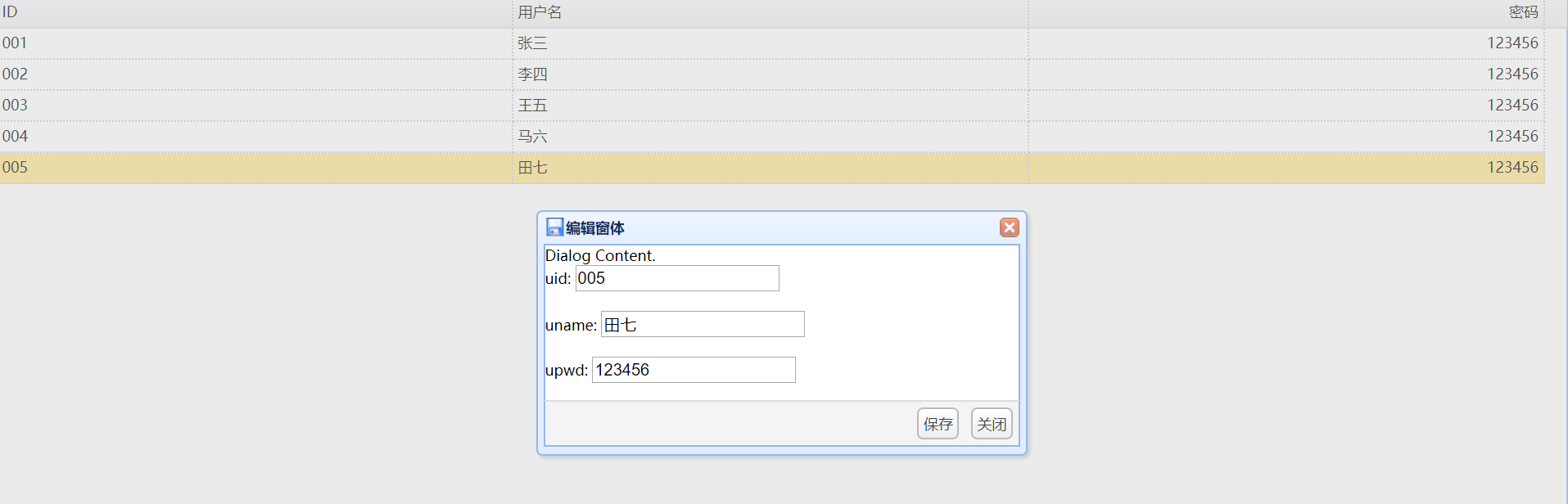
<div id="dd" class="easyui-dialog" title="编辑窗体" style="width:400px;height:200px;"

        data-options="iconCls:'icon-save',resizable:true,modal:true,closed:true,buttons:'#bb'">

    Dialog Content.

<!--提交form 表单  -->

<form id="ff" method="post">

<input type="hidden" name="SerialNo">

    <div>

        <label for="uid">uid:</label>

        <input class="easyui-validatebox" type="text" name="uid" />

    </div> <br>

    <div>

        <label for="uname">uname:</label>

        <input class="easyui-validatebox" type="text" name="uname"  />

    </div>

    <div>   <br>

        <label for="uname">upwd:</label>

        <input class="easyui-validatebox" type="text" name="upwd"  />

    </div>

</form>

<div id="bb">

<a href="#" id="name" class="easyui-linkbutton" value="edit" onclick="ok()">保存</a>

<a href="#" class="easyui-linkbutton">关闭</a>

</div>

</div>

</body>

</html>
easyui三的更多相关文章
- 玩转Web之easyui(三)-----easy ui dataGird 重新指定url以获取不同数据源信息
如果已经写了一个dataGird并且已经通过url绑定数据源,能不能在其他地方改变url使其从不同数据源获取信息,从而实现查询等操作?答案当然是肯定的,而且仅需要几行代码 $('#btnq').bin ...
- EF6 CodeFirst+Repository+Ninject+MVC4+EasyUI实践(三)
前言 在上一篇中,我们依靠着EasyUI强大的前端布局特性把前端登录界面和主界面给搭建完成了.这一篇我们就要尝试着把整个解决方案部署到云端呢,也就是Visual Studio Online(TFVC) ...
- 我的权限系统设计实现MVC4 + WebAPI + EasyUI + Knockout(三)图形化机构树
一.前言 组织机构是国内管理系统中很重要的一个概念,以前我们基本都是采用数据列表的形式展现,最多只是采用树形列表展现.虽然够用,但是如果能做成图形化当然是最好不过了.这里我不用任何图形控件,就用最原始 ...
- ASP.NET MVC +EasyUI 权限设计(三)基础模块
请注明转载地址:http://www.cnblogs.com/arhat 在上一章中呢,我们基本上搭建好了环境,那么本章我们就从基础模块开始写起.由于用户,角色,动作三个当中,都是依赖与动作的,所以本 ...
- 第二百三十节,jQuery EasyUI,后台管理界面---后台管理
jQuery EasyUI,后台管理界面---后台管理 一,admin.php,后台管理界面 <?php session_start(); if (!isset($_SESSION['admin ...
- abp(net core)+easyui+efcore实现仓储管理系统——EasyUI之货物管理三 (二十一)
abp(net core)+easyui+efcore实现仓储管理系统目录 abp(net core)+easyui+efcore实现仓储管理系统——ABP总体介绍(一) abp(net core)+ ...
- (三)easyUI之树形组件
一.同步树 1.1 概念 所有节点一次性加载完成 1.2 案例 1.2.1 数据库设计 1.2.2 编码 index.jsp <%@ page language="java" ...
- abp(net core)+easyui+efcore实现仓储管理系统——入库管理之一(三十七)
abp(net core)+easyui+efcore实现仓储管理系统目录 abp(net core)+easyui+efcore实现仓储管理系统——ABP总体介绍(一) abp(net core)+ ...
- EasyUI tree的三种选中状态
EasyUI中tree有三种选中状态,分别是checked(选中).unchecked(未选中).indeterminate(部分选中). 其中indeterminate状态比较特殊,主要表示只有部分 ...
随机推荐
- CheckBoxList选中某项,获取其它项是否是选中
<div class="formControls col-xs-8 col-sm-9" style="margin-top:-15px;" id=&quo ...
- linux kernel下输入输出console如何实现【转】
转自:https://blog.csdn.net/skyflying2012/article/details/41078349 最近工作在调试usb虚拟串口,让其作为kernel启动的调试串口,以及u ...
- postman---postman导出python脚本
前面一直写关于postman的一些文章,大家现在都应该简单了解,其实postman还有许多的功能,这个要大家一点点的挖掘出来了,安静在给大家分享一个关于postman导出python脚本 Postma ...
- JAVA笔试题(全解)
目录 一. Java基础部分................................................................. 9 1.一个".java& ...
- MATLAB实例:对称双随机矩阵
MATLAB实例:对称双随机矩阵 作者:凯鲁嘎吉 - 博客园 http://www.cnblogs.com/kailugaji/ 双随机矩阵(doubly stochastic matrix):元素属 ...
- ArrayList的输出以及一些问题
//首先需要创建一个ArrayList ArrayList arr=new ArrayList(); //然后往ArrayList里面插入一些值 arr.add("a"); arr ...
- AcWing 166. 数独
题目地址 https://www.acwing.com/problem/content/description/168/ 题目描述 数独是一种传统益智游戏,你需要把一个9 × 9的数独补充完整,使得图 ...
- xpath:
from selenium import webdriverb = webdriver.Firefox()#路径读取方式一:# b.get(r"C:\我的代码\selenium自动化测试\t ...
- Android 中的AlertDialog使用自定义布局
Android使用指定的View开发弹窗功能 Android开发中进程会使用到我们的AlertDialog,但是比较可惜的是我们的Android原生的AlertDialog的效果又比较的简陋,这个时候 ...
- kindEditor 修改上传图片的路径
压缩过的js类似