
全网最全的Windows下Anaconda2 / Anaconda3里正确下载安装爬虫框架Scrapy(离线方式和在线方式)(图文详解)
不多说,直接上干货!
参考博客
全网最全的Windows下Anaconda2 / Anaconda3里正确下载安装OpenCV(离线方式和在线方式)(图文详解)
第一步:首先,提示升级下pip

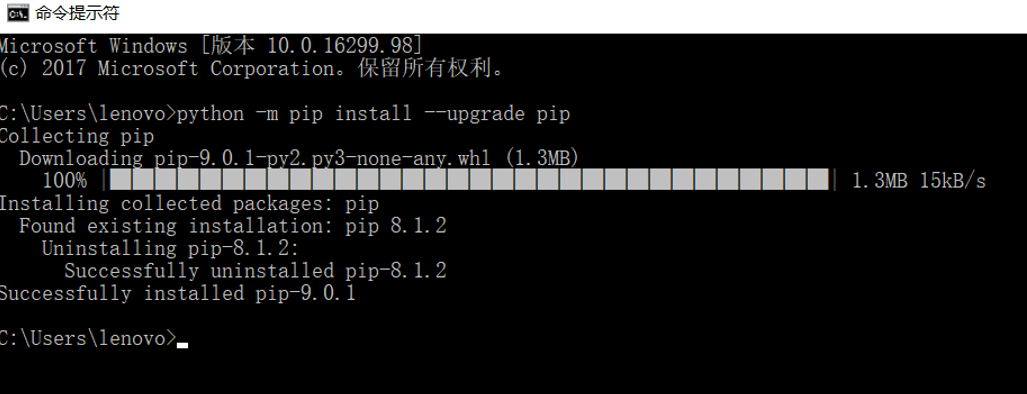
第二步:下载安装wheel

也可以去网站里先下载好,离线安装。也可以如上在线安装。
第三步: 安装lxml

因为,我的是
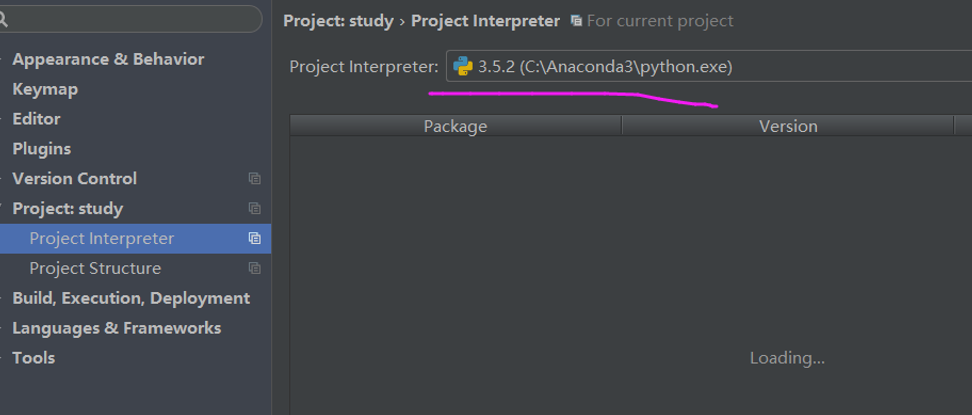

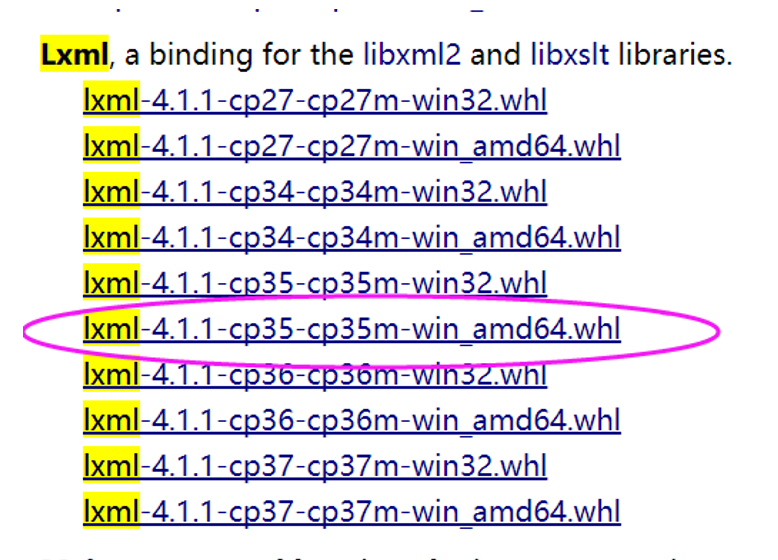


成功!
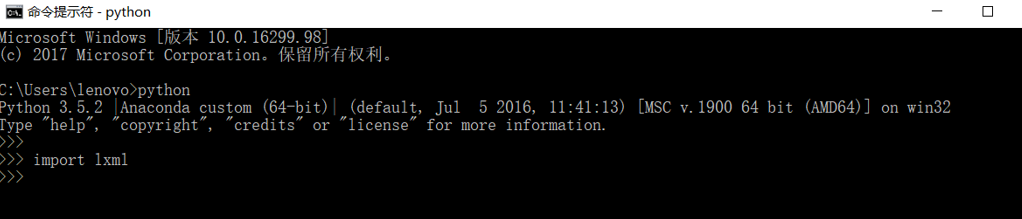
验证下
第四步:安装Twisted

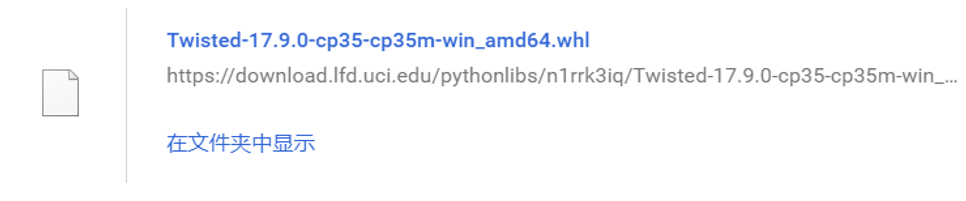
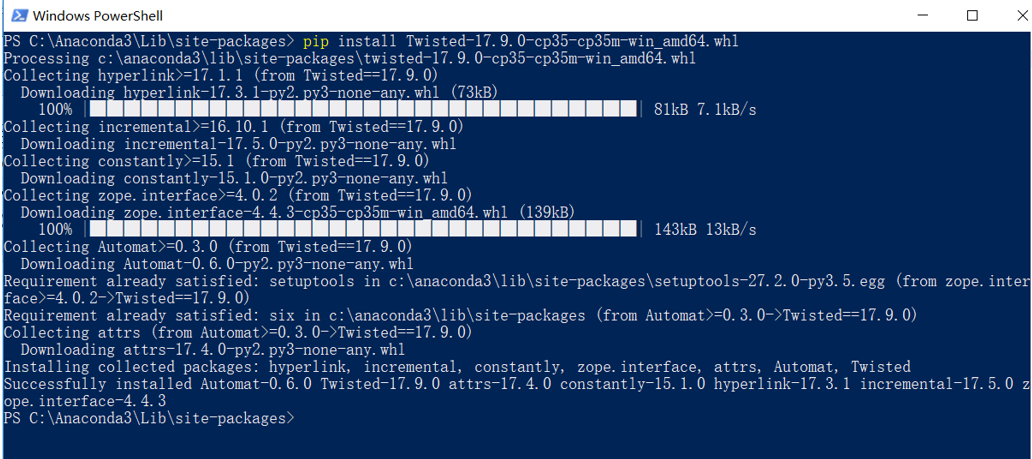
PS C:\Anaconda3\Lib\site-packages> pip install Twisted-17.9.-cp35-cp35m-win_amd64.whl

Processing c:\anaconda3\lib\site-packages\twisted-17.9.-cp35-cp35m-win_amd64.whl

Collecting hyperlink>=17.1. (from Twisted==17.9.)

  Downloading hyperlink-17.3.-py2.py3-none-any.whl (73kB)

    % |████████████████████████████████| 81kB .1kB/s

Collecting incremental>=16.10. (from Twisted==17.9.)

  Downloading incremental-17.5.-py2.py3-none-any.whl

Collecting constantly>=15.1 (from Twisted==17.9.)

  Downloading constantly-15.1.-py2.py3-none-any.whl

Collecting zope.interface>=4.0. (from Twisted==17.9.)

  Downloading zope.interface-4.4.-cp35-cp35m-win_amd64.whl (139kB)

    % |████████████████████████████████| 143kB 13kB/s

Collecting Automat>=0.3. (from Twisted==17.9.)

  Downloading Automat-0.6.-py2.py3-none-any.whl

Requirement already satisfied: setuptools in c:\anaconda3\lib\site-packages\setuptools-27.2.-py3..egg (from zope.interface>=4.0.->Twisted==17.9.)

Requirement already satisfied: six in c:\anaconda3\lib\site-packages (from Automat>=0.3.->Twisted==17.9.)

Collecting attrs (from Automat>=0.3.->Twisted==17.9.)

  Downloading attrs-17.4.-py2.py3-none-any.whl

Installing collected packages: hyperlink, incremental, constantly, zope.interface, attrs, Automat, Twisted

Successfully installed Automat-0.6. Twisted-17.9. attrs-17.4. constantly-15.1. hyperlink-17.3. incremental-17.5. zope.interface-4.4.

PS C:\Anaconda3\Lib\site-packages>
第五步:安装scrapy
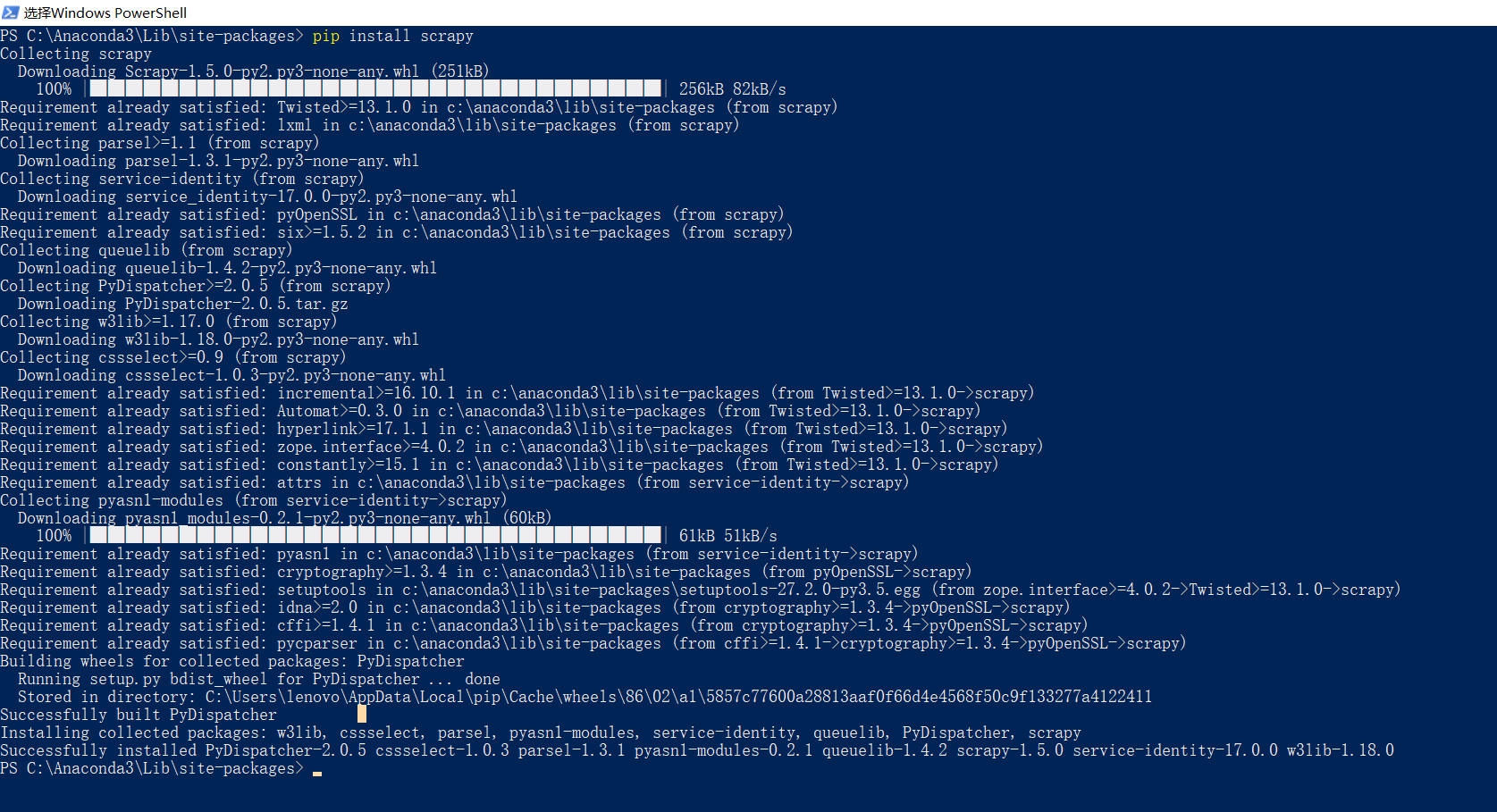
PS C:\Anaconda3\Lib\site-packages> pip install scrapy

Collecting scrapy

  Downloading Scrapy-1.5.-py2.py3-none-any.whl (251kB)

    % |████████████████████████████████| 256kB 82kB/s

Requirement already satisfied: Twisted>=13.1. in c:\anaconda3\lib\site-packages (from scrapy)

Requirement already satisfied: lxml in c:\anaconda3\lib\site-packages (from scrapy)

Collecting parsel>=1.1 (from scrapy)

  Downloading parsel-1.3.-py2.py3-none-any.whl

Collecting service-identity (from scrapy)

  Downloading service_identity-17.0.-py2.py3-none-any.whl

Requirement already satisfied: pyOpenSSL in c:\anaconda3\lib\site-packages (from scrapy)

Requirement already satisfied: six>=1.5. in c:\anaconda3\lib\site-packages (from scrapy)

Collecting queuelib (from scrapy)

  Downloading queuelib-1.4.-py2.py3-none-any.whl

Collecting PyDispatcher>=2.0. (from scrapy)

  Downloading PyDispatcher-2.0..tar.gz

Collecting w3lib>=1.17. (from scrapy)

  Downloading w3lib-1.18.-py2.py3-none-any.whl

Collecting cssselect>=0.9 (from scrapy)

  Downloading cssselect-1.0.-py2.py3-none-any.whl

Requirement already satisfied: incremental>=16.10. in c:\anaconda3\lib\site-packages (from Twisted>=13.1.->scrapy)

Requirement already satisfied: Automat>=0.3. in c:\anaconda3\lib\site-packages (from Twisted>=13.1.->scrapy)

Requirement already satisfied: hyperlink>=17.1. in c:\anaconda3\lib\site-packages (from Twisted>=13.1.->scrapy)

Requirement already satisfied: zope.interface>=4.0. in c:\anaconda3\lib\site-packages (from Twisted>=13.1.->scrapy)

Requirement already satisfied: constantly>=15.1 in c:\anaconda3\lib\site-packages (from Twisted>=13.1.->scrapy)

Requirement already satisfied: attrs in c:\anaconda3\lib\site-packages (from service-identity->scrapy)

Collecting pyasn1-modules (from service-identity->scrapy)

  Downloading pyasn1_modules-0.2.-py2.py3-none-any.whl (60kB)

    % |████████████████████████████████| 61kB 51kB/s

Requirement already satisfied: pyasn1 in c:\anaconda3\lib\site-packages (from service-identity->scrapy)

Requirement already satisfied: cryptography>=1.3. in c:\anaconda3\lib\site-packages (from pyOpenSSL->scrapy)

Requirement already satisfied: setuptools in c:\anaconda3\lib\site-packages\setuptools-27.2.-py3..egg (from zope.interface>=4.0.->Twisted>=13.1.->scrapy)

Requirement already satisfied: idna>=2.0 in c:\anaconda3\lib\site-packages (from cryptography>=1.3.->pyOpenSSL->scrapy)

Requirement already satisfied: cffi>=1.4. in c:\anaconda3\lib\site-packages (from cryptography>=1.3.->pyOpenSSL->scrapy)

Requirement already satisfied: pycparser in c:\anaconda3\lib\site-packages (from cffi>=1.4.->cryptography>=1.3.->pyOpenSSL->scrapy)

Building wheels for collected packages: PyDispatcher

  Running setup.py bdist_wheel for PyDispatcher ... done

  Stored in directory: C:\Users\lenovo\AppData\Local\pip\Cache\wheels\\\a1\5857c77600a28813aaf0f66d4e4568f50c9f133277a4122411

Successfully built PyDispatcher

Installing collected packages: w3lib, cssselect, parsel, pyasn1-modules, service-identity, queuelib, PyDispatcher, scrapy

Successfully installed PyDispatcher-2.0. cssselect-1.0. parsel-1.3. pyasn1-modules-0.2. queuelib-1.4. scrapy-1.5. service-identity-17.0. w3lib-1.18.

PS C:\Anaconda3\Lib\site-packages>
验证下

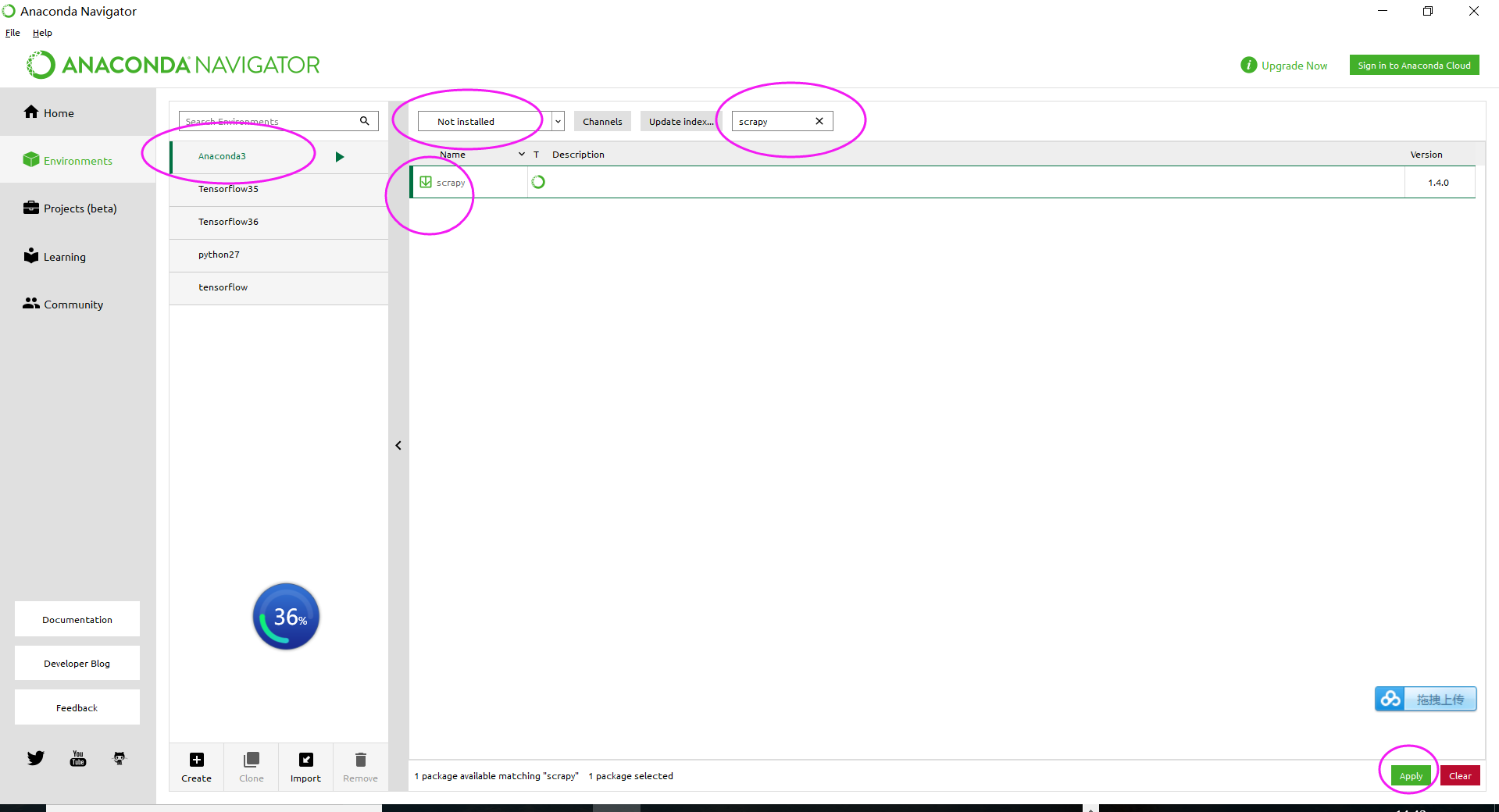
当然,你也可以直接在这里安装

同时,大家可以关注我的个人博客:
http://www.cnblogs.com/zlslch/ 和 http://www.cnblogs.com/lchzls/ http://www.cnblogs.com/sunnyDream/
详情请见:http://www.cnblogs.com/zlslch/p/7473861.html
人生苦短,我愿分享。本公众号将秉持活到老学到老学习无休止的交流分享开源精神,汇聚于互联网和个人学习工作的精华干货知识,一切来于互联网,反馈回互联网。
目前研究领域:大数据、机器学习、深度学习、人工智能、数据挖掘、数据分析。 语言涉及:Java、Scala、Python、Shell、Linux等 。同时还涉及平常所使用的手机、电脑和互联网上的使用技巧、问题和实用软件。 只要你一直关注和呆在群里,每天必须有收获
对应本平台的讨论和答疑QQ群:大数据和人工智能躺过的坑(总群)(161156071)



全网最全的Windows下Anaconda2 / Anaconda3里正确下载安装爬虫框架Scrapy(离线方式和在线方式)(图文详解)的更多相关文章
- 全网最全的Windows下Anaconda2 / Anaconda3里正确下载安装OpenCV(离线方式和在线方式)(图文详解)
不多说,直接上干货! 说明: Anaconda2-5.0.0-Windows-x86_64.exe安装下来,默认的Python2.7 Anaconda3-4.2.0-Windows-x86_64.ex ...
- 全网最全的Windows下Anaconda2 / Anaconda3里正确下载安装用来向微信好友发送消息的itchat库(图文详解)
不多说,直接上干货! Anaconda2 里 PS C:\Anaconda2\Scripts> PS C:\Anaconda2\Scripts> pip.exe install itch ...
- 全网最全的Windows下Anaconda2 / Anaconda3里正确下载安装用来定时任务apscheduler库(图文详解)
不多说,直接上干货! Anaconda2 里 PS C:\Anaconda2\Scripts> PS C:\Anaconda2\Scripts> pip.exe install apsc ...
- 全网最全的Windows下Anaconda2 / Anaconda3里正确下载安装Theano(图文详解)
不多说,直接上干货! Theano的安装教程目前网上一搜很多,前几天折腾了好久,终于安装成功了Anaconda3(Python3)的Theano,嗯~发博客总结并分享下经验教训吧. 渣电脑,显卡用的是 ...
- 全网最全的Windows下Python2 / Python3里正确下载安装用来向微信好友发送消息的itchat库(图文详解)
不多说,直接上干货! 建议,你用Anaconda2或Anaconda3. 见 全网最全的Windows下Anaconda2 / Anaconda3里正确下载安装用来向微信好友发送消息的itchat库( ...
- 全网最全的Windows下Anaconda2 / Anaconda3里Python语言实现定时发送微信消息给好友或群里(图文详解)
不多说,直接上干货! 缘由: (1)最近看到情侣零点送祝福,感觉还是很浪漫的事情,相信有很多人熬夜为了给爱的人送上零点祝福,但是有时等着等着就睡着了或者时间并不是卡的那么准就有点强迫症了,这是也许程序 ...
- 全网最详细的Windows系统里Oracle 11g R2 Database(64bit)的完全卸载(图文详解)
不多说,直接上干货! 前期博客 全网最详细的Windows系统里Oracle 11g R2 Database(64bit)的下载与安装(图文详解) 若你不想用了,则可安全卸载. 完全卸载Oracle ...
- Windows下如何正确下载并安装可视化的Redis数据库管理工具(redis-desktop-manager)(图文详解)
不多说,直接上干货! Redis Desktop Manager是一个可视化的Redis数据库管理工具,使用非常简单. 官网下载:https://redisdesktop.com/down ...
- 全网最详细的用pip安装****模块报错:Could not find a version that satisfies the requirement ****(from version:) No matching distribution found for ****的解决办法(图文详解)
不多说,直接上干货! 问题详情 这个问题,很普遍.如我这里想实现,Windows下Anaconda2 / Anaconda3里正确下载安装用来向微信好友发送消息的itchat库. 见,我撰写的 全网最 ...
随机推荐
- CommonsChunkPlugin VS SplitChunksPlugin
等了好久终于等到你, webpack团队人员卧薪尝胆五个多月的时间终于带来的webpack4.0,个人觉得webpack4带来的最大优化便是对于懒加载块拆分的优化,删除了CommonsChunkPlu ...
- RNQOJ 21 FBI数
如果字符串全是0输出B,全是1输出I,01混合输出F,如果字符串分解到只剩下一个字符的时候我们可以很简单的判断出来是B串还是I串,如果处在父节点的位置,这里运用递归,通过子节点的返回值来判断子节点是混 ...
- dubbo入门学习 六 admin管理界面
1. 本质就是一个web项目 2. 获取注册中心内Provider注册的信息.用页面呈现出来. 3. 实现步骤 3.1 把dubbo-admin-2.5.3.war上传到服务器tomcat中. 3.2 ...
- C++实现对文件中各单词词频的统计及其代码优化
先给出github上的代码链接以及项目需求 1.项目概述 这个项目的需求可以概括为:对记事本(txt)文件进行单词的词频统计和排序,排序结果以指定格式输出到默认文件中,并要求能够快速地完成整个统计和结 ...
- kettle连接oracle报错oracle.i18n.text.converter.CharacterConverter.OGS.getInstance(I)Loracle/i18n/text/converter/CharacterConverter
问题背景1:需要将一张excel中的数据导入到数据库中,并且还有关联转换和去重的处理问题,且此excel表不是固定的,需要写一个脚本 当新的excel拿来的时候,可以直接导入即可.所以我想用kettl ...
- C语言的数据类型的本质和提高学习
一.数据类型的概念 类型是对数据的抽象 类型是相同的数据有相同的表示形式.存储格式以及相关的操作 程序中使用的数据必定属于某一种数据类型 1.算术类型: 包括三种类型:整数类型.浮点类型,枚举型. ...
- ubuntu18.04静态ip设置
1.配置文件 vi /etc/netplan/-cloud-init.yaml network: ethernets: enp129s0f0: addresses: [] dhcp4: true op ...
- jq封装
<div id='container' class='container'>盒子</div> <button onClick="f()" >te ...
- POI对Excel的操作
1. 先导包 commons-io-2.6.jar包,用于对文件的操作. 下载地址:http://commons.apache.org/proper/commons-io/download_io.cg ...
- Python request库与爬虫框架
Requests库的7个主要方法 requests.request():构造一个请求,支持以下各方法的基础方法 requests.get():获取HTML网页的主要方法,对应于HTTP的GET ...