
十四、文件和目录——文件时间和utime函数
14.1 文件时间
存在于 stat 结构体中
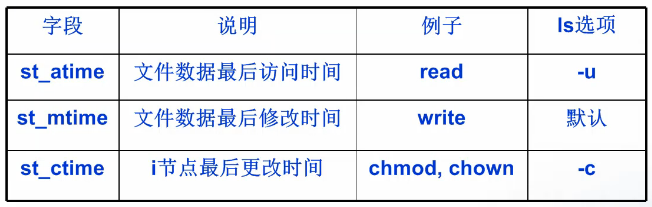
14.2 文件时间函数
14.2.1 介绍
utime(修改文件的存取时间和更改时间)
相关函数 utimes,stat
 #include <sys/types.h>

 #include <utime.h>

 int utime(const char * filename, struct utimbuf * buf);
- 函数功能
- 更改文件的存取和修改时间
- utime 会自动更新 st_ctime 的值
- 参数 buf
- 空指针:则取当前时间
- 进程的有效用户 ID 必须等于该文件的所有者ID
- 或者进程对该文件具有写权限
- 非空:取 utimebuf 结构体中的时间
- 进程有效用户ID 等于该文件的所有者ID
- 或者进程是超级用户进程
- 空指针:则取当前时间
- 返回值
- 如果参数buf为空指针(NULL),则该文件的存取时间和更改时间全部会设为目前时间。
- 执行成功则返回 0,失败返回-1,错误代码存于errno。
- 错误代码
- EACCESS 存取文件时被拒绝,权限不足
- ENOENT 指定的文件不存在。
 结构体 utimbuf 定义如下

 struct utimbuf{

     time_t actime;  //访问时间

     time_t modtime;  //修改时间

 };
14.2.3 例子
file_time.c
 #include <time.h>

 #include <sys/types.h>

 #include <utime.h>

 #include <stdio.h>

 #include <stdlib.h>

 #include <errno.h>

 #include <sys/stat.h>

 #include <fcntl.h>

 #include <string.h>

 #include <unistd.h>

 #include <memory.h>

 // ctime 函数 将事件转换成字符串输出

 void out(struct stat buff)

 {

     time_t val_atime = (time_t)buff.st_atime;

     time_t val_mtime = (time_t)buff.st_mtime;

     time_t val_ctime = (time_t)buff.st_ctime;

     printf("atime: %s\n", ctime(&val_atime));

     printf("mtime: %s\n", ctime(&val_mtime));

     printf("ctime: %s\n", ctime(&val_ctime));

 }

 //获取文件属性信息

 struct stat get_stat(char *file, struct stat buff)

 {

     memset(&buff, , sizeof(buff));

     if(lstat(file, &buff) < ) {

         perror("lstat error");

         exit();

     }

     return buff;

 }

 int main(int argc, char *argv[])

 {

     if(argc < ) {

         fprintf(stderr, "usage:%s file\n", argv[]);

         exit();

     }

     struct stat buff;

     buff = get_stat(argv[], buff);

     //备份原先的时间

     struct stat bak_stat = buff;

     out(buff);

     printf("=============================\n");

     //设置文件的事件为当前系统时间

     utime(argv[], NULL);

     buff = get_stat(argv[], buff);

     out(buff);

     printf("=============================\n");

     //把文件的时间恢复成之前的时间

     struct utimbuf timebuf;

     timebuf.actime = bak_stat.st_atime;

     timebuf.modtime = bak_stat.st_mtime;

     utime(argv[], &timebuf);

     buff = get_stat(argv[], buff);

     out(buff);

     return ;

 }
编译执行:
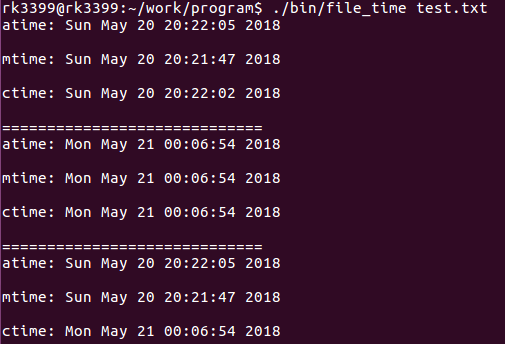
ctime 的时间是 i 节点的最后更改时间,只要调用了 utime 就会自动修改 ctime。
十四、文件和目录——文件时间和utime函数的更多相关文章
- 孤荷凌寒自学python第三十四天python的文件操作对file类的对象学习
孤荷凌寒自学python第三十四天python的文件操作对file类的对象学习 (完整学习过程屏幕记录视频地址在文末,手写笔记在文末) 一.close() 当一个file对象执行此方法时,将关闭当前 ...
- JS读取/创建本地文件及目录文件夹的方法
原文链接:http://www.cnblogs.com/ayan/archive/2013/04/22/3036072.html 注:以下操作只在IE下有效! Javascript是网页制作中离不开的 ...
- TortoiseSVN设置忽略文件和目录文件夹
TortoiseSVN设置忽略文件和目录文件夹 在多数项目中你总会有文件和目录不需要进行版本控制.这可能包括一些由编译器生成的文件,*.obj,*.lst,或许是一个用于存放可执行程序的输出文件夹. ...
- 第四节 Linux目录文件及文件基本操作
一.Linux目录结构 Linux 的目录与 Windows 的目录的区别: 一种不同是体现在目录与存储介质(磁盘,内存,DVD 等)的关系上,以往的 Windows 一直是以存储介质为主的,主要以盘 ...
- PHP7语法知识(四):目录文件操作、Cookie与Session、MySQL数据库的使用、Redis数据库、PHP处理XML与JSON
目录文件操作 一.目录 1.判断文件类型: 2.创建和删除目录: 3.打开读取和关闭目录 4.获得路径中目录部分 5.目录磁盘空间 二.文件操作 1.打开文件: 2.读取文件: 3.获得文件属性: 4 ...
- 文件和目录之mkdir和rmdir函数
用mkdir函数创建目录,用rmdir函数删除目录. #include <sys/stat.h> int mkdir( const char *pathname, mode_t mode ...
- Asp.net 获取服务器指定文件夹目录文件,并提供下载
string dirPath = HttpContext.Current.Server.MapPath("uploads/"); if (Directory.Exists(dirP ...
- UNIX环境编程学习笔记(11)——文件I/O之文件时间以及 utime 函数
lienhua342014-09-16 1 文件的时间 每个文件都有三个时间字段,如表 1 所示. 表 1: 文件的三个时间字段 说明 字段 st_atime 文件数据的最后访问时间 st_mtime ...
- 文件和目录之chmod和fchmod函数
本篇博文内容摘自<UNIX环境高级编程>(第二版),仅作个人学习记录所用.关于本书可参考:http://www.apuebook.com/. 这两个函数使我们可以更改现有文件的访问权限: ...
随机推荐
- 「SCOI2015」小凸玩密室 解题报告
「SCOI2015」小凸玩密室 虽然有心里在想一些奇奇怪怪的事情的原因,不过还是写太久了.. 不过这个题本身也挺厉害的 注意第一个被点亮的是任意选的,我最开始压根没注意到 \(dp_{i,j}\)代表 ...
- Expand the scale swarm 副本增减实现负载均衡
#创建好了swarm集群后,我们可以部署一个httpd应用来了解工作情况:#执行以下命令来部署应用: docker service create --name web_server httpd --n ...
- LinkedBlockingQueue中put源码分析
查看源码得知: LinkedBlockingQueue采用是锁分离的技术 //取出锁 private final ReentrantLock takeLock = new ReentrantLock( ...
- [luogu1020][导弹拦截]
题目位置 https://www.luogu.org/problemnew/show/P1020 题目描述 某国为了防御敌国的导弹袭击,发展出一种导弹拦截系统.但是这种导弹拦截系统有一个缺陷:虽然它的 ...
- Flask filter过滤器
简单的数据集体添加样式输出用管道过滤,除了flask模块以外不需要导其他的包 <head> <meta charset="UTF-8"> <meta ...
- 2018.10.26 浪在ACM 集训队第四次测试赛
2018.10.26 浪在ACM 集训队第四次测试赛 题目一览表 来源 考察知识点 完成时间 A 生活大爆炸版 石头剪刀布 NOIP 提高组 2014 模拟??? 2018.11.9 B 联合 ...
- java 常用的类
一.日期操作:Calendar类和SimpleDateFormat类 public void Test1() { Calendar calendar=Calendar.getInstance(); S ...
- (Dijkstra) POJ1797 Heavy Transportation
Heavy Transportation Time Limit: 3000MS Memory Limit: 30000K Total Submissions: 53170 Accepted: ...
- java 打印水仙花数
package cn.lijun.demo6; public class Test2 { public static void main(String[] args) { for(int i=100; ...
- Excel:11个查询函数组合
还不懂?上栗子~ 1.普通查找 根据表二中的姓名,查找表一对应的应发工资.最基础的VLOOKUP函数就能搞定. 2.反向查找 根据表二姓名,查找表一编号.但表一中编号列在姓名列之前,无法直接使用VLO ...