
opencv实现坐标旋转(教你框住小姐姐)
一、项目背景
最近在做一个人脸检测项目,需要接入百度AI的系统进行识别和检测。主要流程就是往指定的URL上post图片上去,之后接收检测结果就好了。
百度的检测结果包含这样的信息:
left - 人脸区域离左边界的距离
top - 人脸区域离上边界的距离
width - 人脸区域的宽度
height - 人脸区域的高度
ratation 人脸框相对于竖直方向的顺时针旋转角[-180, 180].
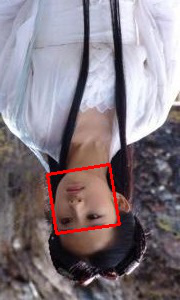
如果我想把人脸框出来,很容易想到的是以(left, top)为左上顶点,以width 为宽,height为高,画一个矩形就好了。但其实这样是不合理的,如果人头是倒着的,这样画出来是不合理的。就像下面这样:

所以必须考虑把旋转角加上去。于是我想的策略是先把框画出来,再逆时针旋转ratation 就可以了。
二、如何旋转
大致策略就是:先算出四个点的左标,再以左上角的点为原点,逆时针旋转ratation 就ok了。四个点的左标比较容易确定,利用起点左标加宽高就能算出来。
这里主要讲解如何算旋转后的左标,如下图:
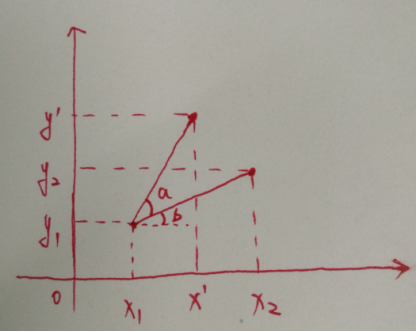
已知x1,x2,y1,y2和∠a,求x’,和y’。这时候就需要用到高中的三角函数的知识了。
假设,(x1, y1) 到 (x2, y2)的长度为r,再画一个∠b。
x’ = x1 + r * cos(a + b);
x’ = x1 + r * cos(a) * cos(b) - r * sin(a) * sin(b);
又因为:
r * cos(b) = x2 - x1;
r * sin(b) = (y2 - y1);
最终可以求出:
x’ = x1 + cos(a) * (x2 - x1) - sin(a) * (y2 - y1);
同理求出:
y’ = y1 + sin(a) * (x2 - x1) - cos(a) * (y2 - y1);
啊,这真是用了我毕生所学的数学知识,真没想到工作后还会用到三角函数的知识。还是要多学点数学知识才好啊。
三、源码
下面就是真正画图的东西了,为了测试这个公式是否可行,我用opencv画了一个四根线(其实就是一个方形),然后以左上角为顶点旋转。
下面的具体的代码,比较简单,主要是那个公式,所以也没什么注释。需要包含opencv头文件,以及链接opencv的库。
/*

 * @author:xcywt

 * @date:2018-08-10

 * @contact me: https://www.cnblogs.com/xcywt/

 */

#include<iostream>

#include "opencv2/highgui/highgui.hpp"

using namespace cv;

#define PI 3.14159265

#define ROTATE_COUNT 180

int RotateTest2()

{

    if (ROTATE_COUNT > )

    {

        return -;

    }

    int x1 = , y1 = ;

    int x2 = , y2 = ;

    int x3 = , y3 = ;

    int x4 = , y4 = ;

    int arrX1[ROTATE_COUNT], arrY1[ROTATE_COUNT];

    int arrX2[ROTATE_COUNT], arrY2[ROTATE_COUNT];

    int arrX3[ROTATE_COUNT], arrY3[ROTATE_COUNT];

    int arrX4[ROTATE_COUNT], arrY4[ROTATE_COUNT];

    int nAgree = ;

    for (int i = ; i < ROTATE_COUNT; i++)

    {

        nAgree = i * ( / ROTATE_COUNT);

        double dRot = nAgree * PI / ;

        double dSinRot = sin(dRot), dCosRot = cos(dRot);

        arrX1[i] = x1;

        arrY1[i] = y1;

        arrX2[i] = x1 + dCosRot * (x2 - x1) - dSinRot * (y2 - y1);

        arrY2[i] = y1 + dSinRot * (x2 - x1) + dCosRot * (y2 - y1);

        arrX3[i] = x1 + dCosRot * (x3 - x1) - dSinRot * (y3 - y1);

        arrY3[i] = y1 + dSinRot * (x3 - x1) + dCosRot * (y3 - y1);

        arrX4[i] = x1 + dCosRot * (x4 - x1) - dSinRot * (y4 - y1);

        arrY4[i] = y1 + dSinRot * (x4 - x1) + dCosRot * (y4 - y1);

    }

    Mat im(, , CV_8UC3);

    line(im, Point(x1, y1), Point(x2, y2), Scalar(, , ), );

    line(im, Point(x1, y1), Point(x4, y4), Scalar(, , ), );

    line(im, Point(x3, y3), Point(x2, y2), Scalar(, , ), );

    line(im, Point(x4, y4), Point(x3, y3), Scalar(, , ), );

    for (int i = ; i < ROTATE_COUNT; i++)

    {

        line(im, Point(arrX1[i], arrY1[i]), Point(arrX2[i], arrY2[i]), Scalar(, , ), );

        line(im, Point(arrX1[i], arrY1[i]), Point(arrX4[i], arrY4[i]), Scalar(, , ), );

        line(im, Point(arrX3[i], arrY3[i]), Point(arrX2[i], arrY2[i]), Scalar(, , ), );

        line(im, Point(arrX4[i], arrY4[i]), Point(arrX3[i], arrY3[i]), Scalar(, , ), );

    }

    imshow("Is ok", im);

    cvWaitKey();

    return ;

}

int RotateTest()

{

    int nAgree = ;

    double dRot = nAgree * PI / ;

    double dSinRot = sin(dRot), dCosRot = cos(dRot);

    int x1 = , y1 = ;

    int x2 = , y2 = ;

    int x3 = , y3 = ;

    int x4 = , y4 = ;

    int x1_1 = x1, y1_1 = y1;

    int x2_1 = x1 + dCosRot * (x2 - x1) - dSinRot * (y2 - y1), y2_1 = y1 + dSinRot * (x2 - x1) + dCosRot * (y2 - y1);

    int x3_1 = x1 + dCosRot * (x3 - x1) - dSinRot * (y3 - y1), y3_1 = y1 + dSinRot * (x3 - x1) + dCosRot * (y3 - y1);

    int x4_1 = x1 + dCosRot * (x4 - x1) - dSinRot * (y4 - y1), y4_1 = y1 + dSinRot * (x4 - x1) + dCosRot * (y4 - y1);

    std::cout << "P1:(" << x1 << " , " << y1 << ") --> (" << x1_1 << ", " << y1_1 << ")" << std::endl;

    std::cout << "P2:(" << x2 << " , " << y2 << ") --> (" << x2_1 << ", " << y2_1 << ")" << std::endl;

    std::cout << "P3:(" << x3 << " , " << y3 << ") --> (" << x3_1 << ", " << y3_1 << ")" << std::endl;

    std::cout << "P4:(" << x4 << " , " << y4 << ") --> (" << x4_1 << ", " << y4_1 << ")" << std::endl;

    Mat im(, , CV_8UC3);

    line(im, Point(x1, y1), Point(x2, y2), Scalar(, , ), );

    line(im, Point(x1, y1), Point(x4, y4), Scalar(, , ), );

    line(im, Point(x3, y3), Point(x2, y2), Scalar(, , ), );

    line(im, Point(x4, y4), Point(x3, y3), Scalar(, , ), );

    line(im, Point(x1_1, y1_1), Point(x2_1, y2_1), Scalar(, , ), );

    line(im, Point(x1_1, y1_1), Point(x4_1, y4_1), Scalar(, , ), );

    line(im, Point(x3_1, y3_1), Point(x2_1, y2_1), Scalar(, , ), );

    line(im, Point(x4_1, y4_1), Point(x3_1, y3_1), Scalar(, , ), );

    imshow("Is ok", im);

    cvWaitKey();

    return ;

}

int main()

{

    //RotateTest();

    RotateTest2();

    return ;

}
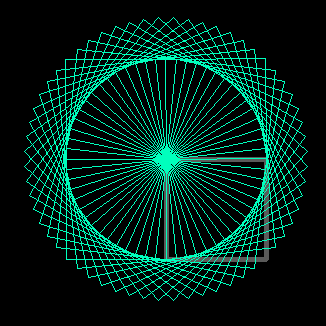
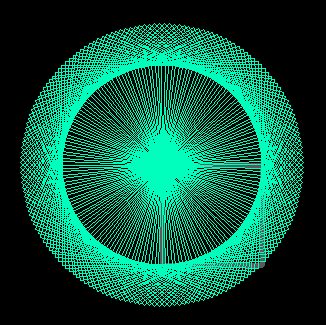
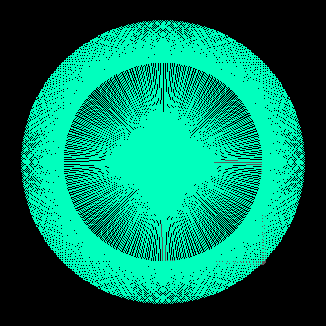
其中RotateTest2()实现了在一个Mat上,画出了旋转各个角度的样子,具体把360分成 ROTATE_COUNT这么多份。可以看到效果还是很好看的。
ROTATE_COUNT为10时:

ROTATE_COUNT为60时:
ROTATE_COUNT为180时:
ROTATE_COUNT为360时:
旋转之后的神仙姐姐就框的比较准确了。这样就能正确的框住小姐姐了。
四、总结
数学还是很有用的。人工智能、深度学习还是需要具备数学知识的。
opencv实现坐标旋转(教你框住小姐姐)的更多相关文章
- HDU4456-Crowd (坐标旋转处理+hash处理+二维树状数组)
题意: 给出一个矩阵,初始每个位置上的值都为0,然后有两种操作 一种是更改某个位置上的值 另一种是求某个位置附近曼哈顿距离不大于K的所有位置的值的总和 技巧: 坐标旋转,使得操作之后菱形变成方方正正的 ...
- HDU 1700 Points on Cycle (坐标旋转)
题目链接:HDU 1700 Problem Description There is a cycle with its center on the origin. Now give you a poi ...
- 【30分钟学完】canvas动画|游戏基础(6):坐标旋转探究
前言 本篇主要讲坐标旋转及其应用,这是编程动画必不可少的技术. 阅读本篇前请先打好前面的基础. 本人能力有限,欢迎牛人共同讨论,批评指正. 坐标旋转 模拟场景:已知一个中心点(centerX,cent ...
- 刷抖音太累,教你用Python把高颜值的小姐姐都爬下来慢慢看
前言 文的文字及图片来源于网络,仅供学习.交流使用,不具有任何商业用途,版权归原作者所有,如有问题请及时联系我们以作处理. 作者: 星安果.AirPython 目 标 场 景 相信大家平时刷抖音短视频 ...
- python+opencv抠图并旋转(根据坐标抠图)
import cv2 import numpy as np def subimage(image, center, theta, width, height): theta *= np.pi / 18 ...
- hdu 1700 Points on Cycle(坐标旋转)
http://acm.hdu.edu.cn/showproblem.php?pid=1700 Points on Cycle Time Limit: 1000/1000 MS (Java/Others ...
- opencv图像的旋转
#include"stdafx.h"#include"opencv2/opencv.hpp" using namespace cv;// clockwise 为 ...
- eigen 四元数进行坐标旋转
(<视觉SLAM十四讲>第三讲习题7)设有小萝卜一号和二号在世界坐标系中.一号位姿q1 = [0.35, 0.2, 0.3, 0.1],t1=[0.3, 0.1, 0.1].二号位姿q2= ...
- UVA 11178 Morley's Theorem (坐标旋转)
题目链接:UVA 11178 Description Input Output Sample Input Sample Output Solution 题意 \(Morley's\ theorem\) ...
随机推荐
- 洛谷 P5020 【货币系统】
谁说这一定要排序的,这就是个装满背包嘛 \({f[i]}\) 表示 \(i\) 面值最多能被几张钱表示 则若其不能被表示 \(f[i]=-inf\) 能表示且只有它自己则 \(f[i]=1\) 初始化 ...
- (一)flask-sqlalchemy的安装和配置
在使用flask-sqlalchemy之前要先了解ORM模型,什么叫做ORM模型 一.什么是ORM ORM 全拼Object-Relation Mapping. 称为对象-关系映射 主要实现模型对象到 ...
- js jquery 遍历 for,while,each,map,grep
js jquery 遍历 一,for循环. // 第一种var arr = [1, 2, 3];for(var i = 0; i < arr.length; i++) { console.log ...
- Linux安装 火速入门
一.基本简介 Linux是一套免费使用和自由传播的类Unix操作系统,是一个基于POSIX和UNIX的多用户.多任务.支持多线程和多CPU的操作系统. Linux能运行主要的UNIX工具软件.应用程序 ...
- qrcode.js 动态生成二维码
用qrcode.js动态生成二维码图片非常简单,只需要引入qrcode.js即可使用,而且可以自定义图片大小.背景色等信息. 1.jsp代码---页面头部引入qrcode.js,jquery文件可选 ...
- php-resque 轻量级队列
一:简介 github地址:https://github.com/chrisboulton/php-resque 这个轻量级队列是由 Ruby 开发的 Resque 启发而来的. 注意:1. php- ...
- thinkphp中用ajax对数据库进行操作
删除和查看详情操作的共同语句:就是怎么显示表? 1.在主体中写表的开头行,想要显示的内容,并且加载数据也要显示的地方也建张表 1 2 3 4 5 6 7 8 9 10 11 12 13 14 15 & ...
- CodeForces1065F 树形dp
http://codeforces.com/problemset/problem/1065/F 你有一棵带有n个结点的树,根是结点1.有一个标记,最初在根结点处.你可以将标记移动到其他结点处.假设标记 ...
- centos7下安装pip以及mysql等软件
1.安装pip 安装失败了的提示: No package pip available.Error: Nothing to do 解决方法: 需要先安装扩展源EPEL. EPEL(http://fedo ...
- SQL语法基础之高级应用
SQL语法基础之高级应用 作者:尹正杰 版权声明:原创作品,谢绝转载!否则将追究法律责任. 一.存储过程与函数 1>.CREATE PROCEDURE 用来创建存储过程 mysql> ? ...