
nginx常用服务配置
一、nginx.conf的配置方式,创建新vhost
1)nginx的安装编译方式
./configure \

--prefix=/opt/nginx \

--user=nginx \

--group=nginx \

--conf-path=/opt/nginx/conf/nginx.conf \

--error-log-path=/opt/nginx/log/error.log \

--http-log-path=/opt/nginx/log/access.log \

--http-client-body-temp-path=/opt/nginx/client/ \

--http-proxy-temp-path=/opt/nginx/proxy/ \

--http-fastcgi-temp-path=/opt/nginx/fcgi/ \

--http-uwsgi-temp-path=/opt/nginx/uwsgi \

--http-scgi-temp-path=/opt/nginx/scgi --with-pcre \

--with-http_ssl_module \

--with-http_flv_module \

--with-http_gzip_static_module \

--with-http_stub_status_module \

--with-http_realip_module \

--pid-path=/opt/nginx/nginx.pid \

--with-file-aio --with-http_image_filter_module \

--add-module=/opt/nginx_upstream_check_module-master \        # 健康检查的模块

--with-stream   # tcp 协议的模块
常用优化配置
user nginx;

worker_processes  ;

worker_cpu_affinity    ;

worker_rlimit_nofile ;

pid        /var/run/nginx.pid;

events {

    worker_connections  ;

    use epoll;

    multi_accept off;

}

http {

    include       /usr/local/nginx/conf/mime.types;

    default_type  application/octet-stream;

    log_format  main  '$remote_addr --- $remote_user --- [$time_local] --- $request --- '

                      '"$status" --- $body_bytes_sent --- "$http_referer" --- '

                      '"$http_user_agent" --- "$http_x_forwarded_for"';

    log_format  mtr  '$remote_addr [$time_local] "$request_uri" '

                      '$status "$http_referer" '

                      '"$http_user_agent" "$host"';

    sendfile        on;

    keepalive_timeout  ;

    client_header_timeout    ;

    client_body_timeout    ;

    server_tokens off;

    tcp_nodelay        on;

    gzip  on;

    include /usr/local/nginx/conf/vhost/*.conf;

    fastcgi_send_timeout 300;

    fastcgi_read_timeout 300;

    #fastcgi_buffer_size 16k;

    #fastcgi_buffers 16 16k;

    #fastcgi_busy_buffers_size 16k;

    fastcgi_buffer_size 64k;

    fastcgi_buffers 4 64k;

    fastcgi_busy_buffers_size 128k;

    server_names_hash_bucket_size 128;

    client_header_buffer_size 2k;

    large_client_header_buffers 4 4k;

    client_max_body_size 100k;

    open_file_cache max=51200 inactive=20s;

    open_file_cache_valid   30s;

    open_file_cache_min_uses 1;

}
nginx.conf
之后新的服务写入vhost文件夹
1.1)配置2
#user  nginx;

worker_processes auto;

worker_rlimit_nofile  ;

events {

    use epoll;

    worker_connections  ;

    accept_mutex off;

}

http {

    server_tokens off;

    include       /usr/local/nginx/conf/mime.types;

   # default_type  text/html;

    charset  UTF-;

    #log config

    log_format  main  '$remote_addr  [$time_local] "$request" '

                      '$status $body_bytes_sent "$http_referer" '

                      '"$http_x_forwarded_for" ' '"$request_time"';

    sendfile       on;

    tcp_nopush     on;

    tcp_nodelay    on;

    client_header_buffer_size 1024k;

    #timeout config

    keepalive_timeout  ;

    client_header_timeout  ;

    client_body_timeout  ;

    client_max_body_size 20m;

    reset_timedout_connection  on;

    send_timeout  ;

    #limit_conn_zone  $binary_remote_addr zone=addr:5m;

    #limit_conn  addr ;

    #gzip config

    gzip  on;

    gzip_disable  "msie6";

    gzip_proxied  any;

    gzip_min_length  ;

    gzip_comp_level  ;

    gzip_types  text/plain text/css application/json application/x-javascript text/xml application/xml application/xml+rss text/javascript;

    open_file_cache  max= inactive=600s;

    open_file_cache_valid  30s;

    open_file_cache_min_uses  ;

    open_file_cache_errors  off;

    include /usr/local/nginx/vhost/conf/*.conf;

#    include /etc/nginx/sites-enabled/*;

}
nginx.conf
2)nginx的开机自启动脚本
#!/bin/bash

# [ -e $PID ]   -e 存在

PROCESS=/usr/local/nginx/sbin/nginx

PID=/var/run/nginx.pid

start(){

    if [ -e $PID ];then

      echo -e "\033[34m nginx already running... \033[0m"

    else

      $PROCESS

      echo -e "\033[34m ngins start OK \033[0m"

      exit

    fi

}

stop(){

  if [ -e $PID ];then

     $PROCESS -s stop

     echo -e "\033[34m nginx stop OK ... \033[0m"

  else

     echo -e "\033[34m nginx not running... \033[0m"

  fi

}

reload(){

  if [ -e $PID ];then

    $PROCESS -s reload

    echo -e "\033[34m nginx is reload ... \033[0m"

  else

    echo -e "\033[31m nginx not running ... \033[0m"

  fi

}

configtest(){

  $PROCESS -t

}

status(){

  if [ -e $PID ];then

     echo -e "\033[34m nginx already running... \033[0m"

  else

     echo -e "\033[31m nginx not running ... \033[0m"

  fi

}

case $ in

  start)

      start

    ;;

  stop)

    stop

    ;;

  reload)

    reload

    ;;

  configtest)

    configtest

    ;;

  status)

    status

    ;;

  *)

  echo -e $"\033[31m Usage: $prog {start|stop|reload|configtest|status}\033[0m"

  ;;

esac
nginx
二、配置nginx需要的服务
1)对html服务的配置(只包含html,js,png文件)
server {

        listen       ;

        server_name  127.0.0.1;

        #server_name sch5.com.cn;

        access_log  /var/log/nginx/sch5.com.cn_access.log  main;

    error_log  /var/log/nginx/sch5.talkweb.com.cn_error.log;

    proxy_set_header                    Host $host;

    proxy_set_header                    X-Forwarded-For $remote_addr;

    proxy_set_header                    X-Real_IP $remote_addr;

    disable_symlinks off;

        location  / {

        root   /opt/wwwroot/;

            index  index.php index.html index.htm;

        }

        location /nginx_status {

            #stub_status on;

            allow 127.0.0.1;

            deny all;

        }

}
html.conf
1.1)添加跨域访问的请求头
server {

        listen       ;

        server_name  127.0.0.1;

        #server_name sch5.com.cn;

        access_log  /var/log/nginx/sch5.com.cn_access.log  main;

    error_log  /var/log/nginx/sch5.talkweb.com.cn_error.log;

    proxy_set_header                    Host $host;

    proxy_set_header                    X-Forwarded-For $remote_addr;

    proxy_set_header                    X-Real_IP $remote_addr;

    disable_symlinks off;

        location  / {

             add_header Access-Control-Allow-Origin *;

             add_header Access-Control-Allow-Headers "Origin, X-Requested-With, Content-Type, Accept";

             add_header Access-Control-Allow-Methods "GET, POST, OPTIONS";

        root   /opt/wwwroot/;

            index  index.php index.html index.htm;

        }

        location /nginx_status {

            #stub_status on;

            allow 127.0.0.1;

            deny all;

        }

}
1.2)跨域2
server {

    listen  ;

    server_name filer.nad.com;

    root /var/www/nad/service/nad_filer;

    index index.php index.html index.htm;

    try_files $uri $uri/ @rewrite;

    location @rewrite {

        rewrite ^/(.*)$ /index.php?_url=/$;

    }

    location ~ \.php {

        add_header Access-Control-Allow-Origin *;

        add_header Access-Control-Allow-Methods 'GET, POST, OPTIONS';

        add_header Access-Control-Allow-Headers 'DNT,X-Mx-ReqToken,Keep-Alive,User-Agent,X-Requested-With,If-Modified-Since,Cache-Control,Content-Type,Authorization,lang,access-token';

        if ($request_method = 'OPTIONS') {

            return ;

        }

        fastcgi_pass 127.0.0.1:;

        fastcgi_index /index.php;

        fastcgi_split_path_info       ^(.+\.php)(/.+)$;

        fastcgi_param PATH_INFO       $fastcgi_path_info;

        fastcgi_param PATH_TRANSLATED $document_root$fastcgi_path_info;

        fastcgi_param SCRIPT_FILENAME $document_root$fastcgi_script_name;

        include                       fastcgi_params;

    }

}
2) 对django项目的配置
server {

    listen       ;

    server_name  localhost;

        access_log  /data/log/nginx/myjumpserver_access.log  main;

        error_log  /data/log/nginx/myjumpserver_error.log;

    location / {

            uwsgi_pass   192.168.10.55:;

            include uwsgi_params;

    }

        # django项目文件, MyJumpserver,静态资源这里加载

        location /static {

            alias /opt/wwwroot/MyJumpserver/static/;

        }

    error_page        /50x.html;

    location = /50x.html {

        root   html;

    }

}

# 访问localhost: ===>192.168.10.13:(uwsgi服务提供的)
3)对django项目后台管理的配置
server {

    listen       ;

    server_name  localhost;

        access_log  /data/log/nginx/pvzstar_access.log  main;

        error_log  /data/log/nginx/pvzstar_error.log;

    location / {

            uwsgi_pass   192.168.2.155:;

            include uwsgi_params;

    }

        # django项目文件, MyJumpserver,静态资源这里加载

        location /static {

            alias /usr/local/python3/lib/python3./site-packages/django/contrib/admin/static/;

        }

    # redirect server error pages to the static page /50x.html

    error_page        /50x.html;

    location = /50x.html {

        root   html;

    }

}
django_admin.conf
4)配置php项目
server {

        listen       ;

        server_name  test.php.com;

        #server_name  192.168.2.41;

        access_log  /data/log/nginx/test.php_access.log  main;

    error_log  /data/log/nginx/test.php_error.log;

    proxy_set_header                    Host $host;

    proxy_set_header                    X-Forwarded-For $remote_addr;

    proxy_set_header                    X-Real_IP $remote_addr;

        location  / {

        root   /opt/wwwroot/test.php.com.cn/;

            index  index.php index.html index.htm;

        }

        location /nginx_status {

            stub_status on;

            allow 127.0.0.1;

            deny all;

        }

        error_page                /.html;

        location = /.html {

            root   /usr/share/nginx/html;

        }

        error_page        /50x.html;

        location = /50x.html {

            root   /usr/share/nginx/html;

        }

        location ~ .*\.php$ {

            fastcgi_pass   127.0.0.1:;

            #fastcgi_pass   UNIX:/tmp/php-cgi.sock;

            fastcgi_index  index.php;

            fastcgi_param  SCRIPT_FILENAME  /opt/wwwroot/test.php.com.cn$fastcgi_script_name;

            include        fastcgi_params;

          if ( $fastcgi_script_name ~ \..*\/.*php ) {

                return ;

            }

        }

}
php.conf
5) nginx配置zabbix服务
#user  nobody;

worker_processes  ;

#error_log  logs/error.log;

#error_log  logs/error.log  notice;

#error_log  logs/error.log  info;

#pid        logs/nginx.pid;

events {

    worker_connections  ;

}

http {

    include       /opt/lnmp_zabbix/nginx/conf/mime.types;

    default_type  application/octet-stream;

    #access_log  logs/access.log  main;

    sendfile        on;

    #tcp_nopush     on;

    #keepalive_timeout  ;

    keepalive_timeout  ;

    #gzip  on;

    server {

        listen       ;

        server_name  localhost;

        #access_log /opt/lnmp_zabbix/nginx/log/zabbix.log main;

        index index.html index.php index.html;

        root /opt/wwwroot/zabbix;

        location / {

            try_files $uri $uri/ /index.php?$args;

        }

      location ~ ^(.+.php)(.*)$ {

        fastcgi_split_path_info ^(.+.php)(.*)$;

        include fastcgi.conf;

        fastcgi_pass 127.0.0.1:;

        fastcgi_index index.php;

        fastcgi_param PATH_INFO $fastcgi_path_info;

    }

        error_page        /50x.html;

        location = /50x.html {

            root   html;

        }

    }

}
6) 查看nginx的连接状态
    server {

        listen  default;

        location /nginx_status {

            stub_status on;

            allow 127.0.0.1;

            deny all;

        }

        location /{

            return ;

        }

    }
三、nginx作为代理服务
1)代理tcp协议
user nginx;

worker_processes  ;

worker_cpu_affinity    ;

worker_rlimit_nofile ;

pid        /var/run/nginx.pid;

events {

    worker_connections  ;

    use epoll;

    multi_accept off;

}

http {

    include       /opt/lnmp_zabbix/nginx/conf/mime.types;

    default_type  application/octet-stream;

    log_format  main  '$remote_addr --- $remote_user --- [$time_local] --- $request --- '

                      '"$status" --- $body_bytes_sent --- "$http_referer" --- '

                      '"$http_user_agent" --- "$http_x_forwarded_for"';

    log_format  mtr  '$remote_addr [$time_local] "$request_uri" '

                      '$status "$http_referer" '

                      '"$http_user_agent" "$host"';

    sendfile        on;

    keepalive_timeout  ;

    client_header_timeout    ;

    client_body_timeout    ;

    server_tokens off;

    tcp_nodelay        on;

    gzip  on;

    include /opt/lnmp_zabbix/nginx/conf/vhost/*.conf;

    fastcgi_send_timeout 300;

    fastcgi_read_timeout 300;

    #fastcgi_buffer_size 16k;

    #fastcgi_buffers 16 16k;

    #fastcgi_busy_buffers_size 16k;

    fastcgi_buffer_size 64k;

    fastcgi_buffers 4 64k;

    fastcgi_busy_buffers_size 128k;

    server_names_hash_bucket_size 128;

    client_header_buffer_size 2k;

    large_client_header_buffers 4 4k;

    client_max_body_size 100k;

    open_file_cache max=51200 inactive=20s;

    open_file_cache_valid   30s;

    open_file_cache_min_uses 1;

}

stream {

    upstream cloudsocket {

       hash $remote_addr consistent;

      # $binary_remote_addr;

       server 192.168.0.12:3306 weight=5 max_fails=3 fail_timeout=30s;

    }

    server {

       listen 80;#数据库服务器监听端口

       proxy_connect_timeout 10s;

       proxy_timeout 300s;#设置客户端和代理服务之间的超时时间,如果5分钟内没操作将自动断开。

       proxy_pass cloudsocket;

    }

}
stream.conf
2.1)代理http服务
server {

    listen      ;

    server_name  110.110.110.110;

    charset utf8;

    location / {

        proxy_pass        http://192.168.1.222;

    }

}
2.2) 代理http的更多参数优化
upstream 192.168.1.29 {

      server  192.168.1.25:;

}

server {

    listen      ;

    server_name  192.168.1.29;

    charset utf8;

    location / {

        proxy_pass        http://192.168.1.29;

        proxy_set_header  Host            $host;

        proxy_set_header  X-Real-IP        $remote_addr;

        proxy_set_header  X-Forwarded-For  $proxy_add_x_forwarded_for;

    }

}
2.3) 代理http服务, 加入白名单
server {

    listen      ;

    server_name  192.168.2.95;

    access_log /opt/lnmp_zabbix/nginx/log/zabbix2.log main;

    error_log /opt/lnmp_zabbix/nginx/log/zabbix_error2.log crit;

    charset utf8;

    location / {

        allow             192.168.2.5;  # 代理服务下,只有这个ip可以去访问 192.168.2.95:

        proxy_pass        http://192.168.2.90:89;

        deny              all;

    }

    error_page        /50x.html;

        location = /50x.html {

            root   html;

        }

}
http.conf
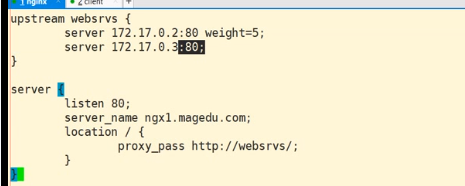
3) 实现nginx的负载均衡
upstream 192.168.1.29 {

      server  192.168.1.25:;

      server  192.168.1.26:;

}

server {

    listen      ;

    server_name  192.168.1.29;

    charset utf8;

    location / {

        proxy_pass        http://192.168.1.29;

        proxy_set_header  Host            $host;

        proxy_set_header  X-Real-IP        $remote_addr;

        proxy_set_header  X-Forwarded-For  $proxy_add_x_forwarded_for;

    }

}
4)负载均衡的健康检查
upstream 192.168.10.100 {

    server  192.168.10.142:;  #web01

    server  192.168.10.100:; # web28

    check interval= rise= fall= timeout= type=http port=;

    #check interval= rise= fall= timeout= type=http;

    #check_http_send "GET /index.php HTTP/1.1\r\nHost: 10.19.145.144\r\n\r\n";

    #check_http_expect_alive http_2xx http_3xx ;

}

server {

    listen      ;

    server_name  192.168.10.100;

    charset utf8;

    access_log  /data/log/mytestpvz2/cloud.pvz2android.popcap.com.cn_access.log  main;

    error_log  /data/log/mytestpvz2/cloud.pvz2android.popcap.com.cn_error.log;

    location / {

        proxy_pass        http://192.168.10.100;

        proxy_set_header  Host            $host;

        proxy_set_header  X-Real-IP        $remote_addr;

        proxy_set_header  X-Forwarded-For  $proxy_add_x_forwarded_for;

    }

}
5)网络代理。现象:有2台互通的机器,但是有一台有网络,有一台,没有网络,因为没有dns,如何让没有网络的机器能使用yum源
server {

    resolver 192.168.10.1 192.168.2.1;    # dns

    resolver_timeout 5s;

    listen ;

    server_name 0.0.0.0;

    access_log /data/log/nginx/myjumpserver_access.log main;

    error_log /data/log/nginx/myjumpserver_error.log;

    location / {

                        proxy_pass $scheme://$host$request_uri;

            proxy_set_header Host $http_host;

            proxy_set_header X-Real-IP $Host;

            proxy_set_header X-Forwarder-For $Host;

            proxy_buffering on;

            proxy_max_temp_file_size ;

            proxy_cache_valid   10m;

            proxy_cache_valid  1h;

            proxy_cache_valid any 1m;

            # include /data/app/nginx/conf/proxy.conf;

    }

}
network.conf
二、location 配置
1)配置server标签加载 location
server {

    listen  ssl;

    server_name  app-portal-zyd1.eniot.io;

    #ssl on;

    ssl_certificate /etc/nginx/ssl/Server_wildcard_eniot_io_20180308.cer;

    ssl_certificate_key /etc/nginx/ssl/Server_wildcard_eniot_io_20180308.key;

    ssl_protocols      TLSv1. TLSv1.;

    ssl_ciphers HIGH:!aNULL:!ADH:!DH:!DSA:!DES:!3DES:!SEED:!RC4:!MD5:!CBC;

    ssl_prefer_server_ciphers on;

    add_header Strict-Transport-Security "max-age=31536000; includeSubDomains" always;

    #add_header X-Frame-Options "SAMEORIGIN";

    error_log  /var/log/nginx-error.log debug;

    client_max_body_size 100m;

    client_header_buffer_size 64k;

    large_client_header_buffers  64k;

    underscores_in_headers on;

    include /etc/nginx/conf.d/app-portal/*.conf;

}

server {

    listen 80;

    server_name app-portal-zyd1.eniot.io;

    return 301 https://$host$request_uri;

}

server {

    listen 80;

    server_name app-portal-zyd1.yngj.spic gzyj.yngj.spic;

    client_max_body_size 100m;

    client_header_buffer_size 64k;

    large_client_header_buffers 4 64k;

    underscores_in_headers on;

    include /etc/nginx/conf.d/app-portal/*.conf;

}
配置 location
location /yunnan-trade-nfe/ {

    proxy_pass  http://yunnan-trade-nfe.apaas-zyd1.eniot.io;

    proxy_http_version 1.1;

    proxy_set_header Upgrade $http_upgrade;

    proxy_set_header Connection "upgrade";

    #proxy_set_header Host $host;

    proxy_set_header X-Real-IP $remote_addr;

    proxy_set_header X-Forwarded-For $proxy_add_x_forwarded_for;

    proxy_connect_timeout ;

    proxy_send_timeout ;

    proxy_read_timeout ;

}

location /yunnan-trade-web/ {

    proxy_pass  http://yunnan-trade-web.apaas-zyd1.eniot.io/;

    proxy_set_header X-REAL-IP $remote_addr;

    proxy_set_header X-Forwarded-For $proxy_add_x_forwarded_for;

    proxy_connect_timeout ;

    proxy_send_timeout ;

    proxy_read_timeout ;

}
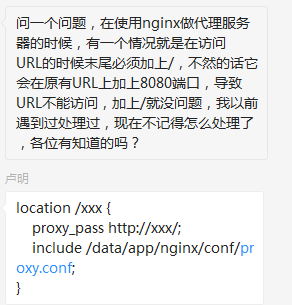
注意 proxy_pass 请求是否携带斜杠
访问携带斜杠的做法

nginx常用服务配置的更多相关文章
- (转)Nginx静态服务配置---详解root和alias指令
Nginx静态服务配置---详解root和alias指令 原文:https://www.jianshu.com/p/4be0d5882ec5 静态文件 Nginx以其高性能著称,常用与做前端反向代理服 ...
- Nginx静态服务配置---详解root和alias指令
Nginx静态服务配置---详解root和alias指令 静态文件 Nginx以其高性能著称,常用与做前端反向代理服务器.同时nginx也是一个高性能的静态文件服务器.通常都会把应用的静态文件使用ng ...
- Kali Linux常用服务配置教程获取IP地址
Kali Linux常用服务配置教程获取IP地址 下面以Kali Linux为例,演示获取IP地址的方法 (1)设置网络接口为自动获取IP地址.在Kali Linux的收藏夹中单击图标,将显示所有的程 ...
- Kali Linux常用服务配置教程启动DHCP服务
Kali Linux常用服务配置教程启动DHCP服务 通过前面的介绍,DHCP服务就配置好了.接下来,用户就可以使用该服务器来获取IP地址了.下面将对前面配置的服务进行测试. 1.启动DHCP服务 如 ...
- Kali Linux常用服务配置教程安装及配置DHCP服务
Kali Linux常用服务配置教程安装及配置DHCP服务 在Kali Linux中,默认没有安装DHCP服务.下面将介绍安装并配置DHCP服务的方法. 1.安装DHCP服务 在Kali Linux中 ...
- KaliLinux常用服务配置教程DHCP服务工作流程
KaliLinux常用服务配置教程DHCP服务工作流程 DHCP服务工作流程如图1.1所示. 具体的工作流程如下所示: (1)DHCP客户端以广播的方式发出DHCP Discover报文. (2)所有 ...
- Kali Linux常用服务配置教程DHCP服务原理
Kali Linux常用服务配置教程DHCP服务原理 动态主机配置协议(Dynamic Host Configuration Protocol,简称DHCP)是一个局域网的网络协议,基于UDP协议工作 ...
- 2-4、nginx特性及基础概念-nginx web服务配置详解
Nginx Nginx:engine X 调用了libevent:高性能的网络库 epoll():基于事件驱动event的网络库文件 Nginx的特性: 模块化设计.较好扩展性(不支持模块动态装卸载, ...
- Linux 网络配置及常用服务配置(Redhat 6)
一.网络配置 1. VMWare 提供了三种网络工作模式供用户选择,他们分别是, ①Bridged(桥接模式): 如果网络中能提供多个IP地址,则使用桥接方式 ②NAT(网络地址转换模式): 如果网络 ...
随机推荐
- Python 学习笔记02篇
之前很庆幸早点报名课程 可以早点看到视频讲解,不至于后期太赶 不得不说原本21天压缩到14天再压缩到7天,如果可以完整且独立地完成至少三个作业,那水平应该真的很不错吧
- 微信自带浏览器不支持form表单post提交方案解决
微信自带浏览器form表单post提交,Java控制后台获取不到值得解决方案: 第一种:把post改成get请求,但是改后另一个问题来了就是,数据不安全了,连接上都能看到,导致数据会流失,Java ...
- Code First 不自动生成数据库
工具--〉程序包管理器控制台 k1. 启用迁移: Enable-Migrations Enable-Migrations -ContextTypeName Mvc4WebSite.Models.Mvc ...
- Spring的诞生
前言:不先学习常见的设计模式直接看Spring.MyBatis等源码,简直就是一个找虐的过程!不掌握Servlet原理.基本的Tomcat容器技术上来就看Spring MVC源码同样也是一个打击自信心 ...
- editplus注册码
EditPlus5.0注册码 注册名 Vovan 注册码 3AG46-JJ48E-CEACC-8E6EW-ECUAW EditPlus3.x注册码 EditPlus注册码生成器链接 http://ww ...
- C# 消息队列 RabbitMQ
1.引言 RabbitMQ——Rabbit Message Queue的简写,但不能仅仅理解其为消息队列,消息代理更合适. RabbitMQ 是一个由 Erlang 语言开发的AMQP(高级消息队列协 ...
- BOOST_PREVENT_MACRO_SUBSTITUTION
[BOOST_PREVENT_MACRO_SUBSTITUTION] 用于防止函数被macro替换的问题. 例如: 参考: 1.https://blog.csdn.net/yanxiangtianji ...
- Linux源码安装JDK1.8
Linux源码安装Java 1.到官网下载 jdk-8u131-linux-x64.tar.gz 官网地址:http://www.oracle.com/technetwork/java/javase/ ...
- 字符编码:Unicode和UTF-8之间的关系
Unicode和UTF-8之间的关系 1. ASCII码 我们知道,在计算机内部,所有的信息最终都表示为一个二进制的字符串.每一个二进制位(bit)有0和1两种状态,因此八个二进制位就可以组合出256 ...
- grep -iq 与grep -qi 意思
就是有的时候你不需要直接打印出结果,比如在shell脚本中,你只需要知道grep有没有找到指定的字符串,而不需要满屏幕打印出来,因为那样会很难看.这只可以加-q选项,执行结果是:如果找到了,会返回0, ...