
WSGI and Paste学习笔记
The Problem
- Lots of web frameworks Zope, Quixote, Webware, SkunkWeb and Twisted Web etc
- Applications written for one framework often weren't compatible with the server components of the others
HTTP Basics
- When you request a page the browser sends an HTTP request
- When the server receives that request it will perform some action, (typically running an application) and return an HTTP response
WSGI application
- It is a callable (in this case a simple function) taking environ and start_response as positional parameters
- It calls start_response() with a status code and a list of tuple pairs of headers
- It returns a value.
- It should only be called once.
- The response it returns is an iterable (in this case a list with just one string).

The environ Dictionary :
A dictionary of strings
- CGI strings
- WSGI strings: wsgi.version, wsgi.url_scheme, wsgi.input, wsgi.errors, wsgi.multithread, wsgi.multiprocess, wsgi.run_once
- Server extension strings
easy_install WSGIUtils
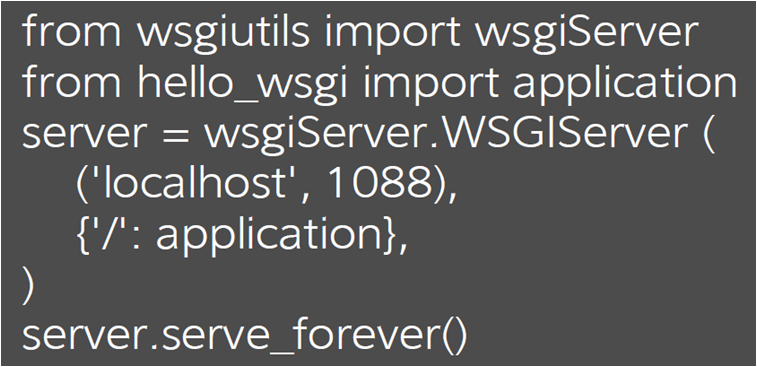
Middleware
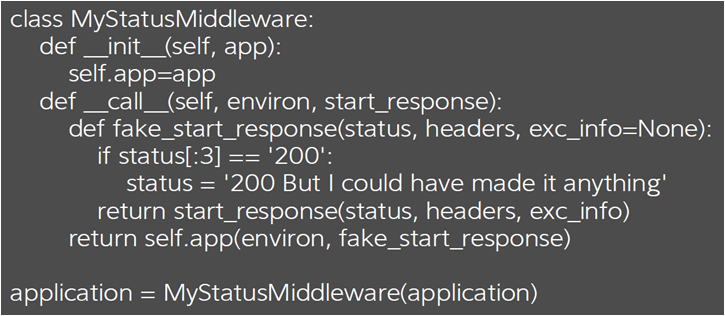
Component that acts like an application from the server's point of view
- It is a callable that accepts environ and start_response
- Calls start_repsonse once with status and headers etc
- Returns an iterable
with mddleware, you can do the following
- Provide more functionality by adding a key to the environ dictionary
- Change the status
- Intercepting an error
- Adding/removing/changing headers
- Change a response
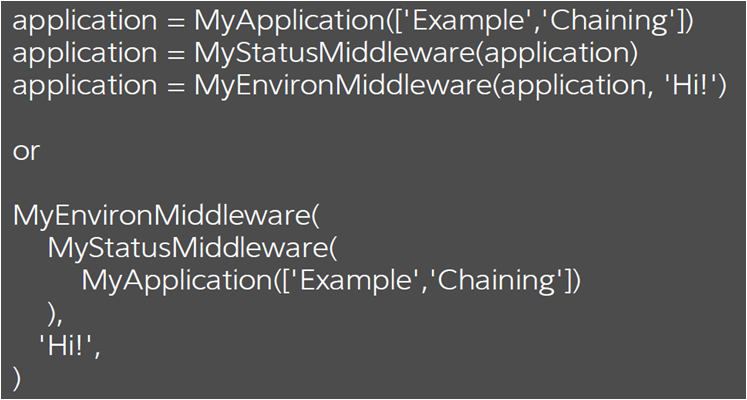
Middleware Chains
Use Paste
- http://wsgi.readthedocs.org/en/latest/libraries.html
- Paste Deploy is one of the Middleware and libraries for WSGI
例子一
- app.py
from webob import Response
from webob.dec import wsgify
from paste import httpserver
from paste.deploy import loadapp
@wsgify
def application(req):
return Response('Hello World')
def app_factory(global_config, **local_config):
return application
wsgi_app = loadapp('config:/root/paste.ini')
httpserver.serve(wsgi_app, host='127.0.0.1', port=8080)
- paste.ini
[app:main]
paste.app_factory = app:app_factory
例子二
- app.py
from webob import Response
from webob.dec import wsgify
from paste import httpserver
from paste.deploy import loadapp
@wsgify
def application(req):
return Response('Hello World')
@wsgify.middleware()
def my_filter(req, app):
# just print a message to the console
print('my_filter was called')
return app(req)
def app_factory(global_config, **local_config):
return application
def filter_factory(global_config, **local_config):
return my_filter
wsgi_app = loadapp('config:/root/paste.ini')
httpserver.serve(wsgi_app, host='127.0.0.1', port=8080)
- paste.ini
[pipeline:main]
pipeline = myfilter myapp
[app:myapp]
paste.app_factory = app:app_factory
[filter:myfilter]
paste.filter_factory = app:filter_factory
Paste Deploy
- Paste Deployment is a system for finding and configuring WSGI applications and servers.
- For WSGI application consumers:
- it provides a single, simple function (loadapp) for loading a WSGI application from a configuration file or a Python Egg.
- For WSGI application providers
- it only asks for a single, simple entry point to your application
- two URI formats currently supported:
- config: refer to configuration files.
- egg:
- Python Eggs are a distribution and installation format produced by setuptools and distribute that adds metadata to a normal Python package
- Eggs are to Pythons as Jars are to Java
- http://peak.telecommunity.com/DevCenter/PythonEggs
- Global and Local Configurations
- Global configuration to apply to every application defined in a file should go in a special section named [DEFAULT].
[DEFAULT]
admin_email = webmaster@example.com
- Configuration is done through keys besides use
[app:blog]
use = egg:MyBlog
database = mysql://localhost/blogdb
blogname = This Is My Blog!
- Tree types of sections:
- Applications
- Composite Applications
- Filter Composition
- Application section: There’s two ways to indicate the Python code for the application.
- The first is to refer to another URI or name:
#points to application section in other config files
[app:myapp]
use = config:another_config_file.ini#app_name
# or any URI:
[app:myotherapp]
use = egg:MyApp
# or a callable from a module:
[app:mythirdapp]
use = call:my.project:myapplication
# or even another section:
[app:mylastapp]
use = myotherapp
- The other way to define an application is to point exactly to some Python code:
[app:myapp]
paste.app_factory = myapp.modulename:app_factory
- Composite Applications
- “Composite” applications are things that act like applications, but are made up of other applications.
- One example would be a URL mapper, where you mount applications at different URL paths.
[composite:main]
use = egg:Paste#urlmap
/ = mainapp
/files = staticapp
[app:mainapp]
use = egg:MyApp
[app:staticapp]
use = egg:Paste#static
document_root = /path/to/docroot
- Filter Composition: several ways to apply filters to applications:
- The first way is to use the filter-with setting
[app:main]
use = egg:MyEgg
filter-with = printdebug
[filter:printdebug]
use = egg:Paste#printdebug
# and you could have another filter-with here, and so on...
- filter-app defines a filter, and then a special key next which points to the application to apply the filter to.
[composite:main]
use = egg:Paste#urlmap
/ = home
/blog = blog
/wiki = wiki
/cms = config:cms.ini
[app:home]
use = egg:Paste#static
document_root = %(here)s/htdocs
[filter-app:blog]
use = egg:Authentication#auth
next = blogapp
roles = admin
htpasswd = /home/me/users.htpasswd
[app:blogapp]
use = egg:BlogApp
database = sqlite:/home/me/blog.db
[app:wiki]
use = call:mywiki.main:application
database = sqlite:/home/me/wiki.db
- pipeline: is used when you need apply a number of filters.
[pipeline:main]
pipeline = filter1 egg:FilterEgg#filter2 filter3 app
[filter:filter1]
...
- Factories
- paste.app_factory
- paste.composite_factory
- paste.filter_factory
- paste.server_factory
- keystoneclient/middleware/auth_token.py
class AuthProtocol(object):
"""Auth Middleware that handles authenticating client calls."""
def __init__(self, app, conf):
……
def __call__(self, env, start_response):
"""Handle incoming request.
Authenticate send downstream on success. Reject request if we can't authenticate.
def filter_factory(global_conf, **local_conf):
"""Returns a WSGI filter app for use with paste.deploy."""
conf = global_conf.copy()
conf.update(local_conf)
def auth_filter(app):
return AuthProtocol(app, conf)
return auth_filter
def app_factory(global_conf, **local_conf):
conf = global_conf.copy()
conf.update(local_conf)
return AuthProtocol(None, conf)
[composite:rootapp]
paste.composite_factory = glance.api:root_app_factory
/: apiversions
/v1: apiv1app
/v2: apiv2app
def root_app_factory(loader, global_conf, **local_conf):
if not CONF.enable_v1_api:
del local_conf['/v1']
if not CONF.enable_v2_api:
del local_conf['/v2']
return paste.urlmap.urlmap_factory(loader, global_conf, **local_conf)
WSGI and Paste学习笔记的更多相关文章
- VS2013中Python学习笔记[Django Web的第一个网页]
前言 前面我简单介绍了Python的Hello World.看到有人问我搞搞Python的Web,一时兴起,就来试试看. 第一篇 VS2013中Python学习笔记[环境搭建] 简单介绍Python环 ...
- Java学习笔记--Swing用户界面组件
很多与AWT类似. 事件处理参考:Java学习笔记--AWT事件处理 1.设计模式: 模型:存储内容视图:显示内容控制器:处理用户输入· 2. 文本输入常用组件 2.1 文本域: JLabel lab ...
- shell学习笔记
shell学习笔记 .查看/etc/shells,看看有几个可用的Shell . 曾经用过的命令存在.bash_history中,但是~/.bash_history记录的是前一次登录前记录的所有指令, ...
- openstack学习笔记一 虚拟机启动过程代码跟踪
openstack学习笔记一 虚拟机启动过程代码跟踪 本文主要通过对虚拟机创建过程的代码跟踪.观察虚拟机启动任务状态的变化,来透彻理解openstack各组件之间的作用过程. 当从horizon界面发 ...
- Django 学习笔记(三)模板导入
本章内容是将一个html网页放进模板中,并运行服务器将其展现出来. 平台:windows平台下Liunx子系统 目前的目录: hello ├── manage.py ├── hello │ ├── _ ...
- R学习笔记(4): 使用外部数据
来源于:R学习笔记(4): 使用外部数据 博客:心内求法 鉴于内存的非持久性和容量限制,一个有效的数据处理工具必须能够使用外部数据:能够从外部获取大量的数据,也能够将处理结果保存.R中提供了一系列的函 ...
- Django学习笔记(4)——Django连接数据库
前言 在MVC或者MTV设计模式中,模型(M)代表对数据库的操作.那么如何操作数据库呢?本小节就认真学习一下.首先复习一下Django的整个实现流程 ,然后再实现一下使用数据库的整个流程,最后学习一下 ...
- Python Flask学习笔记之Hello World
Python Flask学习笔记之Hello World 安装virtualenv,配置Flask开发环境 virtualenv 虚拟环境是Python解释器的一个私有副本,在这个环境中可以安装私有包 ...
- 鸟哥Linux私房菜基础学习篇学习笔记2
鸟哥Linux私房菜基础学习篇学习笔记2 第九章 文件与文件系统的压缩打包: Linux下的扩展名没有什么特殊的意义,仅为了方便记忆. 压缩文件的扩展名一般为: *.tar, *.tar.gz, *. ...
随机推荐
- web前端面试题题目
一.各种浏览器兼容的前缀:-o-(Opera),-ms-(IE): -moz-(火狐):-webkit-(chrome) 二.存在兼容性的css属性:placeholder,主要是因为各种浏览器pla ...
- VS2008打上SP1的补丁后安装了silverlight后出现未将对象引用设置到对象实例的解决办法
新建silverlight项目失败,提示 未将对象设置到实例 的解决办法: 1.打开 visual studio 命令提示 输入一下命令:2.devenv /resetskippkgs ,这条命令会启 ...
- 安装使用aria2下载百度网盘内容(转)
原文地址:https://blog.csdn.net/wudi1107/article/details/80728891 安装使用aria2下载百度网盘内容 目前在Linux中没有好用的百度网盘客户端 ...
- 使用QML绘制界面
1 使用QML设计登录界面 https://www.cnblogs.com/bhlsheji/p/5324871.html 2 使用QML实现下拉列表框 https://blog.csdn.net/ ...
- 弹飞绵羊[HNOI2010]
--BZOJ2002 Description 某天,Lostmonkey发明了一种超级弹力装置,为了在他的绵羊朋友面前显摆,他邀请小绵羊一起玩个游戏.游戏一开始,Lostmonkey在地上沿着一条直线 ...
- char对比varchar
char对比varchar 相同点:char与varchar都是存储字符串的数据类型 不同点:char是固定长度的字符类型,而varchar是可变长度的字符类型,这个一定要注意.另外进行select时 ...
- sha1withRSA算法
RAS_USE_PRIVATE_ENCRYPT(3021300906052b0e03021a05000414 + SHA1(DATA))
- ajax 与jsp servlet
jQuery的Ajax实现异步传输List.Map_GOOD 分类: JAVA WEB前端2013-08-29 18:35 6296人阅读 评论(0) 收藏 举报 javajquerylistjson ...
- angular的一些东西
每个人都知道在使用angular的时候只能有一个ng-app指令但是也可以手动创建,这样就可以写很多个模块 例: var app=angular.module('App',[]);var app1=a ...
- RQNOJ PID51 / 乒乓球 ☆
因为是多行输入,所以用了getchar()进行输入,题目没有说明数据范围,所以开始的时候因为数组开的不够大,WA90了一次,我之前开了10000的长度,之后开100000的长度跑过了 一个基本的模拟, ...