
react-native中的触摸事件
移动应用上的用户交互基本靠“摸”。当然,“摸”也是有各种姿势的:在一个按钮上点击,在一个列表上滑动,
或是在一个地图上缩放。React Native 提供了可以处理常见触摸手势(例如点击或滑动)的组件, 以及可用于识别更复杂的手势的完整的手势响应系统。
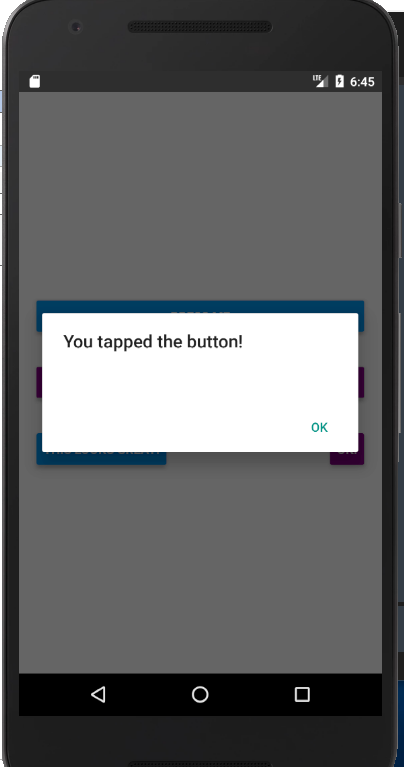
再试试下面这个使用Button的例子吧。你可以点击"Tap to Play"来预览真实效果。
(下面会显示一个嵌在网页中的手机模拟器,国内用户可能打不开这个网页模拟器,或速度非常慢)。
import React, { Component } from 'react';

import { Alert, AppRegistry, Button, StyleSheet, View } from 'react-native';

export default class ButtonBasics extends Component {

  _onPressButton() {

    Alert.alert('You tapped the button!')

  }

  render() {

    return (

      <View style={styles.container}>

        <View style={styles.buttonContainer}>

          <Button

            onPress={this._onPressButton}

            title="Press Me"

          />

        </View>

        <View style={styles.buttonContainer}>

          <Button

            onPress={this._onPressButton}

            title="Press Me"

            color="#841584"

          />

        </View>

        <View style={styles.alternativeLayoutButtonContainer}>

          <Button

            onPress={this._onPressButton}

            title="This looks great!"

          />

          <Button

            onPress={this._onPressButton}

            title="OK!"

            color="#841584"

          />

        </View>

      </View>

    );

  }

}

const styles = StyleSheet.create({

  container: {

   flex: 1,

   justifyContent: 'center',

  },

  buttonContainer: {

    margin: 20

  },

  alternativeLayoutButtonContainer: {

    margin: 20,

    flexDirection: 'row',

    justifyContent: 'space-between'

  }

})

// skip this line if using Create React Native App

AppRegistry.registerComponent('AwesomeProject', () => ButtonBasics);
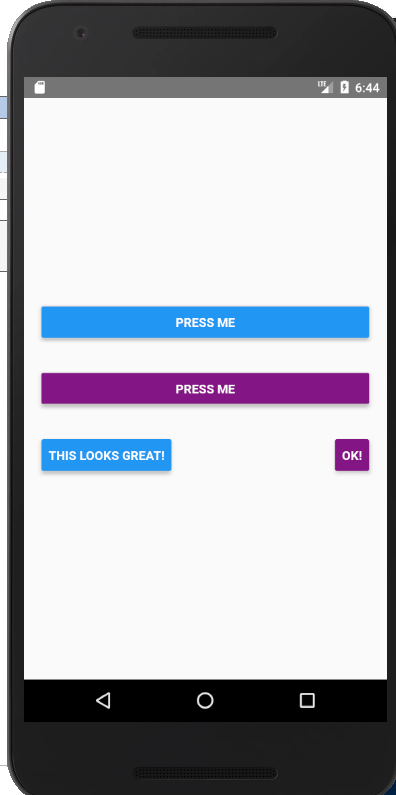
如果你想在处理点击事件的同时不显示任何视觉反馈,则需要使用TouchableWithoutFeedback。
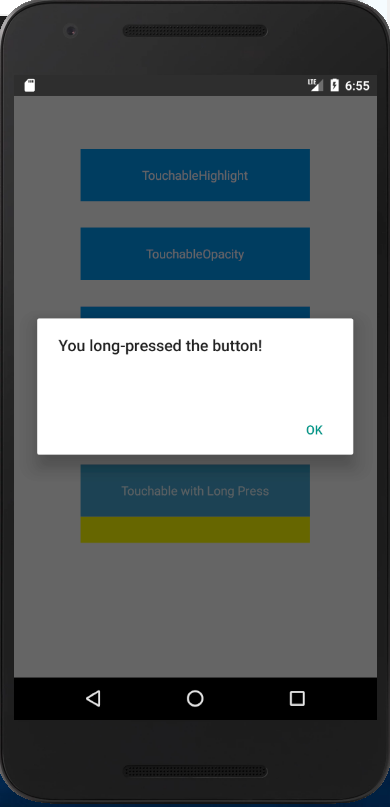
某些场景中你可能需要检测用户是否进行了长按操作。可以在上面列出的任意组件中使用onLongPress属性来实现
import React, { Component } from 'react';

import { Alert, AppRegistry, Platform, StyleSheet, Text, TouchableHighlight, TouchableOpacity, TouchableNativeFeedback, TouchableWithoutFeedback, View } from 'react-native';

export default class Touchables extends Component {

  _onPressButton() {

    Alert.alert('You tapped the button!')

  }

  _onLongPressButton() {

    Alert.alert('You long-pressed the button!')

  }

  render() {

    return (

      <View style={styles.container}>

        <TouchableHighlight onPress={this._onPressButton} underlayColor="white">

          <View style={styles.button}>

            <Text style={styles.buttonText}>TouchableHighlight</Text>

          </View>

        </TouchableHighlight>

        <TouchableOpacity onPress={this._onPressButton}>

          <View style={styles.button}>

            <Text style={styles.buttonText}>TouchableOpacity</Text>

          </View>

        </TouchableOpacity>

        <TouchableNativeFeedback

            onPress={this._onPressButton}

            background={Platform.OS === 'android' ? TouchableNativeFeedback.SelectableBackground() : ''}>

          <View style={styles.button}>

            <Text style={styles.buttonText}>TouchableNativeFeedback</Text>

          </View>

        </TouchableNativeFeedback>

        <TouchableWithoutFeedback

            onPress={this._onPressButton}

            >

          <View style={styles.button}>

            <Text style={styles.buttonText}>TouchableWithoutFeedback</Text>

          </View>

        </TouchableWithoutFeedback>

        <TouchableHighlight onPress={this._onPressButton} onLongPress={this._onLongPressButton} underlayColor="yellow">

          <View style={styles.button}>

            <Text style={styles.buttonText}>Touchable with Long Press</Text>

          </View>

        </TouchableHighlight>

      </View>

    );

  }

}

const styles = StyleSheet.create({

  container: {

    paddingTop: 60,

    alignItems: 'center'

  },

  button: {

    marginBottom: 30,

    width: 260,

    alignItems: 'center',

    backgroundColor: '#2196F3'

  },

  buttonText: {

    padding: 20,

    color: 'white'

  }

})
具体使用哪种组件,取决于你希望给用户什么样的视觉反馈:
一般来说,你可以使用TouchableHighlight来制作按钮或者链接。注意此组件的背景会在用户手指按下时变暗。
在 Android 上还可以使用TouchableNativeFeedback,它会在用户手指按下时形成类似墨水涟漪的视觉效果。
TouchableOpacity会在用户手指按下时降低按钮的透明度,而不会改变背景的颜色。
如果你想在处理点击事件的同时不显示任何视觉反馈,则需要使用TouchableWithoutFeedback。
某些场景中你可能需要检测用户是否进行了长按操作。可以在上面列出的任意组件中使用onLongPress属性来实现。
react-native中的触摸事件的更多相关文章
- [转] 「指尖上的魔法」 - 谈谈 React Native 中的手势
http://gold.xitu.io/entry/55fa202960b28497519db23f React-Native是一款由Facebook开发并开源的框架,主要卖点是使用JavaScrip ...
- 在React Native中,使用fetch网络请求 实现get 和 post
//在React Native中,使用fetch实现网络请求 /* fetch 是一个封装程度更高的网络API, 使用了Promise * Promise 是异步编程的一种解决方案 * Promise ...
- react native中如何往服务器上传网络图片
let common_url = 'http://192.168.1.1:8080/'; //服务器地址 let token = ''; //用户登陆后返回的token /** * 使用fetch实现 ...
- React Native 中 CSS 的使用
首先声明,此文原作者为黎 跃春 React Native中CSS 内联样式 对象样式 使用Stylesheet.Create 样式拼接 导出样式对象 下面的代码是index.ios.js中的代码: / ...
- react native中的欢迎页(解决首加载白屏)
参照网页: http://blog.csdn.net/fengyuzhengfan/article/details/52712829 首先是在原生中写一些方法,然后通过react native中js去 ...
- React Native中的网络请求fetch和简单封装
React Native中的网络请求fetch使用方法最为简单,但却可以实现大多数的网络请求,需要了解更多的可以访问: https://segmentfault.com/a/1190000003810 ...
- 关于js-binding中Layer触摸事件的优化
关于js-binding中Layer触摸事件的优化 cocos2d-x 3.7 1. 目前js中监听触摸事件带来的不便(特别是cocosbuilder) 在目前的js-binding中,如果要监听la ...
- [转] 在React Native中使用ART
http://bbs.reactnative.cn/topic/306/%E5%9C%A8react-native%E4%B8%AD%E4%BD%BF%E7%94%A8art 前半个月捣腾了一下Rea ...
- react native中使用echarts
开发平台:mac pro node版本:v8.11.2 npm版本:6.4.1 react-native版本:0.57.8 native-echarts版本:^0.5.0 目标平台:android端收 ...
- react native中一次错误排查 Error:Error: Duplicate resources
最近一直在使用react native中,遇到了很多的坑,同时也学习到了一些移动端的开发经验. 今天在做一个打包的测试时,遇到了一个问题,打包过程中报错“Error:Error: Duplicate ...
随机推荐
- python爬虫之git的使用(coding.net的使用)
1.注册coding.net账号,然后登陆. 2.创建项目 套路和github都一样. 1.1.我们在远程仓库上创建了一个仓库,这样的话,我们需要在本地随便建立一个文件普通文件夹,进去以后,执行git ...
- 18个Python高效编程技巧,Mark!
初识Python语言,觉得python满足了我上学时候对编程语言的所有要求.python语言的高效编程技巧让我们这些大学曾经苦逼学了四年c或者c++的人,兴奋的不行不行的,终于解脱了.高级语言,如果做 ...
- windows git支持arc命令
本文整理了在Windows系统上安装代码审查工具Arcanist的过程.目的是配合Phabricator进行代码review.配置成功后可使用arc diff命令来发起code review. 1.安 ...
- Vue过渡状态
前面的话 Vue 的过渡系统提供了非常多简单的方法设置进入.离开和列表的动效.那么对于数据元素本身的动效呢?包括数字和运算.颜色的显示.SVG 节点的位置.元素的大小和其他的属性等.所有的原始数字都被 ...
- 使用aapt查看当前apk的属性
android:versioncode——整数值,代表应用程序代码的相对版本,也就是版本更新过多少次. android:versionname——字符串值,代表应用程序的版本信息,需要显示给用户. e ...
- 下载模板、Excel导入、导出
下载模板 /// <summary> /// 下载模板 /// </summary> /// <returns></returns> public Ac ...
- Oracle查看表空间,创建表空间
查看表空间: SELECT tablespace_name, file_id, file_name, round(bytes / (1024 * 1024), 0) total_space FROM ...
- redis哨兵集群+spring boot 2.×
Ubuntu集群构建篇 redis-cli:不跟参数,默认访问localhost:6379端口,无密码登陆 redis-cli -h ${host} -p ${port} -a ${password} ...
- BZOJ3224普通平衡树——非旋转treap
题目: 此为平衡树系列第一道:普通平衡树您需要写一种数据结构,来维护一些数,其中需要提供以下操作:1. 插入x数2. 删除x数(若有多个相同的数,因只删除一个)3. 查询x数的排名(若有多个相同的数, ...
- Django auth认证系统
Django自带的用户认证 我们在开发一个网站的时候,无可避免的需要设计实现网站的用户系统.此时我们需要实现包括用户注册.用户登录.用户认证.注销.修改密码等功能,这还真是个麻烦的事情呢. Djang ...