
MySQL log_slave_updates 参数【转】
说明:最近部署了mysql的集群环境,详细如下M01和M02为主主复制,M01和R01为主从复制;在测试的过程中发现了以下问题:
1、M01和M02的主主复制是没有问题的(从M01写入数据能同步到M02,从M02写入数据能够同步到M01);
2、主从同步的时候,当从M01写入的时候,数据可以写入到R01;
3、当从M02写入的时候,数据就不能写入到R01;
问题的原因:log_slave_updates参数的状态为NO
mysql的官网说明如下:
|
Normally, a slave does not log to its own binary log any updates that are received from a master server. This option tells the slave to log the updates performed by its SQL thread to its own binary log. For this option to have any effect, the slave must also be started with the --log-bin option to enable binary logging. Prior to MySQL 5.5, the server would not start when using the --log-slave-updates option without also starting the server with the --log-bin option, and would fail with an error; in MySQL 5.5, only a warning is generated. (Bug #44663) --log-slave-updates is used when you want to chain replication servers. For example, you might want to set up replication servers using this arrangement: A -> B -> C Here, A serves as the master for the slave B, and B serves as the master for the slave C. For this to work, B must be both a master and a slave. You must start both A and B with --log-bin to enable binary logging, and B with the --log-slave-updates option so that updates received from A are logged by B to its binary log. |
a) M01同步从M02同步数据过来的时候,log_slave_updates参数用来控制M01是否把所有的操作写入到binary log,默认的情况下mysql是关闭的;
b) R01数据的更新需要通过读取到M01的binary log才能进行更新,这个时候M01是没有写binary log的,所以当数据从M02写入的时候,R01也就没有更新了。。
问题的解决方法:
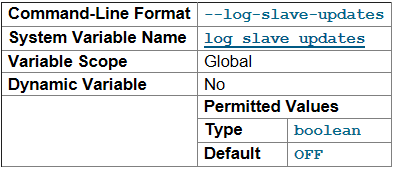
log_slave_updates:默认值为OFF;
Dynamic Variable:NO
处理方法:修改/etc/my.cnf,增加一行log_slave_updates=1,重启数据库后就可以了;
总结:设置完该参数后,数据库的架构就可以设置成M01和M02为主主同步,R01通过M01进行主从同步;
应用的写操作中M02上面进行,读操作中R01上面进行(如果读操作很多的话,可以在M01上面架设多台只读数据库),当M02发生故障后,系统的写操作自动迁移到M01上面。这种架构基本可以保证大部分公司的应用需求;
官网说明:

Normally, a slave does not log to its own binary log any updates that are received from a master server. This option tells the slave to log the updates performed by its SQL thread to its own binary log. For this option to have any effect, the slave must also be started with the --log-bin option to enable binary logging. Prior to MySQL 5.5, the server would not start when using the --log-slave-updates option without also starting the server with the --log-bin option, and would fail with an error; in MySQL 5.5, only a warning is generated. (Bug #) --log-slave-updates is used when you want to chain replication servers. For example, you might want to set up replication servers using this arrangement:

A -> B -> C

Here, A serves as the master for the slave B, and B serves as the master for the slave C. For this to work, B must be both a master and a slave. You must start both A and B with --log-bin to enable binary logging, and B with the --log-slave-updates option so that updates received from A are logged by B to its binary log.

通常情况,从服务器从主服务器接收到的更新不记入它的二进制日志。该选项告诉从服务器将其SQL线程执行的更新记入到从服务器自己的二进制日志。为了使该选项生效,还必须用--logs-bin选项启动从服务器以启用二进制日志。如果想要应用链式复制服务器,应使用--logs-slave-updates。例如,可能你想要这样设置:

A -> B -> C

也就是说,A为从服务器B的主服务器,B为从服务器C的主服务器。为了能工作,B必须既为主服务器又为从服务器。你必须用--logs-bin启动A和B以启用二进制日志,并且用--logs-slave-updates选项启动B。
转自
主从同步设置的重要参数log_slave_updates_ITPUB博客 http://blog.itpub.net/12679300/viewspace-1319263/
Mysql log_slave_updates 参数 - 泽锦 - 博客园 https://www.cnblogs.com/zejin2008/p/4656251.html
MySQL log_slave_updates 参数【转】的更多相关文章
- Mysql log_slave_updates 参数
官网说明: Normally, a slave does not log to its own binary log any updates that are received from a mast ...
- MySql配置参数很全的Mysql配置参数说明
MySql配置参数 很全的Mysql配置参数说明 1. back_log 指定MySQL可能的连接数量.当MySQL主线程在很短的时间内得到非常多的连接请求,该参数就起作用,之后主线程花些时间(尽管很 ...
- 【查阅】mysql配置文件/参数文件重要参数笔录(my.cnf)
持续更新,积累自己对参数的理解 [1]my.cnf参数 [client]port = 3306socket = /mysql/data/3306/mysql.sockdefault-character ...
- 1201MySQL配置文件mysql.ini参数详解
转自http://www.cnblogs.com/feichexia/archive/2012/11/27/mysqlconf.html my.ini(Linux系统下是my.cnf),当mysql服 ...
- (转)MySQL配置文件mysql.ini参数详解、MySQL性能优化
本文转自:http://www.cr173.com/html/18331_1.html my.ini(Linux系统下是my.cnf),当mysql服务器启动时它会读取这个文件,设置相关的运行环境参数 ...
- MySQL配置文件mysql.ini参数详解、MySQL性能优化
my.ini(Linux系统下是my.cnf),当mysql服务器启动时它会读取这个文件,设置相关的运行环境参数. my.ini分为两块:Client Section和Server Section. ...
- MySQL配置文件mysql.ini参数详解
my.ini(Linux系统下是my.cnf),当mysql服务器启动时它会读取这个文件,设置相关的运行环境参数. my.ini分为两块:Client Section和Server Section. ...
- 在Linux最大打开文件数限制下 MySQL 对参数的调整
http://www.actionsky.com/docs/archives/78 2016年4月7日 周文雅 目录 1 起因 2 说明 3 MySQL调整参数的方式 3.1 计算 request ...
- skip-grant-tables:非常有用的mysql启动参数
skip-grant-tables:非常有用的mysql启动参数 介绍一个非常有用的mysql启动参数—— --skip-grant-tables.顾名思义,就是在启动mysql时不启动grant ...
随机推荐
- Linxu系统下JDK1.7(rpm)安装
一.JDK下载地址: https://www.oracle.com/technetwork/java/javase/downloads/jdk7-downloads-1880260.html 二.查看 ...
- win10的cmd中显示:telnet不是内部或外部命令也不是可运行的程序或批处理?
win10的cmd中显示:telnet不是内部或外部命令也不是可运行的程序或批处理? 摘录自:https://blog.csdn.net/haijing1995/article/details/664 ...
- Docker 容器管理
单一容器管理 容器的标识符 每个容器被创建后都会分配一个CONTAINER_ID作为容器的唯一标识符,后续的启动.停止等操作都通过CONTAINER_ID来完成的. CONTAINER_ID很难记忆, ...
- layui(二)——layer组件常见用法总结
layer是layui的代表作,功能十分强大,为方便以后快速配置这里对其常见用法做了简单总结 一.常用调用方式 //1.普通消息:alert(content,[options],[yesCallBac ...
- ruby----%使用法
%{String} 用于创建一个使用双引号括起来的字符串,这个表示法与%Q{String}完全一样 result = %{hello} puts "result is: #{result} ...
- Silverlight设计器——Path
如下图,在设计一个InfoWindow的时候,顶栏的关闭按钮没有出现.观察了半天,也没有弄明白.无意中,拖动一个几乎透明的信息框,突然就出现了关闭的按钮.原来,那个信息框只是一个Path,它遮住了关闭 ...
- 实惠VPS推荐
1. Topmain 2. Virmach 3. BanwagonHost [备用地址1] [备用地址2] 4. HiFormance (跑路) 5. my.hosteons.com 6. . 以 ...
- 修改教材P74 一行代码 NineNineTable.java, 让执行结果是个三角形
修改教材P74 一行代码 NineNineTable.java, 让执行结果是个三角形: 提交在IDEA或命令行中运行结查截图,加上学号水印,没学号的不给成绩 2*9=18 3*9=27 4*9=36 ...
- 使用vlfeat 包中遇到的问题
run('..../setup'); vl_complie(); 编译成功,但是仍然出现Invalid MEX-file ‘E:\vlfeat-0.9.20\toolbox\mex\mexw64\vl ...
- 使用Hexo在github上搭建个人博客
最近正好在学习前端开发,想着搭建一个属于自己的个人博客,把自己的技能树整理整理,温故而知新. 如果你有前端开发经验,那么搭建这样的博客就很简单了. 一 什么是Hexo Hexo 是一个快速.简 ...