
jQuery -- 光阴似箭(四):jQuery 遍历
jQuery -- 知识点回顾篇(四):jQuery 遍历
通过 jQuery 遍历,您能够从被选(当前的)元素开始,轻松地在家族树中向上移动(祖先),向下移动(子孙),水平移动(同胞)。这种移动被称为对 DOM 进行遍历。
1. 向上遍历 DOM 树,查找元素的祖先。
parent() 方法,parents() 方法,parentsUntil() 方法。
<!DOCTYPE html>

<html>

<head>

<meta http-equiv="Content-Type" content="text/html; charset=utf-8"/>

<title>My Test JQuery</title>

    <script type="text/javascript" src="./js/jquery-1.10.2.min.js"></script>

    <script type="text/javascript" >

        $(function(){

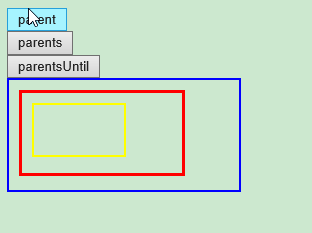
            //parent() 方法返回被选元素的直接父元素。该方法只会向上一级对 DOM 树进行遍历。

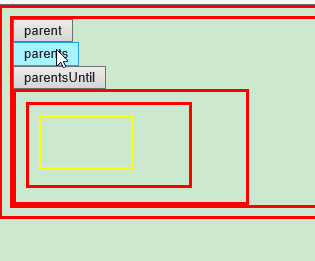
            //parents() 方法返回被选元素的所有祖先元素,它一路向上直到文档的根元素 (<html>)。

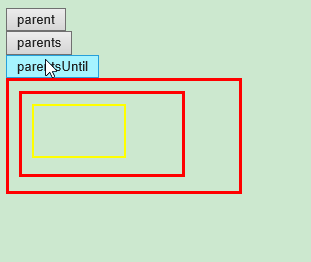
            //parentsUntil() 方法返回介于两个给定元素之间的所有祖先元素。

            $("#btn_parent").click(function(){

                $("#myDiv3").parent().css({"color":"red","border":"3px solid red"});

            });

            $("#btn_parents").click(function(){

                $("#myDiv3").parents().css({"color":"red","border":"3px solid red"});

            });

            $("#btn_parentsUntil").click(function(){

                $("#myDiv3").parentsUntil("body").css({"color":"red","border":"3px solid red"});

            });

        });

    </script>

</head>

<body>

    <button type="button" id="btn_parent">parent</button><br/>

    <button type="button" id="btn_parents">parents</button><br/>

    <button type="button" id="btn_parentsUntil">parentsUntil</button><br/>

    <div id="myDiv1" style="width:210px;height:90px;padding: 10px;border:2px solid blue;">

        <div id="myDiv2" style="width:140px;height:60px;padding: 10px;border:2px solid green;" >

            <div id="myDiv3" style="width:70px;height:30px;padding: 10px;border:2px solid yellow;" >

            </div>

        </div>

    </div>

</body>

</html>

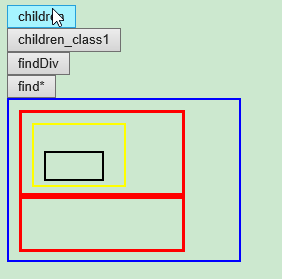
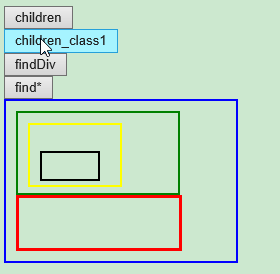
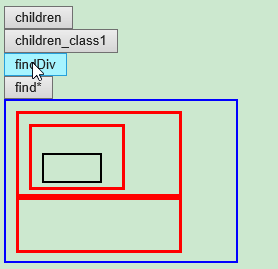
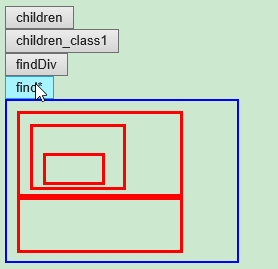
2. 向下遍历 DOM 树,查找元素的后代。children() 方法,find() 方法。
<html>

<head>

<meta http-equiv="Content-Type" content="text/html; charset=utf-8"/>

<title>My Test JQuery</title>

    <script type="text/javascript" src="./js/jquery-1.10.2.min.js"></script>

    <script type="text/javascript" >

        $(function(){

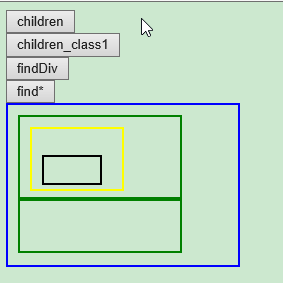
            //children() 方法返回被选元素的所有直接子元素。该方法只会向下一级对 DOM 树进行遍历。

            //find() 方法返回被选元素的后代元素,一路向下直到最后一个后代。

            $("#btn_children1").click(function(){

                $("#myDiv1").children().css({"color":"red","border":"3px solid red"});

            });

            $("#btn_children2").click(function(){

                $("#myDiv1").children("div.class1").css({"color":"red","border":"3px solid red"});

            });

            $("#btn_find1").click(function(){

                $("#myDiv1").find("div").css({"color":"red","border":"3px solid red"});

            });

            $("#btn_find2").click(function(){

                $("#myDiv1").find("*").css({"color":"red","border":"3px solid red"});

            });

        });

    </script>

</head>

<body>

    <button type="button" id="btn_children1">children</button><br/>

    <button type="button" id="btn_children2">children_class1</button><br/>

    <button type="button" id="btn_find1">findDiv</button><br/>

    <button type="button" id="btn_find2">find*</button><br/>

    <div id="myDiv1" style="width:210px;height:140px;padding: 10px;border:2px solid blue;">

        <div id="myDiv2" style="width:140px;height:60px;padding: 10px;border:2px solid green;" >

            <div id="myDiv3" style="width:70px;height:40px;padding: 10px;border:2px solid yellow;" >

                <p id="myP1" style="width:50px;height:20px;padding: 3px;border:2px solid black;" >

                </p>

            </div>

        </div>

        <div Class="class1" style="width:140px;height:30px;padding: 10px;border:2px solid green;" >

        </div>

    </div>

</body>

</html>
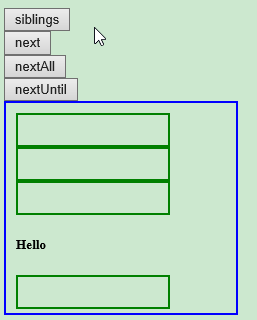
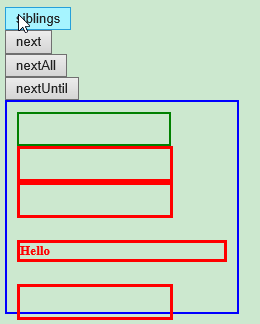
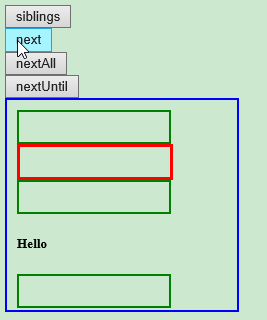
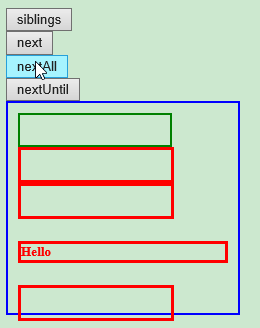
3. 遍历元素的同胞元素:siblings() 方法,next() 方法,nextAll() 方法,nextUntil() 方法。
<!DOCTYPE html>

<html>

<head>

<meta http-equiv="Content-Type" content="text/html; charset=utf-8"/>

<title>My Test JQuery</title>

    <script type="text/javascript" src="./js/jquery-1.10.2.min.js"></script>

    <script type="text/javascript" >

        $(function(){

            //children() 方法返回被选元素的所有直接子元素。该方法只会向下一级对 DOM 树进行遍历。

            //find() 方法返回被选元素的后代元素,一路向下直到最后一个后代。

            $("#btn_siblings").click(function(){

                $("#myDiv21").siblings().css({"color":"red","border":"3px solid red"});

            });

            $("#btn_next").click(function(){

                $("#myDiv21").next().css({"color":"red","border":"3px solid red"});

            });

            $("#btn_nextAll").click(function(){

                $("#myDiv21").nextAll().css({"color":"red","border":"3px solid red"});

            });

            $("#btn_nextUntil").click(function(){

                $("#myDiv21").nextUntil("h5").css({"color":"red","border":"3px solid red"});

            });

        });

    </script>

</head>

<body>

    <button type="button" id="btn_siblings">siblings</button><br/>

    <button type="button" id="btn_next">next</button><br/>

    <button type="button" id="btn_nextAll">nextAll</button><br/>

    <button type="button" id="btn_nextUntil">nextUntil</button><br/>

    <div id="myDiv1" style="width:210px;height:190px;padding: 10px;border:2px solid blue;">

        <div id="myDiv21" style="width:140px;height:20px;padding: 5px;border:2px solid green;" >

        </div>

        <div id="myDiv22" style="width:140px;height:20px;padding: 5px;border:2px solid green;" >

        </div>

        <div id="myDiv23" style="width:140px;height:20px;padding: 5px;border:2px solid green;" >

        </div>

        <h5>Hello</h5>

        <div id="myDiv24" style="width:140px;height:20px;padding: 5px;border:2px solid green;" >

        </div>

    </div>

</body>

</html>
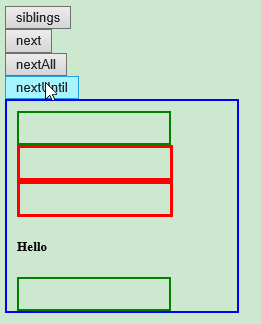
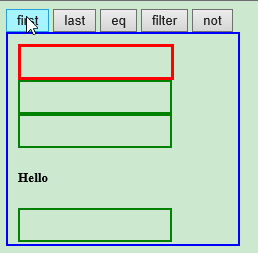
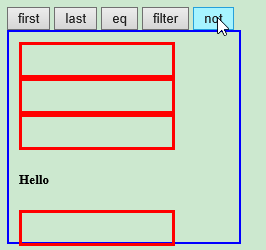
4. 过滤方法:基于其在一组元素中的位置来选择一个特定的元素。
first() 方法,last() 方法,eq() 方法,filter() 方法,not() 方法
<!DOCTYPE html>

<html>

<head>

<meta http-equiv="Content-Type" content="text/html; charset=utf-8"/>

<title>My Test JQuery</title>

    <script type="text/javascript" src="./js/jquery-1.10.2.min.js"></script>

    <script type="text/javascript" >

        $(function(){

            //first() 方法返回被选元素的首个元素。

            //last() 方法返回被选元素的最后一个元素。

            //eq() 方法返回被选元素中带有指定索引号的元素。

            //filter() 方法允许您规定一个标准。不匹配这个标准的元素会被从集合中删除,匹配的元素会被返回。

            //not() 方法返回不匹配标准的所有元素。

            $("#btn_first").click(function(){

                $("#myDiv1 div").first().css({"color":"red","border":"3px solid red"});

            });

            $("#btn_last").click(function(){

                $("#myDiv1 div").last().css({"color":"red","border":"3px solid red"});

            });

            $("#btn_eq").click(function(){

                $("#myDiv1 div").eq(2).css({"color":"red","border":"3px solid red"});

            });

            $("#btn_filter").click(function(){

                $("#myDiv1 *").filter("h5").css({"color":"red","border":"3px solid red"});

            });

            $("#btn_not").click(function(){

                $("#myDiv1 *").not("h5").css({"color":"red","border":"3px solid red"});

            });

        });

    </script>

</head>

<body>

    <button type="button" id="btn_first">first</button>

    <button type="button" id="btn_last">last</button>

    <button type="button" id="btn_eq">eq</button>

    <button type="button" id="btn_filter">filter</button>

    <button type="button" id="btn_not">not</button>

    <div id="myDiv1" style="width:210px;height:190px;padding: 10px;border:2px solid blue;">

        <div id="myDiv21" style="width:140px;height:20px;padding: 5px;border:2px solid green;" >

        </div>

        <div id="myDiv22" style="width:140px;height:20px;padding: 5px;border:2px solid green;" >

        </div>

        <div id="myDiv23" style="width:140px;height:20px;padding: 5px;border:2px solid green;" >

        </div>

        <h5>Hello</h5>

        <div id="myDiv24" style="width:140px;height:20px;padding: 5px;border:2px solid green;" >

        </div>

    </div>

</body>

</html>



jQuery -- 光阴似箭(四):jQuery 遍历的更多相关文章
- JavaScript学习总结(四)——jQuery插件开发与发布
jQuery插件就是以jQuery库为基础衍生出来的库,jQuery插件的好处是封装功能,提高了代码的复用性,加快了开发速度,现在网络上开源的jQuery插件非常多,随着版本的不停迭代越来越稳定好用, ...
- python 学习笔记十四 jQuery案例详解(进阶篇)
1.选择器和筛选器 案例1 <!DOCTYPE html> <html lang="en"> <head> <meta charset=& ...
- 第四十四课:jQuery UI和jQuery easy UI
jQuery UI是jQuery官方提供的功能效果和UI样式.作为官方出的东西,它一直没有被人们看重,一是它没有datagrid,tree等UI库必备的东西,二是它修改太过频繁,体积庞大.其实它所有以 ...
- jQuery组织您钞四----jQuery操作DOM
一.采用jQuery创建节点 节点是DOM基础设施.依据DOM产品规格,Node是一个很宽泛的概念,包含元素.属性.正文.档..实际开发过程中,要创建动态内容,主要操作的节点包括元素. 属性和文本. ...
- jQuery通用的全局遍历方法$.each()用法实例
1.jQuery通用的全局遍历方法$.each()用法 2. test.json文件代码: 3. html代码 4.jQuery代码 <script src="jquery-1.3.1 ...
- 原生JS forEach()和map()遍历,jQuery$.each()和$.map()遍历
一.原生JS forEach()和map()遍历 共同点: 1.都是循环遍历数组中的每一项. 2.forEach() 和 map() 里面每一次执行匿名函数都支持3个参数:数组中的当前项item,当前 ...
- jQuery 第四章 实例方法 DOM操作之data方法
jquery 里面 的 data 方法比较重要, 所以成一个模块写: 首先, 得知道 data() 干嘛用的, 看淘宝上 有自定义的属性, 为data - 什么什么, 这是为了dom 跟数据有 ...
- JavaScript学习笔记(四)——jQuery插件开发与发布
jQuery插件就是以jQuery库为基础衍生出来的库,jQuery插件的好处是封装功能,提高了代码的复用性,加快了开发速度,现在网络上开源的jQuery插件非常多,随着版本的不停迭代越来越稳定好用, ...
- python 全栈开发,Day53(jQuery的介绍,jQuery的选择器,jQuery动画效果)
js总结 js: 1.ECMAScript5 ES5语法 2.DOM CRUD 获取 3种方式 id tag className //面向对象 对象 : 属性和方法 某个对象中 function $( ...
- JQuery:JQuery基本语法,JQuery选择器,JQuery DOM,综合案例 复选框,综合案例 随机图片
知识点梳理 课堂讲义 1.JQuery快速入门 1.1.JQuery介绍 jQuery 是一个 JavaScript 库. 框架:Mybatis (jar包) 大工具 插件:PageHelper (j ...
随机推荐
- 第12章 Linux配置定时任务详解
12.1 配置定时任务 首先需弄清的概念: (1).crond是一个daemon类程序,路径为/usr/sbin/crond.默认会以后台方式启动,service或systemd方式启动crond默认 ...
- Perl一行式:处理行号和单词数
perl一行式程序系列文章:Perl一行式 所有行的行号 $ perl -pe '$_ = "$. $_"' file.log $ perl -ne 'print "$. ...
- Tomcat类加载架构
前言 主流的Java Web服务器(Tomcat.Jetty.WebLogic.WebSphere等)都有多个自定义的类加载器以及具备的类加载优势,本篇博文主要是通过以Tomcat为例简单认识Java ...
- 数据可视化 seaborn绘图(1)
seaborn是基于matplotlib的数据可视化库.提供更高层的抽象接口.绘图效果也更好. 用seaborn探索数据分布 绘制单变量分布 绘制二变量分布 成对的数据关系可视化 绘制单变量分布 se ...
- 从零开始学安全(二十五)●用nmap做端口扫描
以上是常用的端口扫描 -T 用法 每个级别发包时间 当没有使用T 时默认的使用T3级别发包 半开扫描 先探测主机是否存活 再用-sS 扫描端口 容易造成syn 包攻击 就是利用僵尸主机 进 ...
- Java 学习笔记 判断一个数组是否有序
思路 升序:每次比较数组中的两个数的时候,最大的数一定是前一个 降序: 每次比较数组中的两个数的时候,最小的数一定是前一个 Flag1和flag2都是假的时候,返回flase,否则,返回flase 代 ...
- RabbitMQ 基本概念总结
1.ack模式-应答模式 执行一个任务可能需要花费几秒钟,你可能会担心如果一个消费者在执行任务过程中挂掉了.一旦RabbitMQ将消息分发给了消费者,就会从内存中删除.在这种情况下,如果正在执行任务的 ...
- MySQL技巧(二)——无限级分类表设计
无限级分类表的设计(掌握'自身连接') 类似图书这种,会有很多种分类,而且在现实生活中这种分类会无限的往下分,所以不可能每有一个分类就创建一个分类表.应该使用下面这种语句 DROP TABLE IF ...
- navicate 远程无法链接linux上mysql数据库问题
1. 先确认阿里云是否放开了3306权限 (开启阿里云服务器端口) 2. 连接linux,登录数据库:mysql -uroot -p 修改root用户远程登录权限: 想myuser使用mypasswo ...
- js 年份左右点击加减
默认为今年 var date = new Date; $scope.year = date.getFullYear(); //年份减 $scope.yearPrev = function(){ $sc ...