
学习1__STM32--FatFS之逻辑盘符与物理盘符
FatFS源代码中的函数逻辑关系
第一 调用函数 f_mount()
result = f_mount(&fs, FS_VOLUME_NAND, ); /* Mount a logical drive */
FS_VOLUME_NAND 代表 “路径”
第二 进入函数 f_mount()内
 /*-----------------------------------------------------------------------*/

 /* Mount/Unmount a Logical Drive                                         */

 /*-----------------------------------------------------------------------*/

 FRESULT f_mount (

     FATFS* fs,            /* Pointer to the file system object (NULL:unmount)*/

     const TCHAR* path,    /* Logical drive number to be mounted/unmounted */

     BYTE opt              /* 0:Do not mount (delayed mount), 1:Mount immediately */

 )

 {

     FATFS *cfs;

     int vol;

     FRESULT res;

     const TCHAR *rp = path;

     vol = get_ldnumber(&rp);

     if (vol < ) return FR_INVALID_DRIVE;

     cfs = FatFs[vol];                    /* Pointer to fs object */

     if (cfs) {

 #if _FS_LOCK

         clear_lock(cfs);

 #endif

 #if _FS_REENTRANT                        /* Discard sync object of the current volume */

         if (!ff_del_syncobj(cfs->sobj)) return FR_INT_ERR;

 #endif

         cfs->fs_type = ;                /* Clear old fs object */

     }

     if (fs) {

         fs->fs_type = ;                 /* Clear new fs object */

 #if _FS_REENTRANT                        /* Create sync object for the new volume */

         if (!ff_cre_syncobj((BYTE)vol, &fs->sobj)) return FR_INT_ERR;

 #endif

     }

     FatFs[vol] = fs;                     /* Register new fs object */

     if (!fs || opt != ) return FR_OK;   /* Do not mount now, it will be mounted later */

     res = find_volume(&fs, &path, );    /* Force mounted the volume */

     LEAVE_FF(fs, res);

 }
代码中第17行 vol = get_ldnumber(&rp) 将路径转换为 logical drive number
第三 进入函数 get_ldnumber()
 /*-----------------------------------------------------------------------*/

 /* Get logical drive number from path name                               */

 /*-----------------------------------------------------------------------*/

 static

 int get_ldnumber (        /* Returns logical drive number (-1:invalid drive) */

     const TCHAR** path    /* Pointer to pointer to the path name */

 )

 {

     const TCHAR *tp, *tt;

     UINT i;

     int vol = -;

     if (*path) {    /* If the pointer is not a null */

         for (tt = *path; (UINT)*tt >= (_USE_LFN ? ' ' : '!') && *tt != ':'; tt++) ;    /* Find ':' in the path */

         if (*tt == ':') {    /* If a ':' is exist in the path name */

             tp = *path;

             i = *tp++ - '';

             if (i <  && tp == tt) {    /* Is there a numeric drive id? */

                 if (i < _VOLUMES) {      /* If a drive id is found, get the value and strip it */

                     vol = (int)i;

                     *path = ++tt;

                 }

             } else {      /* No numeric drive number */

 #if _STR_VOLUME_ID        /* Find string drive id */

                 static const char* const str[] = {_VOLUME_STRS};

                 const char *sp;

                 char c;

                 TCHAR tc;

                 i = ; tt++;

                 do {

                     sp = str[i]; tp = *path;

                     do {    /* Compare a string drive id with path name */

                         c = *sp++; tc = *tp++;

                         if (IsLower(tc)) tc -= 0x20;

                     } while (c && (TCHAR)c == tc);

                 } while ((c || tp != tt) && ++i < _VOLUMES);    /* Repeat for each id until pattern match */

                 if (i < _VOLUMES) {    /* If a drive id is found, get the value and strip it */

                     vol = (int)i;

                     *path = tt;

                 }

 #endif

             }

             return vol;

         }

 #if _FS_RPATH && _VOLUMES >= 2

         vol = CurrVol;    /* Current drive */

 #else

         vol = ;          /* Drive 0 */

 #endif

     }

     return vol;

 }
本函数获取 path 后解析 path 得到 logical drive number
代码中
第15行 判断 path 的内容是否为空字符 NULL
第16行 检测冒号 ‘:’,for循环的条件为 路径名中的字符 >= (_USE_LFN ? ' ': '!') 且 != ‘:’,只要_USE_LFN>0则第一个条件恒满足,找到冒号‘:’后则第二个条件失败,即跳出循环
第17行 再次确认当前路径字符为冒号‘:’
第18行 暂存*path
第19行 得到路径中的首字符那个数字字符对应的数字
第20行 判断该数字在0~9之中,且路径中的第二个字符为冒号‘:’
第21行 判断该数字在定义的范围内
第22行 将该数字赋值给vol
第46行 最终将vol值返回
帮助理解的代码示例
示例一 指针与字符串
 #include "stdio.h"

 void ptf(char **p);

 int main(void)

 {

     char *pstr = "0:wojiushiyixia";

     ptf(&pstr);

     return ;

 }

 void ptf(char **p)

 {

     if(*p)

     {

         printf("*p = %d\n", *p);

         printf("*p = %s\n", *p);

     }

     else

     {

         printf("*p = NULL\n");

     }

 }
运行环境 C-Free5.0
运行结果
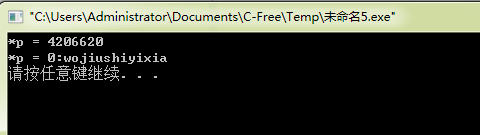
示例二 多参数宏定义
 #include "stdio.h"

 #define _VOLUME_STRS    "RAM","NAND","CF","SD1","SD2","USB1","USB2","USB3"

 int main(void)

 {

     int i;

     static const char* const str[] = {_VOLUME_STRS};

     for(i = ; i < ; i++)

     {

         printf("str[%d] = %s\n", i, str[i]);

     }

     return ;

 }
运行环境 C-Free5.0
运行结果
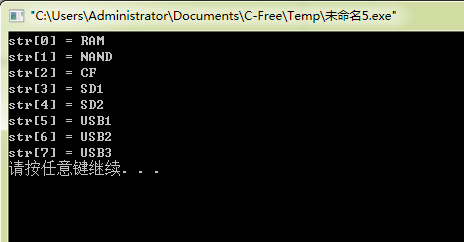
学习1__STM32--FatFS之逻辑盘符与物理盘符的更多相关文章
- Linux学习之管道符、重定向、通配符、转义符、环境变量
Linux学习之管道符.重定向.通配符.转义符.环境变量 1. 输入输出重定向 输入重定向是指把文件导入命令中. 输出重定向是指把原本要输出到屏幕的数据信息写入指定文件中. a 标准输入重定向(STD ...
- USB学习笔记连载(十二):USB描述符
USB设备是端口,接口,配置的集合,USB协议是以各种USB描述符来表征USB设备的功能.计算机通过这些描述符来获得USB设备的功能. USB描述符包括: USB标准设备描述符,USB集线器描述符.H ...
- 学习C#修饰符:类修饰符和成员修饰符
C#修饰符之类修饰符:public.internal. partial.abstract.sealed.static C#修饰符之成员修饰符:public.protected.private.inte ...
- WEB学习路线2019完整版(附视频教程+网盘下载地址)
WEB学习路线2019完整版(附视频教程+网盘下载地址).适合初学者的最新WEB前端学习路线汇总! 在当下来说web前端开发工程师可谓是高福利.高薪水的职业了.所以现在学习web前端开发的技术人员也是 ...
- 《Python Web开发学习实录》高清PDF版|百度网盘免费下载|Python Web开发学习实录
<Python Web开发学习实录>高清PDF版|百度网盘免费下载|Python Web开发学习实录 提取码:9w3o 内容简介 Python是目前流行的动态脚本语言之一. 李勇,本书共1 ...
- 电脑盘符为什么从C盘开始?A盘和B盘去哪了?
虽然我们几乎每天都在跟电脑打交道,但是不知道大家有没有过疑惑,为什么电脑盘符是从C盘开始命名呢?有没有A盘和B盘??A盘和B盘去哪了??? 其实,A盘和B盘是真实存在的. 在早期的DOS时代,计算机的 ...
- 怎么制作U盘系统/PE启动盘
原地址:http://jingyan.baidu.com/article/3c48dd3453d05de10be358fb.html 不用光驱就能启动系统,做一个U盘启动系统就搞定,下面我给大家演示如 ...
- VirtualBox虚拟磁盘文件.vdi从C盘转移到D盘
起因很简单:C盘快爆满了,用PS修个图的都无法保存.用Everything搜索了下C盘,发现有个WIN7的.vdi文件,竟然占据了15G的宝贵C盘空间!记得有一次,我直接把.vdi文件转移,然后在Vi ...
- Win & Mac 系统之间U盘传递的U盘文件格式选取问题
Win & Mac 系统之间U盘传递的U盘文件格式选取问题 1. Win系统与Mac系统之间可以通过 exFat U盘文件系统传递 exFAT(Extended File Allocation ...
随机推荐
- 【转】shell之for、while、until循环
一.简介 Shell编程中循环命令用于特定条件下决定某些语句重复执行的控制方式,有三种常用的循环语句:for.while和until.while循环和for循环属于“当型循环”,而unti ...
- semantic-ui 图标
semantic-ui提供了很多的图标,基本常用的在官网上面都能找到.要想记住这么多图标是不可能的,但是也是有简便方法记忆. 首先,图标其实和按钮的区别基本没有,要说有的话,也就是基础样式的大小不同吧 ...
- syncthing 多主机同步文件工具
周五看了下阮一峰的blog 看到有一个 syncthing的小工具挺好用的 进行了简单的尝试: 1. 下载文件位置: https://syncthing.net 2. 下载文件后的简单安装 绿色版直接 ...
- [转帖]xargs命令详解,xargs与管道的区别
xargs命令详解,xargs与管道的区别 https://www.cnblogs.com/wangqiguo/p/6464234.html 之前一直说要学习一下 xargs 到现在为止也没学习.. ...
- innerText兼容问题处理
IE.Safari.Opera和Chrome支持innerText属性.低版本的火狐浏览器不支持,但支持作用类似的textContent属性.textContent是DOM3级规定的一个属性,而且也得 ...
- Failed to execute goal org.apache.maven.plugins:maven-clean-plugin:2.5:clean (default-
Maven项目报错:Failed to execute goal org.apache.maven.plugins:maven-clean-plugin:2.5:clean (default-clea ...
- 牛客练习赛13D 幸运数字4
题目链接:https://ac.nowcoder.com/acm/contest/70/D 题目大意: 略 分析: 注意到12! < 10^9 < 13!,于是当n > 13时,第k ...
- java之序列化
详细内容 连接https://blog.csdn.net/qq_27093465/article/details/78544505 Java 之 Serializable 序列化和反序列化的概念,作用 ...
- idea 方便的设置代码段
使用快捷键(ctrl+alt+s)找到:从idea的菜单File->Settings->Editor->Live Templates 先添加Template Group,然后添加Li ...
- 设计模式笔记:开闭原则(OCP,The Open-Closed Principle)
1. 开闭原则概述 开闭原则(OCP,The Open-Closed Principle)两个主要特征: (1)对扩展开放(open for extension):模块的行为的可以扩展的,当应用的需求 ...