
CentOS使用nginx部署https服务
nginx安装参考:https://www.cnblogs.com/taiyonghai/p/6728707.html
一:Nginx 安装
openssl安装
[root@localhost src]# tar zxvf openssl-fips-2.0.10.tar.gz
省略安装内容...
[root@localhost src]# cd openssl-fips-2.0.10
[root@localhost openssl-fips-2.0.10]# ./config && make && make install
省略安装内容...
pcre安装
[root@localhost src]# tar zxvf pcre-8.40.tar.gz
省略安装内容...
[root@localhost src]# cd pcre-8.40
[root@localhost pcre-8.40]# ./configure && make && make install
省略安装内容...
zlib安装
[root@localhost src]# tar zxvf zlib-1.2.11.tar.gz
省略安装内容...
[root@localhost src]# cd zlib-1.2.11
[root@localhost zlib-1.2.11]# ./configure && make && make install
省略安装内容...
SSL模块安装
[root@localhost src]# yum install openssl-devel
省略安装内容...
nginx安装
[root@localhost src]# tar zxvf nginx-1.10.2.tar.gz
省略安装内容...
[root@localhost src]# cd nginx-1.10.2
[root@localhost nginx-1.10.2]# ./configure --prefix=/usr/local/nginx --with-http_ssl_module && make && make install
省略安装内容...
二、证书和私钥的生成
注意:将生成的服务器证书和私钥, 拷贝到/usr/local/nginx/conf/目录下, 测试可以使用自签证书。使用openssl自签即可。
建议使用ECC加密证书
[root@localhost conf]# ls -al
total 84
drwxr-xr-x. 3 root root 4096 Apr 5 15:29 .
drwxr-xr-x. 11 root root 151 Apr 5 13:34 ..
省略
-rw-r--r--. 1 root root 615 Apr 5 15:29 server.crt
-rw-r--r--. 1 root root 302 Apr 5 15:29 server.key
省略
三、配置文件
1.下面为配置文件 /usr/local/nginx/conf/nginx.conf , 将HTTPS部分的server配置注释去掉,并设置正确的证书证书和私钥
[root@localhost conf]# cat nginx.conf
#user nobody;
worker_processes 1;
#error_log logs/error.log;
#error_log logs/error.log notice;
#error_log logs/error.log info;
#pid logs/nginx.pid;
events {
worker_connections 1024;
}
http {
include mime.types;
default_type application/octet-stream;
#log_format main '$remote_addr - $remote_user [$time_local] "$request" '
# '$status $body_bytes_sent "$http_referer" '
# '"$http_user_agent" "$http_x_forwarded_for"';
#access_log logs/access.log main;
sendfile on;
#tcp_nopush on;
#keepalive_timeout 0;
keepalive_timeout 65;
#gzip on;
server {
listen 80;
server_name localhost;
#charset koi8-r;
#access_log logs/host.access.log main;
location / {
root html;
index index.html index.htm;
}
#error_page 404 /404.html;
# redirect server error pages to the static page /50x.html
#
error_page 500 502 503 504 /50x.html;
location = /50x.html {
root html;
}
# proxy the PHP scripts to Apache listening on 127.0.0.1:80
#
#location ~ \.php$ {
# proxy_pass http://127.0.0.1;
#}
# pass the PHP scripts to FastCGI server listening on 127.0.0.1:9000
#
#location ~ \.php$ {
# root html;
# fastcgi_pass 127.0.0.1:9000;
# fastcgi_index index.php;
# fastcgi_param SCRIPT_FILENAME /scripts$fastcgi_script_name;
# include fastcgi_params;
#}
# deny access to .htaccess files, if Apache's document root
# concurs with nginx's one
#
#location ~ /\.ht {
# deny all;
#}
}
# another virtual host using mix of IP-, name-, and port-based configuration
#
server {
listen 8000;
# listen somename:8080;
# server_name somename alias another.alias;
location / {
root html;
index index.html index.htm;
}
}
# HTTPS server
#
server {
listen 443 ssl;
server_name localhost;
ssl_certificate server.crt;
ssl_certificate_key server.key;
ssl_session_cache shared:SSL:1m;
ssl_session_timeout 5m;
ssl_ciphers HIGH:!aNULL:!MD5;
ssl_prefer_server_ciphers on;
location / {
root html;
index index.html index.htm;
}
}
}
四、开启nginx 服务器
开启nginx服务器 和查看服务器状态
[root@localhost conf]# /usr/local/nginx/sbin/nginx
[root@localhost conf]# /usr/local/nginx/sbin/nginx -t
nginx: the configuration file /usr/local/nginx/conf/nginx.conf syntax is ok
nginx: configuration file /usr/local/nginx/conf/nginx.conf test is successful
关闭nginx 服务器
[root@localhost conf]# ps -aux | grep nginx
root 11821 0.0 0.0 46936 1168 ? Ss 15:29 0:00 nginx: master process ./nginx
nobody 11822 0.0 0.0 49552 3552 ? S 15:29 0:00 nginx: worker process
root 12229 0.0 0.0 112712 972 pts/0 S+ 17:19 0:00 grep --color=auto nginx
[root@localhost conf]# kill 11821
[root@localhost conf]# ps -aux | grep nginx
root 12231 0.0 0.0 112712 968 pts/0 S+ 17:19 0:00 grep --color=auto nginx
五、关闭CentOS防火墙
关闭CentOS防火墙
[root@localhost conf]#
[root@localhost conf]# systemctl stop firewalld
[root@localhost conf]#
[root@localhost conf]# systemctl disable firewalld
Removed symlink /etc/systemd/system/basic.target.wants/firewalld.service.
Removed symlink /etc/systemd/system/dbus-org.fedoraproject.FirewallD1.service.
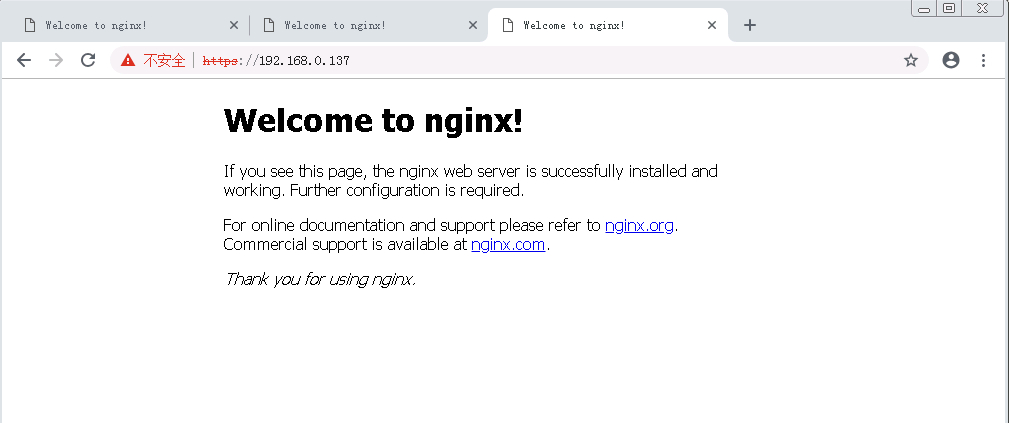
六:客户端测试访问
大功告成:
CentOS使用nginx部署https服务的更多相关文章
- CentOS Mono Nginx 部署 MVC4+WebApi
CentOS Mono Nginx 部署 MVC4+WebApi 经过几天的折磨,终于在CentOS上成功部署了MVC4+WebApi.Mono上的服务器推荐两种:Jexus(国产高人写的一款很牛的服 ...
- Nginx 部署HTTPS
Nginx 部署HTTPS 系统:Linux Centos 7.4 x64 软件:Nginx 1.12.2 注:需要阿里云申请本地域名与证书并添加下载到本地. 注:证书文件为 xxxx.pem 与 x ...
- 【HTTPS】自签CA证书 && nginx配置https服务
首先,搭建https服务肯定需要一个https证书.这个证书可以看做是一个应用层面的证书.之所以这么说是因为https证书是基于CA证书生成的.对于正式的网站,CA证书需要到有资质的第三方证书颁发机构 ...
- Nginx 配置https 服务
一.HTTPS 服务 为什么需要HTTPS? 原因:HTTP不安全 1.传输数据被中间人盗用.信息泄露 2.数据内容劫持.篡改 HTTPS协议的实现 对传输内容进行加密以及身份验证 HTTPS加密校验 ...
- centos7.x下环境搭建(五)—nginx搭建https服务
https证书获取 十大免费SSL证书 https://blog.csdn.net/ithomer/article/details/78075006 如果我们用的是阿里云或腾讯云,他们都提供了免费版的 ...
- 基于Nginx的https服务
1.HTTPS协议的实现 1.为什么需要HTTPS? 原因:HTTP不安全 1.传输数据被中间人盗用.信息泄露 2.数据内容劫持.篡改 对传输内容进行加密以及身份验证 2.对称加密 非对称加密 3.H ...
- centos配置apache的https服务
因为公司要开发微信小程序,由于小程序比较特殊,需要https服务,所以就研究了下apache的https服务了,大致过程如下: 1.向证书机构申请https证书,会得到证书和私钥 2.安装apache ...
- [CentOS] 结合Nginx部署DotNetCore的demo项目【转载】
部署前准备 1.VisualStudio2017+.netcore2.0SDK 2.Centos7.2 3.SecureCRT,Xftp(根据自己喜好) 创建WebApi项目 修改Program.cs ...
- CentOS 7 Nginx部署.NET Core Web应用
部署.NET Core运行时 必要前提 在安装.NET Core前,需要注册Microsoft签名秘钥并添加Microsoft产品提要,每台机器只需要注册一次,执行如下命令: sudo rpm -Uv ...
随机推荐
- Spock - Document -02 - Spock Primer
Spock Primer Peter Niederwieser, The Spock Framework TeamVersion 1.1 This chapter assumes that you h ...
- 使用 ReSharper,输入即遵循 StyleCop 的代码格式化规范
使用 ReSharper,输入即遵循 StyleCop 的代码格式化规范 StyleCop 可以帮助强制执行代码格式化规范,ReSharper 可以帮助你更高效地编写代码.把两者结合起来,你便能高效地 ...
- poi 工具类
<!--POI--> <dependency> <groupId>org.apache.poi</groupId> <artifactId> ...
- KendoUI 自定义CheckBoxList
不多说直接上代码 CSS完整代码: .e-selectboxs-container { display: table; } .e-selectbox { min-width: 100px; heigh ...
- IPFS 探索
IPFS 探索 比特币当前是用于存金融交易数据,有leveldb 存关键小的交易数据.那么我们的文件,譬如一个网站里面的static file 怎么办? IPFS(InterPlanetary Fil ...
- Python-100道练习题答案
题目链接:http://www.runoob.com/python/python-100-examples.html #5. # def find_max(): # a=int(input(" ...
- 查看当前mysql使用的配置文件是哪个
my.cnf是mysql启动时加载的配置文件,一般会放在mysql的安装目录中,用户也可以放在其他目录加载.安装mysql后,系统中会有多个my.cnf文件,有些是用于测试的.使用locate my. ...
- redux源码解读(二)
之前,已经写过一篇redux源码解读(一),主要分析了 redux 的核心思想,并用100多行代码实现一个简单的 redux .但是,那个实现还不具备合并 reducer 和添加 middleware ...
- python-简单的登陆接口
# 工作需求2 编写登陆接口(1输入用户名密码 2认证成功后显示欢迎信息 3输错三次后锁定)# 实现思路 1.用户名和密码是否正确,全部正确可正常登陆 输错三次无法登陆 2.是否已经注册 未注册 无法 ...
- 1、Nexus安装
1.nexus 下载地址: https://sonatype-download.global.ssl.fastly.net/nexus/oss/nexus-2.14.5-02-bundle.tar.g ...