
springcloud webflux
文章很长,建议收藏起来,慢慢读! 疯狂创客圈为小伙伴奉上以下珍贵的学习资源:
- 疯狂创客圈 经典图书 : 《Netty Zookeeper Redis 高并发实战》 面试必备 + 大厂必备 + 涨薪必备
- 疯狂创客圈 经典图书 : 《SpringCloud、Nginx高并发核心编程》 面试必备 + 大厂必备 + 涨薪必备
- 资源宝库: Java程序员必备 网盘资源大集合 价值>1000元 随便取 GO->【博客园总入口 】
- 独孤九剑:Netty灵魂实验 : 本地 100W连接 高并发实验,瞬间提升Java内力
- 最纯粹的技术交流:和大厂 小伙伴、技术高手、架构师 进行 纯粹的的技术问题交流、探讨求助、问题围观学习
推荐2:史上最全 Java 面试题 21 个专题
| 史上最全 Java 面试题 21 个专题 | 阿里、京东、美团、头条.... 随意挑、横着走!!! |
|---|---|
| 1: JVM面试题(史上最强、持续更新、吐血推荐) | https://www.cnblogs.com/crazymakercircle/p/14365820.html |
| 2:Java基础面试题(史上最全、持续更新、吐血推荐) | https://www.cnblogs.com/crazymakercircle/p/14366081.html |
| 4:设计模式面试题 (史上最全、持续更新、吐血推荐) | https://www.cnblogs.com/crazymakercircle/p/14367101.html |
| 5:架构设计面试题 (史上最全、持续更新、吐血推荐) | https://www.cnblogs.com/crazymakercircle/p/14367907.html |
| 还有 21篇必刷、必刷 的面试题 | 更多 ....., 请参见【疯狂创客圈 高并发 总目录 】 |
推荐3: 疯狂创客圈 高质量 博文
| springCloud 高质量 博文 | |
|---|---|
| nacos 实战(史上最全) | sentinel (史上最全+入门教程) |
| springcloud + webflux 高并发实战 | Webflux(史上最全) |
| SpringCloud gateway (史上最全) | TCP/IP图解 (史上最全) |
| 10分钟看懂, Java NIO 底层原理 | Feign原理 (图解) |
| 更多精彩博文 ..... | 请参见【疯狂创客圈 高并发 总目录 】 |
前言
webmvc和webflux作为spring framework的两个重要模块,代表了两个IO模型,阻塞式和非阻塞式的。
webmvc是基于servlet的阻塞式模型(一般称为oio),一个请求到达服务器后会单独分配一个线程去处理请求,如果请求包含IO操作,线程在IO操作结束之前一直处于阻塞等待状态,这样线程在等待IO操作结束的时间就浪费了。
webflux是基于reactor的非阻塞模型(一般称为nio),同样,请求到达服务器后也会分配一个线程去处理请求,如果请求包含IO操作,线程在IO操作结束之前不再是处于阻塞等待状态,而是去处理其他事情,等到IO操作结束之后,再通知(得益于系统的机制)线程继续处理请求。
这样线程就有效地利用了IO操作所消耗的时间。
WebFlux 增删改查完整实战 demo
Dao层 (又称 repository 层)
entity(又称 PO对象)
新建User 对象 ,代码如下:
package com.crazymaker.springcloud.reactive.user.info.entity;

import com.crazymaker.springcloud.reactive.user.info.dto.User;

import javax.persistence.Column;

import javax.persistence.Entity;

import javax.persistence.GeneratedValue;

import javax.persistence.GenerationType;

import javax.persistence.Id;

import javax.persistence.Table;

@Entity

@Table(name = "t_user")

public final class UserEntity extends User

{

    @Id

    @Column(name = "id")

    @GeneratedValue(strategy = GenerationType.IDENTITY)

    @Override

    public long getUserId()

    {

        return super.getUserId();

    }

    @Column(name = "name")

    public String getName()

    {

        return super.getName();

    }

}
Dao 实现类
@Repository 用于标注数据访问组件,即 DAO 组件。实现代码中使用名为 repository 的 Map 对象作为内存数据存储,并对对象具体实现了具体业务逻辑。JpaUserRepositoryImpl 负责将 PO 持久层(数据操作)相关的封装组织,完成新增、查询、删除等操作。
package com.crazymaker.springcloud.reactive.user.info.dao.impl;

import com.crazymaker.springcloud.reactive.user.info.dto.User;

import org.springframework.stereotype.Repository;

import javax.persistence.EntityManager;

import javax.persistence.PersistenceContext;

import javax.persistence.Query;

import javax.transaction.Transactional;

import java.util.List;

@Repository

@Transactional

public class JpaUserRepositoryImpl

{

    @PersistenceContext

    private EntityManager entityManager;

    public Long insert(final User user)

    {

        entityManager.persist(user);

        return user.getUserId();

    }

    public void delete(final Long userId)

    {

        Query query = entityManager.createQuery("DELETE FROM UserEntity o WHERE o.userId = ?1");

        query.setParameter(1, userId);

        query.executeUpdate();

    }

    @SuppressWarnings("unchecked")

    public List<User> selectAll()

    {

        return (List<User>) entityManager.createQuery("SELECT o FROM UserEntity o").getResultList();

    }

    @SuppressWarnings("unchecked")

    public User selectOne(final Long userId)

    {

        Query query = entityManager.createQuery("SELECT o FROM UserEntity o WHERE o.userId = ?1");

        query.setParameter(1, userId);

        return (User) query.getSingleResult();

    }

}
Service服务层
package com.crazymaker.springcloud.reactive.user.info.service.impl;

import com.crazymaker.springcloud.common.util.BeanUtil;

import com.crazymaker.springcloud.reactive.user.info.dao.impl.JpaUserRepositoryImpl;

import com.crazymaker.springcloud.reactive.user.info.dto.User;

import com.crazymaker.springcloud.reactive.user.info.entity.UserEntity;

import lombok.extern.slf4j.Slf4j;

import org.springframework.stereotype.Service;

import org.springframework.transaction.annotation.Transactional;

import javax.annotation.Resource;

import java.util.List;

@Slf4j

@Service

@Transactional

public class JpaEntityServiceImpl

{

    @Resource

    private JpaUserRepositoryImpl userRepository;

    @Transactional

    //增加用户

    public User addUser(User dto)

    {

        User userEntity = new UserEntity();

        userEntity.setUserId(dto.getUserId());

        userEntity.setName(dto.getName());

        userRepository.insert(userEntity);

        BeanUtil.copyProperties(userEntity,dto);

        return dto;

    }

    @Transactional

    //删除用户

    public User delUser(User dto)

    {

          userRepository.delete(dto.getUserId());

          return dto;

    }

    //查询全部用户

    public List<User> selectAllUser()

    {

        log.info("方法 selectAllUser 被调用了");

        return userRepository.selectAll();

    }

    //查询一个用户

    public User selectOne(final Long userId)

    {

        log.info("方法 selectOne 被调用了");

        return userRepository.selectOne(userId);

    }

}
Controller控制层
Spring Boot WebFlux也可以使用注解模式来进行API接口开发。
package com.crazymaker.springcloud.reactive.user.info.controller;

import com.crazymaker.springcloud.common.result.RestOut;

import com.crazymaker.springcloud.reactive.user.info.dto.User;

import com.crazymaker.springcloud.reactive.user.info.service.impl.JpaEntityServiceImpl;

import io.swagger.annotations.Api;

import io.swagger.annotations.ApiImplicitParam;

import io.swagger.annotations.ApiImplicitParams;

import io.swagger.annotations.ApiOperation;

import lombok.extern.slf4j.Slf4j;

import org.springframework.web.bind.annotation.DeleteMapping;

import org.springframework.web.bind.annotation.PostMapping;

import org.springframework.web.bind.annotation.RequestBody;

import org.springframework.web.bind.annotation.RequestMapping;

import org.springframework.web.bind.annotation.RequestParam;

import org.springframework.web.bind.annotation.RestController;

import reactor.core.publisher.Flux;

import reactor.core.publisher.Mono;

import javax.annotation.Resource;

/**

 * Mono 和 Flux 适用于两个场景,即:

 * Mono:实现发布者,并返回 0 或 1 个元素,即单对象。

 * Flux:实现发布者,并返回 N 个元素,即 List 列表对象。

 * 有人会问,这为啥不直接返回对象,比如返回 City/Long/List。

 * 原因是,直接使用 Flux 和 Mono 是非阻塞写法,相当于回调方式。

 * 利用函数式可以减少了回调,因此会看不到相关接口。这恰恰是 WebFlux 的好处:集合了非阻塞 + 异步

 */

@Slf4j

@Api(value = "用户信息、基础学习DEMO", tags = {"用户信息DEMO"})

@RestController

@RequestMapping("/api/user")

public class UserReactiveController

{

        @ApiOperation(value = "回显测试", notes = "提示接口使用者注意事项", httpMethod = "GET")

        @RequestMapping(value = "/hello")

        @ApiImplicitParams({

                @ApiImplicitParam(paramType = "query", dataType="string",dataTypeClass = String.class, name = "name",value = "名称", required = true)})

        public Mono<RestOut<String>> hello(@RequestParam(name = "name") String name)

        {

            log.info("方法 hello 被调用了");

            return  Mono.just(RestOut.succeed("hello " + name));

        }

        @Resource

        JpaEntityServiceImpl jpaEntityService;

        @PostMapping("/add/v1")

        @ApiOperation(value = "插入用户" )

        @ApiImplicitParams({

//                @ApiImplicitParam(paramType = "body", dataType="java.lang.Long", name = "userId", required = false),

//                @ApiImplicitParam(paramType = "body", dataType="用户", name = "dto", required = true)

                @ApiImplicitParam(paramType = "body",dataTypeClass = User.class, dataType="User", name = "dto",  required = true),

        })

//    @ApiImplicitParam(paramType = "body", dataType="com.crazymaker.springcloud.reactive.user.info.dto.User",  required = true)

        public Mono<User> userAdd(@RequestBody User dto)

        {

            //命令式写法

//        jpaEntityService.delUser(dto);

            //响应式写法

            return Mono.create(cityMonoSink -> cityMonoSink.success(jpaEntityService.addUser(dto)));

        }

        @PostMapping("/del/v1")

        @ApiOperation(value = "响应式的删除")

        @ApiImplicitParams({

                @ApiImplicitParam(paramType = "body", dataType="User",dataTypeClass = User.class,name = "dto",  required = true),

        })

        public Mono<User> userDel(@RequestBody User dto)

        {

            //命令式写法

//        jpaEntityService.delUser(dto);

            //响应式写法

            return Mono.create(cityMonoSink -> cityMonoSink.success(jpaEntityService.delUser(dto)));

        }

        @PostMapping("/list/v1")

        @ApiOperation(value = "查询用户")

        public Flux<User> listAllUser()

        {

            log.info("方法 listAllUser 被调用了");

            //命令式写法 改为响应式 以下语句,需要在流中执行

//        List<User> list = jpaEntityService.selectAllUser();

            //响应式写法

            Flux<User> userFlux = Flux.fromIterable(jpaEntityService.selectAllUser());

            return userFlux;

        }

        @PostMapping("/detail/v1")

        @ApiOperation(value = "响应式的查看")

        @ApiImplicitParams({

                @ApiImplicitParam(paramType = "body", dataTypeClass = User.class,dataType="User", name = "dto",  required = true),

        })

        public Mono<User> getUser(@RequestBody User dto)

        {

            log.info("方法 getUser 被调用了");

            //构造流

            Mono<User> userMono = Mono.justOrEmpty(jpaEntityService.selectOne(dto.getUserId()));

            return userMono;

        }

        @PostMapping("/detail/v2")

        @ApiOperation(value = "命令式的查看")

        @ApiImplicitParams({

                @ApiImplicitParam(paramType = "body", dataType="User",dataTypeClass = User.class, name = "dto",  required = true),

        })        public RestOut<User> getUserV2(@RequestBody User dto)

        {

            log.info("方法 getUserV2 被调用了");

            User user = jpaEntityService.selectOne(dto.getUserId());

            return RestOut.success(user);

        }

    }
从返回值可以看出,Mono 和 Flux 适用于两个场景,即:
- Mono:实现发布者,并返回 0 或 1 个元素,即单对象
- Flux:实现发布者,并返回 N 个元素,即 List 列表对象
有人会问,这为啥不直接返回对象,比如返回 City/Long/List。原因是,直接使用 Flux 和 Mono 是非阻塞写法,相当于回调方式。利用函数式可以减少了回调,因此会看不到相关接口。这恰恰是 WebFlux 的好处:集合了非阻塞 + 异步。
Mono
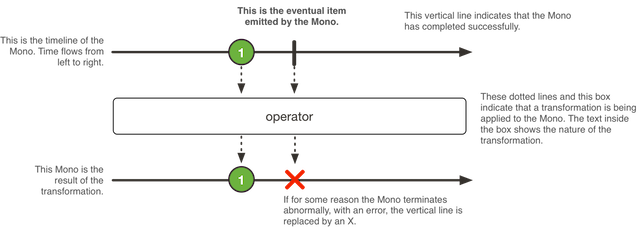
Mono 是什么? 官方描述如下:A Reactive Streams Publisher with basic rx operators that completes successfully by emitting an element, or with an error.
Mono 是响应流 Publisher 具有基础 rx 操作符。可以成功发布元素或者错误。如图所示:
file
Mono 常用的方法有:
- Mono.create():使用 MonoSink 来创建 Mono
- Mono.justOrEmpty():从一个 Optional 对象或 null 对象中创建 Mono。
- Mono.error():创建一个只包含错误消息的 Mono
- Mono.never():创建一个不包含任何消息通知的 Mono
- Mono.delay():在指定的延迟时间之后,创建一个 Mono,产生数字 0 作为唯一值
Flux
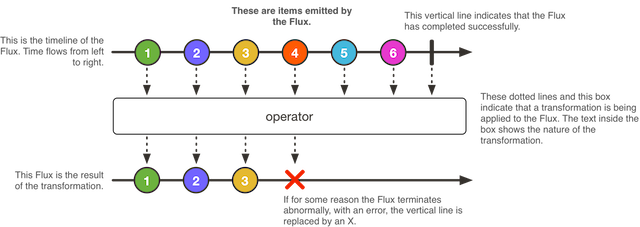
Flux 是什么? 官方描述如下:A Reactive Streams Publisher with rx operators that emits 0 to N elements, and then completes (successfully or with an error).
Flux 是响应流 Publisher 具有基础 rx 操作符。可以成功发布 0 到 N 个元素或者错误。Flux 其实是 Mono 的一个补充。如图所示:
file
所以要注意:如果知道 Publisher 是 0 或 1 个,则用 Mono。
Flux 最值得一提的是 fromIterable 方法。 fromIterable(Iterable<? extends T> it) 可以发布 Iterable 类型的元素。当然,Flux 也包含了基础的操作:map、merge、concat、flatMap、take,这里就不展开介绍了。
使用配置模式进行WebFlux 接口开发
1 可以编写一个处理器类 Handler代替 Controller , Service 、dao层保持不变。
2 配置请求的路由
处理器类 Handler
处理器类 Handler需要从请求解析参数,并且封装响应,代码如下:
package com.crazymaker.springcloud.reactive.user.info.config.handler;

import com.crazymaker.springcloud.common.exception.BusinessException;

import com.crazymaker.springcloud.reactive.user.info.dto.User;

import com.crazymaker.springcloud.reactive.user.info.service.impl.JpaEntityServiceImpl;

import lombok.extern.slf4j.Slf4j;

import org.apache.commons.lang3.StringUtils;

import org.springframework.stereotype.Component;

import org.springframework.web.reactive.function.server.ServerRequest;

import org.springframework.web.reactive.function.server.ServerResponse;

import reactor.core.publisher.Flux;

import reactor.core.publisher.Mono;

import javax.annotation.Resource;

import static org.springframework.http.MediaType.APPLICATION_JSON_UTF8;

import static org.springframework.web.reactive.function.server.ServerResponse.ok;

@Slf4j

@Component

public class UserReactiveHandler

{

    @Resource

    private JpaEntityServiceImpl jpaEntityService;

    /**

     * 得到所有用户

     *

     * @param request

     * @return

     */

    public Mono<ServerResponse> getAllUser(ServerRequest request)

    {

        log.info("方法 getAllUser 被调用了");

        return ok().contentType(APPLICATION_JSON_UTF8)

                .body(Flux.fromIterable(jpaEntityService.selectAllUser()), User.class);

    }

    /**

     * 创建用户

     *

     * @param request

     * @return

     */

    public Mono<ServerResponse> createUser(ServerRequest request)

    {

        // 2.0.0 是可以工作, 但是2.0.1 下面这个模式是会报异常

        Mono<User> user = request.bodyToMono(User.class);

        /**Mono 使用响应式的,时候都是一个流,是一个发布者,任何时候都不能调用发布者的订阅方法

         也就是不能消费它, 最终的消费还是交给我们的Springboot来对它进行消费,任何时候不能调用它的

         user.subscribe();

         不能调用block

         把异常放在统一的地方来处理

         */

        return user.flatMap(dto ->

        {

            // 校验代码需要放在这里

            if (StringUtils.isBlank(dto.getName()))

            {

                throw new BusinessException("用户名不能为空");

            }

            return ok().contentType(APPLICATION_JSON_UTF8)

                    .body(Mono.create(cityMonoSink -> cityMonoSink.success(jpaEntityService.addUser(dto))), User.class);

        });

    }

    /**

     * 根据id删除用户

     *

     * @param request

     * @return

     */

    public Mono<ServerResponse> deleteUserById(ServerRequest request)

    {

        String id = request.pathVariable("id");

        // 校验代码需要放在这里

        if (StringUtils.isBlank(id))

        {

            throw new BusinessException("id不能为空");

        }

        User dto = new User();

        dto.setUserId(Long.parseLong(id));

        return ok().contentType(APPLICATION_JSON_UTF8)

                .body(Mono.create(cityMonoSink -> cityMonoSink.success(jpaEntityService.delUser(dto))), User.class);

    }

}
路由配置
package com.crazymaker.springcloud.reactive.user.info.config;

import com.crazymaker.springcloud.reactive.user.info.config.handler.UserReactiveHandler;

import org.springframework.beans.factory.annotation.Value;

import org.springframework.context.annotation.Bean;

import org.springframework.context.annotation.Configuration;

import org.springframework.http.MediaType;

import org.springframework.http.server.reactive.ServerHttpRequest;

import org.springframework.web.reactive.function.server.RouterFunction;

import org.springframework.web.reactive.function.server.RouterFunctions;

import org.springframework.web.reactive.function.server.ServerResponse;

import org.springframework.web.server.WebFilter;

import static org.springframework.web.reactive.function.server.RequestPredicates.DELETE;

import static org.springframework.web.reactive.function.server.RequestPredicates.GET;

import static org.springframework.web.reactive.function.server.RequestPredicates.POST;

import static org.springframework.web.reactive.function.server.RequestPredicates.accept;

@Configuration

public class RoutersConfig

{

    @Bean

    RouterFunction<ServerResponse> routes(UserReactiveHandler handler)

    {

        // 下面的相当于类里面的 @RequestMapping

        // 得到所有用户

        return RouterFunctions.route(GET("/user"), handler::getAllUser)

                // 创建用户

                .andRoute(POST("/user").and(accept(MediaType.APPLICATION_JSON_UTF8)), handler::createUser)

                // 删除用户

                .andRoute(DELETE("/user/{id}"), handler::deleteUserById);

    }

    @Value("${server.servlet.context-path}")

    private String contextPath;

    //处理上下文路径,没有上下文路径,此函数可以忽略

    @Bean

    public WebFilter contextPathWebFilter()

    {

        return (exchange, chain) ->

        {

            ServerHttpRequest request = exchange.getRequest();

            String requestPath = request.getURI().getPath();

            if (requestPath.startsWith(contextPath))

            {

                return chain.filter(

                        exchange.mutate()

                                .request(request.mutate().contextPath(contextPath).build())

                                .build());

            }

            return chain.filter(exchange);

        };

    }

}
集成Swagger
本文主要展示一下如何使用支持WebFlux的Swagger
maven依赖
        <dependency>

            <groupId>io.springfox</groupId>

            <artifactId>springfox-swagger2</artifactId>

            <version>${swagger.version}</version>

        </dependency>

        <dependency>

            <groupId>io.springfox</groupId>

            <artifactId>springfox-spring-webflux</artifactId>

            <version>${swagger.version}</version>

        </dependency>

        <dependency>

            <groupId>io.springfox</groupId>

            <artifactId>springfox-swagger-ui</artifactId>

            <version>${swagger.version}</version>

        </dependency>
- swagger.version目前是3.0.0,Spring 5引入了WebFlux,而当前版本的SpringFox Swagger2(
2.9.2)还不支持WebFlux,得使用3.0.0才支持
swagger 配置
package com.crazymaker.springcloud.reactive.user.info.config;

import org.springframework.beans.factory.annotation.Value;

import org.springframework.context.annotation.Bean;

import org.springframework.context.annotation.Configuration;

import org.springframework.core.Ordered;

import org.springframework.core.annotation.Order;

import org.springframework.web.util.UriComponentsBuilder;

import springfox.documentation.PathProvider;

import springfox.documentation.builders.ApiInfoBuilder;

import springfox.documentation.builders.PathSelectors;

import springfox.documentation.builders.RequestHandlerSelectors;

import springfox.documentation.service.ApiInfo;

import springfox.documentation.service.Contact;

import springfox.documentation.spi.DocumentationType;

import springfox.documentation.spring.web.paths.DefaultPathProvider;

import springfox.documentation.spring.web.paths.Paths;

import springfox.documentation.spring.web.plugins.Docket;

import springfox.documentation.swagger2.annotations.EnableSwagger2WebFlux;

@Configuration

@EnableSwagger2WebFlux

public class SwaggerConfig

{

    @Bean

    public Docket createRestApi()

    {

//        return new Docket(DocumentationType.OAS_30)

        return new Docket(DocumentationType.SWAGGER_2)

                .apiInfo(apiInfo())

                .pathMapping(servletContextPath)  //注意webflux没有context-path配置,如果不加这句话的话,接口测试时路径没有前缀

                .select()

                .apis(RequestHandlerSelectors.basePackage("com.crazymaker.springcloud.reactive.user.info.controller"))

                .paths(PathSelectors.any())

                .build();

    }

    @Value("${server.servlet.context-path}")

    private String servletContextPath;

    //构建 api文档的详细信息函数

    private ApiInfo apiInfo()

    {

        return new ApiInfoBuilder()

                //页面标题

                .title("疯狂创客圈 springcloud + Nginx 高并发核心编程")

                //描述

                .description("Zuul+Swagger2  构建  RESTful APIs")

                //条款地址

                .termsOfServiceUrl("https://www.cnblogs.com/crazymakercircle/")

                .contact(new Contact("疯狂创客圈", "https://www.cnblogs.com/crazymakercircle/", ""))

                .version("1.0")

                .build();

    }

    /**

     * 重写 PathProvider ,解决 context-path 重复问题

     * @return

     */

    @Order(Ordered.HIGHEST_PRECEDENCE)

    @Bean

    public PathProvider pathProvider() {

        return new DefaultPathProvider() {

            @Override

            public String getOperationPath(String operationPath) {

                operationPath = operationPath.replaceFirst(servletContextPath, "/");

                UriComponentsBuilder uriComponentsBuilder = UriComponentsBuilder.fromPath("/");

                return Paths.removeAdjacentForwardSlashes(uriComponentsBuilder.path(operationPath).build().toString());

            }

            @Override

            public String getResourceListingPath(String groupName, String apiDeclaration) {

                apiDeclaration = super.getResourceListingPath(groupName, apiDeclaration);

                return apiDeclaration;

            }

        };

    }

}
测试
配置模式的 WebFlux Rest接口测试
配置模式的 WebFlux Rest接口只能使用PostMan测试,例子如下:
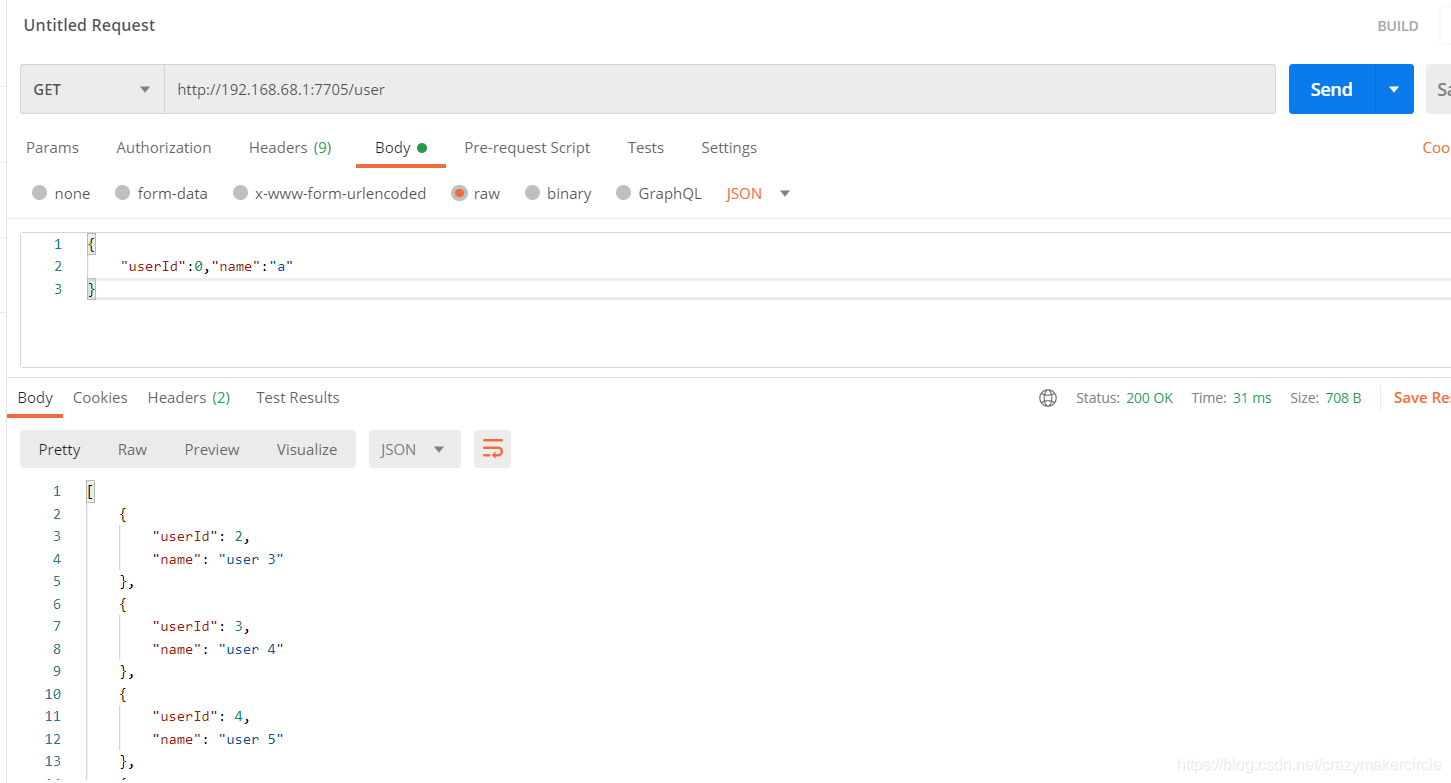
注意,不能带上下文路径:
http://192.168.68.1:7705/uaa-react-provider/user
注解模式的WebFlux Rest接口测试
swagger 增加界面
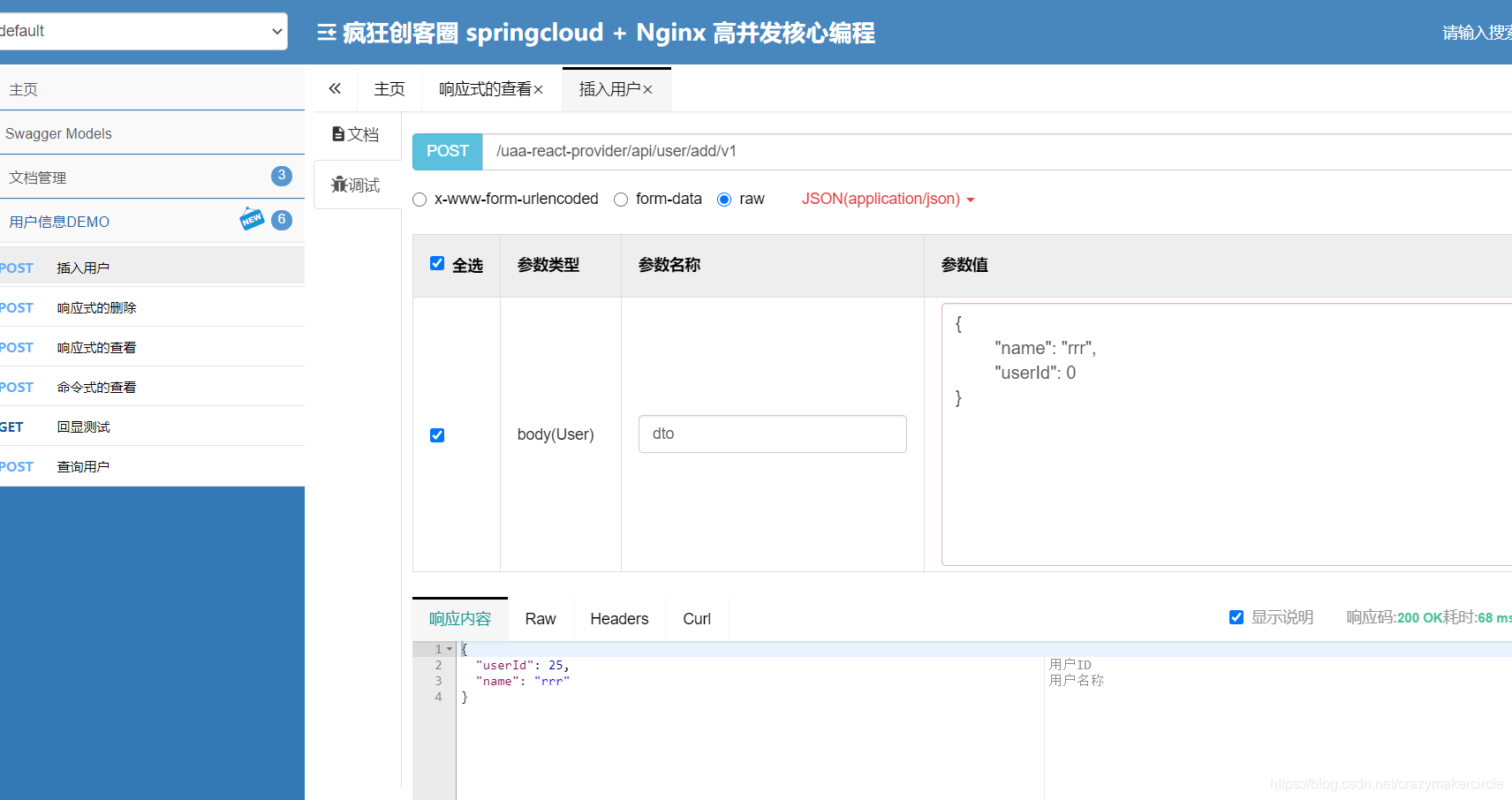
CRUD其他的界面,略过
配置大全
静态资源配置
@Configuration

@EnableWebFlux		//使用注解@EnableWebFlux

public class WebFluxConfig implements WebFluxConfigurer {		//继承WebFluxConfigurer

	//配置静态资源

	@Override

    public void addResourceHandlers(ResourceHandlerRegistry registry) {

        registry.addResourceHandler("/static/**")

                .addResourceLocations("classpath:/static/");

        registry.addResourceHandler("/file/**")

                .addResourceLocations("file:" + System.getProperty("user.dir") + File.separator + "file" + File.separator);

        registry.addResourceHandler("/swagger-ui.html**")

                .addResourceLocations("classpath:/META-INF/resources/");

        registry.addResourceHandler("/webjars/**")

                .addResourceLocations("classpath:/META-INF/resources/webjars/");

    }

	//配置拦截器

	//配置编解码

	...

}
WebFluxSecurity配置
@Configuration

@EnableWebSecurity

public class WebMvcSecurityConfig extends WebSecurityConfigurerAdapter implements

AuthenticationEntryPoint,		//未验证回调

AuthenticationSuccessHandler,		//验证成功回调

AuthenticationFailureHandler,		//验证失败回调

LogoutSuccessHandler {		//登出成功回调

    @Override

    public void commence(HttpServletRequest request, HttpServletResponse response, AuthenticationException authException) throws IOException, ServletException {

        sendJson(response, new Response<>(HttpStatus.UNAUTHORIZED.value(), "Unauthorized"));

    }

    @Override

    public void onAuthenticationFailure(HttpServletRequest request, HttpServletResponse response, AuthenticationException exception) throws IOException, ServletException {

        sendJson(response, new Response<>(1, "Incorrect"));

    }

    @Override

    public void onAuthenticationSuccess(HttpServletRequest request, HttpServletResponse response, Authentication authentication) throws IOException, ServletException {

        sendJson(response, new Response<>(0, authentication.getClass().getSimpleName()));

    }

    @Override

    public void onLogoutSuccess(HttpServletRequest request, HttpServletResponse response, Authentication authentication) throws IOException, ServletException {

        sendJson(response, new Response<>(0, "Success"));

    }

    @Override

    protected void configure(HttpSecurity http) throws Exception {

        http

                .csrf()

                .disable()

                .authorizeRequests()

                .antMatchers("/swagger*/**", "/webjars/**", "/v2/api-docs")

                .permitAll()

                .and()

                .authorizeRequests()

                .antMatchers("/static/**", "/file/**")

                .permitAll()

                .and()

                .authorizeRequests()

                .anyRequest()

                .authenticated()

                .and()

                .logout()

                .logoutUrl("/user/logout")		//虚拟路径,不是控制器定义的路径

                .logoutSuccessHandler(this)

                .permitAll()

                .and()

                .exceptionHandling()

                .authenticationEntryPoint(this)

                .and()

                .formLogin()

                .usernameParameter("username")

                .passwordParameter("password")

                .loginProcessingUrl("/user/login")		//虚拟路径,不是控制器定义的路径

                .successForwardUrl("/user/login")		//是控制器定义的路径

                .failureHandler(this)

                .and()

                .httpBasic()

                .authenticationEntryPoint(this);

    }

    @Override

    protected void configure(AuthenticationManagerBuilder auth) throws Exception {

        auth.userDetailsService(userDetailService);

    }
webflux-验证依赖于用户数据服务,需定义实现ReactiveUserDetailsService的Bean
@Configuration

@EnableWebFluxSecurity		//使用注解@EnableWebFluxSecurity

public class WebFluxSecurityConfig implements

WebFilter,		//拦截器

ServerLogoutSuccessHandler,		//登出成功回调

ServerAuthenticationEntryPoint,		//验证入口

ServerAuthenticationFailureHandler,		//验证成功回调

ServerAuthenticationSuccessHandler {		//验证失败回调

	//实现接口的方法

	@Override

    public Mono<Void> filter(ServerWebExchange exchange, WebFilterChain chain) {

    	//配置webflux的context-path

        ServerHttpRequest request = exchange.getRequest();

        if (request.getURI().getPath().startsWith(contextPath)) {

            exchange = exchange.mutate().request(request.mutate().contextPath(contextPath).build()).build();

        }

        //把查询参数转移到FormData中,不然验证过滤器(ServerFormLoginAuthenticationConverter)接受不到参数

        if (exchange.getRequest().getMethod() == HttpMethod.POST && exchange.getRequest().getQueryParams().size() > 0) {

            ServerWebExchange finalExchange = exchange;

            ServerWebExchange realExchange = new Decorator(exchange) {

                @Override

                public Mono<MultiValueMap<String, String>> getFormData() {

                    return super.getFormData().map(new Function<MultiValueMap<String, String>, MultiValueMap<String, String>>() {

                        @Override

                        public MultiValueMap<String, String> apply(MultiValueMap<String, String> stringStringMultiValueMap) {

                            if (stringStringMultiValueMap.size() == 0) {

                                return finalExchange.getRequest().getQueryParams();

                            } else {

                                return stringStringMultiValueMap;

                            }

                        }

                    });

                }

            };

            return chain.filter(realExchange);

        }

        return chain.filter(exchange);

    }

	@Override

    public Mono<Void> onLogoutSuccess(WebFilterExchange webFilterExchange, Authentication authentication) {

        return sendJson(webFilterExchange.getExchange(), new Response<>("登出成功"));

    }

    @Override

    public Mono<Void> commence(ServerWebExchange exchange, AuthenticationException e) {

        return sendJson(exchange, new Response<>(HttpStatus.UNAUTHORIZED.value(), "未验证"));

    }

    @Override

    public Mono<Void> onAuthenticationFailure(WebFilterExchange webFilterExchange, AuthenticationException exception) {

        return sendJson(webFilterExchange.getExchange(), new Response<>(1, "验证失败"));

    }

    @Override

    public Mono<Void> onAuthenticationSuccess(WebFilterExchange webFilterExchange, Authentication authentication) {

        return webFilterExchange.getChain().filter(

                webFilterExchange.getExchange().mutate()

                        .request(t -> t.method(HttpMethod.POST).path("/user/login"))		//转发到自定义控制器

                        .build()

        );

    }

	@Bean

    public SecurityWebFilterChain springSecurityFilterChain(ServerHttpSecurity http) {

        http.addFilterAfter(this, SecurityWebFiltersOrder.FIRST)

                .csrf().disable()

                .authorizeExchange()

                .pathMatchers("/swagger*/**", "/webjars/**", "/v2/api-docs")		//swagger

                .permitAll()

                .and()

                .authorizeExchange()

                .pathMatchers("/static/**", "/file/**")		//静态资源

                .permitAll()

                .and()

                .authorizeExchange()

                .anyExchange()

                .authenticated()

                .and()

                .logout()		//登出

                .logoutUrl("/user/logout")

                .logoutSuccessHandler(this)

                .and()

                .exceptionHandling()		//未验证回调

                .authenticationEntryPoint(this)

                .and()

                .formLogin()

                .loginPage("/user/login")

                .authenticationFailureHandler(this)		//验证失败回调

                .authenticationSuccessHandler(this)		//验证成功回调

                .and()

                .httpBasic()

                .authenticationEntryPoint(this);		//basic验证,一般用于移动端

        return http.build();

    }

}
WebSession配置
@Configuration

@EnableRedisWebSession(maxInactiveIntervalInSeconds = 60) //使用注解@EnableRedisWebSession ,maxInactiveIntervalInSeconds设置数据过期时间,spring.session.timeout不管用

public class RedisWebSessionConfig { //考虑到分布式系统,一般使用redis存储session

    @Bean

    public LettuceConnectionFactory lettuceConnectionFactory() {

        return new LettuceConnectionFactory();

    }

}
//单点登录使用ReactiveRedisSessionRepository.getSessionRedisOperations().scan方法查询相同用户名的session,删除其他session即可

public Mono<Map<String, String>> findByPrincipalName(String name) {

        return reactiveSessionRepository.getSessionRedisOperations().scan(ScanOptions.scanOptions().match(ReactiveRedisSessionRepository.DEFAULT_NAMESPACE + ":sessions:*").build())

                .flatMap(new Function<String, Publisher<Tuple2<String, Map.Entry<Object, Object>>>>() {

                    @Override

                    public Publisher<Tuple2<String, Map.Entry<Object, Object>>> apply(String s) {

                        return reactiveSessionRepository.getSessionRedisOperations().opsForHash().entries(s)

                                .map(new Function<Map.Entry<Object, Object>, Tuple2<String, Map.Entry<Object, Object>>>() {

                                    @Override

                                    public Tuple2<String, Map.Entry<Object, Object>> apply(Map.Entry<Object, Object> objectObjectEntry) {

                                        return Tuples.of(s, objectObjectEntry);

                                    }

                                });

                    }

                })

                .filter(new Predicate<Tuple2<String, Map.Entry<Object, Object>>>() {

                    @Override

                    public boolean test(Tuple2<String, Map.Entry<Object, Object>> rule) {

                        Map.Entry<Object, Object> t = rule.getT2();

                        String key = "sessionAttr:" + HttpSessionSecurityContextRepository.SPRING_SECURITY_CONTEXT_KEY;

                        if (key.equals(t.getKey())) {

                            User sci = (User) ((SecurityContextImpl) t.getValue()).getAuthentication().getPrincipal();

                            return sci.getUsername().equals(name);

                        }

                        return false;

                    }

                })

                .collectMap(new Function<Tuple2<String, Map.Entry<Object, Object>>, String>() {

                    @Override

                    public String apply(Tuple2<String, Map.Entry<Object, Object>> rule) {

                        return name;

                    }

                }, new Function<Tuple2<String, Map.Entry<Object, Object>>, String>() {

                    @Override

                    public String apply(Tuple2<String, Map.Entry<Object, Object>> rule) {

                        return rule.getT1().replace(ReactiveRedisSessionRepository.DEFAULT_NAMESPACE + ":sessions:", "");

                    }

                });

    }
对标的 SpringWebMVC配置
@Configuration

@EnableRedisHttpSession	//使用注解@EnableRedisHttpSession

public class RedisHttpSessionConfig { //考虑到分布式系统,一般使用redis存储session

  @Bean

  public LettuceConnectionFactory redisConnectionFactory() {

    return new LettuceConnectionFactory();

  }

}
//单点登录使用FindByIndexNameSessionRepository根据用户名查询session,删除其他session即可

Map<String, Session> map = findByIndexNameSessionRepository.findByPrincipalName(name);
文件上传配置
//参数上传

//定义参数bean

@Setter

@Getter

@ToString

@ApiModel

public class QueryBean{

    @ApiModelProperty(value = "普通参数", required = false, example = "")

    private String query;

    @ApiModelProperty(value = "文件参数", required = false, example = "")

    private FilePart image;		//强调,webflux中使用FilePart作为接收文件的类型

}

//定义接口

@ApiOperation("一个接口")

@PostMapping("/path")

//这里需要使用@ApiImplicitParam显示配置【文件参数】才能使swagger界面显示上传文件按钮

@ApiImplicitParams({

	@ApiImplicitParam(

		paramType = "form", //表单参数

		dataType = "__file", //最新版本使用__file表示文件,以前用的是file

		name = "image", //和QueryBean里面的【文件参数image】同名

		value = "文件")	//注释

})

public Mono<Response> bannerAddOrUpdate(QueryBean q) {

}
WebFlux 执行流程
userAdd方法代码如下:
        public Mono<User> userAdd(@RequestBody User dto)

        {

            //命令式写法

//        jpaEntityService.delUser(dto);

            //响应式写法

            return Mono.create(cityMonoSink -> cityMonoSink.success(jpaEntityService.addUser(dto)));

        }
由于返回的数据只有一个所以使用的是Mono作为返回数据,使用Mono类静态create方法创建Mono对象,代码如下:
public abstract class Mono<T> implements Publisher<T> {

    static final BiPredicate EQUALS_BIPREDICATE = Object::equals;

    public Mono() {

    }

    public static <T> Mono<T> create(Consumer<MonoSink<T>> callback) {

        return onAssembly(new MonoCreate(callback));

    }

...

}
可以到create方法接收一个参数,参数是Consumer对象,通过callback可以看出,这里使用的是callback回调,下面看看Consumer接口的定义:
@FunctionalInterface

public interface Consumer<T> {

    /**

     * Performs this operation on the given argument.

     *

     * @param t the input argument

     */

    void accept(T t);

    /**

     * Returns a composed {@code Consumer} that performs, in sequence, this

     * operation followed by the {@code after} operation. If performing either

     * operation throws an exception, it is relayed to the caller of the

     * composed operation.  If performing this operation throws an exception,

     * the {@code after} operation will not be performed.

     *

     * @param after the operation to perform after this operation

     * @return a composed {@code Consumer} that performs in sequence this

     * operation followed by the {@code after} operation

     * @throws NullPointerException if {@code after} is null

     */

    default Consumer<T> andThen(Consumer<? super T> after) {

        Objects.requireNonNull(after);

        return (T t) -> { accept(t); after.accept(t); };

    }

}
通过上面的代码可以看出,有两个方法,一个是默认的方法andThen,还有一个accept方法,
Mono.create()方法的参数需要一个实现类,实现Consumer接口;Mono.create方法的参数指向的实例对象, 就是要实现这个accept方法。
例子中,下面的lambda表达式,就是accept方法的实现,实参的类型为 Consumer<MonoSink> , accept的实现为 如下:
cityMonoSink -> cityMonoSink.success(jpaEntityService.addUser(dto))
来来来,重复看一下,create方法的实现:
   public static <T> Mono<T> create(Consumer<MonoSink<T>> callback) {

        return onAssembly(new MonoCreate(callback));

    }
在方法内部调用了onAssembly方法,参数是MonoCreate对象,然后我们看看MonoCreate类,代码如下:
//

// Source code recreated from a .class file by IntelliJ IDEA

// (powered by Fernflower decompiler)

//

package reactor.core.publisher;

import java.util.Objects;

import java.util.concurrent.atomic.AtomicBoolean;

import java.util.concurrent.atomic.AtomicIntegerFieldUpdater;

import java.util.concurrent.atomic.AtomicReferenceFieldUpdater;

import java.util.function.Consumer;

import java.util.function.LongConsumer;

import reactor.core.CoreSubscriber;

import reactor.core.Disposable;

import reactor.core.Scannable.Attr;

import reactor.core.publisher.FluxCreate.SinkDisposable;

import reactor.util.annotation.Nullable;

import reactor.util.context.Context;

final class MonoCreate<T> extends Mono<T> {

    final Consumer<MonoSink<T>> callback;

    MonoCreate(Consumer<MonoSink<T>> callback) {

        this.callback = callback;

    }

    public void subscribe(CoreSubscriber<? super T> actual) {

        MonoCreate.DefaultMonoSink<T> emitter = new MonoCreate.DefaultMonoSink(actual);

        actual.onSubscribe(emitter);

        try {

            this.callback.accept(emitter);

        } catch (Throwable var4) {

            emitter.error(Operators.onOperatorError(var4, actual.currentContext()));

        }

    }

    static final class DefaultMonoSink<T> extends AtomicBoolean implements MonoSink<T>, InnerProducer<T> {

        final CoreSubscriber<? super T> actual;

        volatile Disposable disposable;

        static final AtomicReferenceFieldUpdater<MonoCreate.DefaultMonoSink, Disposable> DISPOSABLE = AtomicReferenceFieldUpdater.newUpdater(MonoCreate.DefaultMonoSink.class, Disposable.class, "disposable");

        volatile int state;

        static final AtomicIntegerFieldUpdater<MonoCreate.DefaultMonoSink> STATE = AtomicIntegerFieldUpdater.newUpdater(MonoCreate.DefaultMonoSink.class, "state");

        volatile LongConsumer requestConsumer;

        static final AtomicReferenceFieldUpdater<MonoCreate.DefaultMonoSink, LongConsumer> REQUEST_CONSUMER = AtomicReferenceFieldUpdater.newUpdater(MonoCreate.DefaultMonoSink.class, LongConsumer.class, "requestConsumer");

        T value;

        static final int NO_REQUEST_HAS_VALUE = 1;

        static final int HAS_REQUEST_NO_VALUE = 2;

        static final int HAS_REQUEST_HAS_VALUE = 3;

        DefaultMonoSink(CoreSubscriber<? super T> actual) {

            this.actual = actual;

        }

        public Context currentContext() {

            return this.actual.currentContext();

        }

        @Nullable

        public Object scanUnsafe(Attr key) {

            if (key != Attr.TERMINATED) {

                return key == Attr.CANCELLED ? OperatorDisposables.isDisposed(this.disposable) : super.scanUnsafe(key);

            } else {

                return this.state == 3 || this.state == 1;

            }

        }

        public void success() {

            if (STATE.getAndSet(this, 3) != 3) {

                try {

                    this.actual.onComplete();

                } finally {

                    this.disposeResource(false);

                }

            }

        }

        public void success(@Nullable T value) {

            if (value == null) {

                this.success();

            } else {

                int s;

                do {

                    s = this.state;

                    if (s == 3 || s == 1) {

                        Operators.onNextDropped(value, this.actual.currentContext());

                        return;

                    }

                    if (s == 2) {

                        if (STATE.compareAndSet(this, s, 3)) {

                            try {

                                this.actual.onNext(value);

                                this.actual.onComplete();

                            } finally {

                                this.disposeResource(false);

                            }

                        }

                        return;

                    }

                    this.value = value;

                } while(!STATE.compareAndSet(this, s, 1));

            }

        }

        public void error(Throwable e) {

            if (STATE.getAndSet(this, 3) != 3) {

                try {

                    this.actual.onError(e);

                } finally {

                    this.disposeResource(false);

                }

            } else {

                Operators.onOperatorError(e, this.actual.currentContext());

            }

        }

        public MonoSink<T> onRequest(LongConsumer consumer) {

            Objects.requireNonNull(consumer, "onRequest");

            if (!REQUEST_CONSUMER.compareAndSet(this, (Object)null, consumer)) {

                throw new IllegalStateException("A consumer has already been assigned to consume requests");

            } else {

                return this;

            }

        }

        public CoreSubscriber<? super T> actual() {

            return this.actual;

        }

        public MonoSink<T> onCancel(Disposable d) {

            Objects.requireNonNull(d, "onCancel");

            SinkDisposable sd = new SinkDisposable((Disposable)null, d);

            if (!DISPOSABLE.compareAndSet(this, (Object)null, sd)) {

                Disposable c = this.disposable;

                if (c instanceof SinkDisposable) {

                    SinkDisposable current = (SinkDisposable)c;

                    if (current.onCancel == null) {

                        current.onCancel = d;

                    } else {

                        d.dispose();

                    }

                }

            }

            return this;

        }

        public MonoSink<T> onDispose(Disposable d) {

            Objects.requireNonNull(d, "onDispose");

            SinkDisposable sd = new SinkDisposable(d, (Disposable)null);

            if (!DISPOSABLE.compareAndSet(this, (Object)null, sd)) {

                Disposable c = this.disposable;

                if (c instanceof SinkDisposable) {

                    SinkDisposable current = (SinkDisposable)c;

                    if (current.disposable == null) {

                        current.disposable = d;

                    } else {

                        d.dispose();

                    }

                }

            }

            return this;

        }

        public void request(long n) {

            if (Operators.validate(n)) {

                LongConsumer consumer = this.requestConsumer;

                if (consumer != null) {

                    consumer.accept(n);

                }

                int s;

                do {

                    s = this.state;

                    if (s == 2 || s == 3) {

                        return;

                    }

                    if (s == 1) {

                        if (STATE.compareAndSet(this, s, 3)) {

                            try {

                                this.actual.onNext(this.value);

                                this.actual.onComplete();

                            } finally {

                                this.disposeResource(false);

                            }

                        }

                        return;

                    }

                } while(!STATE.compareAndSet(this, s, 2));

            }

        }

        public void cancel() {

            if (STATE.getAndSet(this, 3) != 3) {

                this.value = null;

                this.disposeResource(true);

            }

        }

        void disposeResource(boolean isCancel) {

            Disposable d = this.disposable;

            if (d != OperatorDisposables.DISPOSED) {

                d = (Disposable)DISPOSABLE.getAndSet(this, OperatorDisposables.DISPOSED);

                if (d != null && d != OperatorDisposables.DISPOSED) {

                    if (isCancel && d instanceof SinkDisposable) {

                        ((SinkDisposable)d).cancel();

                    }

                    d.dispose();

                }

            }

        }

    }

}
上面的代码比较多,我们主要关注下面两个函数:
MonoCreate(Consumer<MonoSink<T>> callback) {

        this.callback = callback;

    }

    public void subscribe(CoreSubscriber<? super T> actual) {

        MonoCreate.DefaultMonoSink<T> emitter = new MonoCreate.DefaultMonoSink(actual);

        actual.onSubscribe(emitter);

        try {

            this.callback.accept(emitter);

        } catch (Throwable var4) {

            emitter.error(Operators.onOperatorError(var4, actual.currentContext()));

        }

    }
通过上面的代码可以看出,一个是构造器,参数是Consumer,里面进行操作保存了Consumer对象,然后在subscribe方法里面有一句代码是this.callback.accept(emitter),就是在这里进行了接口的回调,回调Consumer的accept方法,这个方法是在调用Mono.create()方法的时候实现了。然后在细看subscribe方法,这里面有一个actual.onSubscribe方法,通过方法名可以知道,这里是订阅了消息。webflux是基于reactor模型,基于事件消息和异步,这里也体现了一个异步。
Mono和Flux的其他用法可以参照上面的源码流程自己看看,就不细说了。
springcloud webflux的更多相关文章
- Webflux(史上最全)
文章很长,建议收藏起来,慢慢读! 疯狂创客圈为小伙伴奉上以下珍贵的学习资源: 疯狂创客圈 经典图书 : <Netty Zookeeper Redis 高并发实战> 面试必备 + 大厂必备 ...
- vagrant+java+springcloud+redis+zookeeper镜像下载(&制作详解)
文章很长,建议收藏起来,慢慢读! 备注:持续更新中..... 疯狂创客圈 经典图书 : <Netty Zookeeper Redis 高并发实战> 面试必备 + 大厂必备 + 涨薪必备 疯 ...
- Reactor3 中文文档(用户手册)
文章很长,建议收藏起来,慢慢读! 疯狂创客圈为小伙伴奉上以下珍贵的学习资源: 疯狂创客圈 经典图书 : <Netty Zookeeper Redis 高并发实战> 面试必备 + 大厂必备 ...
- WebClient (史上最全)
疯狂创客圈 经典图书 : <Netty Zookeeper Redis 高并发实战> 面试必备 + 面试必备 + 面试必备 [博客园总入口 ] 疯狂创客圈 经典图书 : <Sprin ...
- 实战SpringCloud响应式微服务系列教程(第九章)使用Spring WebFlux构建响应式RESTful服务
本文为实战SpringCloud响应式微服务系列教程第九章,讲解使用Spring WebFlux构建响应式RESTful服务.建议没有之前基础的童鞋,先看之前的章节,章节目录放在文末. 从本节开始我们 ...
- springcloud(十五):Spring Cloud 终于按捺不住推出了自己的服务网关 Gateway
Spring 官方最终还是按捺不住推出了自己的网关组件:Spring Cloud Gateway ,相比之前我们使用的 Zuul(1.x) 它有哪些优势呢?Zuul(1.x) 基于 Servlet,使 ...
- 使用springcloud gateway搭建网关(分流,限流,熔断)
Spring Cloud Gateway Spring Cloud Gateway 是 Spring Cloud 的一个全新项目,该项目是基于 Spring 5.0,Spring Boot 2.0 和 ...
- 跟我学SpringCloud | 第十二篇:Spring Cloud Gateway初探
SpringCloud系列教程 | 第十二篇:Spring Cloud Gateway初探 Springboot: 2.1.6.RELEASE SpringCloud: Greenwich.SR1 如 ...
- 实战SpringCloud响应式微服务系列教程(第一章)
前言 在当今互联网飞速发展的时代,业务需求不断的更新和产品的迭代给系统开发过程和编程模式也带来巨大挑战,Spring Cloud微服务也随之应用而生,从springboot1.x到springboot ...
随机推荐
- .NET之生成数据库全流程
开篇语 本文主要是回顾下从项目创建到生成数据到数据库(代码优先)的全部过程.采用EFCore作为ORM框架. 本次示例环境:vs2019.net5.mysql 创建项目 本次事例代码是用过vs2019 ...
- 【Docker】2. Docker的架构介绍、安装与卸载 (CentOS 7)
一.docker的基本组成 开局一张图. docker的组成: Client:客户端,可以通过它与docker服务进行交互.比如容器的构建.拉取.运行. DOCKER_HOST:就是docker服务. ...
- CLS的探索:Python如何让日志免费云化
前言 日志服务(Cloud Log Service,CLS)是腾讯云提供的一站式日志服务平台,提供了从日志采集.日志存储到日志检索,图表分析.监控告警.日志投递等多项服务,协助用户通过日志来解决业务运 ...
- Matlab将数据存为文本文件
dlmwrite :将一个矩阵写到由分隔符分割的文件中. 在保存整数到文件时使用save存为ascii文件时,常常是文件里都是实型格式的数据(有小数点,和后面很多的0,看着很不方便).于是要保存此类数 ...
- 项目展示$\alpha$
项目 内容 课程:北航-2020-春-软件工程 博客园班级博客 要求 强制转会与项目展示 我们在这个课程的目标是 提升团队管理及合作能力,开发一项满意的工程项目 这个作业在哪个具体方面帮助我们实现目标 ...
- Mac 使用 Parallels Desktop 虚拟机安装 win10 教程
Parallels Desktop 介绍 Parallels Desktop 是一款运行在 Mac 电脑上的极为优秀的虚拟机软件,用户可以在 Mac OS X下非常方便运行 Windows.Linux ...
- ioctl 函数的FIOREAD参数
在学习ioctl 时常常跟 read, write 混淆.其实 ioctl 是用来设置硬件控制寄存器,或者读取硬件状态寄存器的数值之类的. 而read,write 是把数据丢入缓冲区,硬件的驱动从缓冲 ...
- 【错误解决】The prefix "context" for element "context:component-scan" is not bound
在配置spring相关的applicationContext.xml文件时报以上错误 原因是缺失context的namespace. http://www.springframework.org/sc ...
- 思考一个问题STM32的
如果一个定时中断刚刚进入中断服务函数 但是服务函数执行时间太长 又一次触发了中断 会怎样
- 友盟+U-APM应用性能报告:Android崩溃率达0.32%,OPPO 、华为、VIVO 崩溃表现良好
随着信息技术高速发展,移动互联几乎已成为了一种生活方式的代名词,在全民上网的数字热潮中,如何能最大程度保障产品服务的稳定性,提供良好的用户体验,是当前企业都需要思考和亟待解决的问题.App的应用性能 ...