
有了Swagger2,再也不用为写Api文档头疼了
1、为什么要写Api文档
现在,前后端分离的开发模式已经非常流行,后端开发工程师只负责完成后端接口,前端页面的开发和渲染完全由前端工程师完成。
问题来了,前端工程师怎么知道后端接口的具体定义呢?答案是由后端工程师撰写。
2、写Api文档很头疼吗
答案是一定的,这对后端工程师来说,是额外的工作,编码已经很耗费精力了,这时前端工程师来催文档,不头疼才怪:),当然这也不是前端工程师的问题,都是为项目的进度着急。
3、Swagger2
现在好了,一个自动撰写Api文档的神器出现了,他就是 Swagger2,Swagger2通过美观的WEB界面展示了所有接口的定义,非常方便,还能直接在界面上进行测试调用,有助于调试。
后端工程师,定义好接口,加几个注解,便能自动生成在线接口定义,前端工程师可以实时的看到。
下面就来讲讲如何把 Swagger2 整合到项目中来。
4、接口介绍
这里以一个简单的接口作为例子,接口的功能是输入用户ID,获取用户数据。
5、引入依赖
        <dependency>

            <groupId>io.springfox</groupId>

            <artifactId>springfox-swagger2</artifactId>

            <version>2.9.2</version>

        </dependency>

        <dependency>

            <groupId>io.springfox</groupId>

            <artifactId>springfox-swagger-ui</artifactId>

            <version>2.9.2</version>

        </dependency>
6、增加Swagger2配置类
import org.springframework.context.annotation.Bean;

import org.springframework.context.annotation.Configuration;

import springfox.documentation.builders.ApiInfoBuilder;

import springfox.documentation.builders.PathSelectors;

import springfox.documentation.builders.RequestHandlerSelectors;

import springfox.documentation.service.ApiInfo;

import springfox.documentation.service.Contact;

import springfox.documentation.spi.DocumentationType;

import springfox.documentation.spring.web.plugins.Docket;

import springfox.documentation.swagger2.annotations.EnableSwagger2;

@Configuration

@EnableSwagger2

public class Swagger2 {

// swagger2配置

    @Bean

    public Docket createRestApi() {

        return new Docket(DocumentationType.SWAGGER_2)  // 指定api类型为swagger2

                    .apiInfo(apiInfo())                 // 用于定义api文档汇总信息

                    .select()

                    .apis(RequestHandlerSelectors

                            .basePackage("cn.zhuifengren.controller"))   // 指定扫描的controller包

                    .paths(PathSelectors.any())         // 所有controller

                    .build();

    }

    private ApiInfo apiInfo() {

        return new ApiInfoBuilder()

                .title("hello工程接口api")        // 文档页标题

                .contact(new Contact("hello",

                        "",

                        ""))        // 联系人信息

                .description("专为hello工程提供的api文档")  // 详细信息

                .version("1.0.0")   // 文档版本号

                .termsOfServiceUrl("") // 网站地址

                .build();

    }

}
7、在Controller类中增加Swagger2注解
import cn.zhuifengren.model.Result;

import cn.zhuifengren.model.User;

import cn.zhuifengren.service.UserService;

import io.swagger.annotations.Api;

import io.swagger.annotations.ApiOperation;

import io.swagger.annotations.ApiParam;

import org.springframework.beans.factory.annotation.Autowired;

import org.springframework.web.bind.annotation.GetMapping;

import org.springframework.web.bind.annotation.PathVariable;

import org.springframework.web.bind.annotation.RequestMapping;

import org.springframework.web.bind.annotation.RestController;

@RestController

@RequestMapping("/user")

@Api(value = "UserController", tags = "用户接口")

public class UserController {

    @Autowired

    private UserService userService;

    @GetMapping("/info/{id}")

    @ApiOperation(value = "获取用户信息")

    public Result<User> getUserInfo(@ApiParam(value = "用户ID") @PathVariable("id") String id) {

        User userInfo = userService.getUserInfo(id);

        Result<User> result = new Result<>();

        result.setCode(200);

        result.setMessage("success");

        result.setData(userInfo);

        return result;

    }

}
其中 @Api注解 放在类上,用于对类的描述,@ApiOperation注解 放在方法上,用于对接口方法的描述。
8、模型类中增加Swagger2注解
import io.swagger.annotations.ApiModel;

import io.swagger.annotations.ApiModelProperty;

@ApiModel(value = "用户实体", description = "用户实体")

public class User {

    @ApiModelProperty(value = "用户id", name = "id", example = "1")

    private String id;

    @ApiModelProperty(value = "用户姓名", name = "name", example = "小李")

    private String name;

    @ApiModelProperty(value = "用户年龄", name = "age", example = "36")

    private Integer age;
其中 @ApiModel注解 放在类上,用于对模型类的描述,@ApiModelProperty注解 放在属性上,用于对模型属性的描述。
9、启动项目查看效果
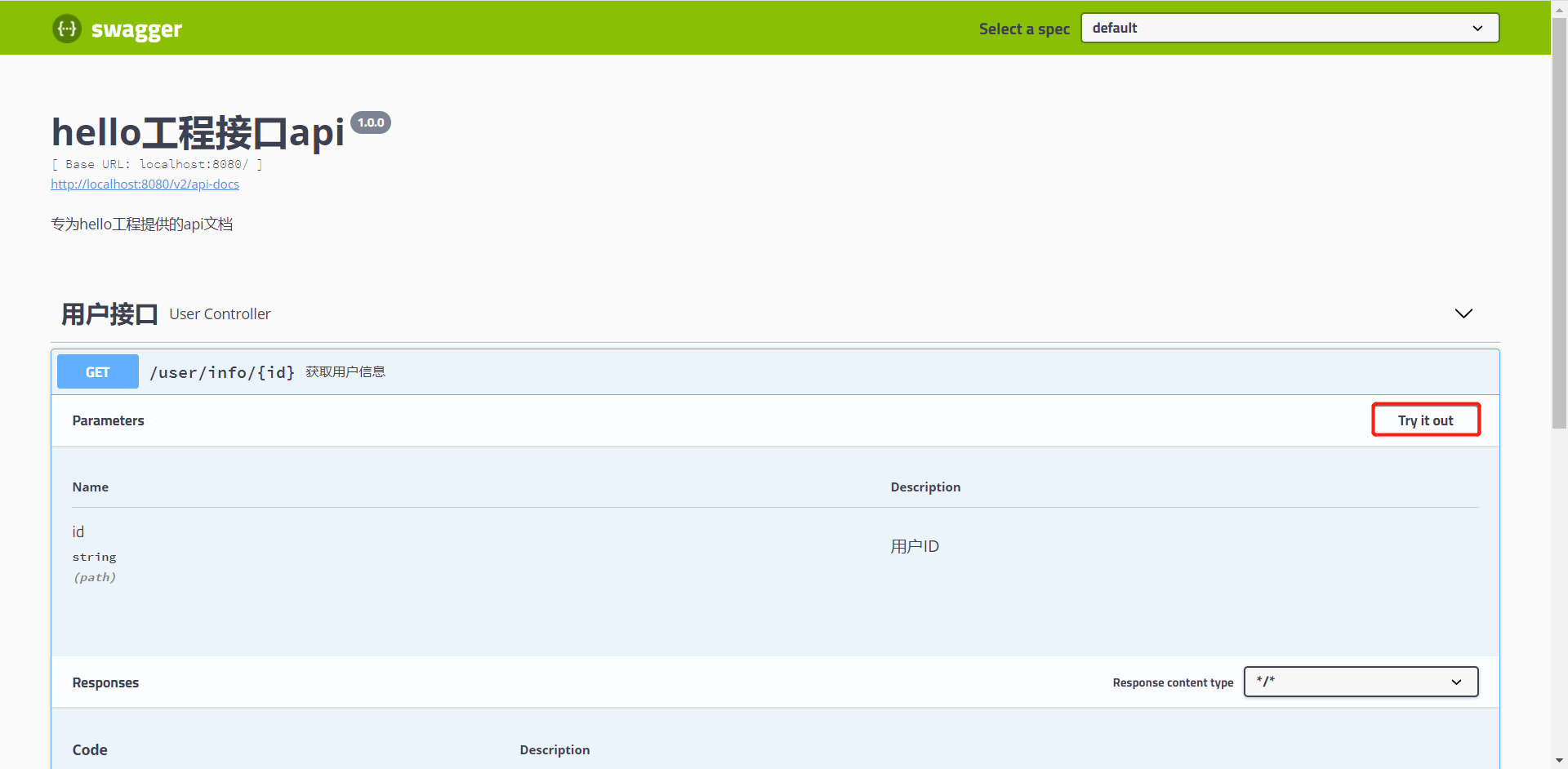
启动项目后,进入地址:http://localhost:8080/swagger-ui.html,即可看到Swagger2 WEB页面,点击【Try it out】按钮,还可以对接口进行测试,是不是很方便呢,赶快去用一下吧
有了Swagger2,再也不用为写Api文档头疼了的更多相关文章
- 集成 Swagger2 构建强大的 RESTful API 文档
微信公众号:一个优秀的废人如有问题或建议,请后台留言,我会尽力解决你的问题. 前言 快过年了,不知道你们啥时候放年假,忙不忙.反正我是挺闲的,所以有时间写 blog.今天给你们带来 SpringBoo ...
- Spring Boot2 系列教程 (四) | 集成 Swagger2 构建强大的 RESTful API 文档
前言 快过年了,不知道你们啥时候放年假,忙不忙.反正我是挺闲的,所以有时间写 blog.今天给你们带来 SpringBoot 集成 Swagger2 的教程. 什么是 Swagger2 Swagger ...
- SpringBoot_06_使用Swagger2构建强大的RESTful API文档
二.参考资料 1.Spring Boot中使用Swagger2构建强大的RESTful API文档 2.
- Spring Boot中使用Swagger2构建强大的RESTful API文档
由于Spring Boot能够快速开发.便捷部署等特性,相信有很大一部分Spring Boot的用户会用来构建RESTful API.而我们构建RESTful API的目的通常都是由于多终端的原因,这 ...
- 使用Swagger2构建强大的RESTful API文档(1)(二十二)
由于Spring Boot能够快速开发.便捷部署等特性,相信有很大一部分Spring Boot的用户会用来构建RESTful API.而我们构建RESTful API的目的通常都是由于多终端的原因,这 ...
- Spring Boot 中使用 Swagger2 构建强大的 RESTful API 文档
项目现状:由于前后端分离,没有很好的前后端合作工具. 由于接口众多,并且细节复杂(需要考虑不同的HTTP请求类型.HTTP头部信息.HTTP请求内容等),高质量地创建这份文档本身就是件非常吃力的事,下 ...
- Spring Boot教程(二十二)使用Swagger2构建强大的RESTful API文档(1)
由于Spring Boot能够快速开发.便捷部署等特性,相信有很大一部分Spring Boot的用户会用来构建RESTful API.而我们构建RESTful API的目的通常都是由于多终端的原因,这 ...
- SpringBoot使用Swagger2搭建强大的RESTful API 文档功能
swagger用于定义API文档. Swagger2的使用 Maven Plugin添加Swagger2相关jar包 <!--swagger2 start--> <dependenc ...
- 使用Swagger2构建强大的RESTful API文档(2)(二十三)
添加文档内容 在完成了上述配置后,其实已经可以生产文档内容,但是这样的文档主要针对请求本身,而描述主要来源于函数等命名产生,对用户并不友好,我们通常需要自己增加一些说明来丰富文档内容.如下所示,我们通 ...
随机推荐
- 重新梳理调度器——GMP 调度模型
调度器--GMP 调度模型 Goroutine 调度器,它是负责在工作线程上分发准备运行的 goroutines. 首先在讲 GMP 调度模型之前,我们先了解为什么会有这个模型,之前的调度模型是什么样 ...
- C语言的编译与链接
C语言源文件要经过编译.链接才能生成可执行程序:编译(Compile)会将源文件(.c文件)转换为目标文件.对于 VC/VS,目标文件后缀为.obj:对于GCC,目标文件后缀为.o.编译是针对单个源文 ...
- [刘阳Java]_酷炫视频播放器制作_界面篇
今天开始分享一篇酷炫播放器制作,包括界面+JS.整个案例非常类似腾讯视频,优酷视频,爱奇艺视频.我们先看一下效果图,然后这篇文章主要界面篇 是不是效果比较酷炫,那么我接着来给大家说一下这个界面设计思路 ...
- Day9 数组 冒泡排序及稀疏数组!
数组 数组是相同类型数据的有序集合. 数组描述的是相同类型的若干个数据,按照一定的先后次序排列组合而成. 其中,每一个数据称作一个数组元素,每个数组元素可以通过一个下标来访问它们.(下标从0开始) 数 ...
- 【深度学习】在linux和windows下anaconda+pycharm+tensorflow+cuda的配置
在linux和windows下anaconda+pycharm+tensorflow+cuda的配置 在linux和windows下anaconda+pycharm+tensorflow+cuda的配 ...
- canvas实现任意正多边形的移动(点、线、面)
前言 我在上一篇文章简单实现了在canvas中移动矩形(点线面),不清楚的小伙伴请看我这篇文章:用canvas 实现矩形的移动(点.线.面)(1). ok,废话不多说,直接进入文章主题, 上一篇文章我 ...
- python3执行.sql文件
这个脚本主要是遍历执行文件夹下的sql文件,但是没有辨别文件的格式,所以文件夹下只能够放.sql文件,否则会报错哈. 我的sql文件夹与执行的文件平级,所以dir_path就是sql,大家依照自己的路 ...
- 微信小程序云开发-云存储-上传、下载、打开文件文件(word/excel/ppt/pdf)一步到位
一.wxml文件 <!-- 上传.下载.打开文件一步执行 --> <view class="handle"> <button bindtap=&quo ...
- 购买二手iPhone需要注意什么?这份避坑指南请收好!
iPhone二手机市场一直非常火热,有时甚至出现供不应求的情况.主要是因为新机的价格不便宜,没什么性价比,很多小伙伴会选择低价购买二手iPhone,价格基本只要新机的二到五折.不过二手机的水深相信大家 ...
- 最小覆盖问题-POJ3041-P1129
POJ3041 这道题正解对于像我这种蒟蒻来说比较难以想到. 我们发现每次覆盖的只是一条线上的所有点.那么我们可以把它想象成一个二分图,两个集合分别是横轴和纵轴. 想一想,这实际上是不是就是x轴轴和纵 ...