
Yarn 生产环境核心参数配置案例
Yarn 生产环境核心参数配置案例
调整下列参数之前要拍摄Linux快照(就是保留之前的状态),否则后续的案例,还需要重写集群
右键-拍摄快照
右键-恢复到快照
需求
从1G数据中,统计每个单词出现次数。服务器3台,每台配置4G内存,4核CPU,4线程。
1G/128M=8个MapTask 1个ReduceTask 1个mrAppMaster
平均每个节点运行10个/3台≈3个任务 (4个任务,3个任务,3个任务)
修改yarn-site.xml配置
<!-- ResourceManager 处理调度器请求的线程数量,默认50,如果提交的任务数大于50可以增加该值,但是不能超过3台*4线程=12线程,去除其他应用程序(不可能全部分配给这个任务)时机不能超过8 -->

<property>

<description>Number of threads to handle scheduler

interface.</description>

<name>yarn.resourcemanager.scheduler.client.thread-count</name>

<value>8</value>

</property>

<!-- 是否让 yarn 自动检测硬件进行配置,默认是 false,如果该节点有很多其他应用程序,建议手动配置。如果该节点没有其他应用程序,可以采用自动 -->

<property>

<description>Enable auto-detection of node capabilities such as

memory and CPU.

</description>

<name>yarn.nodemanager.resource.detect-hardware-capabilities</name>

<value>false</value>

</property>

<!-- 是否将虚拟核数当作 CPU 核数,默认是 false,采用物理 CPU 核数 -->

<property>

<description>Flag to determine if logical processors(such as

hyperthreads) should be counted as cores. Only applicable on Linux when yarn.nodemanager.resource.cpu-vcores is set to -1 and yarn.nodemanager.resource.detect-hardware-capabilities is true.

</description>

<name>yarn.nodemanager.resource.count-logical-processors-ascores</name>

<value>false</value>

</property>

<!-- 虚拟核数和物理核数乘数,默认是 1.0 -->

<property>

<description>Multiplier to determine how to convert phyiscal cores to

vcores. This value is used if yarn.nodemanager.resource.cpu-vcores is set to -1(which implies auto-calculate vcores) and yarn.nodemanager.resource.detect-hardware-capabilities is set to true. The number of vcores will be calculated as number of CPUs * multiplier.

</description>

<name>yarn.nodemanager.resource.pcores-vcores-multiplier</name>

<value>1.0</value>

</property>

<!-- NodeManager 使用内存数,默认 8G,修改为 4G 内存 -->

<property>

<description>Amount of physical memory, in MB, that can be allocated for containers. If set to -1 and yarn.nodemanager.resource.detect-hardware-capabilities is true, it is automatically calculated(in case of Windows and Linux).In other cases, the default is 8192MB.

</description>

<name>yarn.nodemanager.resource.memory-mb</name>

<value>4096</value>

</property>

<!-- nodemanager 的 CPU 核数, 不按照硬件环境自动设定时默认是 8 个,修改为 4 个 -->

<property>

<description>Number of vcores that can be allocated

for containers. This is used by the RM scheduler when allocating resources for containers. This is not used to limit the number of CPUs used by YARN containers. If it is set to -1 and yarn.nodemanager.resource.detect-hardware-capabilities is true, it is automatically determined from the hardware in case of Windows and Linux.In other cases, number of vcores is 8 by default.</description>

<name>yarn.nodemanager.resource.cpu-vcores</name>

<value>4</value>

</property>

<!-- 容器最小内存,默认 1G -->

<property>

<description>The minimum allocation for every container request at the RM in MBs. Memory requests lower than this will be set to the value of this property. Additionally, a node manager that is configured to have less memory than this value will be shut down by the resource manager.

</description>

<name>yarn.scheduler.minimum-allocation-mb</name>

<value>1024</value>

</property>

<!-- 容器最大内存,默认 8G,修改为 2G -->

<property>

<description>The maximum allocation for every container request at the RM in MBs. Memory requests higher than this will throw an InvalidResourceRequestException.

</description>

<name>yarn.scheduler.maximum-allocation-mb</name>

<value>2048</value>

</property>

<!-- 容器最小 CPU 核数,默认 1 个 -->

<property>

<description>The minimum allocation for every container request at the RM in terms of virtual CPU cores. Requests lower than this will be set to the value of this property. Additionally, a node manager that is configured to have fewer virtual cores than this value will be shut down by the

resource manager.

</description>

<name>yarn.scheduler.minimum-allocation-vcores</name>

<value>1</value>

</property>

<!-- 容器最大 CPU 核数,默认 4 个, 修改为 2 个 -->

<property>

<description>The maximum allocation for every container request at the RM in terms of virtual CPU cores. Requests higher than this will throw an InvalidResourceRequestException.</description>

<name>yarn.scheduler.maximum-allocation-vcores</name>

<value>2</value>

</property>

<!-- 虚拟内存检查,默认打开,修改为关闭 -->

<property>

<description>Whether virtual memory limits will be enforced for containers.</description>

<name>yarn.nodemanager.vmem-check-enabled</name>

<value>false</value>

</property>

<!-- 虚拟内存和物理内存设置比例,默认 2.1 -->

<property>

<description>Ratio between virtual memory to physical memory when

setting memory limits for containers. Container allocations are

expressed in terms of physical memory, and virtual memory usage is

allowed to exceed this allocation by this ratio.

</description>

<name>yarn.nodemanager.vmem-pmem-ratio</name>

<value>2.1</value>

</property>
为什么关掉虚拟内存检查?
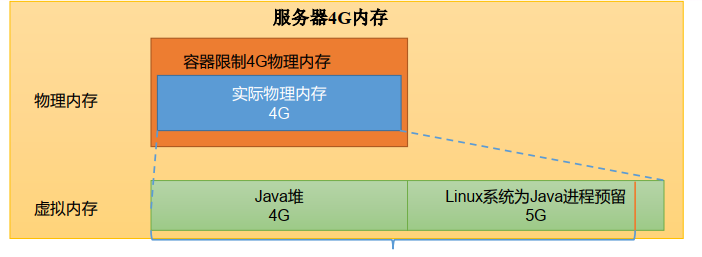
如图Linux系统为Java进程预留了5G,但是Java8不会去使用那部分,导致大量内存浪费。
所以在CentOS7和Java8之间不用开启。
[ranan@hadoop102 hadoop]$ pwd

/opt/module/hadoop-3.1.3/etc/hadoop

//贴入之前的代码

[ranan@hadoop102 hadoop]$ vim yarn-site.xml
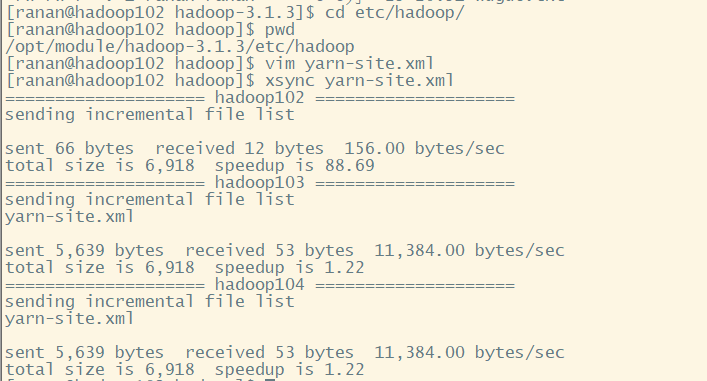
分发
三台服务器硬件配置一样,可以直接分发
[ranan@hadoop102 hadoop]$ xsync yarn-site.xml
重启集群
//重启集群

[ranan@hadoop102 hadoop]$ myhadoop.sh start
myhadoop.sh
#!/bin/bash

# $#获取输入的参数个数 小于1

if [ $# -lt 1 ]

then

    echo "No Args Input..."

    exit ;

fi

# $1表示第一个参数

case $1 in

"start")

        echo " =================== 启动 hadoop 集群 ==================="

        echo " --------------- 启动 hdfs ---------------"

        # ssh无密访问其他服务器

        ssh hadoop102 "/opt/module/hadoop-3.1.3/sbin/start-dfs.sh"

        echo " --------------- 启动 yarn ---------------"

        ssh hadoop103 "/opt/module/hadoop-3.1.3/sbin/start-yarn.sh"

        echo " --------------- 启动 historyserver ---------------"

        ssh hadoop102 "/opt/module/hadoop-3.1.3/bin/mapred --daemon start historyserver"

;;

"stop")

        echo " =================== 关闭 hadoop 集群 ==================="

        echo " --------------- 关闭 historyserver ---------------"

        ssh hadoop102 "/opt/module/hadoop-3.1.3/bin/mapred --daemon stop historyserver"

        echo " --------------- 关闭 yarn ---------------"

        ssh hadoop103 "/opt/module/hadoop-3.1.3/sbin/stop-yarn.sh"

        echo " --------------- 关闭 hdfs ---------------"

        ssh hadoop102 "/opt/module/hadoop-3.1.3/sbin/stop-dfs.sh"

;;

*)

    echo "Input Args Error..."

;;

esac
执行WordCount程序
http://hadoop103:8088/cluster 查看是否配置成功与运行时状态
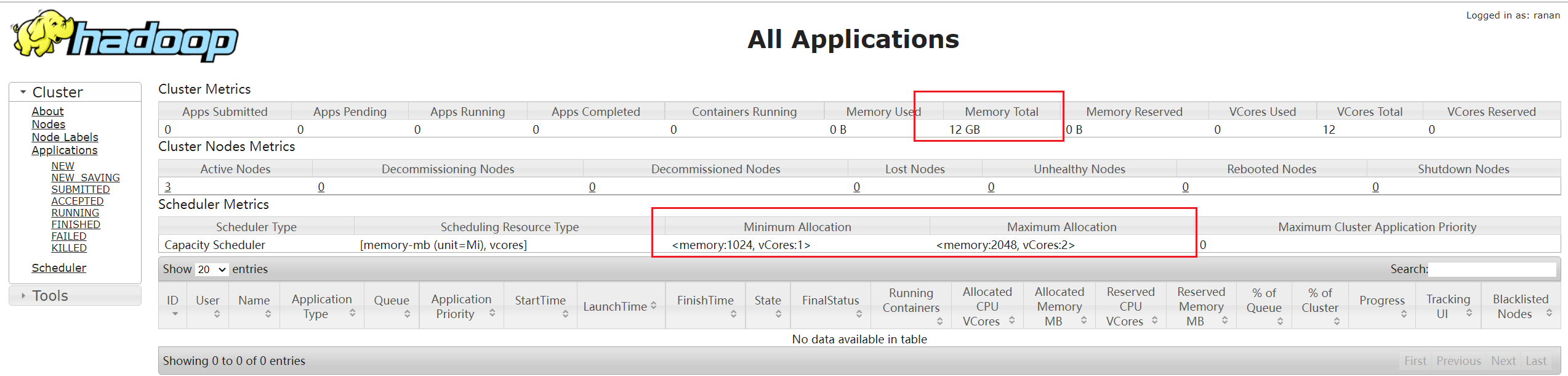
[ranan@hadoop102 hadoop-3.1.3]$ hadoop jar share/hadoop/mapreduce/hadoop-mapreduce-examples-3.1.3.jar wordcount /input /output
| 名称 | 网址 |
|---|---|
| NameNode | hadoop102:9870 |
| Yarn查看任务运行情况 | hadoop103:8088 |
| 历史服务器 | hadoop102:10020 |
Yarn 生产环境核心参数配置案例的更多相关文章
- Yarn 生产环境核心配置参数
目录 Yarn 生产环境核心配置参数 ResourceManager NodeManager Container Yarn 生产环境核心配置参数 ResourceManager 配置调度器 yarn. ...
- CentOS7.1下生产环境Keepalived+Nginx配置
CentOS7.1下生产环境Keepalived+Nginx配置 [日期:2015-07-20] 来源:Linux社区 作者:soulful [字体:大 中 小] 注:下文涉及到配置的,如无特别 ...
- virgo-tomcat-server的生产环境线上配置与管理
Virgo Tomcat Server简称VTS,VTS是一个应用服务器,它是轻量级, 模块化, 基于OSGi系统.与OSGi紧密结合并且可以开发bundles形式的Spring web apps应用 ...
- mysql8在生产环境中的配置
一,配置文件的位置 [root@yjweb ~]# ll /etc/my.cnf -rw-r--r-- 1 root root 935 Mar 11 16:52 /etc/my.cnf 说明:通常我们 ...
- Spark on Yarn:任务提交参数配置
当在YARN上运行Spark作业,每个Spark executor作为一个YARN容器运行.Spark可以使得多个Tasks在同一个容器里面运行. 以下参数配置为例子: spark-submit -- ...
- Django_生产环境静态文件配置
需求: 当Django项目运行在线上的时候,需要关闭debug模式,那么Django设置中,静态文件路径配置将会失效,如何解决这个问题? 问题原因: Django默认关闭debug模式,Django错 ...
- YARN日志聚合相关参数配置
日志聚合是YARN提供的日志中央化管理功能,它能将运行完成的Container/任务日志上传到HDFS上,从而减轻NodeManager负载,且提供一个中央化存储和分析机制.默认情况下,Contain ...
- Linux服务器核心参数配置
使用Linux作为长连接的web服务器时,为了增加服务的容量,以及处理性能,需要修改一些参数. 一.多进程绑定CPU 1.使用taskset命令可以绑定进程到指定CPU,以减少多核CPU环境中,单进程 ...
- zookeeper在生产环境中的配置(zookeeper3.6)
一,zookeeper中日志的配置 1,快照文件snapshot的目录: dataDir=/data/zookeeper/data 存储快照文件snapshot的目录.默认情况下,事务日志也会存储在这 ...
随机推荐
- Node.js躬行记(13)——MySQL归档
当前我们组管理着一套审核系统,除了数据源是服务端提供的,其余后台管理都是由我们组在维护. 这个系统就是将APP中的各类社交信息送到后台,然后有专门的审核人员来判断信息是否合规,当然在送到后台之前已经让 ...
- APP自动化环境搭建之appium工具介绍(二)
1.下载解压android-sdk-windows-appium //配置环境: ANDROID_HOME:D:\android-sdk-windows-appium path:...;%ANDROI ...
- idea如何在终端使用git并解决终端中文乱码
idea使用git终端 在idea设置中 找到Settings-Tools-Terminal-Shell path,替换为git安装目录下的bin/bash.exe 解决中文乱码 在git安装目录下找 ...
- Java多线程| 01 | 线程概述
Java多线程| 01 | 线程概述 线程相关概念 进程与线程 进程:进程(Process)是计算机中的程序关于某数据集合上的一次运行活动,是操作系统进行资源分配与调度的基本单位.可以把进程简单的理解 ...
- 《手把手教你》系列技巧篇(四十)-java+ selenium自动化测试-JavaScript的调用执行-下篇(详解教程)
1.简介 在实际工作中,我们需要对处理的元素进行高亮显示,或者有时候为了看清楚做跟踪鼠标点击了哪些元素需要标记出来.今天宏哥就在这里把这种测试场景讲解和分享一下. 2.用法 创建一个执行 JS 的对象 ...
- java语言方法中定义final类型的入参有什么用意?
无论参数是基本数据类型,还是引用数据类型,只要加了final,不好意思,该参数不可以再赋值(实参传进来给形参,就相当于初始化完成).可以防止在方法里面不小心重新赋值,造成一些不必要的麻烦!!!参考:h ...
- Go iota 原理和源码剖析
iota 是 Go 语言的一个保留字,用作常量计数器.由于 iota 具有自增特性,所以可以简化数字增长的常量定义. iota 是一个具有魔法的关键字,往往令初学者难以理解其原理和使用方法. 本文会从 ...
- c++ 中vector 常见用法(给初学者)
c++ 中 vector vector有两个参数,一个是size,表示当前vector容器内存储的元素个数,一个是capacity,表示当前vector在内存中申请的这片区域所能容纳的元素个数. ca ...
- OpenShift 本地开发环境配置(基于 Minishift)
本文要做什么? 很多为了验证应用在 OpenShift 平台的行为是否正常,或者组成一个简单的开发环境,直接搭建一个 OpenShift/Origin 环境可能太重了,而且运行在本机可能占用内存也太多 ...
- [loj3330]猜数游戏
如果两个数$a_{x}$和$a_{y}$,$\exists 0<i,a_{x}^{i}\equiv a_{y}(mod\ p^{k})$,就建一条$x$到$y$的有向边,再对这张图强连通分量缩点 ...