
linux中文件内核数据结构
3.文件io
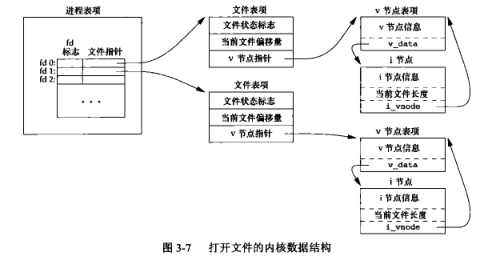
3.1 文件内核数据结构
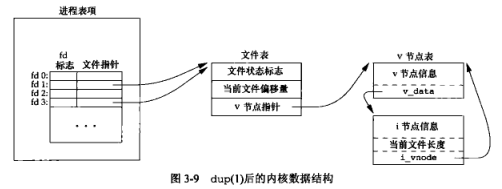
3.2 复制文件描述符的内核数据结构
3.3 对指定的描述符打印文件标志
#include "apue.h"

#include <fcntl.h>

int

main(int argc, char *argv[])

{

	int		val;

	if (argc != 2)

		err_quit("usage: a.out <descriptor#>");

	if ((val = fcntl(atoi(argv[1]), F_GETFL, 0)) < 0)

		err_sys("fcntl error for fd %d", atoi(argv[1]));

	switch (val & O_ACCMODE) {

	case O_RDONLY:

		printf("read only");

		break;

	case O_WRONLY:

		printf("write only");

		break;

	case O_RDWR:

		printf("read write");

		break;

	default:

		err_dump("unknown access mode");

	}

	if (val & O_APPEND)

		printf(", append");

	if (val & O_NONBLOCK)

		printf(", nonblocking");

	if (val & O_SYNC)

		printf(", synchronous writes");

#if !defined(_POSIX_C_SOURCE) && defined(O_FSYNC) && (O_FSYNC != O_SYNC)

	if (val & O_FSYNC)

		printf(", synchronous writes");

#endif

	putchar('\n');

	exit(0);

}
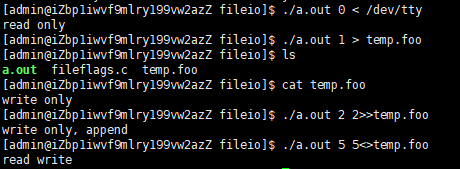
结果:
3.4 开启文件状态标志
#include "apue.h"

#include <fcntl.h>

void

set_fl(int fd, int flags) /* flags are file status flags to turn on */

{

	int		val;

	if ((val = fcntl(fd, F_GETFL, 0)) < 0)

		err_sys("fcntl F_GETFL error");

	val |= flags;		/* turn on flags */

	if (fcntl(fd, F_SETFL, val) < 0)

		err_sys("fcntl F_SETFL error");

}
如果将中间的一条语句修改如下(关闭文件标志):
val &= ~flags; //turn flags off
3.5 将标志输入复制到标准输出
#include "apue.h"

#define	BUFFSIZE	4096

int

main(void)

{

	int		n;

	char	buf[BUFFSIZE];

    //set_fl(STDOUT_FILENO,O_SYNC) //开启同步写标志

	while ((n = read(STDIN_FILENO, buf, BUFFSIZE)) > 0)

		if (write(STDOUT_FILENO, buf, n) != n)

			err_sys("write error");

	if (n < 0)

		err_sys("read error");

	exit(0);

}
程序运行时,设置O_SYNC会增加系统时间和时钟时间。
4.文件和目录
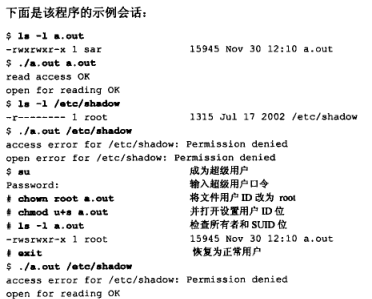
4.1 access函数的使用
#include "apue.h"

#include <fcntl.h>

int

main(int argc, char *argv[])

{

	if (argc != 2)

		err_quit("usage: a.out <pathname>");

	if (access(argv[1], R_OK) < 0)

		err_ret("access error for %s", argv[1]);

	else

		printf("read access OK\n");

	if (open(argv[1], O_RDONLY) < 0)

		err_ret("open error for %s", argv[1]);

	else

		printf("open for reading OK\n");

	exit(0);

}
8.进程控制
8.1 fork函数实例
#include "apue.h"

int		globvar = 6;		/* external variable in initialized data */

char	buf[] = "a write to stdout\n";

int

main(void)

{

	int		var;		/* automatic variable on the stack */

	pid_t	pid;

	var = 88;

	if (write(STDOUT_FILENO, buf, sizeof(buf)-1) != sizeof(buf)-1)

		err_sys("write error");

	printf("before fork\n");	/* we don't flush stdout */

	if ((pid = fork()) < 0) {

		err_sys("fork error");

	} else if (pid == 0) {		/* child */

		globvar++;				/* modify variables */

		var++;

	} else {

		sleep(2);				/* parent */

	}

	printf("pid = %ld, glob = %d, var = %d\n", (long)getpid(), globvar,

	  var);

	exit(0);

}
运行结果

分析
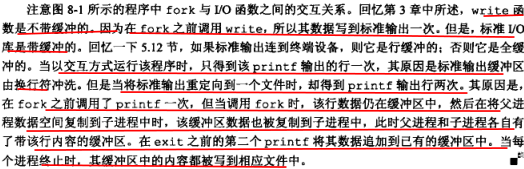
为啥是
sizeof(buf)-1:
为什么出现有两次
before fork出现:
8.2 fork之后父子进程对文件的共享

8.3 vfork函数实例
#include "apue.h"

int		globvar = 6;		/* external variable in initialized data */

int

main(void)

{

	int		var;		/* automatic variable on the stack */

	pid_t	pid;

	var = 88;

	printf("before vfork\n");	/* we don't flush stdio */

	if ((pid = vfork()) < 0) {

		err_sys("vfork error");

	} else if (pid == 0) {		/* child */

		globvar++;				/* modify parent's variables */

		var++;

		_exit(0);				/* child terminates */

	}

	/* parent continues here */

	printf("pid = %ld, glob = %d, var = %d\n", (long)getpid(), globvar,

	  var);

	exit(0);

}
运行结果

linux中文件内核数据结构的更多相关文章
- linux中文件IO
一. linux常用文件IO接口 1.1. 文件描述符 1.1.1. 文件描述符的本质是一个数字,这个数字本质上是进程表中文件描述符表的一个表项,进程通过文件描述符作为index去索引查表得到文件表指 ...
- [转]Linux中文件权限目录权限的意义及权限对文件目录的意义
转自:http://www.jb51.net/article/77458.htm linux中目录与文件权限的意义 一.文件权限的意义 r:可以读这个文件的具体内容: w:可以编辑这个文件的内容,包括 ...
- LSOF查看linux中文件打开情况
如何查看linux中文件打开情况 前言 我们都知道,在linux下,“一切皆文件”,因此有时候查看文件的打开情况,就显得格外重要,而这里有一个命令能够在这件事上很好的帮助我们-它就是lsof. lin ...
- linux中文件压缩介绍
原文内容来自于LZ(楼主)的印象笔记,如出现排版异常或图片丢失等问题,可查看当前链接:https://app.yinxiang.com/shard/s17/nl/19391737/1c62bb7f-f ...
- linux中文件颜色,蓝色,白色等各自代表的含义
linux中文件颜色,蓝色,白色等各自代表的含义 绿色文件---------- 可执行文件,可执行的程序 红色文件-----------压缩文件或者包文件 蓝色文件----------目录 白色文件- ...
- [转载] linux中文件描述符fd和文件指针flip的理解
转载自http://www.cnblogs.com/Jezze/archive/2011/12/23/2299861.html 简单归纳:fd只是一个整数,在open时产生.起到一个索引的作用,进程通 ...
- linux中文件的三种time(atime,mtime,ctime)
linux下文件有3个时间的,分别是atime,mtime,ctime.有些博友对这3个时间还是比较迷茫和困惑的,我整理了下,写下来希望对博友们有所帮助. 1 这三个time的含义 简名 全名 中文名 ...
- linux中文件的时间戳
touch命令 touch用来创建新文件,或者修改时间戳. linux中的文件有三个时间点,利用stat命令查看: 1.atime:最后访问时间:文件最后一次被存取或执行的时间. 2.mtime:最后 ...
- Linux中文件压缩与解压
压缩与解压 compress 文件名 1 -v //详细信息 2 3 -d //等于 uncompress 默认只识别 .Z 如果使用别的后缀,会导致不识别,解压缩失败.也可以使用 -d -c 压缩包 ...
随机推荐
- 黑马c++基础的一个通讯录系统
前言: 代码写的挺简单的,更像是c语言的课设,然后没有持久化的东西,之前也写过一个类似的,不过我写的纯c语言大概有1700多行,把信息全用文件存起来了, 所以如果要写完整的话,最好还是用数据库或者文件 ...
- 学习总结 NCRE二级和三级
NCRE二级C语言 证书 考试感想 2016年考的认证,5年过去了,"光阴荏苒真容易".趁着心有余力有余的时候,把一些个人的体会分享给大家,希望后来人能平稳前行. Windows ...
- MyEclipse无法打开jsp文件(打开是空白的),但是可以打开java文件
转载: 解决MyEclipse使用时打开JSP发生"An error has occurred,See error log for more details"错误的解决方法这个问题 ...
- 在Rancher中修改K8S服务参数的万金油法则
作者简介 王海龙,Rancher中国社区技术经理,负责Rancher中国技术社区的维护和运营.拥有7年的云计算领域经验,经历了OpenStack到Kubernetes的技术变革,无论底层操作系统Lin ...
- 自建CA实现HTTPS
说明:这里是Linux服务综合搭建文章的一部分,本文可以作为自建CA搭建https网站的参考. 注意:这里所有的标题都是根据主要的文章(Linux基础服务搭建综合)的顺序来做的. 如果需要查看相关软件 ...
- 第十一篇 -- 如何实现MFC窗口的最大化以及控件随最大化
这一篇介绍的是怎么实现MFC窗口的最大最小化,以及里面控件大小也随之改变 第一步:实现窗口最大最小化 首先右击窗口空白处,打开properties,将里面的MaximizeBox和MinimizeBo ...
- spring 读取account-service中的值
account-service //main--resources--account-service.properties 文件位置 email.protocol=smtps email.host=s ...
- 学习笔记-CCS-MSP430F5529[快速入门篇二]
由于2021的全国电赛延期了,从今天开始打算好好整理一下使用CCS编程的经验,本篇笔记会好好整理一下我备赛期间用CCS写的程序,包括外部中断,定时器部分的定时中断,定时器输入捕获,PWM波输出,UAR ...
- MySQL Shell import_table数据导入
目录 1. import_table介绍 2. Load Data 与 import table功能示例 2.1 用Load Data方式导入数据 2.2 用import_table方式导入数据 3. ...
- Dubbo 实现一个Load Balance (用于灰度发布)
Dubbo 可以实现的扩展很多, 官方文档在这: https://dubbo.apache.org/zh/docs/v2.7/dev/impls/ (太简单了....) 下面我们实现一个Load Ba ...