
Node.js 从零开发 web server博客项目[数据存储]
web server博客项目
- Node.js 从零开发 web server博客项目[项目介绍]
- Node.js 从零开发 web server博客项目[接口]
- Node.js 从零开发 web server博客项目[数据存储]
- Node.js 从零开发 web server博客项目[登录]
- Node.js 从零开发 web server博客项目[日志]
- Node.js 从零开发 web server博客项目[安全]
- Node.js 从零开发 web server博客项目[express重构博客项目]
- Node.js 从零开发 web server博客项目[koa2重构博客项目]
- Node.js 从零开发 web server博客项目[上线与配置]
文章目录
nodejs链接 mysql 封装成工具
安装
MySQL
cnpm i mysql -S
创建
src/conf/db.js
const env = process.env.NODE_ENV // 环境参数

// 配置

let MYSQL_CONF

if (env === 'dev') {

  MYSQL_CONF = {

    host: 'localhost',

    user: 'root',

    password: 'root',

    port: '3306',

    database: 'myblog'

  }

}

if (env === 'production') {

  MYSQL_CONF = {

    host: 'localhost',

    user: 'root',

    password: 'root',

    port: '3306',

    database: 'myblog'

  }

}

module.exports = { MYSQL_CONF }
- 创建
scr/db/mysql.js
const mysql = require('mysql')

const { MYSQL_CONF } = require('../conf/db')

// 创建链接对象

var con = mysql.createConnection(MYSQL_CONF);

// 开始链接

con.connect();

// 统一执行 sql 的函数

function exec(sql) {

  const promise = new Promise((resolve, reject) => {

    con.query(sql, function (error, result) {

      if (error) {

        reject(error)

        return

      }

      resolve(result)

    })

  })

  return promise

}

module.exports = {

  exec

}
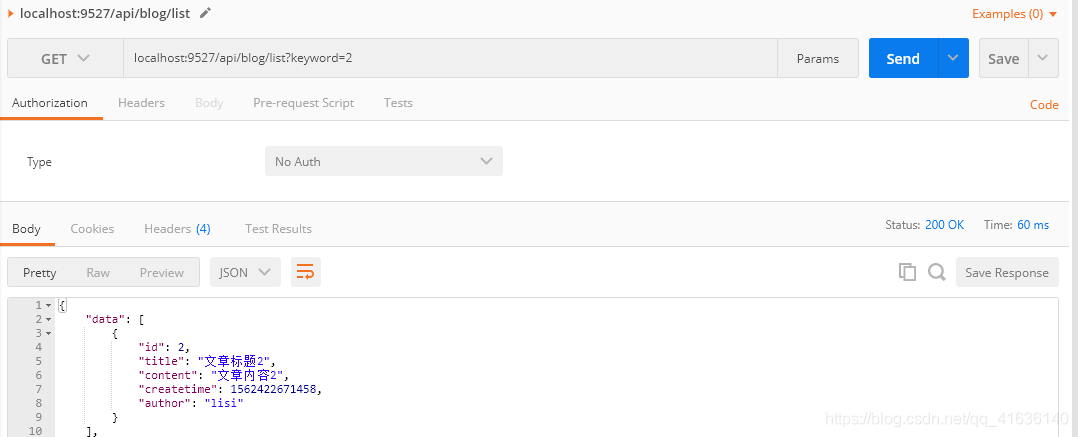
API对接MySQL (博客列表)
controller/blog.js
// 博客列表

const getList = (author, keyword) => {

  let sql = `select * from blogs where 1=1 `

  if (author) {

    sql += `and author='${author}' `

  }

  if (keyword) {

    sql += `and title like '%${keyword}%' `

  }

  sql += `order by createtime desc;`

  return exec(sql)

  // [{

  //   id: 1,

  //   title: '标题a',

  //   content: '内容a',

  //   createTime: 1562085127324,

  //   suthor: 'zhangsan'

  // }]

}
router/blog.js
// 获取博客列表

  if (method === 'GET' && path === '/api/blog/list') {

    const {

      author,

      keyword

    } = req.query || ''

    // const listData = getList(author, keyword)

    // return new SuccessModel(listData)

    const result = getList(author, keyword)

    return result.then(listData => {

      return new SuccessModel(listData)

    })

  }
app.js
getPostData(req).then(postData => {

  req.body = postData

  // 处理 blog 路由

  // const blogData = handleBlogRouter(req, res)

  // if (blogData) {

  //   res.end(

  //     JSON.stringify(blogData)

  //   )

  //   return

  // }

  const blogResult = handleBlogRouter(req, res)

  if (blogResult) {

    blogResult.then(blogData => {

      res.end(

        JSON.stringify(blogData)

      )

    })

    return

  }

  ...

  // 未命中路由, 返回404

  res.writeHead(404, {

    "content-type": "text/plain"

  })

  res.write("404 Not Found\n")

  res.end()

})
API对接MySQL (博客详情和新建)
controller/blog.js
const { exec } = require('../db/mysql')

// 博客内容

const getDtail = (id) => {

  // return {

  //   id: 1,

  //   title: '标题a',

  //   content: '内容a',

  //   createTime: 1562085127324,

  //   suthor: 'zhangsan'

  // }

  let sql = `select * from blogs where id='${id}'`

  return exec(sql).then(rows => {

    return rows[0]

  })

}

// 新增一篇博客

const newBlog = (blogData) => {

  // 赋予id

  // return {

  //   id: 3

  // }

  const {title, content, author} = blogData

  const createtime = Date.now()

  let sql = `insert into blogs (title, content, createtime, author) values ('${title}', '${content}', '${createtime}', '${author}');`

  return exec(sql)

}
router/blog.js
  // 获取一篇博客的内容

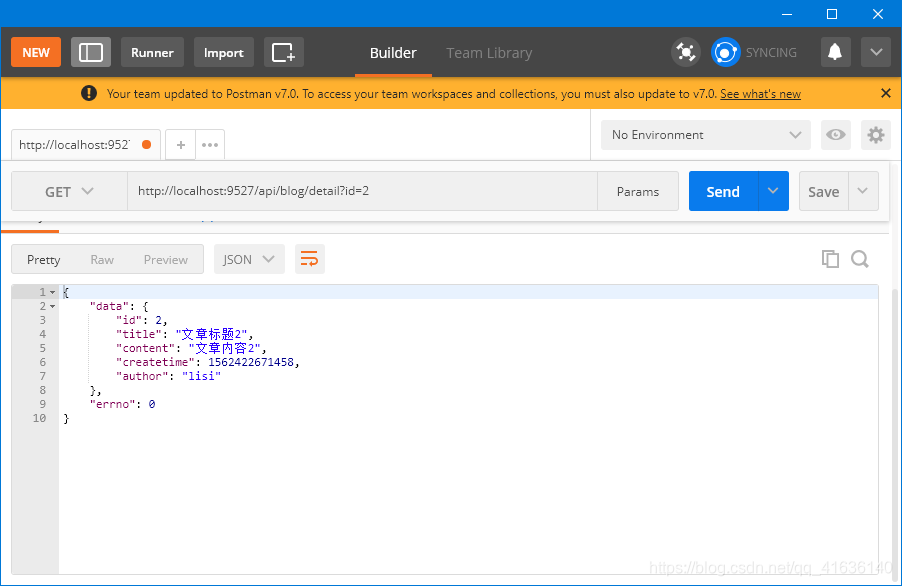
  if (method === 'GET' && path === '/api/blog/detail') {

    // const data = getDtail(id)

    // return new SuccessModel(data)

    const result = getDtail(id)

    return result.then(data => {

      return new SuccessModel(data)

    })

  }

  // 新增一篇博客

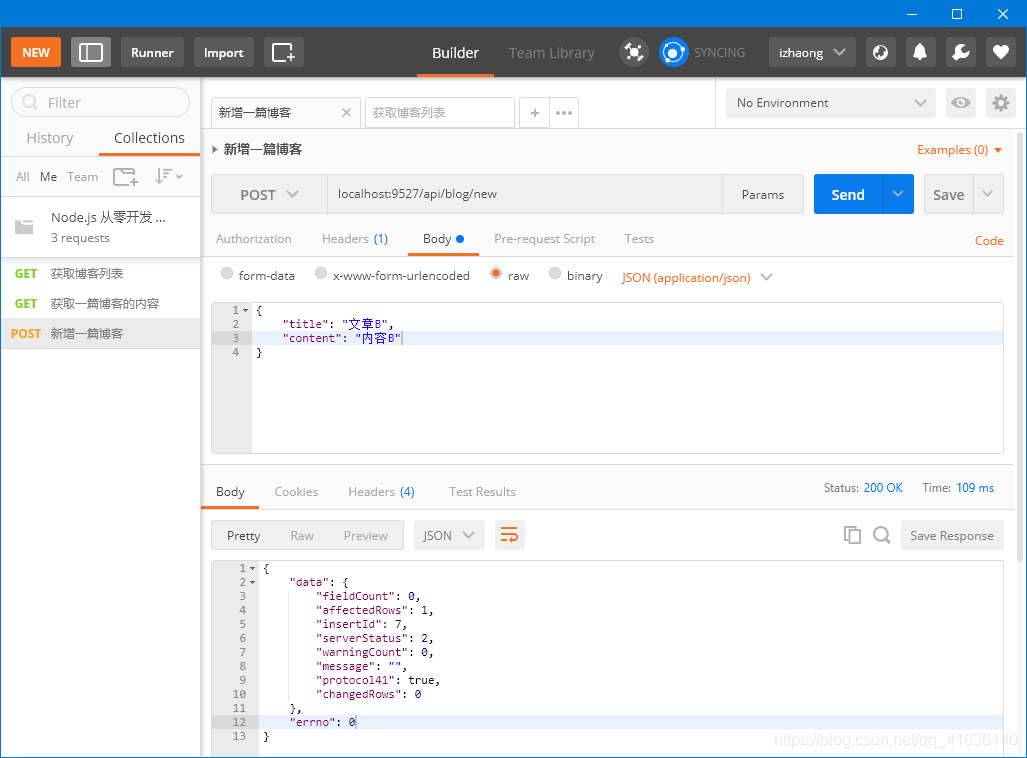
  if (method === 'POST' && path === '/api/blog/new') {

    // const data = newBlog(req.body)

    // return new SuccessModel(data)

    req.body.author = 'zhangsan' // 假数据, 待开发登陆时再改成真实数据

    const result = newBlog(req.body)

    return result.then(data => {

      return new SuccessModel(data)

    })

  }
API对接MySQL (更新和删除)
更新
// 更新一篇博客

const updateBlog = (id, blogData = {}) => {

  // console.log(`更新一篇博客, ID:${id}, 内容:${blogData}`)

  // return true

  const {title, content} = blogData

  const sql = `update blogs set title='${title}', content='${content}' where id=${id}`

  return exec(sql).then(updateData => {

    console.log('updateData is ', updateData);

    if (updateData.affectedRows > 0) {

      return true

    }

    return false

  })

}

*********************

  // 更新一篇博客

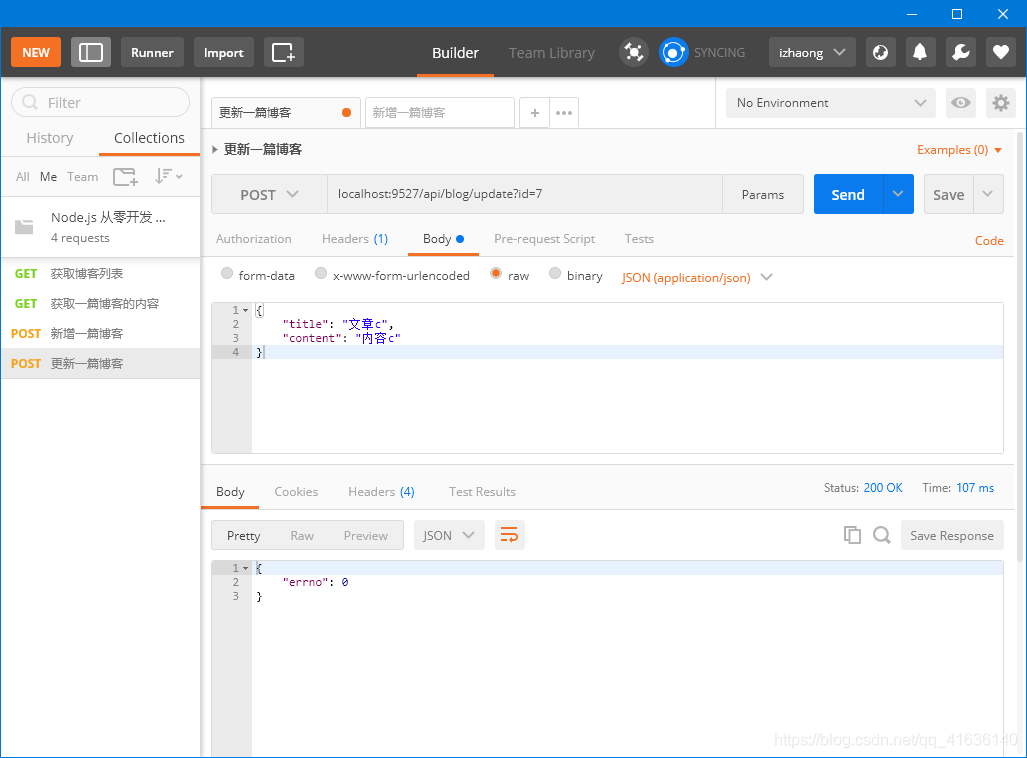
  if (method === 'POST' && path === '/api/blog/update') {

    const result = updateBlog(id, req.body)

    // if (result) {

    //   return new SuccessModel(data)

    // } else {

    //   return ErrorModel('更新博客失败')

    // }

    return result.then(val => {

      if (val) {

        return new SuccessModel()

      } else {

        return ErrorModel('更新博客失败')

      }

    })

  }
删除
// 删除一篇博客

const delBlog = (id, author) => {

  // console.log(`删除一篇博客, ID:${id}`)

  // return true

  const sql = `delete from blogs where id='${id}' and author='${author}'`

  return exec(sql).then(delData => {

    if (delData.affectedRows > 0) {

      return true

    }

    return false

  })

}

*********************

  // 删除一篇博客

  if (method === 'POST' && path === '/api/blog/del') {

    // const result = delBlog(id)

    // if (result) {

    //   return new SuccessModel(result)

    // } else {

    //   return new ErrorModel('删除博客失败')

    // }

    const author = 'zhangsan'

    const result = delBlog(id, author)

    return result.then(val => {

      if (val) {

        return new SuccessModel(result)

      } else {

        return new ErrorModel('删除博客失败')

      }

    })

  }
API对接MySQL (登录)
controller/user.js
const { exec } = require('../db/mysql')

const loginCheck = (username, password) => {

  // if (username === 'zhangsan' && password === '1234') {

  //   return true

  // }

  const sql = `select username, realname from users where username='${username}' and password='${password}'`

  return exec(sql).then(rows => {

    return rows[0] || {}

  })

}

module.exports = {

  loginCheck

}
router/user.js
const {

  loginCheck

} = require('../controller/user')

const { SuccessModel, ErrorModel } = require('../model/resModel')

const handleUserRouter = (req, res) => {

  const {

    method,

    path

  } = req

  // 登录

  if (method === 'POST' && path === '/api/user/login') {

    const {

      username,

      password

    } = req.body

    const result = loginCheck(username, password)

    // if (result) {

    //   return new SuccessModel(result)

    // } else {

    //   return new ErrorModel('登录失败')

    // }

    return result.then(data => {

      if (data.username) {

        return new SuccessModel()

      }

      return new ErrorModel('登录失败')

    })

  }

}

module.exports = handleUserRouter
app.js
// 处理 user 路由

    // const userData = handleUserRouter(req, res)

    // if (userData) {

    //   res.end(

    //     JSON.stringify(userData)

    //   )

    //   return

    // }

    const userResult = handleUserRouter(req, res)

    if (userResult) {

      userResult.then(userData => {

        res.end(

          JSON.stringify(userData)

        )

      })

      return

    }

    ```
Node.js 从零开发 web server博客项目[数据存储]的更多相关文章
- Node.js 从零开发 web server博客项目[express重构博客项目]
web server博客项目 Node.js 从零开发 web server博客项目[项目介绍] Node.js 从零开发 web server博客项目[接口] Node.js 从零开发 web se ...
- Node.js 从零开发 web server博客项目[koa2重构博客项目]
web server博客项目 Node.js 从零开发 web server博客项目[项目介绍] Node.js 从零开发 web server博客项目[接口] Node.js 从零开发 web se ...
- Node.js 从零开发 web server博客项目[安全]
web server博客项目 Node.js 从零开发 web server博客项目[项目介绍] Node.js 从零开发 web server博客项目[接口] Node.js 从零开发 web se ...
- Node.js 从零开发 web server博客项目[日志]
web server博客项目 Node.js 从零开发 web server博客项目[项目介绍] Node.js 从零开发 web server博客项目[接口] Node.js 从零开发 web se ...
- Node.js 从零开发 web server博客项目[登录]
web server博客项目 Node.js 从零开发 web server博客项目[项目介绍] Node.js 从零开发 web server博客项目[接口] Node.js 从零开发 web se ...
- Node.js 从零开发 web server博客项目[接口]
web server博客项目 Node.js 从零开发 web server博客项目[项目介绍] Node.js 从零开发 web server博客项目[接口] Node.js 从零开发 web se ...
- Node.js 从零开发 web server博客项目[项目介绍]
web server博客项目 Node.js 从零开发 web server博客项目[项目介绍] Node.js 从零开发 web server博客项目[接口] Node.js 从零开发 web se ...
- Vue+node.js实现一个简洁的个人博客系统
本项目是一个用vue和node以及mysql实现的一个简单的个人博客系统,整体逻辑比较简单.但是可以我们完整的了解一个项目从数据库到后端到前端的实现过程,适合不太懂这一块的朋友们拿来练手. 本项目所用 ...
- github pages + Hexo + node.js 搭建属于自己的个人博客网站
之前我写过一篇用Github实现个人主页的博客:https://www.cnblogs.com/tu-0718/p/8081288.html 后来看到某个大佬写的文章:[5分钟 0元搭建个人独立 ...
随机推荐
- 【算法•日更•第二十三期】数据结构:two-pointer(尺取法)&莫队
▎引入 ☞『例题』 一道十分easy的题: 洛谷P1638 长度为n的序列,m种数 找一个最短区间,使得所有数出现一遍 n≤1e6 ,m≤2e3. ☞『分析』 这道题非常的简单,但是如果不会two-p ...
- 仿京东BOE官网 html代码
<!DOCTYPE html> <html lang="en"> <head> <meta charset="UTF-8&quo ...
- 小白学PyTorch 动态图与静态图的浅显理解
文章来自公众号[机器学习炼丹术],回复"炼丹"即可获得海量学习资料哦! 目录 1 动态图的初步推导 2 动态图的叶子节点 3. grad_fn 4 静态图 本章节缕一缕PyTorc ...
- 操作系统-PV操作的原理和几种常见问题
信号量是一种变量类型,用一个记录型数据结构表示,有两个分量:信号量的值和信号量队列指针 除了赋初值外,信号量仅能通过同步原语PV对其进行操作 s.value为正时,此值为封锁进程前对s信号量可施行的P ...
- vscode 安装go插件失败后,最简单的方法
vscode 安装go插件 参考: https://github.com/goproxy/goproxy.cn/blob/master/README.zh-CN.md https://goproxy. ...
- 机器学习 | 深入SVM原理及模型推导(一)
本文始发于个人公众号:TechFlow,原创不易,求个关注 今天是机器学习专题的第32篇文章,我们来聊聊SVM. SVM模型大家可能非常熟悉,可能都知道它是面试的常客,经常被问到.它最早诞生于上世纪六 ...
- python安装wordcloud库报错
pip install wordcloud 安装成了这样 红彤彤的一片 解决方法 https://www.lfd.uci.edu/~gohlke/pythonlibs/#wordcloud 下载对应版 ...
- 你可能不了解的java枚举
枚举在java里也算个老生长谈的内容了,每当遇到一组需要类举的数据时我们都会自然而然地使用枚举类型: public enum Color { RED, GREEN, BLUE, YELLOW; pub ...
- Lct 动态链接树
通过树链剖分能了解轻重边 Acdreamer 的博客 http://blog.csdn.net/acdreamers/article/details/10591443 然后看杨哲大大的论文,能了解轻重 ...
- vue学习笔记一
vue 颠覆式的开发方式 解疑 为什么要学习vue? 降低项目的复杂度 就业需要 vue难不难? 特别简单 相比于React,vue有什么优势? 前端三大框架:Angular.React.Vue Vu ...